It is currently Thu Jun 25, 2026 10:10 am


All times are UTC - 5 hours [ DST ]


Post new topic Reply to topic  [ 9 posts ] 
Author Message
 Post subject: How do I change the cursor in Gimp_3.0.2_Portable_clang?
PostPosted: Sun May 04, 2025 9:22 am  (#1) 
Offline
GimpChat Member

Joined: Apr 09, 2018
Posts: 1888
Location: France
GIMP Version: 2.8.14
Operating System: Windows
GIMP Experience: New User


:wvy
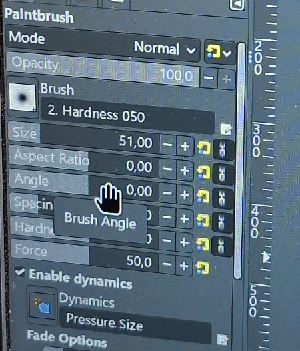
In samj's Gimp_3.0.2_Portable_clang, the cursor is a hand.
Image

How do I get back the usual arrow cursor?

_________________
Les parfums, les couleurs et les sons se répondent.Baudelaire (Les fleurs du mal)
2.10.36/(Samj) Gimp 2.10.38 OS Windows 10 Home 64 bits


Share on Facebook Share on Twitter Share on Orkut Share on Digg Share on MySpace Share on Delicious Share on Technorati
Top
 Post subject: Re: How do I change the cursor in Gimp_3.0.2_Portable_clang?
PostPosted: Sun May 04, 2025 11:10 am  (#2) 
Offline
GimpChat Member

Joined: Mar 04, 2011
Posts: 2604
The short answer is you can't. The hand cursor is new to Gimp 3.0 in all versions.
However you can hide the rather large tooltip under the cursor. Unlike Gimp 2.10 Gimp 3.0 does not have a tooltip toggle in preferences but you can make it 100% transparent and invisible. Unzip and put the attached gimp.css file in your Preferences folder. It replaces the existing file which is empty. That gives a tool box which looks like this.

Attachment:
hand01.jpg
hand01.jpg [ 141 KiB | Viewed 4765 times ]


If you want to experiment with some Gimp 3 themes there are interesting ones here:
https://script-fu.github.io/artbox/hub/themes/folder/

A mid-gray one: note the "hand" icon does become smaller when used in the slider.

Attachment:
hand02.jpg
hand02.jpg [ 137.59 KiB | Viewed 4765 times ]


Attachments:
gimp.css.zip [194 Bytes]
Downloaded 104 times
Top
 Post subject: Re: How do I change the cursor in Gimp_3.0.2_Portable_clang?
PostPosted: Sun May 04, 2025 11:55 am  (#3) 
Offline
GimpChat Member
User avatar

Joined: Jan 13, 2011
Posts: 2643
Location: Poland
However, this is possible in another way.
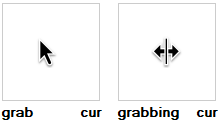
In the location: Gimp_3.0.2_Portable_clang\share\icons\Adwaita\cursors\
Original cursors:
Image

You can replace them with others, keeping the names grab.cur and grabbing.cur
I replaced them with this:
Image

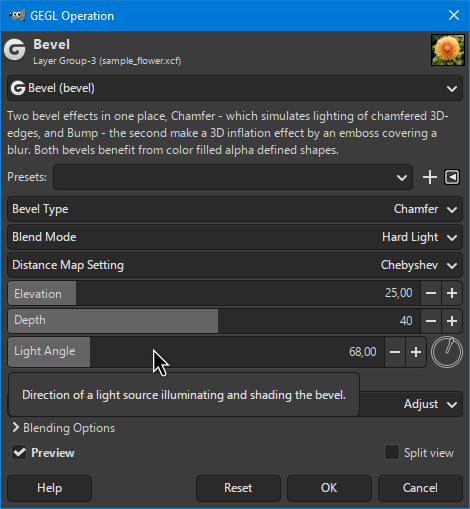
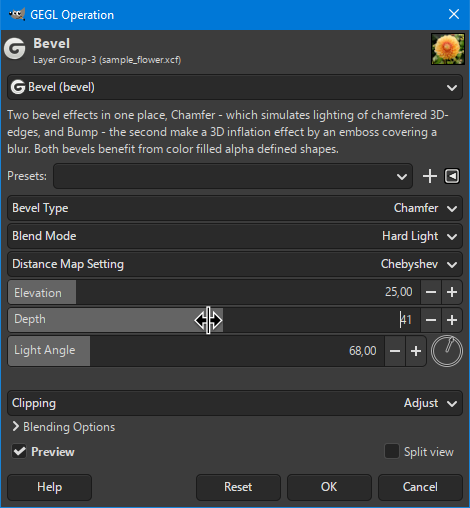
This is what it looks like in use:
Image

Image


Attachments:
cursors.zip [13.64 KiB]
Downloaded 160 times

_________________
Image
Top
 Post subject: Re: How do I change the cursor in Gimp_3.0.2_Portable_clang?
PostPosted: Sun May 04, 2025 12:44 pm  (#4) 
Offline
GimpChat Member

Joined: Apr 11, 2024
Posts: 299
Any chance for Linux flatpak users to get a proper cursor?


Top
 Post subject: Re: How do I change the cursor in Gimp_3.0.2_Portable_clang?
PostPosted: Sun May 04, 2025 1:36 pm  (#5) 
Offline
GimpChat Member

Joined: Apr 09, 2018
Posts: 1888
Location: France
First I put the "gimp.css" from rich2007 then I replaced the grab cur and grabbing cur proposed by MareroQ and the change makes Gimp even more pleasant. :jumpclap
Thank you both. :hugme

@Quitreader:
Linux users will answer you, I have been trying to get started with Linux for about 3 months (it's hard at 83 years old after 20 years of Windows) and I started installing Linux Mint Xfce on Vista and Linux Mint Cinnamon on Windows 7 and I seem to have seen the name "Adwaita" (theme or cursor?)

_________________
Les parfums, les couleurs et les sons se répondent.Baudelaire (Les fleurs du mal)
2.10.36/(Samj) Gimp 2.10.38 OS Windows 10 Home 64 bits


Top
 Post subject: Re: How do I change the cursor in Gimp_3.0.2_Portable_clang?
PostPosted: Sun May 04, 2025 2:34 pm  (#6) 
Offline
GimpChat Member

Joined: Mar 04, 2011
Posts: 2604
This is kubuntu 24.04 but common. Starting Gimp in a terminal this
(gimp:16788): Gtk-WARNING **: 20:23:52.298: Unable to locate theme engine in module_path: "adwaita",

There are adwaita cursors in /usr/share/icons/Adwaita/cursors including the "grab" but it is very much a "Gnome" theme for Gnome type apps. The only thing I use is the viewer " Okular" which shows that grab.

Using a Gimp 3.0.2 appimage and no adwaita folder in icons there, in fact the only icon is gimp.png in various sizes.


Top
 Post subject: Re: How do I change the cursor in Gimp_3.0.2_Portable_clang?
PostPosted: Mon May 05, 2025 2:24 am  (#7) 
Offline
GimpChat Member

Joined: Apr 11, 2024
Posts: 299
Thanks for your answers, level_0, rich2005
I didn't find anything helpful, either.
Hopefully the devs will change that back to a "normal" cursor, as we are used to from every other app.
I wonder who comes upon such an idea ....


Top
 Post subject: Re: How do I change the cursor in Gimp_3.0.2_Portable_clang?
PostPosted: Mon May 05, 2025 3:59 am  (#8) 
Offline
Global Moderator
User avatar

Joined: May 16, 2010
Posts: 16052
Also you can change them in the latest 3.0.3 dev installer here.

C:\Users\Rod\AppData\Local\Programs\GIMP 3\share\icons\Adwaita\cursors

Use your own user name of course. :)

_________________
Image


Top
 Post subject: Re: How do I change the cursor in Gimp_3.0.2_Portable_clang?
PostPosted: Sun Oct 26, 2025 11:33 am  (#9) 
Offline
New Member

Joined: Oct 26, 2025
Posts: 1
I've been using Gimp for about a decade and recently upgraded to Debian 13 (Cinnamon desktop), which ships with Gimp 3.04. I'm also dismayed with the hand cursor. Image editing work wants a bit more precision than some nebulous hand pointer. I don't use Gnome desktop and find their entire UI philosophy to be wholly contrary to a more business/task based way of working with a machine. But whose idea was it to lower user precision with something like Gimp image editing and switch to a hand icon?

Is there any way to contact the development team and make that an easy user-editable change? Changes to user-interface are subjective and should be put into user controllable "space", not forced on everyone due to some new designer's whimsy (/rant). No serious person who does a fair degree of image editing is going to be happy with less precision on the control sliders. We pretty much all appreciate better performance, more functionality, less bugs, etc. (though I think Gimp 3 runs a bit slower on my PC). But user interface changes are subjective and not automatic wins.


Top
Post new topic Reply to topic  [ 9 posts ] 

All times are UTC - 5 hours [ DST ]


* Login  


Powered by phpBB3 © phpBB Group