It is currently Wed Jun 03, 2026 11:46 pm


All times are UTC - 5 hours [ DST ]


Post new topic Reply to topic  [ 87 posts ]  Go to page Previous  1, 2, 3, 4, 5  Next
Author Message
 Post subject: Re: Download all 90 GEGL plugins of mine to prevent a GIMP 3 crash
PostPosted: Tue Jun 17, 2025 4:27 am  (#41) 
Offline
GimpChat Member
User avatar

Joined: Oct 31, 2020
Posts: 2010
All plugins updated with both new features a potential crash fix if GIMP gets X update in the future.

A crash in a experimental build of GIMP 3.1.2 was fixed. Simply put, the build has a GEGL filter viewing list, it doesn't launch them it just list their properties. Two of my plugins crashed it. I fixed it ahead of time.

The said two plugins causing the crash are Text Style Collection Misc and Text Style Collection food

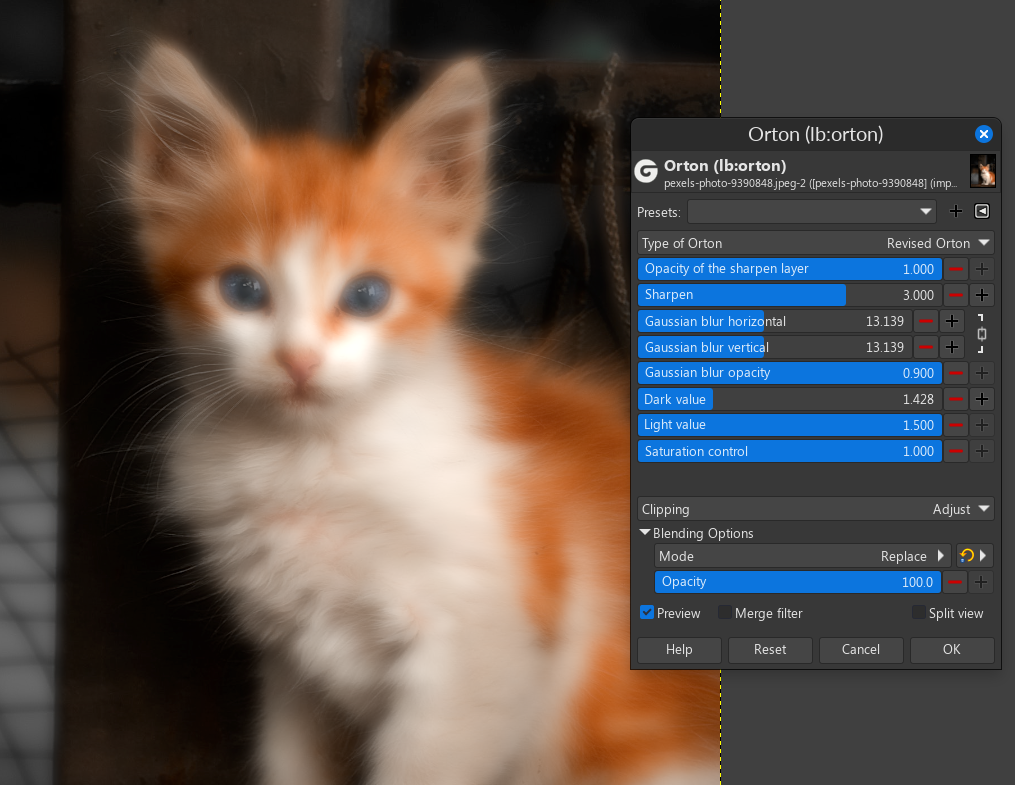
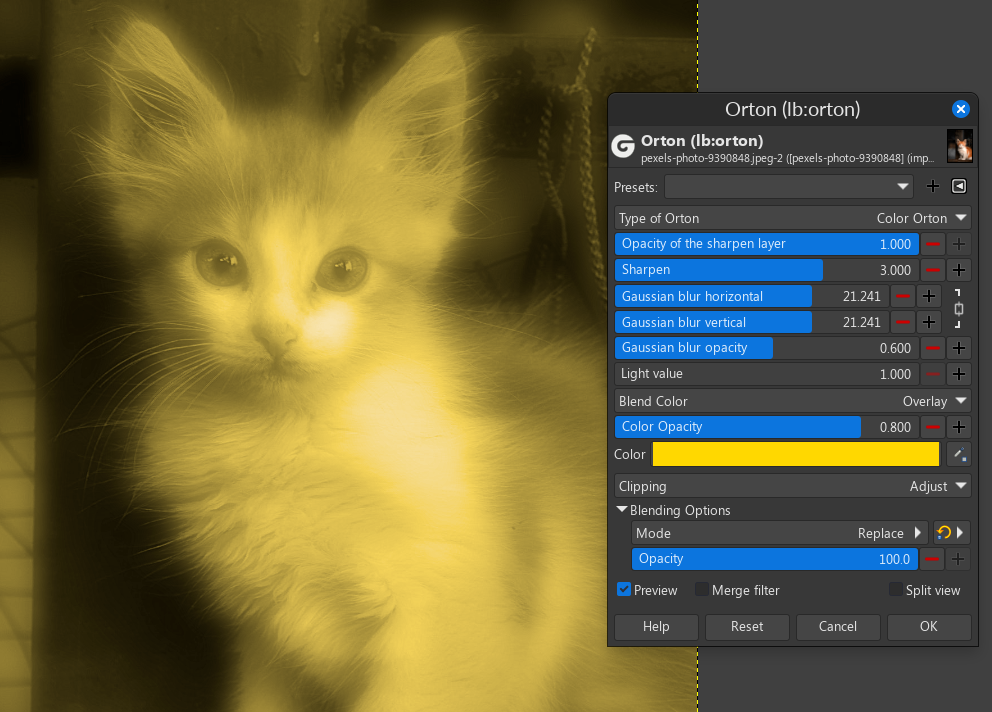
1. Orton was updated to have new modes

Image

Image

New filters Spiral Distortion, Star Distortion and Polygonal distortion were made using a new technique I found called gegl:displacement-map and no they are not AI. All of these plugins are non AI. Outside of code AI ones ship seperate

Polygonal distortion looks like broken glass if you slide up the "blur behind polygonal glass" slider

Image

Image

Download here

Location to put binaries

Attachment:
WindowsBinaries_all_plugins.zip [5.43 MiB]
Downloaded 156 times


Attachment:
LinuxBinaries_all_plugins.zip [4.1 MiB]
Downloaded 109 times


Attachment:
source_code_of_all_GEGL_plugins.zip [3.37 MiB]
Downloaded 87 times


Windows

C:\Users\(USERNAME)\AppData\Local\gegl-0.4\plug-ins

Linux

~/.local/share/gegl-0.4/plug-ins

Linux (Flatpak includes Chromebook)

~/.var/app/org.gimp.GIMP/data/gegl-0.4/plug-ins


We are at 120 non AI GEGL plugins and in a few days it will be more 4 year anniversary of me first studying GEGL. In late June 2021 I wrote my first GEGL syntax.


Top
 Post subject: Re: Download all 90 GEGL plugins of mine to prevent a GIMP 3 crash
PostPosted: Tue Jun 17, 2025 6:22 pm  (#42) 
Offline
GimpChat Member

Joined: Jun 22, 2019
Posts: 18
Hello contrast_, Thank you very much for your forward-looking development for the upcoming gegl plugin management!

I have the ORTON plugin only now spotted. It has no menu entry and was therefore hidden. The filter is a very nice application to create a blooming or dreamy effect and your approach to it gives the user many possibilities and control to do this.

However, I have noticed that sometimes parameters appear twice in the UI of the plugin. This is especially the case when calling the plugin in Batcher.

Using Linux Mint 21.3 Virginia with GIMP 3.04 from ppa.

I very much hope this can be fixed!

Thank you for this beautiful filter contrast_!


Attachments:
Bildschirmfoto zu 2025-06-17 17-41-33.png
Bildschirmfoto zu 2025-06-17 17-41-33.png [ 115.81 KiB | Viewed 4313 times ]

_________________
Gimp 3.0.8
Gimp 2.10.38 AppImage
OS: Linux Mint 21.3 Virginia based on Ubuntu 22.04
Top
 Post subject: Re: Download all 90 GEGL plugins of mine to prevent a GIMP 3 crash
PostPosted: Tue Jun 17, 2025 8:55 pm  (#43) 
Offline
GimpChat Member
User avatar

Joined: Oct 31, 2020
Posts: 2010
c-t-s wrote:
Hello contrast_, Thank you very much for your forward-looking development for the upcoming gegl plugin management!

I have the ORTON plugin only now spotted. It has no menu entry and was therefore hidden. The filter is a very nice application to create a blooming or dreamy effect and your approach to it gives the user many possibilities and control to do this.

However, I have noticed that sometimes parameters appear twice in the UI of the plugin. This is especially the case when calling the plugin in Batcher.

Using Linux Mint 21.3 Virginia with GIMP 3.04 from ppa.

I very much hope this can be fixed!

Thank you for this beautiful filter contrast_!


This is gonna be a tough one to fix because it happens for a logical reason. There are multiple versions of the same slider that appear on different modes and batcher displays them all at once. The best I could do is rename the sliders or create a simple orton plugin for you.

Explained simply `lb:orton` is technically four plugins in one. Each drop down list boots up a different GEGL graph and different sliders. I'll do my best to label the sliders if its possible.


Top
 Post subject: Re: Download all 90 GEGL plugins of mine to prevent a GIMP 3 crash
PostPosted: Tue Jun 17, 2025 9:13 pm  (#44) 
Offline
GimpChat Member
User avatar

Joined: Oct 31, 2020
Posts: 2010
The best I can do is label what sliders go where for batcher. I will push the update soon, I have to add more features to orton.


Image


Top
 Post subject: Re: Download all 90 GEGL plugins of mine to prevent a GIMP 3 crash
PostPosted: Tue Jun 17, 2025 9:51 pm  (#45) 
Offline
GimpChat Member

Joined: Jun 22, 2019
Posts: 18
The redundancy of the slider also appears on a pure GEGL-Gimp level. Switching between different modes glitches!

_________________
Gimp 3.0.8
Gimp 2.10.38 AppImage
OS: Linux Mint 21.3 Virginia based on Ubuntu 22.04


Top
 Post subject: Re: Download all 90 GEGL plugins of mine to prevent a GIMP 3 crash
PostPosted: Tue Jun 17, 2025 11:46 pm  (#46) 
Offline
GimpChat Member
User avatar

Joined: Oct 31, 2020
Posts: 2010
c-t-s wrote:
The redundancy of the slider also appears on a pure GEGL-Gimp level. Switching between different modes glitches!

Indeed you were correct. It has blend modes that carry over to other modes and two opacity sliders on the first one. Fixed here. It will soon be universal but right now the update is only here.

https://github.com/LinuxBeaver/GIMP-GEG ... /releases/

Please test! and thank you for reporting!


Top
 Post subject: Re: Download all 90 GEGL plugins of mine to prevent a GIMP 3 crash
PostPosted: Wed Jun 18, 2025 10:06 am  (#47) 
Offline
GimpChat Member

Joined: Jun 22, 2019
Posts: 18
Thank you contrast_, Orton plugin appears now working as expected! However, Batcher now crashes when calling and unfortunately there is still no menu entry!

_________________
Gimp 3.0.8
Gimp 2.10.38 AppImage
OS: Linux Mint 21.3 Virginia based on Ubuntu 22.04


Top
 Post subject: Re: Download all 90 GEGL plugins of mine to prevent a GIMP 3 crash
PostPosted: Wed Jun 18, 2025 8:11 pm  (#48) 
Offline
GimpChat Member
User avatar

Joined: Oct 31, 2020
Posts: 2010
Everything updated again. Lets see what changed

1. Orton is now in the menu as filters>artistic
2. Noise in Motion and Liquid Ring Noise are now relocated to filters>noise
3. Liquid Ring Noise when set to no color mode now hides its color overlay
4. Ice Text (a plugin I never mentioned before) no longer crashes GIMP 2.10

I was not entirely able to replicate orton crashing Batcher. Infact it crashed it one time but never crashed again. It seems batcher always/almost always crashes if a plugin of mine was selected before an update happens, but it goes away by un-selecting the plugin and will never happen twice

I can't help this. Batcher is a third party to me. The best I can do is interact with Batcher's lead dev and hope for form a mutual relationship to make sure both our plugins work correctly.

Image

Image

Attachment:
WindowsBinaries_all_plugins.zip [5.44 MiB]
Downloaded 107 times


Attachment:
LinuxBinaries_all_plugins.zip [4.1 MiB]
Downloaded 86 times


Attachment:
source_code_of_all_GEGL_plugins.zip [3.37 MiB]
Downloaded 99 times


Windows

C:\Users\(USERNAME)\AppData\Local\gegl-0.4\plug-ins

Linux

~/.local/share/gegl-0.4/plug-ins

Linux (Flatpak includes Chromebook)

~/.var/app/org.gimp.GIMP/data/gegl-0.4/plug-ins


Also in a few days it will be my four year anniversary of studying GEGL


Top
 Post subject: Re: Download all 90 GEGL plugins of mine to prevent a GIMP 3 crash
PostPosted: Thu Jun 19, 2025 11:36 pm  (#49) 
Offline
GimpChat Member
User avatar

Joined: Oct 31, 2020
Posts: 2010
Download all 120 GEGL plugins and their source code here

GEGL Effects (lb:effects) updated to fix an invalid integer that should have been a decimal to prevent a potential crash that has never happened. Also its chamfer bevel was slightly modified in a way that no one will notice.

Image

Image

Attachment:
LinuxBinaries_all_plugins.zip [4.1 MiB]
Downloaded 98 times


Attachment:
WindowsBinaries_all_plugins.zip [5.44 MiB]
Downloaded 101 times


Attachment:
source_code_of_all_GEGL_plugins.zip [3.37 MiB]
Downloaded 88 times


Windows

C:\Users\(USERNAME)\AppData\Local\gegl-0.4\plug-ins

Linux

~/.local/share/gegl-0.4/plug-ins

Linux (Flatpak includes Chromebook)

~/.var/app/org.gimp.GIMP/data/gegl-0.4/plug-ins


Top
 Post subject: Re: Download all 90 GEGL plugins of mine to prevent a GIMP 3 crash
PostPosted: Fri Jun 27, 2025 3:03 am  (#50) 
Offline
GimpChat Member
User avatar

Joined: Oct 31, 2020
Posts: 2010
The source code and binaries to 122 non-AI GEGL plugins are here.

What's new?

1. New plugin Slime was added. This plugin makes a slime background for text or transparency defined images.

Image

2. We have a new plugin made a few hours ago named "Internal Color Lighting" is an inner glow that uses filters like "bloom" "saturation" "hue and light" instead of a color picker. This plugin is best used on transparency defined images but also works good on bevel text like Glossy Balloon for example.

Image

Also I only used Hue Rotation because its the most noticable effect. Other effects look better but are not as noticeable

3. I fixed a crash with liquid noise (lb:liquid-noise) in GIMP 2.10 that recently happened.Early versions of liquid noise didn't have the crash and now its gone again.

Image

4. The bevel in GEGL Effects was slightly tweaked in a way 99.9% of users will not notice

5. GEGL Engrave updated so its newsprint is far more visible and a few other things

Download here

Attachment:
LinuxBinaries_all_plugins.zip [3.98 MiB]
Downloaded 78 times


Attachment:
WindowsBinaries_all_plugins.zip [5.34 MiB]
Downloaded 91 times


Attachment:
source_code_of_all_GEGL_plugins.zip [3.25 MiB]
Downloaded 86 times


LOCATION TO PUT BINARIES

Windows

C:\Users\(USERNAME)\AppData\Local\gegl-0.4\plug-ins

Linux

~/.local/share/gegl-0.4/plug-ins

Linux (Flatpak includes Chromebook)

~/.var/app/org.gimp.GIMP/data/gegl-0.4/plug-ins

- lastly, part of me thinks don't think we need a GEGL board. I only wanted it so GEGL could become more popular, it may not be needed and it would confuse casuals.


Top
 Post subject: Re: Download all 90 GEGL plugins of mine to prevent a GIMP 3 crash
PostPosted: Sat Jul 05, 2025 10:01 pm  (#51) 
Offline
GimpChat Member
User avatar

Joined: Oct 31, 2020
Posts: 2010
Source Code and binaries of all natural non AI plugins is here.

These plugins work on both GIMP 2.10 and GIMP 3, but are most recommended on GIMP 3.0.4 for the highest quality use.

What's new?

1. We have a new plugin named "Target Blur" that lets the user choose from gaussian blur, box blur, pixeliate and median blur that applies only on RGB channels and ignores alpha channels. Alpha locking its content. I knew about the concept of a target blur since 2021 but never had the urge to make it into a plugin until now.

Image

2. We have a new plugin named "Line Ray Aura" that uses zoom motion blur to make aura effect, This is something I knew about since late mid 2021 in GEGL graph but did not make a plugin of it till now

Image

3. One of my earliest plugins from summer 2022 "Edge Extract" updated to get a new slider named "threshold high" and a faster performance by removing unneeded nodes, it is also slightly different in default. This plugin has barely been touched in 3 years but now it has a modern touch up. Edge Extract is meant to be blurred (with its blur slider) and blended

Image

https://github.com/LinuxBeaver/GEGL-GIM ... ge_Extract

Download the Code and Binaries for all natural plugins here

Attachment:
WindowsBinaries_all_plugins.zip [5.35 MiB]
Downloaded 106 times


Attachment:
LinuxBinaries_all_plugins.zip [3.95 MiB]
Downloaded 88 times


Attachment:
source_code_of_all_GEGL_plugins.zip [3.19 MiB]
Downloaded 94 times


Location to put binaries (remember to restart GIMP )


Windows

C:\Users\(USERNAME)\AppData\Local\gegl-0.4\plug-ins

Linux

~/.local/share/gegl-0.4/plug-ins

Linux (Flatpak includes Chromebook)

~/.var/app/org.gimp.GIMP/data/gegl-0.4/plug-ins


Top
 Post subject: Re: Download all 90 GEGL plugins of mine to prevent a GIMP 3 crash
PostPosted: Fri Jul 11, 2025 4:22 am  (#52) 
Offline
GimpChat Member
User avatar

Joined: Oct 31, 2020
Posts: 2010
Source code and Windows and Linux binaries of all 125+ GEGL plugins on their latest version here

Download here

Attachment:
LinuxBinaries_all_plugins.zip [4.01 MiB]
Downloaded 88 times


Attachment:
WindowsBinaries_all_plugins.zip [5.46 MiB]
Downloaded 100 times


Attachment:
source_code_of_all_GEGL_plugins.zip [3.24 MiB]
Downloaded 86 times


LOCATION TO PUT BINARIES

Windows

C:\Users\(USERNAME)\AppData\Local\gegl-0.4\plug-ins

Linux

~/.local/share/gegl-0.4/plug-ins

Linux (Flatpak includes Chromebook)

~/.var/app/org.gimp.GIMP/data/gegl-0.4/plug-ins


What's new?
-----------------
just one new plugin that requires GIMP 3/GEGL 0.4.50 (gegl:inner-glow and gegl:bevel)
but said plugin replaces more features found in Adobe's layer effects!

:clap NEW FILTER CHISEL :clap

Image

Image

Image

Image
Chisel applying after Custom Bevel and blended it with the AI gradient plugin

We have a new filter named "Chisel" that does a bevel both on the text and outside the text, or just outside the text. You can choose between a bump bevel and a sharp bevel. Chisel also has a bonus mode named "inner bevel" which was only added due to it being logically the same but visually distinct. Inner Bevel is like a inner glow and bevel fused together, something that my lb:innerglow plugin already does.

The point is Chisel is my term for a bevel that does the same thing as Adobe's "outer emboss".

Five interesting things about chisel

1. On small text make "blur below chisel" slider lower, on large text make its slider higher

2. On Bump mode make opacity lower

3. On Replace manually blend it with GIMP layers

4. It looks better on Sharp Chamfer (its default) when lightness adjustment is higher

5. Chisel doesn't need Bevel's elevation and depth slider, they don't do much due to the logic of it. For the record depth and elevation are both max values hard coded. So inside Chisel's graph is `gegl:bevel depth=100 elevation=180` but its not in the GUI

In my personal enthusiastic opinion Chisel is really cool!!! I spent hours making and thinking about its theory to make it is useful as possible in GIMP. The bonus "Inner Bevel" is a plus is because its technically the same logic but avoiding transparency. Find it in Filters>Text Styling

Also, I'll be taking a vacation from GIMP. I'll be back soon. :gimp


Last edited by contrast_ on Fri Jul 11, 2025 5:32 pm, edited 1 time in total.

Top
 Post subject: Re: Download all 90 GEGL plugins of mine to prevent a GIMP 3 crash
PostPosted: Fri Jul 11, 2025 2:22 pm  (#53) 
Offline
Global Moderator
User avatar

Joined: May 16, 2010
Posts: 16008
Thanks for the newest updates Contrast. :)

_________________
Image


Top
 Post subject: Re: Download all 90 GEGL plugins of mine to prevent a GIMP 3 crash
PostPosted: Sun Jul 13, 2025 5:19 am  (#54) 
Offline
GimpChat Member
User avatar

Joined: Oct 31, 2020
Posts: 2010
Download to Binaries and Source Code of all 125+ natural GEGL Plugins

Attachment:
LinuxBinaries_all_plugins.zip [4.04 MiB]
Downloaded 89 times


Attachment:
WindowsBinaries_all_plugins.zip [5.49 MiB]
Downloaded 98 times


Attachment:
source_code_of_all_GEGL_plugins.zip [3.27 MiB]
Downloaded 84 times


Location to put binaries (they don't go in normal plugins folder)


Windows

C:\Users\(USERNAME)\AppData\Local\gegl-0.4\plug-ins

Linux

~/.local/share/gegl-0.4/plug-ins

Linux (Flatpak includes Chromebook)

~/.var/app/org.gimp.GIMP/data/gegl-0.4/plug-ins

What's new?


Image

Image

The first plugin I ever made GEGL Bevel (lb:bevel) updated to get a new mode in its drop down list named "sharp chamfer revised" it makes an extremely high quality bevel with a significantly better smoothing ability, two new sliders that give it a flat surface or make it cave inward.

This only exist in stand alone mode, GEGL Effects does not use this. The old Sharp Chamfer Bevel option is still present and obviously presets NDE filters from before still work.

Also unrelated to the amazing new bevel ability

1.Depth Angle was renamed to elevation as it should have been from day one.
2. Stacked emboss mode fixed a hot pixel bug it had by hiding one of its useless sliders and locking a value at 1.0

-

Image


Top
 Post subject: Re: Download all 90 GEGL plugins of mine to prevent a GIMP 3 crash
PostPosted: Thu Jul 17, 2025 12:54 am  (#55) 
Offline
GimpChat Member
User avatar

Joined: Oct 31, 2020
Posts: 2010
Before I start the usual, This might be the final update for a long time for my plugins, meaning I will be taking a long break from GIMP

Source Code and Windows and Linux Binaries of all 125+ GEGL Plugins for GIMP here, on their latest version

Attachment:
source_code_of_all_GEGL_plugins.zip [3.26 MiB]
Downloaded 88 times


Attachment:
LinuxBinaries_all_plugins.zip [4.03 MiB]
Downloaded 93 times


Attachment:
WindowsBinaries_all_plugins.zip [5.49 MiB]
Downloaded 126 times


Location to put binaries

Windows

C:\Users\(USERNAME)\AppData\Local\gegl-0.4\plug-ins

Linux

~/.local/share/gegl-0.4/plug-ins

Linux (Flatpak includes Chromebook)

~/.var/app/org.gimp.GIMP/data/gegl-0.4/plug-ins

What's new?

Image

Image Attached Shows the new features which is a yellow Sharp Chamfer Bevel with Flat Surface and an outline bevel blended by Grain Extract.


The personal version of GEGL Effects that I use (lb:effects) updated. Changes below

1. Bevel drop down list has 3 new options inspired by Bevel's update from a few days ago (Sharp Chamfer Alt, Sharp Chamfer Flat, Sharp Chamfer Inside)
2. The two Outline Bevel options got two new blend modes "Grain Extract and Lighten Only" I personally think Grain Extract is great.
3. Bevel mode got a new blend mode "Lighten Only"
4. The X and Y sliders to move the default outline was moved from "special options for outline" to the first displayed "color fill, outline and shadow" it was put back exactly where it was originally in 2022.
5. Naming of sliders was changed to fix a typo and a few naming inconsistencies


This is not GEGL Effects Continual (the version I recommends to the public, but the obscure personal version of GEGL Effects that I keep quite about. You can tell it apart by its operation name "lb:effects"

Image


Top
 Post subject: Re: Download all 90 GEGL plugins of mine to prevent a GIMP 3 crash
PostPosted: Thu Jul 17, 2025 2:49 am  (#56) 
Offline
GimpChat Member

Joined: Apr 11, 2024
Posts: 290
Hi contrast_,
Do you know if your plug-ins are prepared for translation?
In your sourcecode files I can find
#include <glib/gi18n-lib.h>
, which I assume is for translation support.
Also poedit can find translatable strings.
Is that all that's necessary to make translations work?
If so .... where do the .mo files then go? What should they be named?
Are custom GEGL filters translatable at all?

Would be so great to know if there is translation support in GEGL or not. So if not, one could make a feature request.


Top
 Post subject: Re: Download all 90 GEGL plugins of mine to prevent a GIMP 3 crash
PostPosted: Thu Jul 17, 2025 3:06 pm  (#57) 
Offline
GimpChat Member
User avatar

Joined: Oct 31, 2020
Posts: 2010
quietreader wrote:
Hi contrast_,
Do you know if your plug-ins are prepared for translation?
In your sourcecode files I can find
#include <glib/gi18n-lib.h>
, which I assume is for translation support.
Also poedit can find translatable strings.
Is that all that's necessary to make translations work?
If so .... where do the .mo files then go? What should they be named?
Are custom GEGL filters translatable at all?

Would be so great to know if there is translation support in GEGL or not. So if not, one could make a feature request.


I don't even know where to begin when it comes to translation. I think there is a area where translation contributors can write but I don't know how it works. I know my filters that are officially in GIMP 3 have that so checkout what they are doing differently, What needs to be translated is the title, description and slider/checkbox/drop down list names.

The properties and operation name should obviously **not** be translated because that would break the filter compatibility, presets and other things. I was thinking maybe Grok and Deep Seek, the AIs can translate my plugins in batch and I can just make it where the translated versions never update.


Top
 Post subject: Re: Download all 90 GEGL plugins of mine to prevent a GIMP 3 crash
PostPosted: Fri Jul 18, 2025 1:25 am  (#58) 
Offline
GimpChat Member

Joined: Apr 11, 2024
Posts: 290
Ok, thanks for your answer.
I'll have to ask the GEGL devs then.

How it should work:
You as the plug-in writer put in something gettext like #include <glib/gi18n-lib.h>.
And you mark translatable strings like _("translate me"). Which is done in at least some of your plug-ins.
The translator uses special software like poedit, which can find those translatable strings.
It creates a .po file which contains the strings and translations. On save the .po file is compiled to .mo.
This way, when it's properly named and placed in the correct dir ... the user in France can have a French translation, the Spanish in their language and so on.
And no translator has to touch your source code.
Cool thing ...I find.


Top
 Post subject: Re: Download all 90 GEGL plugins of mine to prevent a GIMP 3 crash
PostPosted: Mon Sep 01, 2025 11:31 pm  (#59) 
Offline
GimpChat Member
User avatar

Joined: Oct 31, 2020
Posts: 2010
Download all GEGL plugins on their latest version (2.10 and 3.0), solves crash in GIMP 3.14 dev build too

GIMP 3.14 dev build released yesterday, it goes really slow and crashes on startup with my plugin.

The crash is due to invalid GEGL syntax + GIMP 3.14's debug warning in default set to high. GIMP team is aware and confirmed to work on a fix now but in the meantime you can fix the crash with this update, once again, its confirmed they will fix it in 3.15 dev but updating to the latest version of my plugin will give you a correcting update + new plugins. Still my plugins will make GIMP 3.14 slow to start up regardless.

What's new?
1. Modified 10 or so plugins slightly to fixes crashes on GIMP 3.14 - basically I just corrected invalid syntax issues that no one will notice
2. New plugin Glow Sharpen (an edge detect/sharpen filter that makes the sharpened content glow
3. New plugin Art Bossing, an artistic emboss effect
4. New plugin Old Photo Antique 2, make your photos look like they were taken 100 years old ago, tons of options to make old school photography effects
5. My 2023 GEGL Clouds plugin updated to have two new modes "realistic" and "night sky" basically its one plugin with 3 different unique modes.
6. Classic 2022 plugin Neon Border had a bug fix
7. New Plugin RGB Glitch, make your photo have a steoroRGB glitch effect
8. Classic 2022 plugin Action lines had its radius slider cease at 5000 opposed to previously 10,000. It can still reach 10,000 but the slider GUI doesn't display as far.
9. Mild tweaks to Slime's GEGL graph by fixing a node loop, this should make tiny changes to the filter by giving it an extra cubism.
10. Mild tweaks to GEGL Effects classics edition's graph to fix a node loop, no one will notice any changes except the node loop warning is gone.
11. Other tiny things I forgot. it looks like I may have done something with edge extract but I can't remember. lol.

Download all 130+ non AI GEGL plugins here

Attachment:
LinuxBinaries_all_plugins.zip [4.13 MiB]
Downloaded 94 times


Attachment:
WindowsBinaries_all_plugins.zip [5.73 MiB]
Downloaded 103 times


Attachment:
source_code_of_all_GEGL_plugins.zip [3.32 MiB]
Downloaded 81 times


Preview of new plugins/notable updates

Image

Image

Image

Image

Image

Image

Personally I think Old Photo 2 and RGB Glitch and Clouds update are really cool I don't care much for the others (glow sharpen and art bossing) . feel free to leave feedback! :pengy


Top
 Post subject: Re: Download all 90 GEGL plugins of mine to prevent a GIMP 3 crash
PostPosted: Thu Sep 04, 2025 11:35 am  (#60) 
Offline
GimpChat Member

Joined: Jun 22, 2019
Posts: 18
Many thanks for the updates, contrast_! I especially like the Old Photo 2 filter. There are so many possibilities to apply the filter. Amazing!

_________________
Gimp 3.0.8
Gimp 2.10.38 AppImage
OS: Linux Mint 21.3 Virginia based on Ubuntu 22.04


Top
Post new topic Reply to topic  [ 87 posts ]  Go to page Previous  1, 2, 3, 4, 5  Next

All times are UTC - 5 hours [ DST ]


* Login  


Powered by phpBB3 © phpBB Group