It is currently Thu Nov 19, 2026 1:24 am


All times are UTC - 5 hours [ DST ]


Post new topic Reply to topic  [ 578 posts ]  Go to page Previous  1 ... 25, 26, 27, 28, 29
Author Message
 Post subject: Re: Portraits using GIMP
PostPosted: Sun Oct 04, 2026 2:03 am  (#561) 
Offline
Global Moderator
User avatar

Joined: Oct 02, 2014
Posts: 5096
Location: Sydney Australia
Here is yet another one inspired by the works of Philip Preston.


Attachments:
abstract_portrait-14.png
abstract_portrait-14.png [ 3.14 MiB | Viewed 2861 times ]

_________________
Image

Respect should be offered freely but hard earned
Top
 Post subject: Re: Portraits using GIMP
PostPosted: Tue Oct 06, 2026 8:14 am  (#562) 
Offline
GimpChat Member
User avatar

Joined: Mar 01, 2014
Posts: 14253
Location: Spain, Aragón
:clap I like your abastract portraits a lot. They are really artistic y very interesting.

_________________
Image

Gimp 2.10.36 (samj) portable _ OS Windows 10 Home_ 64bits
Don’t be afraid to start over. It’s a new chance to rebuild what you want.


Top
 Post subject: Re: Portraits using GIMP
PostPosted: Tue Oct 06, 2026 5:51 pm  (#563) 
Offline
GimpChat Member
User avatar

Joined: Nov 04, 2015
Posts: 1493
Image


I used the luminosity masks plug-in that was posed here on your abstract portrait OMG. I hope you like it :)


Top
 Post subject: Re: Portraits using GIMP
PostPosted: Tue Oct 06, 2026 7:24 pm  (#564) 
Offline
Global Moderator
User avatar

Joined: Oct 02, 2014
Posts: 5096
Location: Sydney Australia
Issabella - thank you for your kind words.

Tas_mania - AOK with use of my pic: actually it has given me an idea to play with.

Here is another portrait experiment; isn't Gimp great :hehe


Attachments:
portrait_experiment.png
portrait_experiment.png [ 5.59 MiB | Viewed 2718 times ]

_________________
Image

Respect should be offered freely but hard earned
Top
 Post subject: Re: Portraits using GIMP
PostPosted: Fri Oct 09, 2026 6:33 pm  (#565) 
Offline
GimpChat Member
User avatar

Joined: Nov 04, 2015
Posts: 1493
The last one (#564) is very well done IMHO. I was thinking front facing portraits must be easier to make because of symmetry. I looked back a page and see you also do non-front facing portraits like #559.

I have a theory: In computer-made art, quantity is better than quality because eventually the artist gets so good they are producing interesting material most of the time :)


Top
 Post subject: Re: Portraits using GIMP
PostPosted: Wed Oct 14, 2026 11:45 pm  (#566) 
Offline
Global Moderator
User avatar

Joined: Oct 02, 2014
Posts: 5096
Location: Sydney Australia
@Tas_mania - thank you; this one was created especially for you, a new, fantasy, semi profile portrait, hope you like it.


Attachments:
fantasy_portrait_profile1.png
fantasy_portrait_profile1.png [ 4.75 MiB | Viewed 1892 times ]

_________________
Image

Respect should be offered freely but hard earned
Top
 Post subject: Re: Portraits using GIMP
PostPosted: Sun Oct 18, 2026 7:55 pm  (#567) 
Offline
Global Moderator
User avatar

Joined: Oct 02, 2014
Posts: 5096
Location: Sydney Australia
Here is another fantasy profile portrait.


Attachments:
fantasy_portrait_profile3.png
fantasy_portrait_profile3.png [ 3.37 MiB | Viewed 1777 times ]

_________________
Image

Respect should be offered freely but hard earned
Top
 Post subject: Re: Portraits using GIMP
PostPosted: Sun Oct 18, 2026 9:44 pm  (#568) 
Offline
GimpChat Member
User avatar

Joined: Nov 04, 2015
Posts: 1493
Quote:
@Tas_mania - thank you; this one was created especially for you, a new, fantasy, semi profile portrait, hope you like it.


I just saw this today. These fantasy portraits are very good and I would say hard to do. :bigthup :bigthup :bigthup


Top
 Post subject: Re: Portraits using GIMP
PostPosted: Sun Oct 18, 2026 11:54 pm  (#569) 
Offline
GimpChat Member
User avatar

Joined: Jan 01, 2026
Posts: 878
Attachment:
fantasy_portrait_profile.png
fantasy_portrait_profile.png [ 4.53 MiB | Viewed 1768 times ]

_________________
Image
Gimp 3.2.8 with Nik Collection and G'mic-QT
Windows 11 Pro with 32 Gigs of RAM
Intel(R) Core(TM) Ultra 7
Previous Paint Shop Pro User v9 - 2023


Top
 Post subject: Re: Portraits using GIMP
PostPosted: Mon Oct 19, 2026 7:45 pm  (#570) 
Offline
Global Moderator
User avatar

Joined: Oct 02, 2014
Posts: 5096
Location: Sydney Australia
OK, lets do a frame as well.


Attachments:
fantasy_portrait_profile1_framed_octal.png
fantasy_portrait_profile1_framed_octal.png [ 3.06 MiB | Viewed 1736 times ]
distress.png
distress.png [ 3.97 MiB | Viewed 1748 times ]

_________________
Image

Respect should be offered freely but hard earned
Top
 Post subject: Re: Portraits using GIMP
PostPosted: Tue Nov 03, 2026 1:09 am  (#571) 
Offline
Global Moderator
User avatar

Joined: Oct 02, 2014
Posts: 5096
Location: Sydney Australia
Another profile portrait.


Attachments:
fantasy_portrait_profile2.png
fantasy_portrait_profile2.png [ 4.41 MiB | Viewed 1236 times ]

_________________
Image

Respect should be offered freely but hard earned
Top
 Post subject: Re: Portraits using GIMP
PostPosted: Tue Nov 03, 2026 5:49 am  (#572) 
Offline
GimpChat Member
User avatar

Joined: Mar 01, 2014
Posts: 14253
Location: Spain, Aragón
:clap What great outcomes! OMG, yours portraits are always impressive. :clap
Your "Despair" represents so much our current world. Much what think about. :(

_________________
Image

Gimp 2.10.36 (samj) portable _ OS Windows 10 Home_ 64bits
Don’t be afraid to start over. It’s a new chance to rebuild what you want.


Top
 Post subject: Re: Portraits using GIMP
PostPosted: Tue Nov 10, 2026 11:18 pm  (#573) 
Offline
Global Moderator
User avatar

Joined: Oct 02, 2014
Posts: 5096
Location: Sydney Australia
Issabella - thank you; your continued support makes me want to keep going :)

Tried a full body portrait this time with a somewhat exotic frame and background.

Revision = found some issues and corrected them. :roll:


Attachments:
boxed_portrait_rev.png
boxed_portrait_rev.png [ 4.83 MiB | Viewed 764 times ]

_________________
Image

Respect should be offered freely but hard earned
Top
 Post subject: Re: Portraits using GIMP
PostPosted: Wed Nov 11, 2026 11:17 pm  (#574) 
Offline
Global Moderator
User avatar

Joined: Oct 02, 2014
Posts: 5096
Location: Sydney Australia
Bevel Reflect Logo (BRL) filter never ceases to amaze me. I have lately been creating a number of new e-maps, designed to give me a plastic looking outcome.

However, I got waylaid drawing a sketch profile portrait with two centre joined faces as I have done previously. But this time I simply applied BRL with some of my new e-maps 'et voilà'.. A different and speedy way to create portrait outcomes :hehe


Attachments:
duo_portrait_plastic_BRL.png
duo_portrait_plastic_BRL.png [ 4.08 MiB | Viewed 740 times ]

_________________
Image

Respect should be offered freely but hard earned
Top
 Post subject: Re: Portraits using GIMP
PostPosted: Thu Nov 12, 2026 5:57 am  (#575) 
Offline
GimpChat Member
User avatar

Joined: Mar 01, 2014
Posts: 14253
Location: Spain, Aragón
A ver nice work using BRL. no easy to do with so good outcome, but you get it. :coolthup

_________________
Image

Gimp 2.10.36 (samj) portable _ OS Windows 10 Home_ 64bits
Don’t be afraid to start over. It’s a new chance to rebuild what you want.


Top
 Post subject: Re: Portraits using GIMP
PostPosted: Mon Nov 16, 2026 4:31 am  (#576) 
Offline
Global Moderator
User avatar

Joined: Oct 02, 2014
Posts: 5096
Location: Sydney Australia
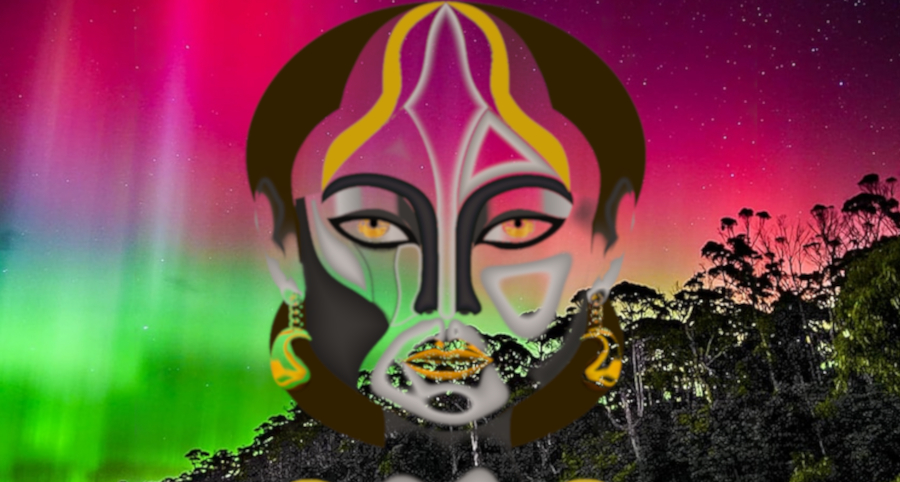
I'm in the mood for experimenting; here is an abstract portrait totally done using BRL and my new e-maps.


Attachments:
abstract_portrait9_BRL.png
abstract_portrait9_BRL.png [ 2.61 MiB | Viewed 389 times ]

_________________
Image

Respect should be offered freely but hard earned
Top
 Post subject: Re: Portraits using GIMP
PostPosted: Tue Nov 17, 2026 2:28 am  (#577) 
Offline
GimpChat Member
User avatar

Joined: Mar 01, 2014
Posts: 14253
Location: Spain, Aragón
:clap Great outcome. You handle volumes and colors very well, ensuring the final result has the perfect look, complete with shadows. :clap

_________________
Image

Gimp 2.10.36 (samj) portable _ OS Windows 10 Home_ 64bits
Don’t be afraid to start over. It’s a new chance to rebuild what you want.


Top
 Post subject: Re: Portraits using GIMP
PostPosted: Wed Nov 18, 2026 4:55 am  (#578) 
Offline
New Member

Joined: Nov 18, 2026
Posts: 4
These abstract portraits are wonderful — the colours and the way the volumes come together in the BRL work are really striking. I'm new here and just learning GIMP, and seeing what's possible with it in threads like this is very inspiring. The framed version and the fantasy profile portraits are beautiful. Thanks for sharing them!


Top
Post new topic Reply to topic  [ 578 posts ]  Go to page Previous  1 ... 25, 26, 27, 28, 29

All times are UTC - 5 hours [ DST ]


* Login  


Powered by phpBB3 © phpBB Group