It is currently Thu Nov 26, 2026 8:06 pm


All times are UTC - 5 hours [ DST ]


Post new topic Reply to topic  [ 42 posts ]  Go to page Previous  1, 2, 3  Next
Author Message
 Post subject: Re: metallic looking text effect
PostPosted: Wed Sep 14, 2011 5:47 pm  (#21) 
Offline
Global Moderator
User avatar

Joined: May 16, 2010
Posts: 16317
Check out Jolies tutorial on Gimp Tricks Draconian.
Just go to youtube and search GimpTricks
Wonderful tutorials there, along with a nice one on adding Python support to Gimp.

_________________
Image


Top
 Post subject: Re: metallic looking text effect
PostPosted: Wed Sep 14, 2011 7:52 pm  (#22) 
Offline
GimpChat Member
User avatar

Joined: Apr 08, 2010
Posts: 5420
Location: Northwest Ohio
Nix, would there be a way to duplicate your effect without the bevel 2.1 and the Tom Keil Chrome? I don't think I have either.


Top
 Post subject: Re: metallic looking text effect
PostPosted: Wed Sep 14, 2011 7:55 pm  (#23) 
Offline
GimpChat Member
User avatar

Joined: Oct 06, 2010
Posts: 4050
Using emboss. But you have to make azimuth, elevation, and depth adjustments with the text selected.

_________________
"In order to attain the impossible, one must attempt the absurd."
~ Miguel de Cervantes


Top
 Post subject: Re: metallic looking text effect
PostPosted: Wed Sep 14, 2011 8:00 pm  (#24) 
Offline
GimpChat Member
User avatar

Joined: Apr 08, 2010
Posts: 5420
Location: Northwest Ohio
Thanks ... guess that means some trial and error!


Top
 Post subject: Re: metallic looking text effect
PostPosted: Wed Sep 14, 2011 8:01 pm  (#25) 
Offline
GimpChat Member
User avatar

Joined: Oct 06, 2010
Posts: 4050
Make sure to blur the text before you start.

This was done using the emboss plug-in:

Image

Plain emboss:

Image

_________________
"In order to attain the impossible, one must attempt the absurd."
~ Miguel de Cervantes


Top
 Post subject: Re: metallic looking text effect
PostPosted: Wed Sep 14, 2011 9:04 pm  (#26) 
Offline
Global Moderator
User avatar

Joined: May 16, 2010
Posts: 16317
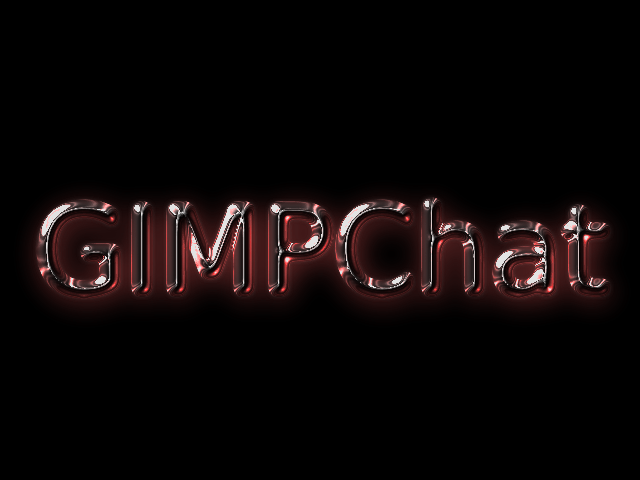
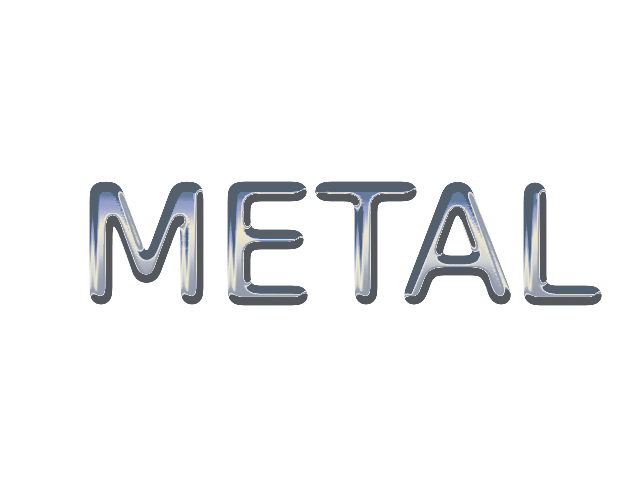
You do not need any other plugins for this effect.
http://penguinpetes.com/b2evo/index.php?p=351

Just remember after part 2, merge the black bg and white text layers or the levels tool will not work for you correctly.
This is not mentioned in the tutorial there.

I also think that the curve is much better for glass or steel as a cone. :)
Example

Image

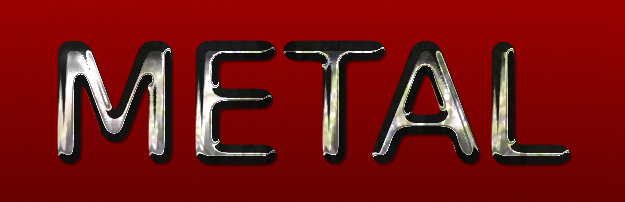
Results with a gradient map (metalic something) - mode set to hard light
Image

_________________
Image


Top
 Post subject: Re: metallic looking text effect
PostPosted: Wed Sep 14, 2011 9:21 pm  (#27) 
Offline
GimpChat Member
User avatar

Joined: Oct 06, 2010
Posts: 4050
If you want those raised lines in your font, like Nixnine's, you'll need something other than Penguin Pete's method, although I use his tutorial often for just metallic looking font.

_________________
"In order to attain the impossible, one must attempt the absurd."
~ Miguel de Cervantes


Top
 Post subject: Re: metallic looking text effect
PostPosted: Wed Sep 14, 2011 9:39 pm  (#28) 
Offline
Global Moderator
User avatar

Joined: May 16, 2010
Posts: 16317
If you use a serif font and the cone effect in curves it will simulate the raised line effect.
There are so many ways to do this though.

Image

_________________
Image


Top
 Post subject: Re: metallic looking text effect
PostPosted: Wed Sep 14, 2011 9:40 pm  (#29) 
Offline
Global Moderator
User avatar

Joined: May 16, 2010
Posts: 16317
Chisel will give this effect quite well also.

_________________
Image


Top
 Post subject: Re: metallic looking text effect
PostPosted: Wed Sep 14, 2011 10:05 pm  (#30) 
Offline
GimpChat Member
User avatar

Joined: Oct 06, 2010
Posts: 4050
I'm just not having the same level of turn-out Nixnine did, with Tom's metallic filter. It just looks crappy on my end. Using the same font, some dimensions, same settings. Sticking with Lighting Effects, as it works best for me.

<hint> Maybe Nixnine should make a video </hint> :)

_________________
"In order to attain the impossible, one must attempt the absurd."
~ Miguel de Cervantes


Top
 Post subject: Re: metallic looking text effect
PostPosted: Wed Sep 14, 2011 10:39 pm  (#31) 
Offline
GimpChat Member
User avatar

Joined: Apr 08, 2010
Posts: 5420
Location: Northwest Ohio
It looks like the basics are to blur the lower font layer, make the upper layer a grey gradient and bump map to the blur layer, then use curves with several ups and downs. I also like bevel and emboss for a sharper look to the 'metal'. Never did find the original tutorial but after checking out everyone's suggestions, trying this and that, I think I can do it by myself! Thanks for all the great help!


Top
 Post subject: Re: metallic looking text effect
PostPosted: Wed Sep 14, 2011 11:56 pm  (#32) 
Offline
Global Moderator
User avatar

Joined: May 16, 2010
Posts: 16317
Good luck with it 2-ton. :)

_________________
Image


Top
 Post subject: Re: metallic looking text effect
PostPosted: Thu Sep 15, 2011 5:12 am  (#33) 
Offline
GimpChat Member
User avatar

Joined: Apr 09, 2011
Posts: 1764
I cant find that bevel even tho its in the plug ins folder...A lot of the python things aI have trouble finding...they dont seem to be where they are supposed to be.


Top
 Post subject: Re: metallic looking text effect
PostPosted: Thu Sep 15, 2011 5:23 am  (#34) 
Offline
GimpChat Member
User avatar

Joined: Apr 07, 2010
Posts: 14182
There is a bevel in Distorts, right near the top.

_________________
Image


Top
 Post subject: Re: metallic looking text effect
PostPosted: Thu Sep 15, 2011 6:11 am  (#35) 
Offline
GimpChat Member
User avatar

Joined: Aug 24, 2011
Posts: 1785
Location: Dallas, TX
nixnine wrote:
Drac, that is correct. Bevel 2.1 but you will need python installed. And it has been ages since I installed python on Windows, but I do remember that you have you have python installed prior to installing Gimp to get it to work. Not to mention there are several other good python scripts for Gimp.


:( Ouch! Not looking forward to reinstalling gimp. Maybe I'll wait for 2.8.


Thanks Rod. I'll check it out. I love Jolie's accent and all her tuts anyway.

_________________
Image


Top
 Post subject: Re: metallic looking text effect
PostPosted: Thu Sep 15, 2011 6:38 am  (#36) 
Offline
GimpChat Member
User avatar

Joined: Apr 07, 2010
Posts: 14182
Drac, you do not have to un-install Gimp in order to install Python, If you use Rods tutorial on how to install Python you can't go wrong. You can leave out the part where it says un-install Gimp and just install it over over the Gimp that is already there. Just make sure you tick the allow Python box while you are following the tute.

_________________
Image


Top
 Post subject: Re: metallic looking text effect
PostPosted: Thu Sep 15, 2011 12:43 pm  (#37) 
Offline
Global Moderator
User avatar

Joined: May 16, 2010
Posts: 16317
Yes make sure to click the customize button to get to the add python area of the install module. :)
Then like Molly said, put a tick in the area provided.Then install as usual.

_________________
Image


Top
 Post subject: Re: metallic looking text effect
PostPosted: Thu Sep 15, 2011 1:44 pm  (#38) 
Offline
GimpChat Member
User avatar

Joined: Aug 24, 2011
Posts: 1785
Location: Dallas, TX
Thanks everyone. I'm just about done backing everything up to a flash drive just incase and then I'll give it a try.


Top
 Post subject: Re: metallic looking text effect
PostPosted: Thu Sep 15, 2011 4:01 pm  (#39) 
Offline
Global Moderator
User avatar

Joined: May 16, 2010
Posts: 16317
Good luck Draconian, here is to seeing you on the python side! :)

_________________
Image


Top
 Post subject: Re: metallic looking text effect
PostPosted: Thu Sep 15, 2011 9:15 pm  (#40) 
Offline
GimpChat Member
User avatar

Joined: Apr 08, 2010
Posts: 5420
Location: Northwest Ohio
Akky, I cannot find most of my plug-ins either even though I see them listed in the plug-ins folder in my finder. I have hunted high and low for the Bevel but no luck so far. Wonder if it has anything to do with osx.


Top
Post new topic Reply to topic  [ 42 posts ]  Go to page Previous  1, 2, 3  Next

All times are UTC - 5 hours [ DST ]


* Login  


Powered by phpBB3 © phpBB Group