It is currently Sat Aug 01, 2026 4:14 pm


All times are UTC - 5 hours [ DST ]


Post new topic Reply to topic  [ 51 posts ]  Go to page Previous  1, 2, 3  Next
Author Message
 Post subject: Re: Fake a painting.
PostPosted: Wed Sep 21, 2011 2:15 pm  (#21) 
Offline
GimpChat Member
User avatar

Joined: Apr 07, 2010
Posts: 14182
Here is the original Mahv.
Image

_________________
Image


Top
 Post subject: Re: Fake a painting.
PostPosted: Wed Sep 21, 2011 3:09 pm  (#22) 
Offline
GimpChat Member
User avatar

Joined: Oct 06, 2010
Posts: 4050
Image

Not sure how this is an improvement. I will say that should David give us some sliders to increase/decrease the effect on the image, it might have a better output. Smaller object areas on the image tend to get overdone.

Something Norman Rockwell'ish:

Image

_________________
"In order to attain the impossible, one must attempt the absurd."
~ Miguel de Cervantes


Top
 Post subject: Re: Fake a painting.
PostPosted: Wed Sep 21, 2011 4:20 pm  (#23) 
Offline
GimpChat Member
User avatar

Joined: Sep 24, 2010
Posts: 12822
The effect works best on larger images Molly, so I first resized your original and then followed by G'MIC's Pen preset before running the cool new preset that David put together for me. I did blend in some additional texture afterwards. :)


Attachments:
145_Picture 001.jpg
145_Picture 001.jpg [ 383.93 KiB | Viewed 2636 times ]

_________________
Lyle

Psalm 109:8

Image
Top
 Post subject: Re: Fake a painting.
PostPosted: Wed Sep 21, 2011 4:35 pm  (#24) 
Offline
GimpChat Member
User avatar

Joined: Apr 07, 2010
Posts: 14182
That is way kewl Lyle thanks.
I am going to have to try figure that out how you got the lighting in the forground.

mahvin, love the NORMAN ROCKWELL look. I always loved these pictures on the cover of all the Saturday Evening Post Magazines. He had such a great imagination.

_________________
Image


Top
 Post subject: Re: Fake a painting.
PostPosted: Wed Sep 21, 2011 4:48 pm  (#25) 
Offline
GimpChat Member
User avatar

Joined: Oct 06, 2010
Posts: 4050
You know, GMIC's pen filter really punches up the twins pic. It looks great just with that filter, too. Just use pen drawing in artistic at default. You'll love it. I threw some of PC's filters in and, lots of great looks, too many to show. But Lyle keeps us entertained for hours with his experiments.

Remember Lyle's soft focus preset? Another winner:

Image

_________________
"In order to attain the impossible, one must attempt the absurd."
~ Miguel de Cervantes


Last edited by mahvin on Wed Sep 21, 2011 4:52 pm, edited 1 time in total.

Top
 Post subject: Re: Fake a painting.
PostPosted: Wed Sep 21, 2011 4:52 pm  (#26) 
Offline
GimpChat Member
User avatar

Joined: Apr 07, 2010
Posts: 14182
Thanx Mahv, I am going to check that pen filter out pronto. I like the way it gave the pic more color, mine is sort of faded and dead looking.

_________________
Image


Last edited by molly on Wed Sep 21, 2011 5:27 pm, edited 1 time in total.

Top
 Post subject: Re: Fake a painting.
PostPosted: Wed Sep 21, 2011 4:53 pm  (#27) 
Offline
GimpChat Member
User avatar

Joined: Oct 06, 2010
Posts: 4050
Re-check my last post, you ninja-ed me, Molly.

_________________
"In order to attain the impossible, one must attempt the absurd."
~ Miguel de Cervantes


Top
 Post subject: Re: Fake a painting.
PostPosted: Thu Sep 22, 2011 4:28 am  (#28) 
Offline
GimpChat Member
User avatar

Joined: Apr 07, 2010
Posts: 14182
:roll: Hey Mahv (or anyone), I looked under presets and I don't have pen preset. I looked under the other dropdowns and don't see it. Please, can you guide me to it? thanx

_________________
Image


Top
 Post subject: Re: Fake a painting.
PostPosted: Thu Sep 22, 2011 4:32 am  (#29) 
Offline
GimpChat Member
User avatar

Joined: Jan 03, 2011
Posts: 1656
Hi there,

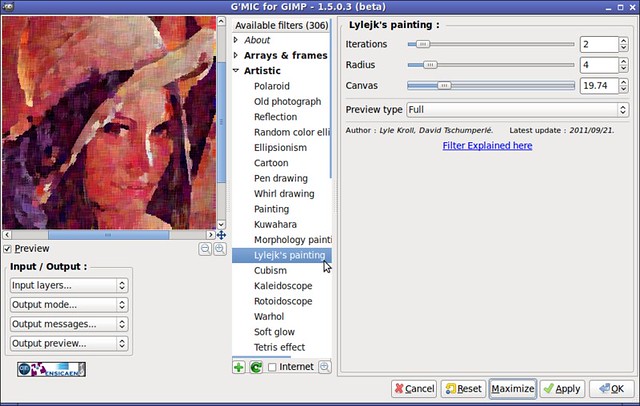
I've added some parameters to the 'Lylejk's painting' filter in G'MIC. Just refresh the filters and it should be available for you. Here is a screenshot of the filter in action :

Image


Top
 Post subject: Re: Fake a painting.
PostPosted: Thu Sep 22, 2011 4:40 am  (#30) 
Offline
GimpChat Member
User avatar

Joined: Apr 07, 2010
Posts: 14182
Thank you very much. I was looking under presets > pen filter. :oops:

_________________
Image


Top
 Post subject: Re: Fake a painting.
PostPosted: Thu Sep 22, 2011 4:56 am  (#31) 
Offline
GimpChat Member
User avatar

Joined: Apr 07, 2010
Posts: 14182
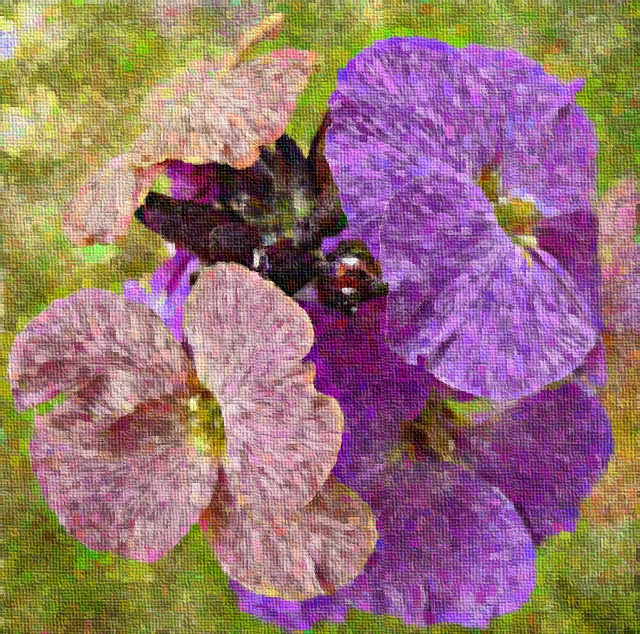
Ok, here is one I did with Lyles painting and added canvas.

Image

_________________
Image


Top
 Post subject: Re: Fake a painting.
PostPosted: Sat Sep 24, 2011 10:12 am  (#32) 
Offline
Retired Staff
User avatar

Joined: May 22, 2008
Posts: 6946
Location: Somewhere in GIMP
molly wrote:
Ok, here is one I did with Lyles painting and added canvas.

That's really nice molly!

Tried the technique on a landscape photo (Thanks, Allie for the photo). It kind of reminds me of a Monet-style landscape.
Image

_________________
Image
World War IV will be fought with sticks and stones. - Albert Einstein


Top
 Post subject: Re: Fake a painting.
PostPosted: Sat Sep 24, 2011 10:22 am  (#33) 
Offline
GimpChat Member
User avatar

Joined: Apr 07, 2010
Posts: 14182
very nice, I love those rolling hills.

_________________
Image


Top
 Post subject: Re: Fake a painting.
PostPosted: Sat Sep 24, 2011 11:25 am  (#34) 
Offline
Retired Staff
User avatar

Joined: May 22, 2008
Posts: 6946
Location: Somewhere in GIMP
Thanks, molly.

I did an, I wonder if ... , and tried it out. If your original image is large and you just want a piece of it but want to show from where the piece was taken, you can use the Rectangle selection tool and do all the processing within the selection. I used brightness and contrast, used the filter, then stroked.

You can click the image to zoom and see the original photo and the processed part together.
o/O/Canyon-w-inset2.jpg

_________________
Image
World War IV will be fought with sticks and stones. - Albert Einstein


Top
 Post subject: Re: Fake a painting.
PostPosted: Sat Sep 24, 2011 11:29 am  (#35) 
Offline
GimpChat Member
User avatar

Joined: Sep 24, 2010
Posts: 12822
Both look good Molly; O. I agree O that it sort of has that Impressionist like feel which got me going this direction in the first place. :)

_________________
Lyle

Psalm 109:8

Image


Top
 Post subject: Re: Fake a painting.
PostPosted: Sat Sep 24, 2011 11:45 am  (#36) 
Offline
GimpChat Member
User avatar

Joined: Oct 06, 2010
Posts: 4050
And you should be proud of that GMIC gem, Lyle. :)

_________________
"In order to attain the impossible, one must attempt the absurd."
~ Miguel de Cervantes


Top
 Post subject: Re: Fake a painting.
PostPosted: Sat Sep 24, 2011 12:10 pm  (#37) 
Offline
Global Moderator
User avatar

Joined: May 16, 2010
Posts: 16142
It is an awesome addition to GMIC
Here is my go at it.
After running your filter with various settings in GMIC, i duplicated the layer twice.
I set the top layer to screen, the next layer under to overlay and the one under that to screen.
The original at the bottom.
I then flattened the image and played with brightness and contrast.
The i used unsharp mask at a very low value.
Then i applied a slight inward curve to it and applied Filters/Artistic/apply canvas at 4

Turned out pretty nice. :) Thanks for the cool filter Lyle and David!

Image

_________________
Image


Top
 Post subject: Re: Fake a painting.
PostPosted: Sat Sep 24, 2011 12:27 pm  (#38) 
Offline
GimpChat Member
User avatar

Joined: Sep 24, 2010
Posts: 12822
GimpChat Member


Joined: Sep 24, 2010
Posts: 1996 Thanks Mahvin. G'MIC just way too powerful for me to ever master though. Enjoy tweaking with the existing presets from time to time. Might do a G'MICtilus later; can't give Rod with his Fractilus endeavors too much glory. lol

Speaking of Rod, glad you like it too. :)

_________________
Lyle

Psalm 109:8

Image


Top
 Post subject: Re: Fake a painting.
PostPosted: Sat Sep 24, 2011 12:29 pm  (#39) 
Offline
GimpChat Member
User avatar

Joined: Apr 07, 2010
Posts: 14182
very nice Rod, who is the good looking couple

_________________
Image


Top
 Post subject: Re: Fake a painting.
PostPosted: Sat Sep 24, 2011 12:41 pm  (#40) 
Offline
Global Moderator
User avatar

Joined: May 16, 2010
Posts: 16142
molly wrote:
very nice Rod, who is the good looking couple


That is my Daughter Jacki and her new Husband Stephen. :)
Thought i would give them this as a late wedding gift.

If i can ever get it printed.

_________________
Image


Top
Post new topic Reply to topic  [ 51 posts ]  Go to page Previous  1, 2, 3  Next

All times are UTC - 5 hours [ DST ]


* Login  


Powered by phpBB3 © phpBB Group