It is currently Sat Sep 19, 2026 10:43 pm


All times are UTC - 5 hours [ DST ]


Post new topic Reply to topic  [ 23 posts ]  Go to page 1, 2  Next
Author Message
 Post subject: Quick & Easy Gold Text
PostPosted: Sun Sep 18, 2011 9:58 am  (#1) 
Offline
GimpChat Member
User avatar

Joined: Aug 24, 2011
Posts: 1785
Location: Dallas, TX
After looking at several different posts and tutorials I now use a couple of easy, simple ways to make gold text. Jolie did an excellent You Tube tute and Nixnine recently posted a tutorial similar to the first one that gave me the idea. Logos are often used in .png format for use on dirrerent backgrounds so I ended up with these. They are not really tuts just the steps. If you are a beginner and don't understand something I'll dig up the other tutorials and post them here or someone else may have them bookmarked.

Method 1

1. Black background>set FG to grey (989898)>text layer (move or center as desired)>alpha to selection
2. Selection bevel>Merge that layer down to the text layer
3. Open GMIC>Tom Kiel's Filters>Metallic look>gold (or whatever you like)>select none
4. If you need a PNG then delete the background or just uncheck the "save background" box in the save dialog.

Method 2 (for this you will need the attached
gradient. It uses whatever colors you select for FG & BG)

1. Use the same steps 1 & 2 as in Method one
2. Set FG to 777424 and BG to fffb91
3.Set gradient to "Three Gold Bars" (the attached gradient) don't do anything else, just set it.
4.Go to Colors>Map>Gradient Map
5. Again, for the png follow step 4 above.


Attachments:
Three-Gold-Bars.ggr [245 Bytes]
Downloaded 253 times
Method 2.png
Method 2.png [ 44.86 KiB | Viewed 8677 times ]
Method 1.png
Method 1.png [ 42.39 KiB | Viewed 8677 times ]

_________________
Image
Share on Facebook Share on Twitter Share on Orkut Share on Digg Share on MySpace Share on Delicious Share on Technorati
Top
 Post subject: Re: Quick & Easy Gold Text
PostPosted: Wed Oct 05, 2011 2:46 am  (#2) 
Offline
GimpChat Member
User avatar

Joined: Apr 09, 2011
Posts: 1764
they look great!!


Top
 Post subject: Re: Quick & Easy Gold Text
PostPosted: Wed Oct 05, 2011 3:35 am  (#3) 
Offline
GimpChat Member
User avatar

Joined: Jul 08, 2011
Posts: 285
Nice tutorial Draconian :)
I made the method 1 but I stuck with the method 2 :(
Image

_________________
Image

My Flickr
http://anaplus.deviantart.com/


Top
 Post subject: Re: Quick & Easy Gold Text
PostPosted: Wed Oct 05, 2011 4:21 am  (#4) 
Offline
Global Moderator
User avatar

Joined: May 16, 2010
Posts: 16173
Great ...Thanks! :)

_________________
Image


Top
 Post subject: Re: Quick & Easy Gold Text
PostPosted: Wed Oct 05, 2011 6:21 am  (#5) 
Offline
GimpChat Member
User avatar

Joined: Aug 24, 2011
Posts: 1785
Location: Dallas, TX
Thanks everyone. Not often do I get to contribute anything being kind of inept at this still. Just wanted to simplify the steps into a short, concise list. They are both based on others work and not my own.

Rod, does that Three Gold Bars gradient look a little greenish to you?

_________________
Image


Top
 Post subject: Re: Quick & Easy Gold Text
PostPosted: Wed Oct 05, 2011 7:14 am  (#6) 
Offline
GimpChat Member
User avatar

Joined: Apr 07, 2010
Posts: 14182
The strangest thing, I have the three gold bars-ggr in my gradient folder in both Gimp-2.6 and 2.7. I open gimp, go to gradients and they don't show up on the list in either one.
I have had this gradient since it was first posted. I have three-bars-sin but no three gold bars.
How can they be in my folders, but not showing in GIMP?

_________________
Image


Top
 Post subject: Re: Quick & Easy Gold Text
PostPosted: Wed Oct 05, 2011 8:28 am  (#7) 
Offline
GimpChat Member
User avatar

Joined: Aug 24, 2011
Posts: 1785
Location: Dallas, TX
Wanna borrow my computer brick? :gaah :crash

_________________
Image


Top
 Post subject: Re: Quick & Easy Gold Text
PostPosted: Wed Oct 05, 2011 8:49 am  (#8) 
Offline
Retired Staff
User avatar

Joined: May 22, 2008
Posts: 6946
Location: Somewhere in GIMP
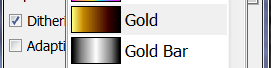
I have the same trouble with the three gold bars gradient. It doesn't show in my gradient list. Is it under a different name than three gold bars in the list?

I have a gradient named Gold Bar that is not gold in color, it's shades of black to white. Is that it? I don't recall seeing it before in my gradients.

LATER: I did a test. I removed the three gold bars gradient from my gradient folder, refreshed my gradients and the gradient named Gold Bar was no longer there. It is not colored gold though. It is black, silver, white.

_________________
Image
World War IV will be fought with sticks and stones. - Albert Einstein


Top
 Post subject: Re: Quick & Easy Gold Text
PostPosted: Wed Oct 05, 2011 9:11 am  (#9) 
Offline
GimpChat Member
User avatar

Joined: Apr 07, 2010
Posts: 14182
This is a scrn shot of what I have and the one that says gold is really silver-gray
Image

_________________
Image


Top
 Post subject: Re: Quick & Easy Gold Text
PostPosted: Wed Oct 05, 2011 9:25 am  (#10) 
Offline
GimpChat Member
User avatar

Joined: Aug 24, 2011
Posts: 1785
Location: Dallas, TX
I don't understand why it won't show up for you. What ever the colors of the FG/BG are, that is the colors that it uses. Pretty handy for quick color changes. Here's where they are for me in XP SP3 and Gimp 2.6.11.


While I was posting this I saw that you had put up another post, Molly. Change your FG and BG colors to what ever colors you need it to be. When I made these gradients, I was going for Gold but didn't really completely know what I was doing. Istead of picking a specific color, I put in FG and BG and ended up with a pretty versatile gradient by accident. I discovered later on that they were not Gold but whatever the FG/BG was set to. Am I being too redundant or was that clear?


Attachments:
GB.jpg
GB.jpg [ 59.17 KiB | Viewed 8515 times ]
TGB.jpg
TGB.jpg [ 55.96 KiB | Viewed 8515 times ]
FGB.jpg
FGB.jpg [ 58.56 KiB | Viewed 8515 times ]

_________________
Image
Top
 Post subject: Re: Quick & Easy Gold Text
PostPosted: Wed Oct 05, 2011 9:32 am  (#11) 
Offline
GimpChat Member
User avatar

Joined: Apr 07, 2010
Posts: 14182
Ok, so you are saying if I click the gold bar in my gradients, it will take on the two colors I set my FG and BG to. I will try it now.

_________________
Image


Top
 Post subject: Re: Quick & Easy Gold Text
PostPosted: Wed Oct 05, 2011 9:38 am  (#12) 
Offline
GimpChat Member
User avatar

Joined: Aug 24, 2011
Posts: 1785
Location: Dallas, TX
Exactly. I guess i should have changed the name of the gradient to FG/BG Variable or something. I just went into my gradients folder and found three and four but couldn't find the single and double. I'll get into this and get back to you with the other gradients. Somebody else may find a use for them.

_________________
Image


Top
 Post subject: Re: Quick & Easy Gold Text
PostPosted: Wed Oct 05, 2011 9:40 am  (#13) 
Offline
GimpChat Member
User avatar

Joined: Apr 07, 2010
Posts: 14182
I tried it with a couple shades of yellow and it just came out yellow so I ran it through bevel and it is better, but not really gold.

Image

_________________
Image


Top
 Post subject: Re: Quick & Easy Gold Text
PostPosted: Wed Oct 05, 2011 10:00 am  (#14) 
Offline
GimpChat Member
User avatar

Joined: Aug 24, 2011
Posts: 1785
Location: Dallas, TX
That's right, both methods use the selection bevel.

I don't know what's going on but I just noticed I have a lot of gradients not showing up. I changed the name of my Three Gold Bars to Three Bars Variable and after refreshing it still says Three Gold Bars in the menu. I even restarted gimp, refreshed again and it will not change the name in the menu list.

The gradients not showing up, could this be another deal where a Photoshop gradient has the same extension and gimp can't see it? Rod, oh Rod....you getting this? Here's one of the gradients that does not show up in the menu.


Attachments:
Lpink-Gloss.ggr [351 Bytes]
Downloaded 147 times

_________________
Image
Top
 Post subject: Re: Quick & Easy Gold Text
PostPosted: Wed Oct 05, 2011 10:02 am  (#15) 
Offline
Retired Staff
User avatar

Joined: May 22, 2008
Posts: 6946
Location: Somewhere in GIMP
I have a problem with your tutorials. I've added notes in red. I know you worked hard on these but a new user would have no idea how to do them. When you write a tutorial you need keep the new user in mind.

Method 1

  1. Black background (is my background LAYER or Color supposed to be filled with black?)
  2. set FG to grey (989898)>text layer (move or center as desired) (Is the text supposed to be color 989898?)
  3. alpha to selection
  4. Selection bevel> (I have several bevel scripts. Is Filters > Distorts > Bevel the one I'm to use?) Merge that layer down to the text layer
  5. Open GMIC>Tom Kiel's Filters>Metallic look>gold (or whatever you like)>select none
  6. If you need a PNG then delete the background or just uncheck the "save background" box in the save dialog.

Method 2 (for this you will need the attached
gradient. It uses whatever colors you select for FG & BG)

  1. Use the same steps 1 & 2 as in Method one
  2. Set FG to 777424 and BG to ffb91 (What do I do with those colors and ffb91 doesn't have enough numbers/letters in it?)
  3. Set gradient to "Three Gold Bars" (the attached gradient) don't do anything else, just set it. (My copy of three gold bars is named Gold Bar in my gradients and is not gold)
  4. Go to Colors>Map>Gradient Map (I had to use my Golden Light gradient)
  5. Again, for the png follow step 4 above.

Image

_________________
Image
World War IV will be fought with sticks and stones. - Albert Einstein


Top
 Post subject: Re: Quick & Easy Gold Text
PostPosted: Wed Oct 05, 2011 10:21 am  (#16) 
Offline
GimpChat Member
User avatar

Joined: Aug 24, 2011
Posts: 1785
Location: Dallas, TX
Sorry for the confusion O. In my first post, I started out by stating it was not really a tut.

"They are not really tuts just the steps. If you are a beginner and don't understand something I'll dig up the other tutorials and post them here or someone else may have them bookmarked."

I can try and address some of your questions. Again this was not designed for a nubie, but I wholeheartedly agreee that full tutorials should be geared toward the beginner. However.....

Method 1

1.Black background(is my background LAYER or Color supposed to be filled with black?) The background layer is supposed to be black
2.set FG to grey (989898)>text layer (move or center as desired) (Is the text supposed to be color 989898?)YES
3.alpha to selection
4.Selection bevel> (I have several bevel scripts. Is Filters > Distorts > Bevel the one I'm to use?) Merge that layer down to the text layer "Selection Bevel" refers to the Bevel 2 script and I believe that is where it shows up
5.Open GMIC>Tom Kiel's Filters>Metallic look>gold (or whatever you like)>select none
6.If you need a PNG then delete the background or just uncheck the "save background" box in the save dialog.

Method 2 (for this you will need the attached
gradient. It uses whatever colors you select for FG & BG)


1.Use the same steps 1 & 2 as in Method one
2.Set FG to 777424 and BG to ffb91 (What do I do with those colors and ffb91 doesn't have enough numbers/letters in it?)Sorry, typo, not enough f's, should be fff9b1
3.Set gradient to "Three Gold Bars" (the attached gradient) don't do anything else, just set it. (My copy of three gold bars is named Gold Bar in my gradients and is not gold) See my post above about setting the FG/BG colors
4.Go to Colors>Map>Gradient Map (I had to use my Golden Light gradient)Once you set the FG/BG colors, the "Three Gold Bars" becomes whatever the FG/BG colors are set to
5.Again, for the png follow step 4 above.

Between this and the other posts above, it should help clear things up a bit.

_________________
Image


Top
 Post subject: Re: Quick & Easy Gold Text
PostPosted: Wed Oct 05, 2011 10:27 am  (#17) 
Offline
GimpChat Member
User avatar

Joined: Aug 24, 2011
Posts: 1785
Location: Dallas, TX
O, would you please post that Golden Light gradient. I really like the soft glow effect. The gmic filters are great aren't they?

_________________
Image


Top
 Post subject: Re: Quick & Easy Gold Text
PostPosted: Wed Oct 05, 2011 10:33 am  (#18) 
Offline
Retired Staff
User avatar

Joined: May 22, 2008
Posts: 6946
Location: Somewhere in GIMP
What I'd like to know is how you got the gold bar gradient to use the FG/BG colors. I've never seen that done before.

I've attached my Golden Light gradient. I think it's pretty, glad you like it.


Attachments:
Golden-light.ggr [1.24 KiB]
Downloaded 159 times

_________________
Image
World War IV will be fought with sticks and stones. - Albert Einstein
Top
 Post subject: Re: Quick & Easy Gold Text
PostPosted: Wed Oct 05, 2011 10:40 am  (#19) 
Offline
GimpChat Member
User avatar

Joined: Aug 24, 2011
Posts: 1785
Location: Dallas, TX
Oregonian wrote:
What I'd like to know is how you got the gold bar gradient to use the FG/BG colors. I've never seen that done before.

I've attached my Golden Light gradient. I think it's pretty, glad you like it.


I tried to explain this (I think my post is on the first page somewhere) to Molly. It was a complete accident. I was trying to learn how to make a gradient and somewhere it asks what color and I picked FG for one and BG for the other not knowing I was supposed to enter a specific color. What it ended up being is a variable FG/BG gradient. I can't seem to be able to change the name from Gold to anything else. I guess the name is confusing all by itself and you're right, if you don't set the colors first....it ain't Gold!

Thanks for the gradient.

_________________
Image


Top
 Post subject: Re: Quick & Easy Gold Text
PostPosted: Wed Oct 05, 2011 11:04 am  (#20) 
Offline
Retired Staff
User avatar

Joined: May 22, 2008
Posts: 6946
Location: Somewhere in GIMP
Draconian wrote:
It was a complete accident. I was trying to learn how to make a gradient and somewhere it asks what color and I picked FG for one and BG for the other not knowing I was supposed to enter a specific color.

Thanks for the gradient.
Well what a cool accident. I'm going to have to write that down. Need to give it a try though.

Later note: It doesn't work with more than three bars. I tried one with 4 bars and it didn't work. :(

You are welcome on the gradient. I messed with the colors a bit and made the yellow slightly oranger and changed the gray to a more brown color and then inverted the colors so the yellow was the fg and the brown the bg before running the gradient map. I think it makes the gold look a little warmer.

Image

_________________
Image
World War IV will be fought with sticks and stones. - Albert Einstein


Top
Post new topic Reply to topic  [ 23 posts ]  Go to page 1, 2  Next

All times are UTC - 5 hours [ DST ]


* Login  


Powered by phpBB3 © phpBB Group