It is currently Thu Jun 04, 2026 12:50 am


All times are UTC - 5 hours [ DST ]


Post new topic Reply to topic  [ 67 posts ]  Go to page Previous  1, 2, 3, 4  Next
Author Message
 Post subject: Re: do you know how this was done?
PostPosted: Tue Oct 18, 2011 12:54 pm  (#21) 
Offline
GimpChat Member
User avatar

Joined: Oct 06, 2010
Posts: 4050
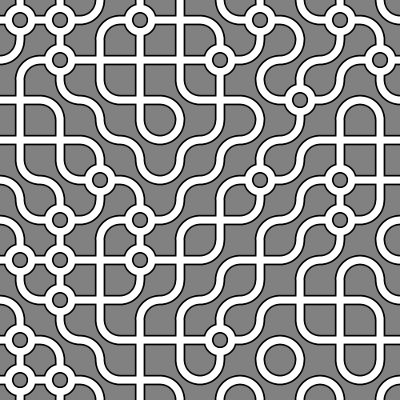
I finally figured out where I found this pattern (I actually had one in one of my GURM folders) its called Truchet, and I found mine from Filter Forge a few years ago. Just thought I would add that here. So, anyone wanting to find a wealth of these patterns, just type in Truchet patterns in the search engine and you'll get plenty of examples/patterns to choose from.

Also, there is a pretty cool little java applet you can play with using quadratic real numbers or rational number parameters. You can find that here:

http://wphooper.com/visual/truchet_dynamics/

_________________
"In order to attain the impossible, one must attempt the absurd."
~ Miguel de Cervantes


Last edited by mahvin on Tue Oct 18, 2011 1:09 pm, edited 1 time in total.

Top
 Post subject: Re: do you know how this was done?
PostPosted: Tue Oct 18, 2011 1:06 pm  (#22) 
Offline
GimpChat Member
User avatar

Joined: Apr 07, 2010
Posts: 14182
thank you Mahn, that's good to know.

_________________
Image


Top
 Post subject: Re: do you know how this was done?
PostPosted: Tue Oct 18, 2011 1:20 pm  (#23) 
Offline
Global Moderator
User avatar

Joined: May 16, 2010
Posts: 16008
Gimp has this pattern in the create>patterns menu
File/Create /Patterns/3-D Truchet

Image

_________________
Image


Top
 Post subject: Re: do you know how this was done?
PostPosted: Tue Oct 18, 2011 1:37 pm  (#24) 
Offline
GimpChat Member
User avatar

Joined: Sep 24, 2010
Posts: 12775
Had no idea Rod; cool. Now I can delete ofnuts brush. lol

:)

_________________
Lyle

Psalm 109:8

Image


Top
 Post subject: Re: do you know how this was done?
PostPosted: Tue Oct 18, 2011 1:40 pm  (#25) 
Offline
GimpChat Member

Joined: Oct 17, 2011
Posts: 5
THAT'S IT! Thank you so much - I knew it wasn't a brush...


Top
 Post subject: Re: do you know how this was done?
PostPosted: Tue Oct 18, 2011 1:49 pm  (#26) 
Offline
GimpChat Member
User avatar

Joined: Sep 24, 2010
Posts: 12775
Just got inspired to do this. lol

:)


Attachments:
truchet_ball.png
truchet_ball.png [ 625.46 KiB | Viewed 1804 times ]

_________________
Lyle

Psalm 109:8

Image
Top
 Post subject: Re: do you know how this was done?
PostPosted: Tue Oct 18, 2011 2:09 pm  (#27) 
Offline
GimpChat Member
User avatar

Joined: Oct 06, 2010
Posts: 4050
I still prefer to keep your method, Lyle, because I found this:

http://www.digitalartform.com/archives/ ... ze_in.html

And made a new set that gets random patterns each time you stroke the path.

Image

If you want solid color lines on the 3D Truchet that Rod pointed out, just make start and end colors the same color.

_________________
"In order to attain the impossible, one must attempt the absurd."
~ Miguel de Cervantes


Top
 Post subject: Re: do you know how this was done?
PostPosted: Tue Oct 18, 2011 4:30 pm  (#28) 
Offline
GimpChat Member
User avatar

Joined: Sep 24, 2010
Posts: 12775
Thanks for that link Mahvin. Definitely some cool stuff there. :)

_________________
Lyle

Psalm 109:8

Image


Top
 Post subject: Re: do you know how this was done?
PostPosted: Tue Oct 18, 2011 4:55 pm  (#29) 
Offline
GimpChat Founder
User avatar

Joined: May 22, 2008
Posts: 5241
Location: Gimpville
Thanks for the cool patterns!!

Image

_________________
“If you reach for the stars, you just might land on a decently sized hill.” - Stuart Hill


Top
 Post subject: Re: do you know how this was done?
PostPosted: Tue Oct 18, 2011 5:05 pm  (#30) 
Offline
GimpChat Member
User avatar

Joined: Sep 24, 2010
Posts: 12775
Your result gave me a smile Tux. lol

Anyway, again thanks for that new info and link Mahvin. Created a pattern (bi-color random noise since I only needed 2) and used the truchet pattern creator to create a single tile and then created a fill and also a horizontal and masked the top layer to create resulting seamless texture and of course made another sphere too. :)

edit: changed patern to a cleaner one.

Attachment:
truchet.png
truchet.png [ 141.21 KiB | Viewed 1786 times ]


Attachments:
truchet_sphere.jpg
truchet_sphere.jpg [ 416.77 KiB | Viewed 1789 times ]

_________________
Lyle

Psalm 109:8

Image


Last edited by lylejk on Tue Oct 18, 2011 10:05 pm, edited 1 time in total.
Top
 Post subject: Re: do you know how this was done?
PostPosted: Tue Oct 18, 2011 5:09 pm  (#31) 
Offline
GimpChat Founder
User avatar

Joined: May 22, 2008
Posts: 5241
Location: Gimpville
lylejk wrote:
Your result gave me a smile Tux. lol

Thanks lyle. I'm getting some cool results using these patterns with the Logo Workshop.

Image

_________________
“If you reach for the stars, you just might land on a decently sized hill.” - Stuart Hill


Top
 Post subject: Re: do you know how this was done?
PostPosted: Tue Oct 18, 2011 5:29 pm  (#32) 
Offline
GimpChat Member
User avatar

Joined: Aug 24, 2011
Posts: 1785
Location: Dallas, TX
lylejk wrote:
Your result gave me a smile Tux. lol

Anyway, again thanks for that new info and link Mahvin. Created a pattern (bi-color random noise since I only needed 2) and used the truchet pattern creator to create a single tile and then created a fill and also a horizontal and masked the top layer to create resulting seamless texture and of course made another sphere too. :)

Attachment:
truchet.png


You're killing me Lyle. You know how much I like metal stuff. You do that sphere in mathmap?

_________________
Image


Top
 Post subject: Re: do you know how this was done?
PostPosted: Tue Oct 18, 2011 5:35 pm  (#33) 
Offline
GimpChat Member
User avatar

Joined: Sep 24, 2010
Posts: 12775
Yes; mathmap>distort>sphere. The best sphere maker that I've run across. To create the back, I used Simple's Diamond filter (ran twice) as a lower layer to the one on top (needs to be perfectly square by the way) and then darkened the base layer some before merging the layers then created the sphere. :)

_________________
Lyle

Psalm 109:8

Image


Top
 Post subject: Re: do you know how this was done?
PostPosted: Wed Oct 19, 2011 8:00 am  (#34) 
Offline
GimpChat Member
User avatar

Joined: Sep 24, 2010
Posts: 12775
OK Drac; did this one for you since you like metal things so much. lol

We all had way too much fun with a cool program called Sculpture Generator which I used to create this one (along with a hint of sparkle). :)

Generated by Sculpture Generator 1 by Carlo H. Séquin, UC Berkeley (and some additional tlc using GIMP).


Attachments:
truchet_sg.png
truchet_sg.png [ 478.65 KiB | Viewed 1536 times ]

_________________
Lyle

Psalm 109:8

Image
Top
 Post subject: Re: do you know how this was done?
PostPosted: Fri Oct 21, 2011 9:58 am  (#35) 
Offline
Script Coder
User avatar

Joined: Jul 14, 2010
Posts: 697
Late to the game again on this one. I had written a script to shuffle tiles that would probably be of use here: http://silent9.com/incoming/sc ... huffle.scm

If you make a tile like this (though with a bit more care than I used) or one with more cell options like on the previously linked site:
Attachment:
curves.png
curves.png [ 7.06 KiB | Viewed 1515 times ]


and use it to fill an image that is a multiple of the cell size (100x100 in this case) then run the script you will end up with something like this:
Attachment:
shuffled.jpg
shuffled.jpg [ 200.41 KiB | Viewed 1515 times ]


Just a warning that it can be slow on a large image or small tile sizes!

-Rob A>

_________________
Image
Fantasy Cartography and Mapping by RobA


Top
 Post subject: Re: do you know how this was done?
PostPosted: Fri Oct 21, 2011 10:08 am  (#36) 
Offline
GimpChat Member
User avatar

Joined: Sep 24, 2010
Posts: 12775
Doesn't appear to do anything Rob; when I run it, I just get the same tile no matter what size I put in the x and y paramters. :)

_________________
Lyle

Psalm 109:8

Image


Top
 Post subject: Re: do you know how this was done?
PostPosted: Fri Oct 21, 2011 10:08 am  (#37) 
Offline
Script Coder
User avatar

Joined: Jul 14, 2010
Posts: 697
Here is a tile based on http://www.digitalartform.com/archives/ ... ze_in.html
Attachment:
curves2.png
curves2.png [ 10.83 KiB | Viewed 1513 times ]


and a shuffle of that:
Attachment:
shuffled2.jpg
shuffled2.jpg [ 182.55 KiB | Viewed 1513 times ]


-Rob A>

_________________
Image
Fantasy Cartography and Mapping by RobA


Top
 Post subject: Re: do you know how this was done?
PostPosted: Fri Oct 21, 2011 10:09 am  (#38) 
Offline
Script Coder
User avatar

Joined: Jul 14, 2010
Posts: 697
lylejk wrote:
Doesn't appear to do anything Rob; when I run it, I just get the same tile no matter what size I put in the x and y paramters. :)


What version gimp?

Just have a layer active with NO selection. The script will slice up and shuffle the layer.

-Rob A>

_________________
Image
Fantasy Cartography and Mapping by RobA


Top
 Post subject: Re: do you know how this was done?
PostPosted: Fri Oct 21, 2011 10:25 am  (#39) 
Offline
GimpChat Member
User avatar

Joined: Sep 24, 2010
Posts: 12775
Use GIMP 2.6.11 Rob. Here are some results that I get (before/after)

Gradient (appears to work):

Attachment:
before.png
before.png [ 567.52 KiB | Viewed 1510 times ]


After:

Attachment:
after.png
after.png [ 649.39 KiB | Viewed 1510 times ]


Your original sample (don't work):

Before and after identical:


Attachments:
after2.png
after2.png [ 95.08 KiB | Viewed 1510 times ]

_________________
Lyle

Psalm 109:8

Image
Top
 Post subject: Re: do you know how this was done?
PostPosted: Fri Oct 21, 2011 10:27 am  (#40) 
Offline
GimpChat Member
User avatar

Joined: Sep 24, 2010
Posts: 12775
OK; changed the layer dimension from 200X100 to 100X100 and got the desired result


Attachments:
modified.png
modified.png [ 97.54 KiB | Viewed 1506 times ]

_________________
Lyle

Psalm 109:8

Image
Top
Post new topic Reply to topic  [ 67 posts ]  Go to page Previous  1, 2, 3, 4  Next

All times are UTC - 5 hours [ DST ]


* Login  


Powered by phpBB3 © phpBB Group