It is currently Wed Jun 10, 2026 4:31 am


All times are UTC - 5 hours [ DST ]


Post new topic Reply to topic  [ 104 posts ]  Go to page Previous  1, 2, 3, 4, 5, 6  Next
Author Message
 Post subject: Re: Logo Workshop - Release Candidate V.04
PostPosted: Tue Oct 25, 2011 1:28 pm  (#81) 
Offline
GimpChat Founder
User avatar

Joined: May 22, 2008
Posts: 5241
Location: Gimpville
Here's the latest release candidate and I feel much better about v0.04 than the v0.03 release. I just wasn't happy with the "stroke to path" approach I used in the last release. My initial stroking approach is simple, superior and it doesn't rely on a brush.

Now that the stroke test sidetrack is behind me, I'm ready to move ahead...

Aside from better code optimization, logical layer arrangement and proper stroking, several other new features have been added, including double stroke and double bevel, along with three new effects (cubism, olify, plasma) that can applied to the fill layer.

Here are a few examples of some of new features in this release candidate..

Double Stroke
Image

Offset Stroke (via double stroke)
Image

Double Bevel (more depth)
Image

Double Bevel Shiny
Image

Plasma Fill
Image

I've attached the new version of the script to the first post in this thread, as well as more details on this version's features.

As always, post your results back to this thread, along with bug reports, suggestions and/or other comments.

Thanks!!

_________________
“If you reach for the stars, you just might land on a decently sized hill.” - Stuart Hill


Top
 Post subject: Re: Logo Workshop - Release Candidate V.04
PostPosted: Tue Oct 25, 2011 2:03 pm  (#82) 
Offline
Global Moderator
User avatar

Joined: May 16, 2010
Posts: 16023
Thanks Tux!
Nice updates. :)

_________________
Image


Top
 Post subject: Re: Logo Workshop - Release Candidate V.04
PostPosted: Tue Oct 25, 2011 2:14 pm  (#83) 
Offline
GimpChat Member
User avatar

Joined: Apr 07, 2010
Posts: 14182
Love it Tux thank you!

Image

_________________
Image


Top
 Post subject: Re: Logo Workshop - Release Candidate V.04
PostPosted: Tue Oct 25, 2011 2:26 pm  (#84) 
Offline
GimpChat Member

Joined: Aug 27, 2010
Posts: 491
Love this script ...

Image


Top
 Post subject: Re: Logo Workshop - Release Candidate V.04
PostPosted: Tue Oct 25, 2011 2:42 pm  (#85) 
Offline
Retired Staff
User avatar

Joined: May 22, 2008
Posts: 6946
Location: Somewhere in GIMP
I love the updated script. Beautiful.

I had a problem in the A2L with it paring the font with the double stroke.

Image

_________________
Image
World War IV will be fought with sticks and stones. - Albert Einstein


Top
 Post subject: Re: Logo Workshop - Release Candidate V.04
PostPosted: Tue Oct 25, 2011 2:54 pm  (#86) 
Offline
GimpChat Founder
User avatar

Joined: May 22, 2008
Posts: 5241
Location: Gimpville
Glad y'all are liking the update.

Check the 1st page in this thread for details on how to use each option. For most "added effects" the "effect depth" value is critical for getting the desired results.

O, when double stroke is selected, the "Added effect depth" controls the outside stoke. Try it at 2 or 3. Too large of values will result in all stroke and no logo. :hehe

Also, remember that the outside stroke get's its color from the underlying image. In the case of text from File/Create, it's the text/font color. For a2s, it's whatever color the underlying image is. You can think of the outside stroke as a transparent stroke.

_________________
“If you reach for the stars, you just might land on a decently sized hill.” - Stuart Hill


Top
 Post subject: Re: Logo Workshop - Release Candidate V.04
PostPosted: Tue Oct 25, 2011 2:58 pm  (#87) 
Offline
Retired Staff
User avatar

Joined: May 22, 2008
Posts: 6946
Location: Somewhere in GIMP
GnuTux wrote:
O, when double stroke is selected, the "effect depth" controls the outside stoke. Try it at 2 or 3.
I tried both 2 and 3 in the effect depth and it still pares the text for me in Alpha to Logo. Am I not holding my mouth right? :smiley2

I thought the double stroke would leave some of the color file on the outside of the stroke. Isn't that what it does in the File > Create > Logo part?

_________________
Image
World War IV will be fought with sticks and stones. - Albert Einstein


Top
 Post subject: Re: Logo Workshop - Release Candidate V.04
PostPosted: Tue Oct 25, 2011 3:10 pm  (#88) 
Offline
GimpChat Founder
User avatar

Joined: May 22, 2008
Posts: 5241
Location: Gimpville
I just tested it again and it appears to work in a2l.

The bottom text layer gets turned off so you'll need to click it back on. I probably should have left it on for this operation

Again, ensure that "Added effect depth" is set to whatever width you want the outer stroke to be and "stroke width" set to whatever you want the inner stroke to be.

_________________
“If you reach for the stars, you just might land on a decently sized hill.” - Stuart Hill


Top
 Post subject: Re: Logo Workshop - Release Candidate V.04
PostPosted: Tue Oct 25, 2011 3:35 pm  (#89) 
Offline
Retired Staff
User avatar

Joined: May 22, 2008
Posts: 6946
Location: Somewhere in GIMP
GnuTux wrote:
The bottom text layer gets turned off so you'll need to click it back on. I probably should have left it on for this operation
That works, plus I started with black text in the example I posted. I should have started with the color I wanted the outer stroke to be.

Seems like I traveled this trail before up yonder in the thread. :hehe

Image

_________________
Image
World War IV will be fought with sticks and stones. - Albert Einstein


Top
 Post subject: Re: Logo Workshop - Release Candidate V.04
PostPosted: Tue Oct 25, 2011 3:41 pm  (#90) 
Offline
GimpChat Member
User avatar

Joined: Oct 06, 2010
Posts: 4050
I need a thumbs up button. Good job, GnuTUx! :bigthup

_________________
"In order to attain the impossible, one must attempt the absurd."
~ Miguel de Cervantes


Last edited by mahvin on Tue Oct 25, 2011 4:47 pm, edited 1 time in total.

Top
 Post subject: Re: Logo Workshop - Release Candidate V.04
PostPosted: Tue Oct 25, 2011 4:43 pm  (#91) 
Offline
Retired Staff
User avatar

Joined: May 22, 2008
Posts: 6946
Location: Somewhere in GIMP
mahvin wrote:
I need a thumbs up button. Good job, GnuTUx!
There's one in the smilies, mahvin. :bigthup

_________________
Image
World War IV will be fought with sticks and stones. - Albert Einstein


Top
 Post subject: Re: Logo Workshop - Release Candidate V.04
PostPosted: Tue Oct 25, 2011 7:52 pm  (#92) 
Offline
GimpChat Member
User avatar

Joined: Apr 08, 2010
Posts: 5420
Location: Northwest Ohio
is it just me and my trifocals or does the double bevel shiny text look very 3-D? In fact it looks to me like it's jumping off the page!


Top
 Post subject: Re: Logo Workshop - Release Candidate V.04
PostPosted: Wed Oct 26, 2011 7:48 am  (#93) 
Offline
GimpChat Founder
User avatar

Joined: May 22, 2008
Posts: 5241
Location: Gimpville
Thanks 2-ton, mahvin & O. I'm having fun with this one.

Next will be to add a few more fill effects and some kind of extruding feature. I'm unsure if I'll use an existing extrusion script but if I do, I'll probably modify it and incorporate it into the script. I like to take a look at other peeps' techniques and use it for inspiration when developing my own approach.

I thought about adding hooks to existing scripts but I'm unsure if that's the right way to go. There are pros and cons doing that.

I also want to create something new with the transparency layer.

_________________
“If you reach for the stars, you just might land on a decently sized hill.” - Stuart Hill


Top
 Post subject: Re: Logo Workshop - Release Candidate V.04
PostPosted: Wed Oct 26, 2011 7:55 am  (#94) 
Offline
Global Moderator
User avatar

Joined: May 16, 2010
Posts: 16023
Tux, i love the zombie penguin avatar!

_________________
Image


Top
 Post subject: Re: Logo Workshop - Release Candidate V.04
PostPosted: Sun Oct 30, 2011 11:10 pm  (#95) 
Offline
GimpChat Member
User avatar

Joined: Jul 04, 2011
Posts: 395
Location: Indianapolis, IN
Rod wrote:
Tux, i love the zombie penguin avatar!


That is rather sweet! lol

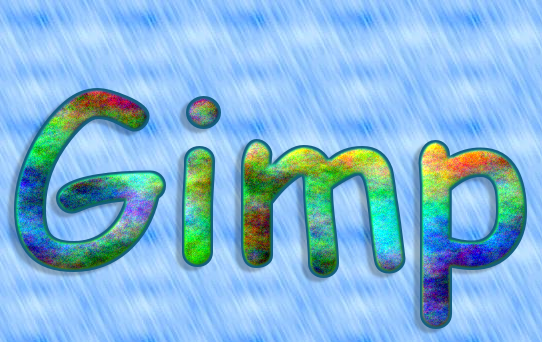
OK ... This Logo Workshop is sweet too!

Attachment:
Gimp Logo.png
Gimp Logo.png [ 290.94 KiB | Viewed 1947 times ]

Attachment:
Gimp Logo1.png
Gimp Logo1.png [ 288.41 KiB | Viewed 1941 times ]

_________________
"That which does not kill us makes us stronger." ~ Friedrich Nietzsche


Top
 Post subject: Re: Logo Workshop - Release Candidate V.04
PostPosted: Thu Dec 01, 2011 1:54 pm  (#96) 
Offline
Retired Staff
User avatar

Joined: May 22, 2008
Posts: 6946
Location: Somewhere in GIMP
I don't know what settings you used, PhotoComix, but I have the same font and I'm not getting that bleeding from letter to letter as in yours.

Image

_________________
Image
World War IV will be fought with sticks and stones. - Albert Einstein


Top
 Post subject: Re: Logo Workshop - Release Candidate V.04
PostPosted: Thu Dec 01, 2011 2:06 pm  (#97) 
Offline
GimpChat Founder
User avatar

Joined: May 22, 2008
Posts: 5241
Location: Gimpville
Make sure you read though the first post in the thread. It describes how to disable some of the functions when running alpha to selection. Otherwise, you'll get layers or drop shadows you probably don't need or want.

_________________
“If you reach for the stars, you just might land on a decently sized hill.” - Stuart Hill


Top
 Post subject: Re: Logo Workshop - Release Candidate V.04
PostPosted: Thu Dec 01, 2011 9:28 pm  (#98) 
Offline
Global Moderator
User avatar

Joined: May 16, 2010
Posts: 16023
This is really one fabulous script.Great work Tux.Thanks for taking the time to do this for everyone. :)
Can you add a stroke with current brush option?

_________________
Image


Top
 Post subject: Re: Logo Workshop - Release Candidate V.04
PostPosted: Thu Dec 01, 2011 9:40 pm  (#99) 
Offline
GimpChat Founder
User avatar

Joined: May 22, 2008
Posts: 5241
Location: Gimpville
Rod wrote:
Can you add a stroke with current brush option?

You read my mind, Rod. It's already in the works. I also plan to add a brush fill to the next release, along with several other enhancements. I've just been so busy with other projects, I haven't the time to complete all the additions I want to include in the next release.

_________________
“If you reach for the stars, you just might land on a decently sized hill.” - Stuart Hill


Top
 Post subject: Re: Logo Workshop - Release Candidate V.04
PostPosted: Thu Dec 01, 2011 9:46 pm  (#100) 
Offline
Global Moderator
User avatar

Joined: May 16, 2010
Posts: 16023
Excellent! :) :bigthup
My next request was actually going to be a fill with current brush :lol
Image

_________________
Image


Top
Post new topic Reply to topic  [ 104 posts ]  Go to page Previous  1, 2, 3, 4, 5, 6  Next

All times are UTC - 5 hours [ DST ]


* Login  


Powered by phpBB3 © phpBB Group