It is currently Wed Jun 17, 2026 7:42 am


All times are UTC - 5 hours [ DST ]


Post new topic Reply to topic  [ 85 posts ]  Go to page Previous  1, 2, 3, 4, 5  Next
Author Message
 Post subject: Re: Alternative script to Flaming Pear Solidify filter
PostPosted: Mon Nov 28, 2011 12:09 pm  (#21) 
Offline
Script Coder
User avatar

Joined: Jul 14, 2010
Posts: 697
Rod wrote:
Looks like select edges>grow edges>blur grown area...repeat... (some smoothing in there also) :)


That's about it, except after the blur I do a level adjustment on the alpha channel to decrease the transparency, as when you blur a hard edge it becomes semi-transparent (50% right at the old edge) and increasing/decreasing following a Gaussian curve on either side.

Repeat until no transparency exists.

It also increases the selection each iteration to speed things up.

This was done as a "shortcut" method since reading the colour directly out of images is slow in script-fu. I'd assume that in G'MIC you would do something like:

for each transparent point, locate the closest X non-transparent points and perform a weighted average across circular hue colour-space to determine the colour for that point.

-Rob A>

_________________
Image
Fantasy Cartography and Mapping by RobA


Top
 Post subject: Re: Alternative script to Flaming Pear Solidify filter
PostPosted: Thu Dec 01, 2011 3:35 am  (#22) 
Offline
Retired Staff
User avatar

Joined: May 22, 2008
Posts: 6946
Location: Somewhere in GIMP
I keep playing with this script. I beveled the text with this one.
Image

_________________
Image
World War IV will be fought with sticks and stones. - Albert Einstein


Top
 Post subject: Re: Alternative script to Flaming Pear Solidify filter
PostPosted: Thu Dec 01, 2011 7:33 am  (#23) 
Offline
GimpChat Member
User avatar

Joined: Apr 07, 2010
Posts: 14182
Nice Script RobA > thank you
Image

_________________
Image


Top
 Post subject: Re: Alternative script to Flaming Pear Solidify filter
PostPosted: Thu Dec 01, 2011 12:39 pm  (#24) 
Offline
GimpChat Member
User avatar

Joined: Jan 03, 2011
Posts: 1656
That is a nice effect ! I tried to 'reproduce' it in G'MIC. It should be already available when updating the filters, under 'Enhancement / Solidify' :
Image

I don't know what algorithm RobA used, but the one I made is based on iterations of averaged erosion/dilation of the image colors, until no transparent pixels remain. This may take long too compute, as it is an iterative process.
Here is an example where it reconstructs a lot of pixels :

Image

If you have some time and the G'MIC plug-in installed, please have a try. There is a working preview window as well, for this filter. I would be interested also by any comparison with the RobA algorithm.

And for curious people, here is the G'MIC code I wrote for this filter :

http://pastebin.com/Qth8z80V


Top
 Post subject: Re: Alternative script to Flaming Pear Solidify filter
PostPosted: Thu Dec 01, 2011 12:56 pm  (#25) 
Offline
GimpChat Member
User avatar

Joined: Apr 07, 2010
Posts: 14182
Thank you David, looks very good. I will give it a try after lunch.

_________________
Image


Top
 Post subject: Re: Alternative script to Flaming Pear Solidify filter
PostPosted: Thu Dec 01, 2011 12:57 pm  (#26) 
Offline
Retired Staff
User avatar

Joined: May 22, 2008
Posts: 6946
Location: Somewhere in GIMP
:wh Pretty cool, David. Works great!

Image

Image

_________________
Image
World War IV will be fought with sticks and stones. - Albert Einstein


Top
 Post subject: Re: Alternative script to Flaming Pear Solidify filter
PostPosted: Thu Dec 01, 2011 1:36 pm  (#27) 
Offline
GimpChat Member
User avatar

Joined: Jan 13, 2011
Posts: 2639
Location: Poland
Quote:
Ronounours wrote:
I would be interested also by any comparison with the RobA algorithm.


Quite different results - both very interesting.


Attachments:
0ryg.png
0ryg.png [ 331.62 KiB | Viewed 13703 times ]
Gmic.png
Gmic.png [ 515.08 KiB | Viewed 13703 times ]
RobA-Flood Fill Trans.png
RobA-Flood Fill Trans.png [ 475.46 KiB | Viewed 13703 times ]

_________________
Image
Top
 Post subject: Re: Alternative script to Flaming Pear Solidify filter
PostPosted: Thu Dec 01, 2011 2:34 pm  (#28) 
Offline
GimpChat Member
User avatar

Joined: Jan 03, 2011
Posts: 1656
In this last example, I'd say I prefer the RobA's one.
I have to think about how I can improve mine :)


Top
 Post subject: Re: Alternative script to Flaming Pear Solidify filter
PostPosted: Thu Dec 01, 2011 2:55 pm  (#29) 
Offline
Script Coder
User avatar

Joined: Jul 14, 2010
Posts: 697
Ronounours wrote:
In this last example, I'd say I prefer the RobA's one.
I have to think about how I can improve mine :)


I think it is a side effect of your dilate/erode process, where it is working on a 3x3 matrix, so it favours 90 and 45 degree angles. can you increase the size of the matrix?

-Rob A>

_________________
Image
Fantasy Cartography and Mapping by RobA


Top
 Post subject: Re: Alternative script to Flaming Pear Solidify filter
PostPosted: Thu Dec 01, 2011 3:05 pm  (#30) 
Offline
GimpChat Member
User avatar

Joined: Sep 24, 2010
Posts: 12775
I like that David but wish it was faster (I asketh for too much; lol). :)


Attachments:
flower.jpg
flower.jpg [ 261.95 KiB | Viewed 13686 times ]

_________________
Lyle

Psalm 109:8

Image
Top
 Post subject: Re: Alternative script to Flaming Pear Solidify filter
PostPosted: Thu Dec 01, 2011 3:10 pm  (#31) 
Offline
GimpChat Member
User avatar

Joined: Jan 03, 2011
Posts: 1656
RobA : Yes, I've tried with larger eroding and dilating elements but in that case it creates less smooth transitions. Anyway, I've got another idea that I must test before doing something else :)

Lyle : In your example too it is really clear how it favors 45° angles.


Top
 Post subject: Re: Alternative script to Flaming Pear Solidify filter
PostPosted: Thu Dec 01, 2011 3:12 pm  (#32) 
Offline
GimpChat Member

Joined: Apr 12, 2010
Posts: 5870
the gmic version

Image

_________________
My 3D Gallery on Deviantart http://photocomix2.deviantart.com/
Main gallery http://www.flickriver.com/photos/photocomix-mandala/
Mandala and simmetry http://www.flickriver.com/photos/photocomix_mandala/

Image

Mrs Wilbress


Top
 Post subject: Re: Alternative script to Flaming Pear Solidify filter
PostPosted: Thu Dec 01, 2011 3:14 pm  (#33) 
Offline
GimpChat Member
User avatar

Joined: Sep 24, 2010
Posts: 12775
I have to admit G'MIC's faster then Script-fu (just tested RobA's on my sample; lol). Still, the result looks good to me. Again, thanks RobA; David. Always good to be able to skin cats multiple ways. ;)

And you just ninja'd me PC. lol :ninja

:)

_________________
Lyle

Psalm 109:8

Image


Top
 Post subject: Re: Alternative script to Flaming Pear Solidify filter
PostPosted: Thu Dec 01, 2011 3:45 pm  (#34) 
Offline
Script Coder
User avatar

Joined: Jul 14, 2010
Posts: 697
lylejk wrote:
I have to admit G'MIC's faster then Script-fu (just tested RobA's on my sample; lol). Still, the result looks good to me. Again, thanks RobA; David. Always good to be able to skin cats multiple ways. ;)

And you just ninja'd me PC. lol :ninja

:)


On larger images you can pull the slider higher in the script and it will run faster. It just starts blurrier that way.

-Rob A>

_________________
Image
Fantasy Cartography and Mapping by RobA


Top
 Post subject: Re: Alternative script to Flaming Pear Solidify filter
PostPosted: Thu Dec 01, 2011 4:10 pm  (#35) 
Offline
GimpChat Member
User avatar

Joined: Sep 24, 2010
Posts: 12775
Your right Rob (w.r.t increased radius); I wonder how fast Flaming Pear's plugin is though? Maybe when GIMP get's hardware acceleration (better GPU, but I can tolerate even taking advantage of the CPU more) ability, operations like blur will be faster. Saw on GIMPUsers that hardware acceleration will be included with 2.8, but I'm still not holding my breath. :)

_________________
Lyle

Psalm 109:8

Image


Top
 Post subject: Re: Alternative script to Flaming Pear Solidify filter
PostPosted: Thu Dec 01, 2011 4:40 pm  (#36) 
Offline
GimpChat Member

Joined: Mar 08, 2011
Posts: 155
After using it, I gotta say, very awesome! It did exactly what I wanted and it looked pretty good too.

While waiting for it to fill, I couldn't help but wish there was a stop button or a setting or something. While the fill effect looks cool at the end when it's over the entire canvas, I really only needed about 10px beyond the edge of the object. Or maybe there is a setting and I didn't recognize it... I used the default settings.


Top
 Post subject: Re: Alternative script to Flaming Pear Solidify filter
PostPosted: Thu Dec 01, 2011 4:49 pm  (#37) 
Offline
Script Coder
User avatar

Joined: Jul 14, 2010
Posts: 697
I've uploaded the script (same loaction) to run offscreen on a duplicate image so it is about twice the speed.

@Amanda47 good idea - I think I'll add an option to specify a distance 0=everything, or a specified px distance out from the transparent images.

@SaulGoode - anyway to make the layer drawable active rather than the mask drawable at the end? I can't find an appropriate call.

-Rob A>

_________________
Image
Fantasy Cartography and Mapping by RobA


Top
 Post subject: Re: Alternative script to Flaming Pear Solidify filter
PostPosted: Thu Dec 01, 2011 5:28 pm  (#38) 
Offline
GimpChat Member

Joined: Apr 12, 2010
Posts: 5870
Quote:
@Amanda47 good idea - I think I'll add an option to specify a distance 0=everything, or a specified px distance out from the transparent images.
-Rob-


what about a option to fade the effect over any chosen color,not only full transparency.?
(here full transparency may be most reasonable default)

PS i think the script going to be better than the original PS plugin

_________________
My 3D Gallery on Deviantart http://photocomix2.deviantart.com/
Main gallery http://www.flickriver.com/photos/photocomix-mandala/
Mandala and simmetry http://www.flickriver.com/photos/photocomix_mandala/

Image

Mrs Wilbress


Top
 Post subject: Re: Alternative script to Flaming Pear Solidify filter
PostPosted: Thu Dec 01, 2011 5:52 pm  (#39) 
Offline
GimpChat Member
User avatar

Joined: Apr 07, 2010
Posts: 14182
Here are my two to compare.
GMIC
Image

RobA
Image

_________________
Image


Top
 Post subject: Re: Alternative script to Flaming Pear Solidify filter
PostPosted: Thu Dec 01, 2011 6:35 pm  (#40) 
Offline
Script Coder
User avatar

Joined: Feb 18, 2011
Posts: 4826
Location: Bendigo Vic. Australia
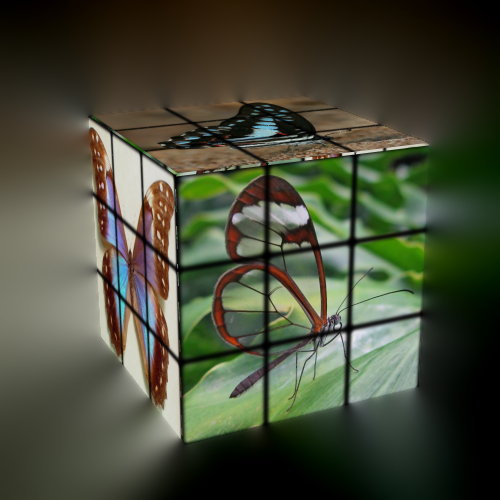
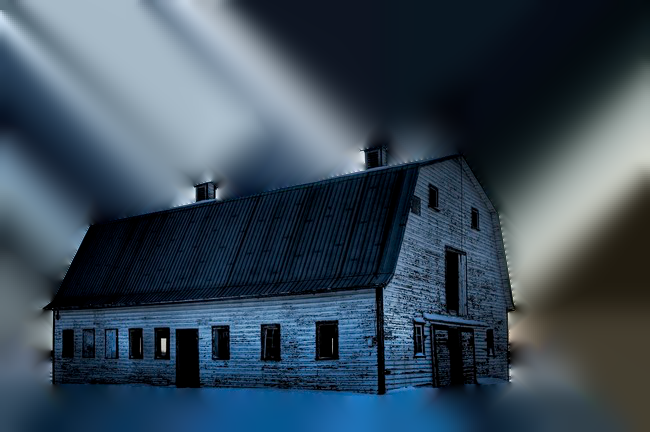
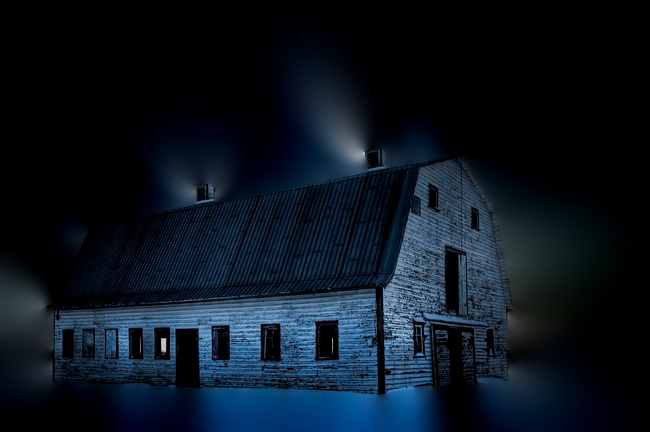
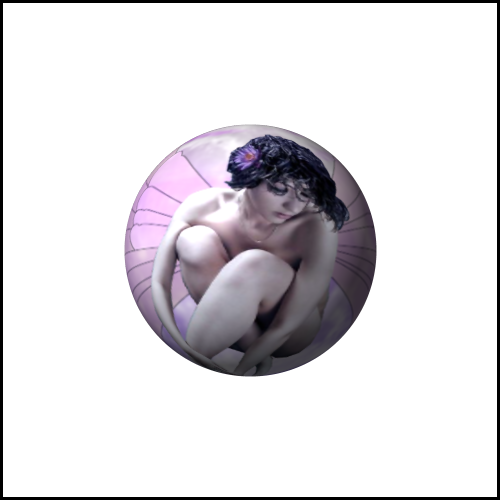
For speed RobA's(set at 10) is faster these are the results they returned

Image
Image

Image
Gimp RobA's

Image
Gmic

The setting on RobA's seems to effect the coloring at the bottom of the image more than the speed of the fill.

I think Amanda's Idea is good, and would like to see an equivalent to the FromNadirZenith filter in Mathmap done in gimp or gmic or a 64bit version of Mathmap please Santa.

_________________
Image
No matter how much you push the envelope, it'll still be stationery.


Last edited by Graechan on Thu Dec 01, 2011 7:05 pm, edited 1 time in total.

Top
Post new topic Reply to topic  [ 85 posts ]  Go to page Previous  1, 2, 3, 4, 5  Next

All times are UTC - 5 hours [ DST ]


* Login  


Powered by phpBB3 © phpBB Group