It is currently Wed Sep 02, 2026 6:28 am


All times are UTC - 5 hours [ DST ]


Post new topic Reply to topic  [ 131 posts ]  Go to page Previous  1, 2, 3, 4, 5, 6, 7  Next
Author Message
 Post subject: Re: Flame Painter
PostPosted: Thu Dec 01, 2011 11:02 pm  (#81) 
Offline
GimpChat Member
User avatar

Joined: Sep 24, 2010
Posts: 12840
Thanks PC; had to paint in the contact shadow points, but that wasn't that hard. Just have fun with what my mind's eye would envision such a glass sculpture. GIMP makes it child's play. :)

edit:

Didn't want to bump; still feeding the binge. :)


Attachments:
flameArtwork.jpg
flameArtwork.jpg [ 558.11 KiB | Viewed 2435 times ]

_________________
Lyle

Psalm 109:8

Image
Top
 Post subject: Re: Flame Painter
PostPosted: Fri Dec 02, 2011 12:42 pm  (#82) 
Offline
GimpChat Member
User avatar

Joined: Jul 04, 2011
Posts: 395
Location: Indianapolis, IN
Where's Ana? I hope she didn't sucked into Flame Painter world and can't get out! :)

+ Little secret, once you have this app installed. You can copy the folder 'Flame Painter' from the 'Program Files' folder to a flash drive and take it with you. When you start it up it'll ask you for your registration info (1 time it seems). Guess it has no real hooks into the registry nor windows libraries! Which is cool! ;)

_________________
"That which does not kill us makes us stronger." ~ Friedrich Nietzsche


Top
 Post subject: Re: Flame Painter
PostPosted: Fri Dec 02, 2011 3:50 pm  (#83) 
Offline
GimpChat Member
User avatar

Joined: Jul 08, 2011
Posts: 285
MrBiggz wrote:
Where's Ana? I hope she didn't sucked into Flame Painter world and can't get out! :)

+ Little secret, once you have this app installed. You can copy the folder 'Flame Painter' from the 'Program Files' folder to a flash drive and take it with you. When you start it up it'll ask you for your registration info (1 time it seems). Guess it has no real hooks into the registry nor windows libraries! Which is cool! ;)

Hheheee...here I am MrBiggz.I'm still exploring this great software.Still confused with brushes....but it doesn't matter.....And you're right....you can't get enough of this ''flames''.Really addictive.

Image

Image

Image

And thanks for the tip.......definitely i'll put it on my flash drive.We will be together forever and ever :hehe .

I'll put some of my flames on flickr ... if you want to look http://www.flickr.com/photos/59621390@N08/.

_________________
Image

My Flickr
http://anaplus.deviantart.com/


Top
 Post subject: Re: Flame Painter
PostPosted: Sat Dec 03, 2011 12:48 pm  (#84) 
Offline
GimpChat Member
User avatar

Joined: Jul 04, 2011
Posts: 395
Location: Indianapolis, IN
This is for Ana, so she can become more dangerous! :hehe And anybody else of course! :)

Hopefully between my hyper-AADD and being honey-do'd to death this morning it'll make sense! It's just a simple howto on selecting,creating and uploading/downloading brushes for Flame Painter.

Attachment:
Flame Planter - Brushes.pdf [114.16 KiB]
Downloaded 115 times


I was going to do video but I didn't want to make anybodies eyes and ears bleed listening to my voice and I would have had to annotate the video to death too! Of course on top of being asked who am I talking to about a million time from the wife *sigh*. Reply is .. telling people that aren't here how to do something. She still can't grasp it! *double sigh*

Enjoy Ana (and everybody else)!!

_________________
"That which does not kill us makes us stronger." ~ Friedrich Nietzsche


Top
 Post subject: Re: Flame Painter
PostPosted: Sat Dec 03, 2011 4:10 pm  (#85) 
Offline
GimpChat Member
User avatar

Joined: Jul 08, 2011
Posts: 285
MrBiggz wrote:
This is for Ana, so she can become more dangerous! :hehe And anybody else of course! :)

Hopefully between my hyper-AADD and being honey-do'd to death this morning it'll make sense! It's just a simple howto on selecting,creating and uploading/downloading brushes for Flame Painter.

Attachment:
Flame Planter - Brushes.pdf


I was going to do video but I didn't want to make anybodies eyes and ears bleed listening to my voice and I would have had to annotate the video to death too! Of course on top of being asked who am I talking to about a million time from the wife *sigh*. Reply is .. telling people that aren't here how to do something. She still can't grasp it! *double sigh*

Enjoy Ana (and everybody else)!!


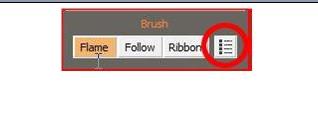
Heheheeee....thank you MrBiggz on this....but there is one problem.....when I click on this icon nothing happens...why....I downloaded a few brushes from the net but I don't see it anywhere...grrrrr :gaah .
Image

_________________
Image

My Flickr
http://anaplus.deviantart.com/


Top
 Post subject: Re: Flame Painter
PostPosted: Sat Dec 03, 2011 7:13 pm  (#86) 
Offline
GimpChat Member
User avatar

Joined: Jul 04, 2011
Posts: 395
Location: Indianapolis, IN
Ana wrote:
Heheheeee....thank you MrBiggz on this....but there is one problem.....when I click on this icon nothing happens...why....I downloaded a few brushes from the net but I don't see it anywhere...grrrrr :gaah .
Image


Ah, I hope your not trying to click on that icon from inside the PDF document. Are you? Please say no! ;)

_________________
"That which does not kill us makes us stronger." ~ Friedrich Nietzsche


Top
 Post subject: Re: Flame Painter
PostPosted: Sat Dec 03, 2011 7:22 pm  (#87) 
Offline
GimpChat Member
User avatar

Joined: Jul 08, 2011
Posts: 285
MrBiggz wrote:
Ana wrote:
Heheheeee....thank you MrBiggz on this....but there is one problem.....when I click on this icon nothing happens...why....I downloaded a few brushes from the net but I don't see it anywhere...grrrrr :gaah .
Image


Ah, I hope your not trying to click on that icon from inside the PDF document. Are you? Please say no! ;)

No,noooo......when i open the flame painter and click on that icon ,nothing happens.I don't see any brushes.Why?

_________________
Image

My Flickr
http://anaplus.deviantart.com/


Top
 Post subject: Re: Flame Painter
PostPosted: Sat Dec 03, 2011 7:31 pm  (#88) 
Offline
Global Moderator
User avatar

Joined: May 16, 2010
Posts: 16169
Ana try Tools>Brushes :)

_________________
Image


Top
 Post subject: Re: Flame Painter
PostPosted: Sat Dec 03, 2011 7:36 pm  (#89) 
Offline
GimpChat Member
User avatar

Joined: Jul 08, 2011
Posts: 285
Rod wrote:
Ana try Tools>Brushes :)

I tried that also Rod,nothing happens.

_________________
Image

My Flickr
http://anaplus.deviantart.com/


Top
 Post subject: Re: Flame Painter
PostPosted: Sat Dec 03, 2011 7:48 pm  (#90) 
Offline
Global Moderator
User avatar

Joined: May 16, 2010
Posts: 16169
That is odd.You should see a brush dialog with all your brushes in it pop up on the right of your screen.
Where did you download the new brushes to?

_________________
Image


Top
 Post subject: Re: Flame Painter
PostPosted: Sat Dec 03, 2011 7:54 pm  (#91) 
Offline
GimpChat Member
User avatar

Joined: Jul 08, 2011
Posts: 285
Rod wrote:
That is odd.You should see a brush dialog with all your brushes in it pop up on the right of your screen.
Where did you download the new brushes to?

I put it into-----Local disc (C:)/program files/flame painter/brushes

_________________
Image

My Flickr
http://anaplus.deviantart.com/


Top
 Post subject: Re: Flame Painter
PostPosted: Sat Dec 03, 2011 8:01 pm  (#92) 
Offline
GimpChat Member
User avatar

Joined: Jul 08, 2011
Posts: 285
This is my flame painter folder:
Image

and here are the brushes:
Image

_________________
Image

My Flickr
http://anaplus.deviantart.com/


Top
 Post subject: Re: Flame Painter
PostPosted: Sat Dec 03, 2011 8:05 pm  (#93) 
Offline
GimpChat Member
User avatar

Joined: Sep 24, 2010
Posts: 12840
They could be minimized on you setup Ana (happened to me when If first started using Flame Painter until I noticed this). :)


Attachments:
cbm.png
cbm.png [ 245.62 KiB | Viewed 1776 times ]

_________________
Lyle

Psalm 109:8

Image
Top
 Post subject: Re: Flame Painter
PostPosted: Sat Dec 03, 2011 8:11 pm  (#94) 
Offline
GimpChat Member
User avatar

Joined: Jul 08, 2011
Posts: 285
lylejk wrote:
They could be minimized on you setup Ana (happened to me when If first started using Flame Painter until I noticed this). :)

No,there is nothing.

_________________
Image

My Flickr
http://anaplus.deviantart.com/


Top
 Post subject: Re: Flame Painter
PostPosted: Sat Dec 03, 2011 8:11 pm  (#95) 
Offline
GimpChat Member
User avatar

Joined: Jul 08, 2011
Posts: 285
Maybe i should deinstall the program and again install it.

_________________
Image

My Flickr
http://anaplus.deviantart.com/


Top
 Post subject: Re: Flame Painter
PostPosted: Sat Dec 03, 2011 8:27 pm  (#96) 
Offline
GimpChat Member
User avatar

Joined: Jul 04, 2011
Posts: 395
Location: Indianapolis, IN
Rod wrote:
That is odd.You should see a brush dialog with all your brushes in it pop up on the right of your screen.
Where did you download the new brushes to?


This is quite odd! Scary actually!

_________________
"That which does not kill us makes us stronger." ~ Friedrich Nietzsche


Top
 Post subject: Re: Flame Painter
PostPosted: Sat Dec 03, 2011 8:35 pm  (#97) 
Offline
GimpChat Member
User avatar

Joined: Jul 08, 2011
Posts: 285
MrBiggz wrote:
Rod wrote:
That is odd.You should see a brush dialog with all your brushes in it pop up on the right of your screen.
Where did you download the new brushes to?


This is quite odd! Scary actually!

I know.And all this time i wonder what is that icon for (the one next to the ribbon)....So, do you think i need to reinstall the program again ?????I'm so frustrated about this...

_________________
Image

My Flickr
http://anaplus.deviantart.com/


Top
 Post subject: Re: Flame Painter
PostPosted: Sat Dec 03, 2011 8:41 pm  (#98) 
Offline
GimpChat Member
User avatar

Joined: Jul 04, 2011
Posts: 395
Location: Indianapolis, IN
Well, 1st of take a step back, breathe then take a step forward again! Relax!

Uninstalling it and re-installing isn't going to hurt. I'd say do it.

But let me ask are you on Vista or XP?

_________________
"That which does not kill us makes us stronger." ~ Friedrich Nietzsche


Top
 Post subject: Re: Flame Painter
PostPosted: Sat Dec 03, 2011 8:44 pm  (#99) 
Offline
GimpChat Member
User avatar

Joined: Jul 08, 2011
Posts: 285
MrBiggz wrote:
Well, 1st of take a step back, breathe then take a step forward again! Relax!

Uninstalling it and re-installing isn't going to hurt. I'd say do it.

But let me ask are you on Vista or XP?

XP.Why??

_________________
Image

My Flickr
http://anaplus.deviantart.com/


Top
 Post subject: Re: Flame Painter
PostPosted: Sat Dec 03, 2011 8:52 pm  (#100) 
Offline
GimpChat Member
User avatar

Joined: Jul 04, 2011
Posts: 395
Location: Indianapolis, IN
Ana wrote:
MrBiggz wrote:
Well, 1st of take a step back, breathe then take a step forward again! Relax!

Uninstalling it and re-installing isn't going to hurt. I'd say do it.

But let me ask are you on Vista or XP?

XP.Why??


I just wanted to install it on an virtualbox XP setup I have to see if I can mimic any of this. And it's there even if I minimize it and close it and then open it again with the program icon.

Go ahead and uninstall it and re-install it .. hopefully *fingers crossed* this will work!

_________________
"That which does not kill us makes us stronger." ~ Friedrich Nietzsche


Top
Post new topic Reply to topic  [ 131 posts ]  Go to page Previous  1, 2, 3, 4, 5, 6, 7  Next

All times are UTC - 5 hours [ DST ]


* Login  


Powered by phpBB3 © phpBB Group