It is currently Mon Aug 03, 2026 6:05 pm


All times are UTC - 5 hours [ DST ]


Post new topic Reply to topic  [ 23 posts ]  Go to page 1, 2  Next
Author Message
 Post subject: Candy
PostPosted: Thu Dec 08, 2011 9:07 pm  (#1) 
Offline
Global Moderator
User avatar

Joined: May 16, 2010
Posts: 16145
Done in Gimp-2.6.11 without the aid of scripts.I thought you guys might like this font.It makes great candy typography. :)

Image

Download PooPlatter font here - http://www.dafont.com/search.php?psize=m&q=pooplatter

_________________
Image


Share on Facebook Share on Twitter Share on Orkut Share on Digg Share on MySpace Share on Delicious Share on Technorati
Top
 Post subject: Re: Candy
PostPosted: Thu Dec 08, 2011 11:19 pm  (#2) 
Offline
Retired Staff
User avatar

Joined: May 22, 2008
Posts: 6946
Location: Somewhere in GIMP
Cool font and cool results. I had to laugh at the author's remark about it:

Quote:
Note of the author
Made this for ex-girlfriend. Don't ask.

_________________
Image
World War IV will be fought with sticks and stones. - Albert Einstein


Top
 Post subject: Re: Candy
PostPosted: Fri Dec 09, 2011 2:38 am  (#3) 
Offline
Global Moderator
User avatar

Joined: May 16, 2010
Posts: 16145
lol

_________________
Image


Top
 Post subject: Re: Candy
PostPosted: Fri Dec 09, 2011 1:41 pm  (#4) 
Offline
GimpChat Member
User avatar

Joined: Aug 24, 2011
Posts: 1785
Location: Dallas, TX
That is a cool font. Looks almost like lifesavers.

I did this one with nothing but layer effects and applied the highlights by hand.


Attachments:
Sweet Stuff.jpg
Sweet Stuff.jpg [ 162.73 KiB | Viewed 3279 times ]

_________________
Image
Top
 Post subject: Re: Candy
PostPosted: Sat Dec 10, 2011 9:11 am  (#5) 
Offline
GimpChat Member

Joined: Oct 31, 2011
Posts: 112
I don't know if you guys aware of this, but anyway here it is:

http://www.gimpusers.com/tutorials/crea ... dy-letters

enjoy :D


Top
 Post subject: Re: Candy
PostPosted: Sat Dec 10, 2011 11:20 am  (#6) 
Offline
GimpChat Member
User avatar

Joined: Jul 04, 2011
Posts: 395
Location: Indianapolis, IN
hanciong wrote:
I don't know if you guys aware of this, but anyway here it is:

http://www.gimpusers.com/tutorials/crea ... dy-letters

enjoy :D


This is pretty nice since the stripes on a candy cane aren't 100% perfect! Nice effects folks! :)

_________________
"That which does not kill us makes us stronger." ~ Friedrich Nietzsche


Top
 Post subject: Re: Candy
PostPosted: Sat Dec 10, 2011 1:03 pm  (#7) 
Offline
Retired Staff
User avatar

Joined: May 22, 2008
Posts: 6946
Location: Somewhere in GIMP
hanciong wrote:
I don't know if you guys aware of this, but anyway here it is:

http://www.gimpusers.com/tutorials/crea ... dy-letters

enjoy :D
Thanks for pointing that out hanciong. Last year Rod posted that here in Gimp Chat and I'm glad you found it and re-posted it. I'd forgotten about it. Christmas Candy

_________________
Image
World War IV will be fought with sticks and stones. - Albert Einstein


Top
 Post subject: Re: Candy
PostPosted: Sat Dec 10, 2011 3:07 pm  (#8) 
Offline
Global Moderator
User avatar

Joined: May 16, 2010
Posts: 16145
It is a fun tutorial to play with. :)

Image

XCF workspace file attached

Attachment:
Candy.xcf [1.01 MiB]
Downloaded 121 times

_________________
Image


Top
 Post subject: Re: Candy
PostPosted: Sat Dec 10, 2011 3:11 pm  (#9) 
Offline
GimpChat Member
User avatar

Joined: Apr 07, 2010
Posts: 14182
Nice Rod, Spearment flavor is my favorite. I will trade a red and white one for it!!
l

_________________
Image


Top
 Post subject: Re: Candy
PostPosted: Sat Dec 10, 2011 3:22 pm  (#10) 
Offline
Global Moderator
User avatar

Joined: May 16, 2010
Posts: 16145
molly wrote:
Nice Rod, Spearment flavor is my favorite. I will trade a red and white one for it!!
l


Done! :)

_________________
Image


Top
 Post subject: Re: Candy
PostPosted: Thu Dec 22, 2011 10:27 am  (#11) 
Offline
GimpChat Member

Joined: Oct 31, 2011
Posts: 112
Oregonian wrote:
hanciong wrote:
I don't know if you guys aware of this, but anyway here it is:

http://www.gimpusers.com/tutorials/crea ... dy-letters

enjoy :D
Thanks for pointing that out hanciong. Last year Rod posted that here in Gimp Chat and I'm glad you found it and re-posted it. I'd forgotten about it. Christmas Candy


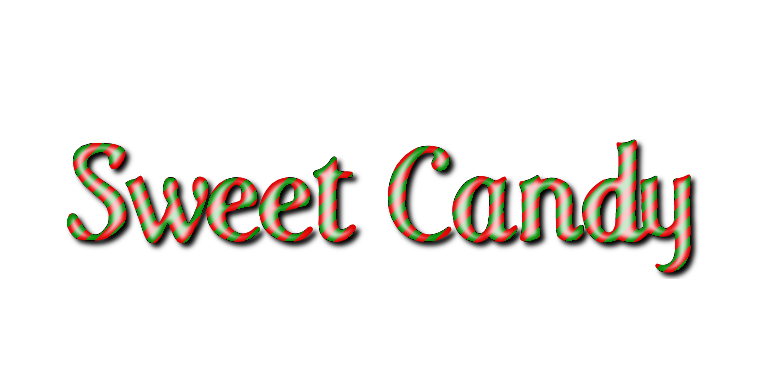
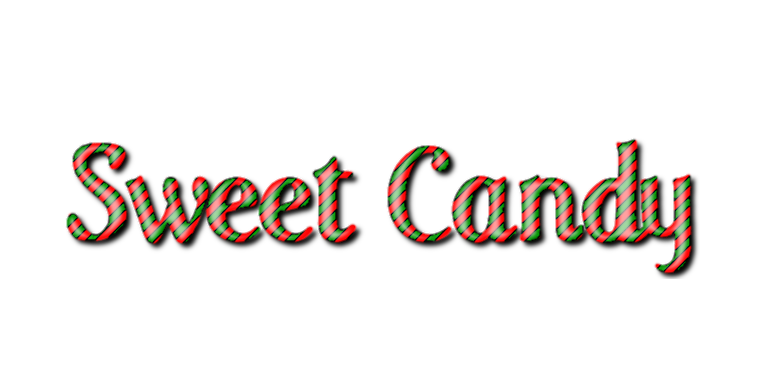
you're welcome oregonian :hehe . one thing that I don't understand is, do you know what font is used in that tutorial? because the author just gives .svg file without specifying the type of the font.

Top
 Post subject: Re: Candy
PostPosted: Thu Dec 22, 2011 11:29 am  (#12) 
Offline
Retired Staff
User avatar

Joined: May 22, 2008
Posts: 6946
Location: Somewhere in GIMP
hanciong wrote:
you're welcome oregonian :hehe . one thing that I don't understand is, do you know what font is used in that tutorial? because the author just gives .svg file without specifying the type of the font.
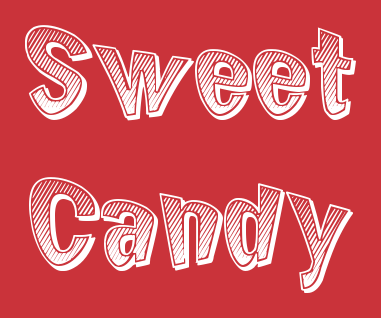
The only way I know is to ask the author.

I have started putting in the font name/link in anything I make anymore because I have so many fonts that I don't remember what I used. It may not be a font anyone wants but it sure makes it easier if someone wants to know.

I see that Rod did post the link to the font he used: http://www.dafont.com/search.php?psize=m&q=pooplatter

_________________
Image
World War IV will be fought with sticks and stones. - Albert Einstein


Top
 Post subject: Re: Candy
PostPosted: Thu Dec 22, 2011 1:33 pm  (#13) 
Offline
Global Moderator
User avatar

Joined: May 16, 2010
Posts: 16145
Yes i have decided like you O to add a link to all material i use in typography art or image manipulations. :)

_________________
Image


Top
 Post subject: Re: Candy
PostPosted: Fri Dec 23, 2011 7:56 am  (#14) 
Offline
GimpChat Member

Joined: Oct 31, 2011
Posts: 112
Oregonian wrote:
The only way I know is to ask the author.

I have started putting in the font name/link in anything I make anymore because I have so many fonts that I don't remember what I used. It may not be a font anyone wants but it sure makes it easier if someone wants to know.

I see that Rod did post the link to the font he used: http://www.dafont.com/search.php?psize=m&q=pooplatter


Ok thanx. I know that Rod post the font he used, but actually I prefer the one in the other tutorial :hehe


Top
 Post subject: Re: Candy
PostPosted: Fri Dec 23, 2011 10:28 am  (#15) 
Offline
Retired Staff
User avatar

Joined: May 22, 2008
Posts: 6946
Location: Somewhere in GIMP
You can download the rendered candy.svg file of the font at the tutorial site: http://www.gimpusers.com/tutorials/crea ... dy-letters

The .svg file can be opened in GIMP.

_________________
Image
World War IV will be fought with sticks and stones. - Albert Einstein


Top
 Post subject: Re: Candy
PostPosted: Fri Dec 23, 2011 10:50 am  (#16) 
Offline
Global Moderator
User avatar

Joined: May 16, 2010
Posts: 16145
I think this is it
Care Bear Family - http://www.dafont.com/care-bear-family. ... weet+Candy

A few more nice ones
Candy - http://www.dafont.com/candy-cane.font?text=Sweet+Candy
Sweet Candy - Many listed here - http://www.dafont.com/alpha.php?lettre= ... weet+Candy

_________________
Image


Top
 Post subject: Re: Candy
PostPosted: Fri Dec 23, 2011 12:13 pm  (#17) 
Offline
Retired Staff
User avatar

Joined: May 22, 2008
Posts: 6946
Location: Somewhere in GIMP
Oh, Rod. I'm such a sucker for fonts. I clicked your third link and ended up downloading a font called Chicken Butt. Yeah, like I REALLY needed that font. Arghhhhhhh!!!

http://www.dafont.com/chicken-butt.font Image

_________________
Image
World War IV will be fought with sticks and stones. - Albert Einstein


Top
 Post subject: Re: Candy
PostPosted: Fri Dec 23, 2011 12:18 pm  (#18) 
Offline
Global Moderator
User avatar

Joined: May 16, 2010
Posts: 16145
I saw that one... :lol

I downloaded 15 more just looking for that care bear font :)

Here it is i think its the correct one...

Image

_________________
Image


Top
 Post subject: Re: Candy
PostPosted: Fri Dec 23, 2011 12:31 pm  (#19) 
Offline
Global Moderator
User avatar

Joined: May 16, 2010
Posts: 16145
I gave it a bit more blur on the text layers.This font is horribly jaggy it seems. :)
Probably why they used Inkscape rendered font in the first place.A blur takes care of it though.

Image

_________________
Image


Top
 Post subject: Re: Candy
PostPosted: Fri Dec 23, 2011 12:33 pm  (#20) 
Offline
Retired Staff
User avatar

Joined: May 22, 2008
Posts: 6946
Location: Somewhere in GIMP
YEs, that looks like the right font.

Trying out my new font.
Image

_________________
Image
World War IV will be fought with sticks and stones. - Albert Einstein


Top
Post new topic Reply to topic  [ 23 posts ]  Go to page 1, 2  Next

All times are UTC - 5 hours [ DST ]


* Login  


Powered by phpBB3 © phpBB Group