It is currently Sat Aug 29, 2026 6:22 am


All times are UTC - 5 hours [ DST ]


Post new topic Reply to topic  [ 84 posts ]  Go to page Previous  1, 2, 3, 4, 5  Next
Author Message
 Post subject: Re: Introducing Gimp 2.7.5
PostPosted: Sat Dec 24, 2011 9:53 am  (#21) 
Offline
GimpChat Member

Joined: Aug 05, 2011
Posts: 606
Location: limestone,ny
it works on my 2.7.5 32 bit gmic 1.5.0.3


Top
 Post subject: Re: Introducing Gimp 2.7.5
PostPosted: Sat Dec 24, 2011 12:10 pm  (#22) 
Offline
Global Moderator
User avatar

Joined: May 16, 2010
Posts: 16168
GMIC 32 bit worked fine for me (maximize) and restore.
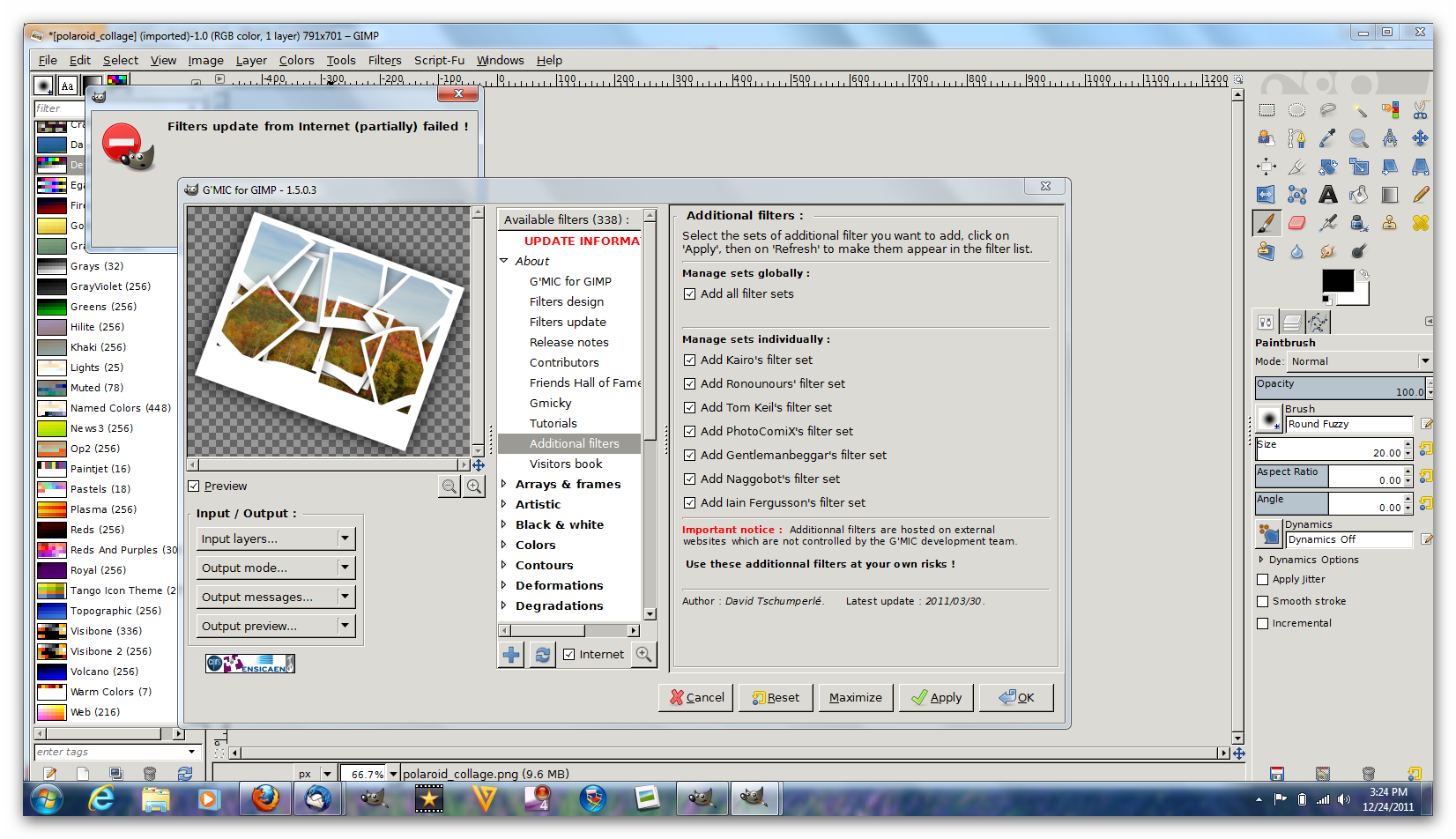
It did seem to want to freeze up when i opened it and clicked refresh right away.Could have just been my machine though.After i closed it and reopened then used the boxes about>additional filters> and ticked all those, clicked apply and then refresh it refreshed the scripts just fine.
I have not had time to test my tablet though.Has anyone tested theirs yet? (32 bit version)

_________________
Image


Top
 Post subject: Re: Introducing Gimp 2.7.5
PostPosted: Sat Dec 24, 2011 3:27 pm  (#23) 
Offline
GimpChat Member

Joined: Aug 05, 2011
Posts: 606
Location: limestone,ny
It won't update for me

Image


Top
 Post subject: Re: Introducing Gimp 2.7.5
PostPosted: Sat Dec 24, 2011 5:07 pm  (#24) 
Offline
GimpChat Member

Joined: Mar 14, 2011
Posts: 998
alc59 wrote:
It won't update for me

Image


Do you have another version of curl in your path or perhaps we can ask David about this?

I fixed curl that I am including with G'mic because of not being able to download compressed files.


Top
 Post subject: Re: Introducing Gimp 2.7.5
PostPosted: Sun Dec 25, 2011 1:16 pm  (#25) 
Offline
GimpChat Member

Joined: Sep 05, 2011
Posts: 5
Hi

I am running into a "gmic_gimp.exe - Unable to Locate Component" error message when I try to start Gimp 2.7.5. With specific "This application has failed to start because libpng14-14.dll was not found"

Checking manually I see that I used to have this file in Gimp 2.7.4\bin directory but it is missing from the corressponding directory in 2.7.5

Gimp itself starts OK but GMIC is of course missing... and that is version 1.5.0.7 32 bit.

Mark
UPDATE
On a hunch I downloaded GMIC 1507 again and this time it worked... Did you change it?


Top
 Post subject: Re: Introducing Gimp 2.7.5
PostPosted: Sun Dec 25, 2011 5:55 pm  (#26) 
Offline
GimpChat Member

Joined: Mar 14, 2011
Posts: 998
MarkUK wrote:
Hi

I am running into a "gmic_gimp.exe - Unable to Locate Component" error message when I try to start Gimp 2.7.5. With specific "This application has failed to start because libpng14-14.dll was not found"

Checking manually I see that I used to have this file in Gimp 2.7.4\bin directory but it is missing from the corressponding directory in 2.7.5

Gimp itself starts OK but GMIC is of course missing... and that is version 1.5.0.7 32 bit.

Mark
UPDATE
On a hunch I downloaded GMIC 1507 again and this time it worked... Did you change it?


Yes, I updated my builds to correspond to the latest DLLs. Sorry I did not explicitly state that.


Top
 Post subject: Re: Introducing Gimp 2.7.5
PostPosted: Mon Dec 26, 2011 3:08 am  (#27) 
Offline
GimpChat Member

Joined: Dec 07, 2011
Posts: 102
In my brief time with it, it works fine. I'm still experiencing artifacting though when moving the image too quickly. It seems that will be an issue with 2.8. Don't know why it doesn't happen with 2.6.


Top
 Post subject: Re: Introducing Gimp 2.7.5
PostPosted: Mon Dec 26, 2011 8:00 am  (#28) 
Offline
GimpChat Member

Joined: Mar 14, 2011
Posts: 998
lacertile wrote:
In my brief time with it, it works fine. I'm still experiencing artifacting though when moving the image too quickly. It seems that will be an issue with 2.8. Don't know why it doesn't happen with 2.6.

I know you have the necessary hardware that this should not happen. Are you able to create a short video to demonstrate what exactly is happening?


Top
 Post subject: Re: Introducing Gimp 2.7.5
PostPosted: Mon Dec 26, 2011 8:52 am  (#29) 
Offline
GimpChat Member

Joined: Dec 07, 2011
Posts: 102
Here is a video of the issue. The dark GIMP is GIMP 2.7.5 (though the same behavior was occurring in 2.7.4; both are the 64-bit versions, though switching to 32-bit portable or regular both produced the same issue). The light GIMP is GIMP 2.6 32-bit version. As you can see in the video, there is a lot of noticeable and quite annoying tearing/artifacting produced in the 2.7 version whereas the 2.6 version produces no such problem.

http://www.youtube.com/watch?v=rzd8LxOmCi4


Top
 Post subject: Re: Introducing Gimp 2.7.5
PostPosted: Mon Dec 26, 2011 9:05 am  (#30) 
Offline
GimpChat Member

Joined: Mar 14, 2011
Posts: 998
lacertile wrote:
Here is a video of the issue. The dark GIMP is GIMP 2.7.5 (though the same behavior was occurring in 2.7.4; both are the 64-bit versions, though switching to 32-bit portable or regular both produced the same issue). The light GIMP is GIMP 2.6 32-bit version. As you can see in the video, there is a lot of noticeable and quite annoying tearing/artifacting produced in the 2.7 version whereas the 2.6 version produces no such problem.

http://www.youtube.com/watch?v=rzd8LxOmCi4

I don't know what could be causing it other than to say that the new GTK+ version may be the culprit. Looking at the video, it seems similar to this:
https://bugzilla.redhat.com/show_bug.cgi?id=712472

Perhaps one solution is not move it around so much? :) (just kidding)


Top
 Post subject: Re: Introducing Gimp 2.7.5
PostPosted: Mon Dec 26, 2011 9:08 am  (#31) 
Offline
GimpChat Member

Joined: Dec 07, 2011
Posts: 102
partha wrote:
I don't know what could be causing it other than to say that the new GTK+ version may be the culprit. Looking at the video, it seems similar to this:
https://bugzilla.redhat.com/show_bug.cgi?id=712472

Perhaps one solution is not move it around so much? :) (just kidding)


LOL I can work around that, but it's quite annoying when you need to quickly move the image and zoom in and it's breaking up like that. That's the only thing I'm not pleased about. The rest of it is great though.


Top
 Post subject: Re: Introducing Gimp 2.7.5
PostPosted: Mon Dec 26, 2011 9:30 am  (#32) 
Offline
GimpChat Member

Joined: Apr 12, 2010
Posts: 5870
Somebody on gt is sure that pyton in the portable version works only if python what previously installed
i believe to have removed all python libraries in my computer (except what included in 2.7) and everything still works

but would be nice if somebody that never installed python may confirm

_________________
My 3D Gallery on Deviantart http://photocomix2.deviantart.com/
Main gallery http://www.flickriver.com/photos/photocomix-mandala/
Mandala and simmetry http://www.flickriver.com/photos/photocomix_mandala/

Image

Mrs Wilbress


Top
 Post subject: Re: Introducing Gimp 2.7.5
PostPosted: Mon Dec 26, 2011 11:07 am  (#33) 
Offline
GimpChat Member

Joined: Mar 14, 2011
Posts: 998
PhotoComix wrote:
Somebody on gt is sure that pyton in the portable version works only if python what previously installed
i believe to have removed all python libraries in my computer (except what included in 2.7) and everything still works

but would be nice if somebody that never installed python may confirm

PC,

Seems someone else mentioned it here awhile back. I don't understand why "python works only if python was previously installed" since python is included in the portable version. Python is included in the regular versions too.

It may be that they are expecting some specific function that they do not find in my versions?

PS: I decided to take your advice and will include G'MIC in the portable versions in the future. :)


Top
 Post subject: Re: Introducing Gimp 2.7.5
PostPosted: Mon Dec 26, 2011 6:26 pm  (#34) 
Offline
Global Moderator
User avatar

Joined: May 16, 2010
Posts: 16168
My portable 2.6.11 version works fine.You just need to set the path in the pygimp.interp file to the correct path to embedded pythonw.exe

_________________
Image


Top
 Post subject: Re: Introducing Gimp 2.7.5
PostPosted: Mon Dec 26, 2011 6:39 pm  (#35) 
Offline
GimpChat Member

Joined: Mar 14, 2011
Posts: 998
Rod wrote:
My portable 2.6.11 version works fine.You just need to set the path in the pygimp.interp file to the correct path to embedded pythonw.exe

Rod,

For my portable versions, you don't need to do that if you stay in the portable environment (which is kind of the point :)).

PC: Another reason I don't agree with whoever posted on GT is that the portable version does not touch OS territories like the PATH and so, how would it find python on the OS?

Partha


Top
 Post subject: Re: Introducing Gimp 2.7.5
PostPosted: Mon Dec 26, 2011 7:08 pm  (#36) 
Offline
GimpChat Member

Joined: Dec 22, 2011
Posts: 25
Is this version for windows only? I am on linux


Top
 Post subject: Re: Introducing Gimp 2.7.5
PostPosted: Mon Dec 26, 2011 9:19 pm  (#37) 
Offline
GimpChat Member

Joined: Mar 14, 2011
Posts: 998
LoriMomOf9 wrote:
Is this version for windows only? I am on linux

Yes it is. However, I think if you use Linux, it should be simple to build and install. Let me know if you have issues with that.


Top
 Post subject: Re: Introducing Gimp 2.7.5
PostPosted: Tue Dec 27, 2011 2:35 am  (#38) 
Offline
New Member
User avatar

Joined: Dec 23, 2011
Posts: 2
PhotoComix wrote:
Somebody on gt is sure that pyton in the portable version works only if python what previously installed
(...)
but would be nice if somebody that never installed python may confirm


Hi, PC,

I had problems with that with the Partha's 2.7.4 version (I haven't tried 2.7.5 yet). In a computer with python never installed the portable version didn't work. I installed, uninstalled, did lots of tests and I think that, in my case, the problem wasn't python itself, but the Microsoft Visual Studio libraries. Installing ActivePython copied and registered the library "C:\WINDOWS\WinSxS\x86_Microsoft.VC90.CRT_1fc8b3b9a1e18e3b_9.0.30729.1_x-ww_6f74963e\msvcr90.dll". I could remove every folder from ActivePython and it still worked in Gimp. However, touching that file broke python (at least this happened in a machine with Windows Xp 32bits).

By the way, Partha, thanks for these new binaries! I've sent you some (minor) suggestions through your web. Not important as your versions are the best :clap. Keep up the good work.


Top
 Post subject: Re: Introducing Gimp 2.7.5
PostPosted: Tue Dec 27, 2011 6:20 am  (#39) 
Offline
GimpChat Member

Joined: Mar 14, 2011
Posts: 998
kokopalen wrote:
PhotoComix wrote:
Somebody on gt is sure that pyton in the portable version works only if python what previously installed
(...)
but would be nice if somebody that never installed python may confirm


Hi, PC,

I had problems with that with the Partha's 2.7.4 version (I haven't tried 2.7.5 yet). In a computer with python never installed the portable version didn't work. I installed, uninstalled, did lots of tests and I think that, in my case, the problem wasn't python itself, but the Microsoft Visual Studio libraries. Installing ActivePython copied and registered the library "C:\WINDOWS\WinSxS\x86_Microsoft.VC90.CRT_1fc8b3b9a1e18e3b_9.0.30729.1_x-ww_6f74963e\msvcr90.dll". I could remove every folder from ActivePython and it still worked in Gimp. However, touching that file broke python (at least this happened in a machine with Windows Xp 32bits).

By the way, Partha, thanks for these new binaries! I've sent you some (minor) suggestions through your web. Not important as your versions are the best :clap. Keep up the good work.


Thanks for the valuable info! I think that people sometimes don't provide enough feedback other than "it does not work". So, it's hard to diagnose what the main issue is.

Thanks for your kind words. Glad you like the new versions. :)


Top
 Post subject: Re: Introducing Gimp 2.7.5
PostPosted: Tue Dec 27, 2011 8:46 am  (#40) 
Offline
Global Moderator
User avatar

Joined: May 16, 2010
Posts: 16168
Has anyone tried their tablet yet? :)

_________________
Image


Top
Post new topic Reply to topic  [ 84 posts ]  Go to page Previous  1, 2, 3, 4, 5  Next

All times are UTC - 5 hours [ DST ]


* Login  


Powered by phpBB3 © phpBB Group