It is currently Sat Jun 27, 2026 2:05 pm


All times are UTC - 5 hours [ DST ]


Post new topic Reply to topic  [ 6 posts ] 
Author Message
 Post subject: Scaling photos
PostPosted: Sun Jan 01, 2012 3:02 pm  (#1) 
Offline
GimpChat Member

Joined: Nov 21, 2011
Posts: 26
Location: Michigan
GIMP Version: 2.6.11
Operating System: Windows
OS Version: XP - SP3
GIMP Experience: Beginner Level


Happy New Year everyone!
I am trying to figure out how to scale my photos before I edit them.
I keep ending up with square pictures that won't fit 4x6 frames.
I use to have a template from HP that automatically filled my photo to 4x6.
I hope this makes sense to someone.
Sorry if this is a stupid question, I don't know where my head is today.


Share on Facebook Share on Twitter Share on Orkut Share on Digg Share on MySpace Share on Delicious Share on Technorati
Top
 Post subject: Re: Scaling photos
PostPosted: Sun Jan 01, 2012 3:16 pm  (#2) 
Offline
Script Coder
User avatar

Joined: Apr 23, 2010
Posts: 1553
Location: not from Guildford after all
http://chiselapp.com/user/saulgoode/rep ... -selection

_________________
Any sufficiently primitive technology is indistinguishable from a rock.


Top
 Post subject: Re: Scaling photos
PostPosted: Sun Jan 01, 2012 3:22 pm  (#3) 
Offline
Script Coder
User avatar

Joined: Jun 22, 2010
Posts: 1171
Location: Here and there
That's an uncharacteristically cryptic response from saulgoode!

What I think you're looking for is the crop tool, to get your image to the right aspect ratio. Have a look at these pages about aspect ratios:
http://www.digital-slr-guide.com/aspect-ratio.html
http://yanikphotoschool.com/tutorials/v ... -printing/

If you aren't starting with an image in the required aspect ratio, then you have two choices. Either crop the image to the right shape -removing part of the original image, or adding extra area to the image to pad it out to the required shape - for example adding letterbox borders.

Kevin


Last edited by paynekj on Sun Jan 01, 2012 3:28 pm, edited 1 time in total.

Top
 Post subject: Re: Scaling photos
PostPosted: Sun Jan 01, 2012 3:27 pm  (#4) 
Offline
GimpChat Member

Joined: Nov 21, 2011
Posts: 26
Location: Michigan
Thank you!


Top
 Post subject: Re: Scaling photos
PostPosted: Sun Jan 01, 2012 9:01 pm  (#5) 
Offline
Global Moderator
User avatar

Joined: May 16, 2010
Posts: 16061
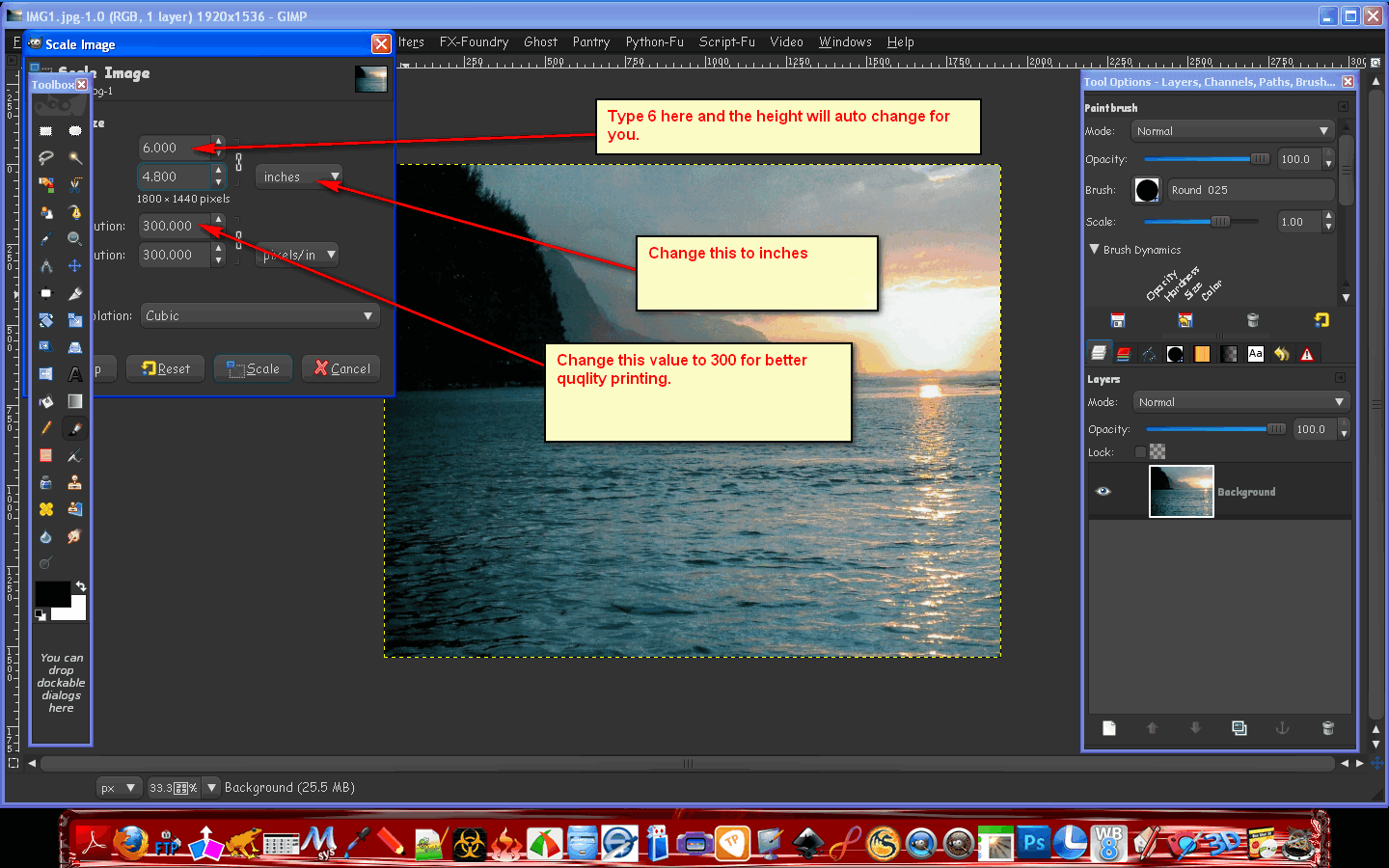
You can also open them and go to Image>Scale Image and change the size to inches instead of pixels.
That is assuming you wanted 4x6 inch printed photos for a real frame?

Image

This would be for a 6 inch wide by 4 inch high fit.
If you want landscape.
For portrait just switch the sizes to 4 inch width and 6 inch height.

_________________
Image


Top
 Post subject: Re: Scaling photos
PostPosted: Mon Jan 02, 2012 10:00 am  (#6) 
Offline
GimpChat Member

Joined: Jul 11, 2010
Posts: 349
Depending on the nature of the image, you may want to look at the Liquid Rescale Plug-in.


Top
Post new topic Reply to topic  [ 6 posts ] 

All times are UTC - 5 hours [ DST ]


* Login  


Powered by phpBB3 © phpBB Group