It is currently Sat Sep 19, 2026 9:12 pm


All times are UTC - 5 hours [ DST ]


Post new topic Reply to topic  [ 6 posts ] 
Author Message
 Post subject: How do you get black or white to glossy bevel?
PostPosted: Thu Jan 12, 2012 8:37 pm  (#1) 
Offline
GimpChat Member
User avatar

Joined: Jul 04, 2011
Posts: 395
Location: Indianapolis, IN
GIMP Version: 2.6.11
Operating System: Windows
GIMP Experience: Basic Level


Hey!

I don't know why I've waited this long to ask. I've always had less than favorable results when ever I wanted to do either a white or black glossy bevel.

If the color is really dark or light and gray can give me problems. There's got to be some thing that I'm not wrapping my mind around.

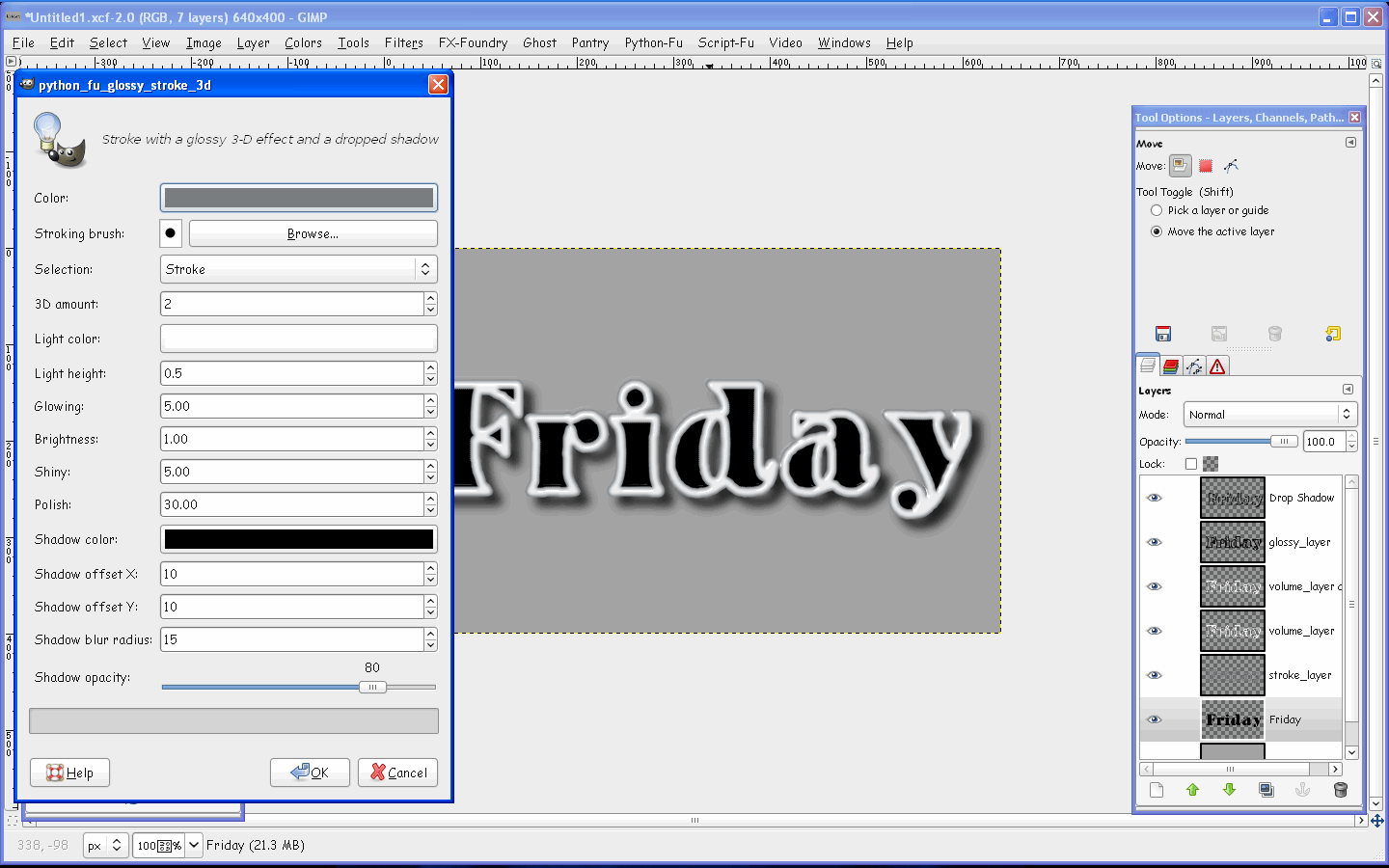
Script I was using what the python glossy 3d stroke. I would try a black word with a white strokee and the vice versa. I could never really get it quite right.

So this is a mystery that still puzzles me!

Thanks for any help!

_________________
"That which does not kill us makes us stronger." ~ Friedrich Nietzsche


Share on Facebook Share on Twitter Share on Orkut Share on Digg Share on MySpace Share on Delicious Share on Technorati
Top
 Post subject: Re: How do you get black or white to glossy bevel?
PostPosted: Fri Jan 13, 2012 11:06 am  (#2) 
Offline
GimpChat Member
User avatar

Joined: Jul 04, 2011
Posts: 395
Location: Indianapolis, IN
This is what I'm getting at (see the xcf file )

Attachment:
Untitled1.xcf [281.54 KiB]
Downloaded 104 times


I probably have the settings all ... WRONG! Bah!

Attachment:
3dglossstroke.JPG
3dglossstroke.JPG [ 63.86 KiB | Viewed 2599 times ]

_________________
"That which does not kill us makes us stronger." ~ Friedrich Nietzsche


Top
 Post subject: Re: How do you get black or white to glossy bevel?
PostPosted: Fri Jan 13, 2012 11:54 am  (#3) 
Offline
Global Moderator
User avatar

Joined: May 16, 2010
Posts: 16173
Keep your text black - layer to image size - use a medium gray for color and white for light color.
Image

_________________
Image


Top
 Post subject: Re: How do you get black or white to glossy bevel?
PostPosted: Fri Jan 13, 2012 1:43 pm  (#4) 
Offline
GimpChat Member
User avatar

Joined: Jul 04, 2011
Posts: 395
Location: Indianapolis, IN
So the stroke color is for lack of a better word exaggerated?

What about the inverse of this? If the text was white and the stroke was black. Would you use a darker grey?

_________________
"That which does not kill us makes us stronger." ~ Friedrich Nietzsche


Top
 Post subject: Re: How do you get black or white to glossy bevel?
PostPosted: Sat Jan 14, 2012 5:58 am  (#5) 
Offline
Global Moderator
User avatar

Joined: May 16, 2010
Posts: 16173
MrBiggz wrote:
So the stroke color is for lack of a better word exaggerated?

What about the inverse of this? If the text was white and the stroke was black. Would you use a darker grey?


Perhaps with this type of glossing you could just use a select shrink on the text fill it with white and blur, and set the opacity.This script may not be the best choice.Sometimes it's just better to do it the old fashioned way.

_________________
Image


Top
 Post subject: Re: How do you get black or white to glossy bevel?
PostPosted: Sat Jan 14, 2012 8:10 pm  (#6) 
Offline
GimpChat Member
User avatar

Joined: Jul 04, 2011
Posts: 395
Location: Indianapolis, IN
Rod wrote:
Perhaps with this type of glossing you could just use a select shrink on the text fill it with white and blur, and set the opacity.This script may not be the best choice.Sometimes it's just better to do it the old fashioned way.


Oh Roger that! I white the old fashion way and it looked pretty good. I used a slight inside shadow of like 1px and it seemed to help the effect!

I'm still puttering on black tho! Kinda like simulating the shiny black that you have on the round parts of a cell phone.

_________________
"That which does not kill us makes us stronger." ~ Friedrich Nietzsche


Top
Post new topic Reply to topic  [ 6 posts ] 

All times are UTC - 5 hours [ DST ]


* Login  


Powered by phpBB3 © phpBB Group