It is currently Sat Aug 01, 2026 2:54 am


All times are UTC - 5 hours [ DST ]


Post new topic Reply to topic  [ 107 posts ]  Go to page Previous  1, 2, 3, 4, 5, 6  Next
Author Message
 Post subject: Re: NEW- Gimp-2.8_Windows-Friendly_64bit ready for testing
PostPosted: Thu May 10, 2012 3:09 am  (#41) 
Offline
GimpChat Member
User avatar

Joined: Apr 25, 2011
Posts: 121
Location: Taiwan
PhotoComix wrote:
@Alec

A relevant difference is about support for python plugin, that works out of the box in both Samj and Partha portable version and not at all in the portableapp builds (i didn't test their very last so this refer to the previous )

Yes, Python not available on portableapps
but it is not a problem
just create pygimp.interp file in Data folder to indicate where python env is, like this
python=D:\GIMP\GIMPPortable2.8\App\gimp\Python\pythonw.exe
/usr/bin/python=D:\GIMP\GIMPPortable2.8\App\gimp\Python\pythonw.exe
:Python:E::py::python:

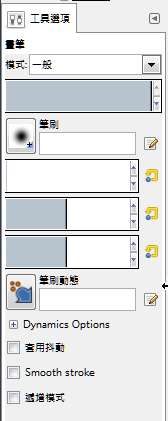
To me, official install version on my win 7 64bits and xp 32bits all happen this on tool option dialog
Image
but it is normal on portableapps build

_________________
Sorry for my poor English, I use Google Translate.
There may be something wrong, Please understand.

GIMP 2.10.38 rev1 portable+GAP+G'MIC+nufraw+Beautify+MathMap+...


Top
 Post subject: Re: NEW- Gimp-2.8_Windows-Friendly_64bit ready for testing
PostPosted: Thu May 10, 2012 3:17 am  (#42) 
Offline
GimpChat Member

Joined: Apr 12, 2010
Posts: 5870
Quote:
I suppose now i will add GAP and i am all set with Gimp-2.8
ALL my Adobe (PSPI) plugins work perfectly except of course UserFilter.


if you refer to the version in the last samj link, GAP is already there, as Mathmap and tons of other things

Only problem there is still something wrong with the preference mapping so you must

1) open the folder of samj build
2) OR transfer from "PhotoComix" subfolders to the correspondent Pref_1 subfolders what you want installed
OR edit the preference to point to what you wish installed

About Gap is in .../Photocomix/plug-ins/animation-avi, with a few other plugin useful for animation
The 2 script-fu included in GAP are instead in .../Photocomix/script/animation with a bunch of other animations script (All that from fenceposte as animated rain, snow and fire, and much more )

It is all already there , they don't show up because the preference mapping doesn't work yet


Quote:
ALL my Adobe (PSPI) plugins work perfectly except of course UserFilter.


Also the Userfilter is included with all the existing filterfactory filters already conveterted in GUF, and works (it will work IF you correct the preference path, ), here i am not sure if will conflict with PSPI anyway is already there

Of all you quote only PSPI is not already included (because its license )
Well not sure if would works

_________________
My 3D Gallery on Deviantart http://photocomix2.deviantart.com/
Main gallery http://www.flickriver.com/photos/photocomix-mandala/
Mandala and simmetry http://www.flickriver.com/photos/photocomix_mandala/

Image

Mrs Wilbress


Top
 Post subject: Re: NEW- Gimp-2.8_Windows-Friendly_64bit ready for testing
PostPosted: Thu May 10, 2012 3:45 am  (#43) 
Offline
Global Moderator
User avatar

Joined: May 16, 2010
Posts: 16142
I installed Sams original version PC, not the one you made available. :)
Sorry i should have made that more evident in my post.

I also right clicked the bat icon and changed it to wilbur. :)
Right click the bat icon on your desktop
Select properties
Select change icon
Browse to your gimp.exe file
select ok 2 new files will pop up to choose from
select the one with transparency.
Select ok.

_________________
Image


Top
 Post subject: Re: NEW- Gimp-2.8_Windows-Friendly_64bit ready for testing
PostPosted: Thu May 10, 2012 4:29 am  (#44) 
Offline
GimpChat Member

Joined: May 09, 2012
Posts: 914
Bonjour,

@PhotoComix

With version "gimp_2_8_0-64bit-20120509" you have two directories of preferences that are installed:
- ...\gimp_2_8_0-64bit-20120509\pref1
- ...\gimp_2_8_0-64bit-20120509\PhotoComix


When you click "Demarrer_Gimp.bat" you use the directory "...\gimp_2_8_0-64bit-20120509\pref1"
When you click "Start_Gimp_Friendly.bat" you use the directory "...\gimp_2_8_0-64bit-20120509\PhotoComix"

You should use only "Start_Gimp_Friendly.bat" for your tests. Thus, you can check the operation of your "extras".

The directory "...\gimp_2_8_0-64bit-20120509\PhotoComix" is reserved for you to place what you want.


Top
 Post subject: Re: NEW- Gimp-2.8_Windows-Friendly_64bit ready for testing
PostPosted: Thu May 10, 2012 4:34 am  (#45) 
Offline
GimpChat Member

Joined: Apr 12, 2010
Posts: 5870
Ahhh ok Samj i am going to try again

_________________
My 3D Gallery on Deviantart http://photocomix2.deviantart.com/
Main gallery http://www.flickriver.com/photos/photocomix-mandala/
Mandala and simmetry http://www.flickriver.com/photos/photocomix_mandala/

Image

Mrs Wilbress


Top
 Post subject: Re: NEW- Gimp-2.8_Windows-Friendly_64bit ready for testing
PostPosted: Thu May 10, 2012 1:30 pm  (#46) 
Offline
GimpChat Member

Joined: Apr 12, 2010
Posts: 5870
Samj i try to load as suggested
result is a encouraging but not perfect for some reason Mathmap (that was in the "32" folder because is at 32 bit) , GAP and all the filters in the animation folder are not loaded .
may be something else that i did not noticed yet but those are the most evident problems not yet solved

PS not sure if may be connected but there is a undocumented limit regarding the number of the gimp preferences paths,limit not specific of your version but general for any version of gimp

for each "group" (script, brush, plugin etc) there is a limit of 16 paths,
the 17 will create a formatting error, it will finish glued to the 16 and in case both will not work, same for any other path added after that

no error message about but only 15 path are safe, the 16 will work only if no other are added

_________________
My 3D Gallery on Deviantart http://photocomix2.deviantart.com/
Main gallery http://www.flickriver.com/photos/photocomix-mandala/
Mandala and simmetry http://www.flickriver.com/photos/photocomix_mandala/

Image

Mrs Wilbress


Top
 Post subject: Re: NEW- Gimp-2.8_Windows-Friendly_64bit ready for testing
PostPosted: Thu May 10, 2012 2:15 pm  (#47) 
Offline
GimpChat Member
User avatar

Joined: Jan 13, 2011
Posts: 2646
Location: Poland
Waiting for 32 bit PhotoComiX and Samj ...
I downloaded the 64 bit and swapped files for compatibility with 32 bit.
It works - but still have a problem: PSPI - whether User-filter - or Freetype - and more - whether (and how) the limit for the number of entries?
How do I fix this?

In the case of Maringouin - I wanted to be (select) menu in your own (native)
For Gimp translations are included in the *. mo.
Stupid idea - this is a separate program.
But the question:
Maringouin as an additional application - may have the option of choosing their own language?

_________________
Image


Top
 Post subject: Re: NEW- Gimp-2.8_Windows-Friendly_64bit ready for testing
PostPosted: Thu May 10, 2012 2:24 pm  (#48) 
Offline
GimpChat Member

Joined: Apr 12, 2010
Posts: 5870
i don't understand well

Userfilter and freetype are both working, just tested, the prioblem i see is for Mathmap , Gap and the additional animation filters( i suppose you may correct the path to fix on your copy but i hope for a global fix)

I don't know what method Samj used so i am not sure if that limit in the number of preference paths may be relevant , i wrote about just in case and because is a not reported bug ( or a not documented limitation)

about Maringouin the documentation is on samj side, i confess that, maybe for defects in the automatic translation from French, i am very far to have fully understand how it works

_________________
My 3D Gallery on Deviantart http://photocomix2.deviantart.com/
Main gallery http://www.flickriver.com/photos/photocomix-mandala/
Mandala and simmetry http://www.flickriver.com/photos/photocomix_mandala/

Image

Mrs Wilbress


Top
 Post subject: Re: NEW- Gimp-2.8_Windows-Friendly_64bit ready for testing
PostPosted: Thu May 10, 2012 6:53 pm  (#49) 
Offline
GimpChat Member

Joined: May 09, 2012
Posts: 914
@Photocomix & MareroQ

Thank you very much for testing, it helps me :tyspin

This first version was made ​​to determine the problems :
- I will limit to 15 the number of directories (This will perhaps require a reorganization of filters, scripts, etc.). This number of 15 will be a modifiable parameter from PhotoComix.ini (15 to 63).
- I will modify "Maringouin" to allow the modification of gimprc by Gimp. Changes from GIMP (gimprc) will not be overwritten as the content of PhotoComix.ini is respected.
- I will also look at the plugins : Mathmap , Gap , PSPI.


For me it is a good start. Within two days I think come up with something coherent.

Another big thank you for your help.


*****

In principle, Maringouin can select the language of Gimp. Now there is a problem on the choice of languages ( ​​Gimp LANG environment variables not working). I'll wait Gimp 2.8.1 to see if the problem is solved.


Top
 Post subject: Re: NEW- Gimp-2.8_Windows-Friendly_64bit ready for testing
PostPosted: Thu May 10, 2012 8:53 pm  (#50) 
Offline
Script Coder
User avatar

Joined: Feb 18, 2011
Posts: 4826
Location: Bendigo Vic. Australia
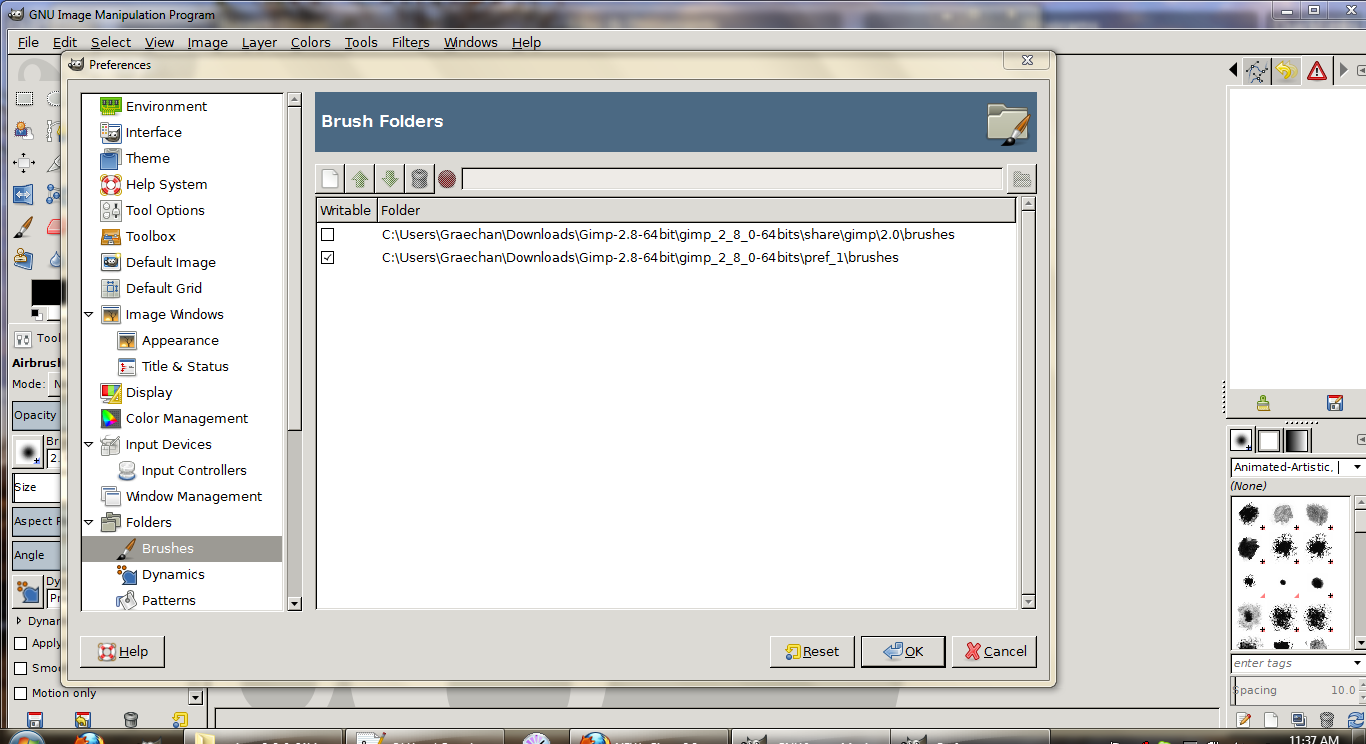
PhotoComix to smplify your folders just add the one path to pref folder as shown below,it will pick up all folders and files inside as in image, if you have a folder you do not want to show go 1 further e.g pref1/brushes/pre-installed and pref1/brushes/not-installed-ready. I hope image below will show
Image

_________________
Image
No matter how much you push the envelope, it'll still be stationery.


Top
 Post subject: Re: NEW- Gimp-2.8_Windows-Friendly_64bit ready for testing
PostPosted: Thu May 10, 2012 10:11 pm  (#51) 
Offline
GimpChat Member

Joined: Apr 12, 2010
Posts: 5870
@Samj

about the number of folders my idea was have the plugins that are not fully contained in a single exe, but require some additional dll (as gmic, liquid rescale, mathmap, resynthesizer ) each on its own folder

this also to allow user update in case of new version without the risk to leave orphan dll floating around
( just deleting the whole content of a folder i.e. gmic,and replacing with that of the new version.
If not ,if the plugins are all stored together become a heavy task determine which dll is connected to which plugin also because the totally unrelated names , and that cause often problem with orphan dll, here zlib.exe is a typical case)

So for the plugin the other subfolders are much less relevant , just vague categories to make a bit easier the search, but they can be merged without much problem.

this for plugin, for the other addon i did the division in subfoldes just to easier search but is not strictly necessary, except for the category "_required" that mark item required by additional script and plugin:

as example removing the "_required" gradients and/or patterns several script-fu will got broken
A alternative could be install that "_required" globally

Less visible are also some "Required" gimpressionist and curve preset in the gimpressionist and curve preset folder, remove them will broke some script and plugin

Ohh i almost forgot:
my idea was also kept separate the Gimp core from any extra BUT there is a relevant exception:
In the bin folder should be swfc.exe, because is the only way (at least the only way i know ) to allow to save animation in flash format

the saving is done by a python plugin from JamesH "Export SWFE.py" that require that exe in the bin folder
(i even tried to place the exe in the same folder of the script but didn't worked, only alternative would be install all the Swftool suite and set a environmental path, ...exactly as was for PDF - ghostscript )

i say to explain why swfc.exe is in the bin folder, and because you may have not noticed its presence.

@Graechan

i didn't get your point: gimp can't read inside subfolders, i mean if you point a preference path to let say "script", it will not see any of the files contained in subfolders inside "script"

_________________
My 3D Gallery on Deviantart http://photocomix2.deviantart.com/
Main gallery http://www.flickriver.com/photos/photocomix-mandala/
Mandala and simmetry http://www.flickriver.com/photos/photocomix_mandala/

Image

Mrs Wilbress


Top
 Post subject: Re: NEW- Gimp-2.8_Windows-Friendly_64bit ready for testing
PostPosted: Thu May 10, 2012 10:33 pm  (#52) 
Offline
Script Coder
User avatar

Joined: Feb 18, 2011
Posts: 4826
Location: Bendigo Vic. Australia
I was talking about resource folders such as brushes, patterns and gradients. what i did was copy your pre-installed folder to pref 1 and started with demarrer.bat, if you do this and click on the the little < beside brushes you will see all the sub-folders listed. please try its interesting.
Plugins and scripts still need full path to each folder

_________________
Image
No matter how much you push the envelope, it'll still be stationery.


Top
 Post subject: Re: NEW- Gimp-2.8_Windows-Friendly_64bit ready for testing
PostPosted: Fri May 11, 2012 5:51 am  (#53) 
Offline
GimpChat Member

Joined: Apr 12, 2010
Posts: 5870
ahh..ok it seems interesting thank to point it out

_________________
My 3D Gallery on Deviantart http://photocomix2.deviantart.com/
Main gallery http://www.flickriver.com/photos/photocomix-mandala/
Mandala and simmetry http://www.flickriver.com/photos/photocomix_mandala/

Image

Mrs Wilbress


Top
 Post subject: Re: NEW- Gimp-2.8_Windows-Friendly_64bit ready for testing
PostPosted: Fri May 11, 2012 7:01 am  (#54) 
Offline
GimpChat Member

Joined: May 09, 2012
Posts: 914
Bonjour,

@Photocomix

What is your problem with MathMap? (I installed it on my version and everything seems to work with this plugin.)


Top
 Post subject: Re: NEW- Gimp-2.8_Windows-Friendly_64bit ready for testing
PostPosted: Fri May 11, 2012 7:46 am  (#55) 
Offline
GimpChat Member

Joined: Apr 12, 2010
Posts: 5870
none except that doesn't show up in the version i got from your posted link

same for GAP and the "animation-avi" group of script, i may see are there, but are not in the menu

i suppose is just a problem with the paths..maybe too much paths for category ?
in case the standard paths for plugins are added to mine 2+15= 17 so 2 path will be not loaded
..maybe as mathmap and gap

_________________
My 3D Gallery on Deviantart http://photocomix2.deviantart.com/
Main gallery http://www.flickriver.com/photos/photocomix-mandala/
Mandala and simmetry http://www.flickriver.com/photos/photocomix_mandala/

Image

Mrs Wilbress


Top
 Post subject: Re: NEW- Gimp-2.8_Windows-Friendly_64bit ready for testing
PostPosted: Fri May 11, 2012 7:58 am  (#56) 
Offline
GimpChat Member

Joined: May 09, 2012
Posts: 914
Bonjour,

@PhotocoMix
According to my tests:
GAP works.
MathMap works.


I'm almost done, I still have to test PSPI.

Note:
It is possible to put all plugins 32 bit and 64 bit in the directory "PhotoComix" provided do not mix DLL


Top
 Post subject: Re: NEW- Gimp-2.8_Windows-Friendly_64bit ready for testing
PostPosted: Fri May 11, 2012 9:45 am  (#57) 
Offline
GimpChat Member

Joined: Apr 12, 2010
Posts: 5870
Quote:
Note:
It is possible to put all plugins 32 bit and 64 bit in the directory "PhotoComix" provided do not mix DLL


ah ok i was not sure
on the other hand may be a risk of mixing dll, since from theirs name is impossible distinguish the 32 from the 64bit
But i believe only MM is at 32bit so till stay in its own folder should be not problem

PS did you read my note about swfc.exe that is in the bin folder ?

_________________
My 3D Gallery on Deviantart http://photocomix2.deviantart.com/
Main gallery http://www.flickriver.com/photos/photocomix-mandala/
Mandala and simmetry http://www.flickriver.com/photos/photocomix_mandala/

Image

Mrs Wilbress


Top
 Post subject: Re: NEW- Gimp-2.8_Windows-Friendly_64bit ready for testing
PostPosted: Fri May 11, 2012 9:58 am  (#58) 
Offline
GimpChat Member

Joined: May 09, 2012
Posts: 914
Here is the version of May 11, 2012.

Download :
http://www.aljacom.com/~gimp/gimp_2_8_0 ... 0120511.7z
125 Mo (131 646 637 bytes)


************

@PhotoComix

I think the utility " maringouin " is ready to create your archive.
The changes are :
- New PhotoComix.ini
- Changes from GIMP (gimprc) will not be overwritten as the content of PhotoComix.ini is respected.
- Mathmap installation

For testing, you should start Gimp by clicking on the file named " Start_Gimp_Friendly.bat "

Plugins "MathMap" and "GAP" work.

PSPI works when installed in the directory "\pref_1", PSPI does not work in "...\PhotoComix" (I think there is a plugin incompatible with PSPI).

It might be a good idea to put all the extras in the directory "...\PhotoComix"

Do not forget to edit the file " PhotoComix.ini " (According to your changes).


Good tests and modifications.


Top
 Post subject: Re: NEW- Gimp-2.8_Windows-Friendly_64bit ready for testing
PostPosted: Fri May 11, 2012 10:19 am  (#59) 
Offline
GimpChat Member

Joined: Apr 12, 2010
Posts: 5870
Wow !! :tyspin thank a lot Samj :yr

_________________
My 3D Gallery on Deviantart http://photocomix2.deviantart.com/
Main gallery http://www.flickriver.com/photos/photocomix-mandala/
Mandala and simmetry http://www.flickriver.com/photos/photocomix_mandala/

Image

Mrs Wilbress


Top
 Post subject: Re: NEW- Gimp-2.8_Windows-Friendly_64bit ready for testing
PostPosted: Fri May 11, 2012 12:05 pm  (#60) 
Offline
GimpChat Member

Joined: Apr 12, 2010
Posts: 5870
and yes seems there is some incompatibility between the Userfilter and PSPI

_________________
My 3D Gallery on Deviantart http://photocomix2.deviantart.com/
Main gallery http://www.flickriver.com/photos/photocomix-mandala/
Mandala and simmetry http://www.flickriver.com/photos/photocomix_mandala/

Image

Mrs Wilbress


Top
Post new topic Reply to topic  [ 107 posts ]  Go to page Previous  1, 2, 3, 4, 5, 6  Next

All times are UTC - 5 hours [ DST ]


* Login  


Powered by phpBB3 © phpBB Group