It is currently Fri Sep 04, 2026 7:25 am


All times are UTC - 5 hours [ DST ]


Post new topic Reply to topic  [ 9 posts ] 
Author Message
 Post subject: Can't open .psp files?
PostPosted: Sun Sep 09, 2012 3:49 pm  (#1) 
Offline
GimpChat Member
User avatar

Joined: Sep 06, 2012
Posts: 28
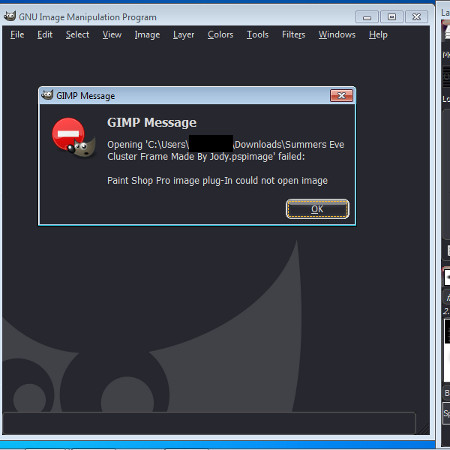
This is what I get when I try to open a .pspimage file.
Is there something I need to do first?

Image


Share on Facebook Share on Twitter Share on Orkut Share on Digg Share on MySpace Share on Delicious Share on Technorati
Top
 Post subject: Re: Can't open .psp files?
PostPosted: Sun Sep 09, 2012 3:59 pm  (#2) 
Offline
GimpChat Member
User avatar

Joined: Jul 17, 2012
Posts: 2769
as far as i understand it, you cant open these filetypes with Gimp

but a quick google search told me, there is a plug-in for this

hope that helps until somebody more knowledgable comes to give you some advice

EDIT: wait, you have this plug-in already installed ?


Top
 Post subject: Re: Can't open .psp files?
PostPosted: Sun Sep 09, 2012 4:02 pm  (#3) 
Offline
GimpChat Member
User avatar

Joined: Sep 06, 2012
Posts: 28
Esper wrote:
as far as i understand it, you cant open these filetypes with Gimp

but a quick google search told me, there is a plug-in for this

hope that helps until somebody more knowledgable comes to give you some advice

EDIT: wait, you have this plug-in already installed ?


Not that I know of...


Top
 Post subject: Re: Can't open .psp files?
PostPosted: Sun Sep 09, 2012 4:04 pm  (#4) 
Offline
GimpChat Member
User avatar

Joined: Jul 17, 2012
Posts: 2769
GimpinMommy wrote:
Not that I know of...
well but your error message says: "paint shop pro image plug-in could not open image"


Top
 Post subject: Re: Can't open .psp files?
PostPosted: Sun Sep 09, 2012 4:06 pm  (#5) 
Offline
GimpChat Member
User avatar

Joined: Sep 06, 2012
Posts: 28
Esper wrote:
GimpinMommy wrote:
Not that I know of...
well but your error message says: "paint shop pro image plug-in could not open image"


Yeah, I know. The only psp plugin I have is pspi.exe.


Top
 Post subject: Re: Can't open .psp files?
PostPosted: Sun Sep 09, 2012 6:33 pm  (#6) 
Offline
Retired Staff
User avatar

Joined: May 22, 2008
Posts: 6946
Location: Somewhere in GIMP
If the PSP version is an old version ... 7 or earlier I think, gimp can't open them. I belong to a newsgroup that they offer PSP tubes and some I can open and some I can't. If I really want one of them, I ask if they'll make the image a .png image for me.

_________________
Image
World War IV will be fought with sticks and stones. - Albert Einstein


Top
 Post subject: Re: Can't open .psp files?
PostPosted: Sun Sep 09, 2012 8:32 pm  (#7) 
Offline
GimpChat Member
User avatar

Joined: Nov 16, 2011
Posts: 5127
Location: Metro Vancouver, BC
GimpinMommy wrote:
This is what I get when I try to open a .pspimage file.
Is there something I need to do first?

I don't have PSP on my machine, but get the same error message trying to open a PSP v8.0 file in Gimp 2.8x. My work around was to open the PSP file in Zoner Photo Studio and convert to TIF. No layers but everything else was OK.

_________________
Image
Gimp 2.8.18, Linux, median user
Gimp Chat Tutorials Index
Spirit Bear (Kermode)


Top
 Post subject: Re: Can't open .psp files?
PostPosted: Sun Sep 09, 2012 8:55 pm  (#8) 
Offline
GimpChat Member
User avatar

Joined: Apr 30, 2010
Posts: 1937
Location: Missouri
As a workaround, you can open a psp with xnview and convert it, I think. I took psp out of my life years ago so I don't have a sample to test it.

_________________
Image
The last time I kept an open mind,
my brain fell out and the dog grabbed it.
Now it's full of dirt, toothmarks, and dog slobber.
No more open minds or dogs for me.


Top
 Post subject: Re: Can't open .psp files?
PostPosted: Mon Sep 10, 2012 11:40 am  (#9) 
Offline
GimpChat Member
User avatar

Joined: Sep 06, 2012
Posts: 28
Aww man. I'm a tagger so if the file is layered, I really need it to stay in layers to delete the credits and such. Guess I'll just have to take it to the creator of the file.

Thanks everyone!


Top
Post new topic Reply to topic  [ 9 posts ] 

All times are UTC - 5 hours [ DST ]


* Login  


Powered by phpBB3 © phpBB Group