It is currently Sun Sep 20, 2026 6:47 pm


All times are UTC - 5 hours [ DST ]


Post new topic Reply to topic  [ 16 posts ] 
Author Message
 Post subject: Can't get Plasma2 to show in Gimp
PostPosted: Sun Oct 14, 2012 5:23 pm  (#1) 
Offline
GimpChat Member
User avatar

Joined: Apr 07, 2010
Posts: 14182
GIMP Version: 2.8.2
Operating System: Linux
OS Version: Fedora 17
GIMP Experience: Intermediate Level


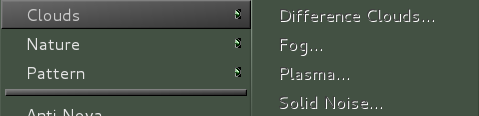
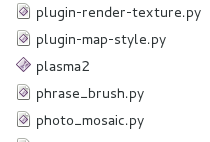
I have the regular plasma in Gimp under render, clouds Plasma. I downloaded the plasma2 and installed it in my plug-ins folder and it doesn't show in Gimp.
I am running Gimp 64-bit, I don't know if that makes the difference or not. Anyone have any idea how this can be.

Image

Image

_________________
Image


Share on Facebook Share on Twitter Share on Orkut Share on Digg Share on MySpace Share on Delicious Share on Technorati
Top
 Post subject: Re: Can't get Plasma2 to show in Gimp
PostPosted: Sun Oct 14, 2012 7:56 pm  (#2) 
Offline
GimpChat Member
User avatar

Joined: Apr 09, 2011
Posts: 1764
Molly, can you tell me where to get plasma2 please I want to see if I can get it to work but cant find a link to it


Top
 Post subject: Re: Can't get Plasma2 to show in Gimp
PostPosted: Sun Oct 14, 2012 8:05 pm  (#3) 
Offline
GimpChat Member
User avatar

Joined: Sep 22, 2012
Posts: 2089
Location: US
Edit


Last edited by K1TesseraEna on Sun Oct 14, 2012 8:13 pm, edited 1 time in total.

Top
 Post subject: Re: Can't get Plasma2 to show in Gimp
PostPosted: Sun Oct 14, 2012 8:12 pm  (#4) 
Offline
GimpChat Member
User avatar

Joined: Sep 22, 2012
Posts: 2089
Location: US
akky wrote:
Molly, can you tell me where to get plasma2 please I want to see if I can get it to work but cant find a link to it


Akky, here is a Linux binary&docs for Plasma2 zip file viewtopic.php?f=9&t=494
(scroll down to GnuTux's comment)


Top
 Post subject: Re: Can't get Plasma2 to show in Gimp
PostPosted: Sun Oct 14, 2012 9:41 pm  (#5) 
Offline
GimpChat Member
User avatar

Joined: Nov 09, 2011
Posts: 726
I found the source code here:
http://www.graphics-muse.org/source/GFX ... ls/source/
http://schumaml.gmxhome.de/downloads/gimp/sources/

But I can not compile it because apparently does not work in 64 bits. It seems that the plugin is too old, Do you know if the plugin works with gimp 2.8?

_________________
Image
Be patient, English is not my language.


Top
 Post subject: Re: Can't get Plasma2 to show in Gimp
PostPosted: Mon Oct 15, 2012 4:35 am  (#6) 
Offline
GimpChat Member
User avatar

Joined: Apr 07, 2010
Posts: 14182
Yes it does Yafu. O has it working in her 32 bit Gimp in Fedora 17

_________________
Image


Top
 Post subject: Re: Can't get Plasma2 to show in Gimp
PostPosted: Mon Oct 15, 2012 4:34 pm  (#7) 
Offline
GimpChat Member
User avatar

Joined: Oct 29, 2010
Posts: 711
Location: Netherlands
I d/led both plasma2 files and browsed the code and other files.
It's all c source code.
The commands to use gimptool won't work because they're obsolete.
When you compile source on your computer it will be compiled either 32 or 64 bit depending on your system.
What I also read was that it was written for gimp-1.1.
I sincerely doubt that it can be made to work in 2.8.
The best way to find out what your gimp thinks of it is to start it in a terminal and look at the messages it spits out.
If there's nothing about plasma2 then gimp probably doesn't recognize it as a plug-in.
Gerard.

_________________
Gentoo Linux always up-to-date.
Kernel-3.17.4 Python-2.7.8/3.3.5
Gimp-2.8.14

I use Linux only.
And Virtualbox with Win 7


Top
 Post subject: Re: Can't get Plasma2 to show in Gimp
PostPosted: Mon Oct 15, 2012 4:40 pm  (#8) 
Offline
Retired Staff
User avatar

Joined: May 22, 2008
Posts: 6946
Location: Somewhere in GIMP
The plug-in works for me in 2.8.2 and I have Fedora 17. I think the reason it doesn't work in Molly's is that her machine is a 64-bit machine. It will need to be compiled for 64-bit.

_________________
Image
World War IV will be fought with sticks and stones. - Albert Einstein


Top
 Post subject: Re: Can't get Plasma2 to show in Gimp
PostPosted: Mon Oct 15, 2012 4:56 pm  (#9) 
Offline
GimpChat Member
User avatar

Joined: Oct 29, 2010
Posts: 711
Location: Netherlands
Hi O,
Did you install it as a binary or from source?
I mean did you use gimptool to compile it?
Gerard.

_________________
Gentoo Linux always up-to-date.
Kernel-3.17.4 Python-2.7.8/3.3.5
Gimp-2.8.14

I use Linux only.
And Virtualbox with Win 7


Top
 Post subject: Re: Can't get Plasma2 to show in Gimp
PostPosted: Mon Oct 15, 2012 5:00 pm  (#10) 
Offline
Retired Staff
User avatar

Joined: May 22, 2008
Posts: 6946
Location: Somewhere in GIMP
I got the one GnuTux compiled for Linux here.

_________________
Image
World War IV will be fought with sticks and stones. - Albert Einstein


Top
 Post subject: Re: Can't get Plasma2 to show in Gimp
PostPosted: Mon Oct 15, 2012 5:06 pm  (#11) 
Offline
GimpChat Founder
User avatar

Joined: May 22, 2008
Posts: 5241
Location: Gimpville
molly wrote:
Yes it does Yafu. O has it working in her 32 bit Gimp in Fedora 17

The only other thing I can think of is to ensure the plug-in is set to be an executable.

You can run gimp from the command line, to see what the errors are generated when it sees the plug-in. That might tell you something.

Being this plug-in is a compiled binary, you're probably going to have to find a 64-bit version that someone has already successfully compiled.

The only binary I can find is the old 32 bit version.

_________________
“If you reach for the stars, you just might land on a decently sized hill.” - Stuart Hill


Top
 Post subject: Re: Can't get Plasma2 to show in Gimp
PostPosted: Mon Oct 15, 2012 5:11 pm  (#12) 
Offline
GimpChat Member
User avatar

Joined: Apr 07, 2010
Posts: 14182
Thanks Tux. It is executable so I guess it is the 64-bit problem. Maybe someone will come along and compile it.

_________________
Image


Top
 Post subject: Re: Can't get Plasma2 to show in Gimp
PostPosted: Mon Oct 15, 2012 5:48 pm  (#13) 
Offline
GimpChat Member
User avatar

Joined: Nov 09, 2011
Posts: 726
When I try to compile plasma2-2.10.tar.bz2 (plasma2 v2.9) in 64 bits I get:

$ make
cc `gimptool-2.0 --cflags` -DLOCALEDIR=\"`gimptool-2.0 --prefix`/share/locale\" -DVERSION=\"2.10\" -Wall -O2 -march=`uname -m`  `gimptool-2.0 --libs` -lm  plasma2.c   -o plasma2
plasma2.c:1:0: error: bad value (x86_64) for -march= switch
make: *** [plasma2] Error 1


I tried to fix it:
https://www.google.com/search?q="bad+value"+"(x86_64)"+"march%3D+switch"
But I can't find the solution. The problem it's clearly related to 64 bits arch. Is not compatible with 64-bit or the flags are wrong in the makefile.

_________________
Image
Be patient, English is not my language.


Top
 Post subject: Re: Can't get Plasma2 to show in Gimp
PostPosted: Mon Oct 15, 2012 5:56 pm  (#14) 
Offline
GimpChat Member
User avatar

Joined: Apr 07, 2010
Posts: 14182
Thanks Yafu, maybe someone will come along and compile it, if not, I will just either have to live without it or bite the bullet and go over to my Windows drive and use it there. (last resort) lol :funnyball

_________________
Image


Top
 Post subject: Re: Can't get Plasma2 to show in Gimp
PostPosted: Mon Oct 15, 2012 6:15 pm  (#15) 
Offline
GimpChat Member
User avatar

Joined: Nov 09, 2011
Posts: 726
Ok, the easy way. I found the binary :)
http://ftp4.fr.postgresql.org/pub/linux/pld/pool/g/gimp-plugin-plasma2/
If you can not install the package, uncompress the package and get the binary directly. Here I share the 64-bit binary plasama 2 (v2.10) to make it easy to find:
http://www.fileswap.com/dl/Fn6H7vX5hl/plasma2_2.10_64bits.zip.html


Attachments:
File comment: GIMP Plasma2 Plugin Linux 64-bit
plasma2_2.10_64bits.zip [24.96 KiB]
Downloaded 91 times

_________________
Image
Be patient, English is not my language.
Top
 Post subject: Re: Can't get Plasma2 to show in Gimp
PostPosted: Mon Oct 15, 2012 7:14 pm  (#16) 
Offline
GimpChat Member
User avatar

Joined: Apr 07, 2010
Posts: 14182
:jumpclap :clap Wow, thank you so much yafu, it works I have it and it is perfect. you rock

_________________
Image


Top
Post new topic Reply to topic  [ 16 posts ] 

All times are UTC - 5 hours [ DST ]


* Login  


Powered by phpBB3 © phpBB Group