It is currently Sat Aug 22, 2026 1:01 pm


All times are UTC - 5 hours [ DST ]


Post new topic Reply to topic  [ 28 posts ]  Go to page Previous  1, 2
Author Message
 Post subject: Re: Using the B&W Border Script
PostPosted: Sat Jan 12, 2013 7:33 pm  (#21) 
Offline
GimpChat Member
User avatar

Joined: Apr 07, 2010
Posts: 14182
Graechan, should I remove the one I have now before I add your version to my Script folder?

_________________
Image


Top
 Post subject: Re: Using the B&W Border Script
PostPosted: Sat Jan 12, 2013 7:39 pm  (#22) 
Offline
Script Coder
User avatar

Joined: Feb 18, 2011
Posts: 4826
Location: Bendigo Vic. Australia
Yes Molly you should remove the old script I decided to post because I could not get a lead on Humcio

_________________
Image
No matter how much you push the envelope, it'll still be stationery.


Top
 Post subject: Re: Using the B&W Border Script
PostPosted: Sat Jan 12, 2013 7:46 pm  (#23) 
Offline
GimpChat Member
User avatar

Joined: Apr 07, 2010
Posts: 14182
Thank you very much Graechan, you are the best.

Image

_________________
Image


Top
 Post subject: Re: Using the B&W Border Script
PostPosted: Sat Jan 12, 2013 9:06 pm  (#24) 
Offline
GimpChat Member
User avatar

Joined: Nov 16, 2011
Posts: 5127
Location: Metro Vancouver, BC
Graechan wrote:
This is the script modified to recognize a selection

Nice touch, Graechan :cool

_________________
Image
Gimp 2.8.18, Linux, median user
Gimp Chat Tutorials Index
Spirit Bear (Kermode)


Top
 Post subject: Re: Using the B&W Border Script
PostPosted: Sat Jan 12, 2013 10:46 pm  (#25) 
Offline
Script Coder
User avatar

Joined: Feb 18, 2011
Posts: 4826
Location: Bendigo Vic. Australia
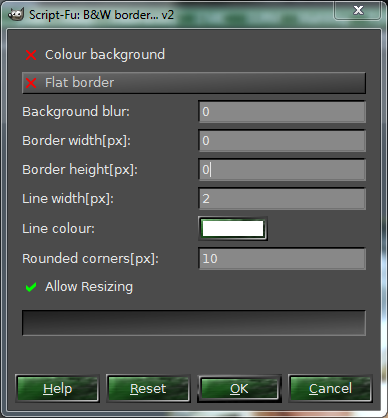
Odin this mod is for you just set borders to 0 script will now 'autosize' to fit any shadow, please replace any previous versions

Attachment:
BW-border-ENG-v2.scm [4.09 KiB]
Downloaded 167 times

_________________
Image
No matter how much you push the envelope, it'll still be stationery.


Top
 Post subject: Re: Using the B&W Border Script
PostPosted: Sun Jan 13, 2013 1:31 am  (#26) 
Offline
Script Coder
User avatar

Joined: Feb 18, 2011
Posts: 4826
Location: Bendigo Vic. Australia
I've updated the script in post above to remove some bugs and to add an additional menu item(Allow Resizing)

Image

_________________
Image
No matter how much you push the envelope, it'll still be stationery.


Top
 Post subject: Re: Using the B&W Border Script
PostPosted: Mon Jan 14, 2013 4:44 am  (#27) 
Offline
Global Moderator
User avatar

Joined: Apr 01, 2012
Posts: 8458
Location: On the other side of your screen
molly wrote:
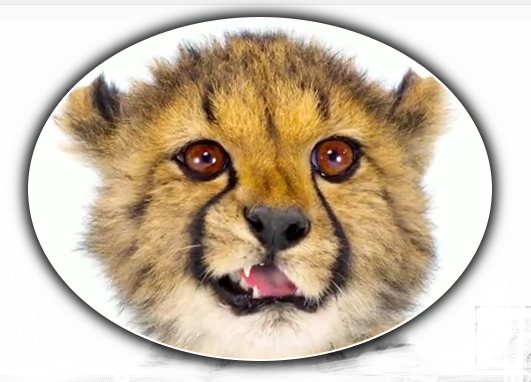
Still playing with this script. :teeth

Image

:bigthup :clap


Cool script! Thanks for updating it Graechan

_________________
Image
Free Fun Photo Editing & resources
Poems from the Lord
Gimp Newby
Gimp version 3.2.4 and GMIC-Qt 4.0.2 OS :- Windows 10 Home 64


Top
 Post subject: Re: Using the B&W Border Script
PostPosted: Mon Jan 14, 2013 9:53 am  (#28) 
Offline
Global Moderator
User avatar

Joined: Apr 01, 2012
Posts: 8458
Location: On the other side of your screen
tried it as is
Image

_________________
Image
Free Fun Photo Editing & resources
Poems from the Lord
Gimp Newby
Gimp version 3.2.4 and GMIC-Qt 4.0.2 OS :- Windows 10 Home 64


Top
Post new topic Reply to topic  [ 28 posts ]  Go to page Previous  1, 2

All times are UTC - 5 hours [ DST ]


* Login  


Powered by phpBB3 © phpBB Group