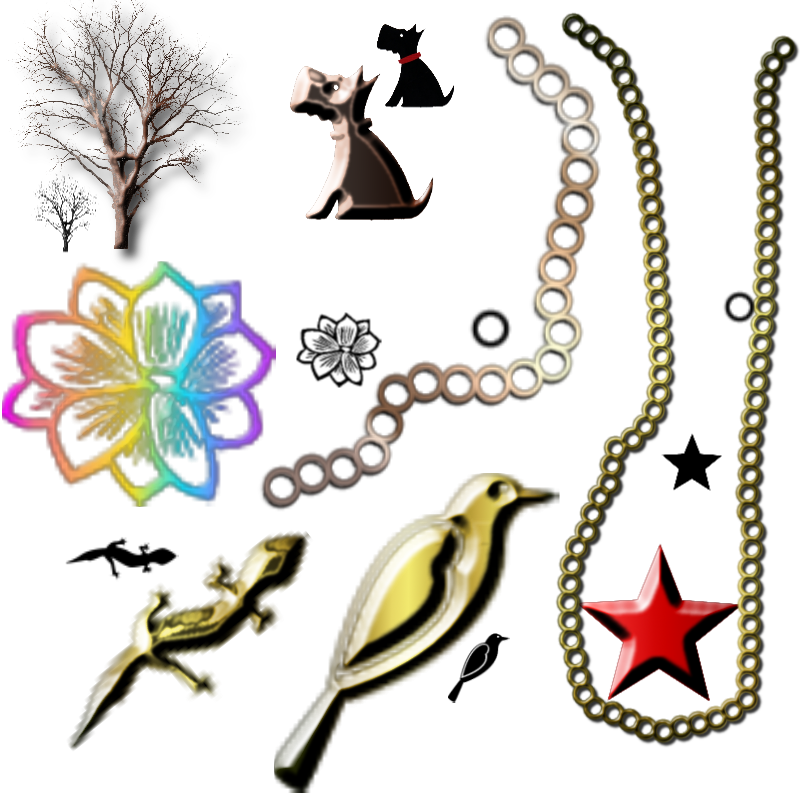
Making bevelled gradients out of anything, including animals, people things, trees, stars, and shapes, and the list goes on.
You will need the bevel python plug-in found
here this one = bevel2_1.py.txt
1. Starting with a transparent layer, use your paint brush

after you select an image you want to use. Adjust it to what ever size you prefer and set the foreground color to black. After you do this, right click and alpha to selection.
2. Go to Filters --> bevel and leave the default the way it is but I crank up the Gloss to 10, but you can experiment with that. Click OK. You will now have a new inner layer above. Leave that as is for now. Keep your selection.
3. In your tools select the blend tool

Look for a nice gradient in your gradient selections, I usually like to stick with the metallic ones but you can use any of them. After you do that, right click on your layer and merge the inner layer down.
4. With the chains I did them the say way. Make one link (circle) with your brush and change the spacing so that when you drag your brush to the shape of chain your want that they are just touching, or even overlapping 1 or 2 pixels, then alpha to selection, run your bevel script, leave selection on and run your gradient. You can also put drop shadows on all these objects if you like.
Below, I added the brush I used for each one to show that anything can be used. You can use images from regular photos, butterflies, birds, animals etc.
 Login
Login Register
 Tweets
 FAQ
FAQ Advanced Search













 . i made some bling myself using your technique, and then i forgot all about it - now it came in handy for the valentine's greetings i'm starting to make, this one's for one of my sisters: