It is currently Sat Sep 19, 2026 4:10 pm


All times are UTC - 5 hours [ DST ]


Post new topic Reply to topic  [ 20 posts ] 
Author Message
 Post subject: Rounded Cornees
PostPosted: Fri Feb 15, 2013 6:35 pm  (#1) 
Offline
GimpChat Member

Joined: Feb 15, 2013
Posts: 5
GIMP Version: 2.8
Operating System: Windows
OS Version: Windows 7
GIMP Experience: Intermediate Level


Hey!

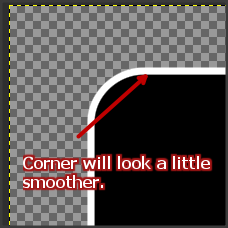
So, I'm tring to create a border around my rounded corners on a rectangle. I'm using the Layer - Layer Effects - Stroke tool, but the transitional point from corner to flat surface does not look right. It appears thicker and just doesn look right... Image

Any help would be greatly appreciated!

Thanks

Sarah


Share on Facebook Share on Twitter Share on Orkut Share on Digg Share on MySpace Share on Delicious Share on Technorati
Top
 Post subject: Re: Rounded Cornees
PostPosted: Fri Feb 15, 2013 6:44 pm  (#2) 
Offline
GimpChat Member
User avatar

Joined: Jul 17, 2012
Posts: 2769
the stroke from layerfx is crap

alpha to select your rounded rectangle
save selection to a path
deselect
go into the paths-tab and choose stroke path


Top
 Post subject: Re: Rounded Cornees
PostPosted: Fri Feb 15, 2013 6:50 pm  (#3) 
Offline
GimpChat Member
User avatar

Joined: Apr 07, 2010
Posts: 14182
Yes, as Esper says never stroke the selection, stroke the path.
This is a very nice video done by one of our members, (Jolie) and it is very good at explaining this problem.
Don't stroke the selection, stroke the path

_________________
Image


Top
 Post subject: Re: Rounded Cornees
PostPosted: Fri Feb 15, 2013 6:54 pm  (#4) 
Offline
GimpChat Member
User avatar

Joined: Aug 16, 2012
Posts: 4271
Location: Göteborg, Sweden
smp: welcome to gimp chat!

:ninja haha, molly, you posted just as i was about to click submit - you're a master ninja :).

_________________


Top
 Post subject: Re: Rounded Cornees
PostPosted: Fri Feb 15, 2013 7:16 pm  (#5) 
Offline
Script Coder

Joined: Apr 10, 2011
Posts: 532
Careful with that - you'll get sued by Apple.


(sorry, had to be said...)


Top
 Post subject: Re: Rounded Cornees
PostPosted: Fri Feb 15, 2013 7:25 pm  (#6) 
Offline
GimpChat Member

Joined: Feb 15, 2013
Posts: 5
Thanks for all of you help!

So I selected parh, and then stroked path, and although it does look better, it still seemd to have trouble with the intermiediate areas between the curve and the flat area.

Could it be some thing else that I'm choosing incorrectly, like the radius of rounding or the thickness of the stroke?

Again thanks for your help and time!


Top
 Post subject: Re: Rounded Cornees
PostPosted: Fri Feb 15, 2013 7:29 pm  (#7) 
Offline
GimpChat Member
User avatar

Joined: Jul 17, 2012
Posts: 2769
hard to say without any pics
but Gimp is raster-based, it will always be built from pixels
if you want something smoother, do it with Inkscape


@dd: is sue = molly ?
she works for the penguin invasion, not apple

EDIT:
yeah it looks a bit jaggy
Attachment:
rounded rectangle.png
rounded rectangle.png [ 7.37 KiB | Viewed 2374 times ]

you could gaussian blur the stroke by 2 or 3 to mask it, depending on what look you want


Top
 Post subject: Re: Rounded Cornees
PostPosted: Fri Feb 15, 2013 7:37 pm  (#8) 
Offline
GimpChat Member

Joined: Feb 15, 2013
Posts: 5
ImageThis help?


Top
 Post subject: Re: Rounded Cornees
PostPosted: Fri Feb 15, 2013 7:40 pm  (#9) 
Offline
GimpChat Member
User avatar

Joined: Jul 17, 2012
Posts: 2769
yes, its the same that i got
i dont think there is much you can do

maybe build your own rounded rectangle with circles and a rectangle ?

EDIT: wait, there is another option
a script called shape paths
it creates paths, also advanced rounded rectangles
http://registry.gimp.org/node/59


Top
 Post subject: Re: Rounded Cornees
PostPosted: Fri Feb 15, 2013 7:45 pm  (#10) 
Offline
GimpChat Member

Joined: Feb 15, 2013
Posts: 5
I tried to gaussian blur it and i didn't make it better.

Yah, originally i was building them manually, but it can quickly become tedious. So i was hoping it was just soemthing that i was missing out on.

Thanks for the help and time!

Image


Last edited by Smp on Fri Feb 15, 2013 7:51 pm, edited 1 time in total.

Top
 Post subject: Re: Rounded Cornees
PostPosted: Fri Feb 15, 2013 7:46 pm  (#11) 
Offline
GimpChat Member

Joined: Feb 15, 2013
Posts: 5
Thanks! I'll try that.


Top
 Post subject: Re: Rounded Cornees
PostPosted: Fri Feb 15, 2013 8:02 pm  (#12) 
Offline
GimpChat Member
User avatar

Joined: Apr 08, 2010
Posts: 5420
Location: Northwest Ohio
what about creating another layer behind the original layer, grow the selection and fill with the border color. No stroking involved but there will be a border showing.


Top
 Post subject: Re: Rounded Cornees
PostPosted: Fri Feb 15, 2013 8:06 pm  (#13) 
Offline
GimpChat Member
User avatar

Joined: Jul 17, 2012
Posts: 2769
Esper wrote:
EDIT: wait, there is another option
a script called shape paths
it creates paths, also advanced rounded rectangles
http://registry.gimp.org/node/59
yes, much better
although the script is hard do understand
Attachment:
Shape Paths.jpg
Shape Paths.jpg [ 244.85 KiB | Viewed 1944 times ]


Top
 Post subject: Re: Rounded Cornees
PostPosted: Fri Feb 15, 2013 10:34 pm  (#14) 
Offline
Script Coder

Joined: Apr 10, 2011
Posts: 532
Smp wrote:
GIMP Version: 2.8
Operating System: Windows
OS Version: Windows 7
GIMP Experience: Intermediate Level


Hey!

So, I'm tring to create a border around my rounded corners on a rectangle. I'm using the Layer - Layer Effects - Stroke tool, but the transitional point from corner to flat surface does not look right. It appears thicker and just doesn look right... Image

Any help would be greatly appreciated!

Thanks

Sarah


A simple thing you can do:

1 - make a rounded rectangle selection (you do this easily by checking "rounded corners" in the rectangle selction tool)
2 - fill it with colour of your choice
3 - shrink the selection by X pixels
4 - clear selection (press delete)

Where X is the width of the border that you want.


Top
 Post subject: Re: Rounded Cornees
PostPosted: Sat Feb 16, 2013 12:30 am  (#15) 
Offline
GimpChat Member
User avatar

Joined: Sep 22, 2012
Posts: 2089
Location: US
dd wrote:
A simple thing you can do:

1 - make a rounded rectangle selection (you do this easily by checking "rounded corners" in the rectangle selction tool)
2 - fill it with colour of your choice
3 - shrink the selection by X pixels
4 - clear selection (press delete)

Where X is the width of the border that you want.


Doesn't gimp have select>border for that?
But it don't really matter, the point is, the results are pretty much the same, that is, ugly. Photoshop used to have the same problem until they integrated more vector graphics into their product. GIMP is still in the stone age in this regard. The only viable option is Inkscape among open source software.
It creates a perfectly clean and rounded border


Top
 Post subject: Re: Rounded Cornees
PostPosted: Sat Feb 16, 2013 1:16 am  (#16) 
Offline
Script Coder
User avatar

Joined: Feb 18, 2011
Posts: 4826
Location: Bendigo Vic. Australia
I've always wanted to create a script to scale a vector (but couldn't understand stroke-Id's) so that I could increase the width of text but not the height

_________________
Image
No matter how much you push the envelope, it'll still be stationery.


Top
 Post subject: Re: Rounded Cornees
PostPosted: Sat Feb 16, 2013 5:00 am  (#17) 
Offline
Script Coder

Joined: Apr 10, 2011
Posts: 532
K1TesseraEna wrote:

[font=Tahoma]Doesn't gimp have select>border for that?
But it don't really matter, the point is, the results are pretty much the same, that is, ugly.


Wat? Doesn't look that bad to me. Look, rounded corners:

Attachment:
rr.png
rr.png [ 3.05 KiB | Viewed 1924 times ]


Shrunk by ten:

Attachment:
rrs.png
rrs.png [ 4.61 KiB | Viewed 1924 times ]


Tell me, what exactly is wrong with these. I don't see any pixelation or anything.


Top
 Post subject: Re: Rounded Cornees
PostPosted: Sat Feb 16, 2013 5:05 am  (#18) 
Offline
GimpChat Member
User avatar

Joined: Aug 16, 2012
Posts: 4271
Location: Göteborg, Sweden
smp: when you make a path from selection your path inherits any unevenness in the selected region, in this case the original rectangle already has the problem with the rounding not being perfect. i've also noticed that the path created isn't always optimal - lots of unnecessary nodes that can be removed to advantage, and some node handles that can be adjusted. so if i were you i'd try making both rectangles with the shape paths script. usually, though, i work with selections i can't make in the shape paths script and then i go in and edit the path i made from selection to optimize it. i did that to a rounded rectangle and found i could improve it. look at this:
ImageImage
i was stupid enough not to take a screen shot of my original rectangle stroke, but it looked just like yours, with a clearly visible dent where the rounding started. i fixed that up just by clicking the nodes closest to the corners and dragging out the handles a little.
also, sometimes when i'm working with for example text with an outer stroke that is likely to get jagged edges i make the text a little bigger (two or three sizes) than i want it and feather the edges a little (2-3 px) of both the original text and the stroke. when i scale it down to the size i want it it looks sharp again and the edges don't look so jagged. make sure the difference in size isn't too big, though, that will make the edges even more jagged.

_________________


Top
 Post subject: Re: Rounded Cornees
PostPosted: Sat Feb 16, 2013 10:21 am  (#19) 
Offline
GimpChat Member
User avatar

Joined: Sep 24, 2010
Posts: 12845
Esper's 100% correct; use paths to stroke; much cleaner results. Not sure what the issue with stroke selection is as opposed to stroke path, but it's been an isue for generations of GIMP now. :)

_________________
Lyle

Psalm 109:8

Image


Top
 Post subject: Re: Rounded Cornees
PostPosted: Sat Feb 16, 2013 10:45 am  (#20) 
Offline
GimpChat Member

Joined: Apr 12, 2010
Posts: 5870
Quote:
. Not sure what the issue with stroke selection is as opposed to stroke path, but it's been an isue for generations of GIMP now.


Issue is simple :
1) selection is a bitmap with all its limitation because its unit is a pixel , more pixels are squared so jagging of curved/oblique lines can't be avoided but only minimized (by sort of blurring )

2 ) path is vectorial with all its advantages

and only smart solution, from a programming side i may imagine would be the same of that you say implemented by PS:
The selection to stroke is automatically converted to a vector (to a path ) and is the path to be stroked

_________________
My 3D Gallery on Deviantart http://photocomix2.deviantart.com/
Main gallery http://www.flickriver.com/photos/photocomix-mandala/
Mandala and simmetry http://www.flickriver.com/photos/photocomix_mandala/

Image

Mrs Wilbress


Top
Post new topic Reply to topic  [ 20 posts ] 

All times are UTC - 5 hours [ DST ]


* Login  


Powered by phpBB3 © phpBB Group