It is currently Wed Jun 24, 2026 7:13 am


All times are UTC - 5 hours [ DST ]


Post new topic Reply to topic  [ 6 posts ] 
Author Message
 Post subject: GAP not working, cannot open any movie files
PostPosted: Sat Jan 05, 2013 3:45 pm  (#1) 
Offline
New Member

Joined: Jan 05, 2013
Posts: 2
GIMP Version: 2.6 for Linux / 2.8 for Windows
Operating System: Linux + Windows
OS Version: Ubuntu / Windows 7
GIMP Experience: Intermediate Level

List any relevant plug-ins or scripts:
gap

List any ERROR messages you received:
Execution error for procedure 'gimp-file-load': Unknown file type


Hi everyone :)

I am trying to make some animated gif's from video files. I made a few but now everytime I try making them I get a "Execution error for procedure 'gimp-file-load': Unknown file type" error window. It does this on every type of movie file I have tried.

It does this on my windows seven computer, and my linux computers. :gaah

I was just converting the videos online on gifninja but the quality is pretty bad.

Any ideas?


Share on Facebook Share on Twitter Share on Orkut Share on Digg Share on MySpace Share on Delicious Share on Technorati
Top
 Post subject: Re: GAP not working, cannot open any movie files
PostPosted: Sat Jan 05, 2013 4:36 pm  (#2) 
Offline
GimpChat Member
User avatar

Joined: Apr 18, 2011
Posts: 620
Location: New York
Quote:
It does this on every type of movie file I have tried
can you be more specific....AVI, MOV, WAV...???????

_________________
Ubuntu 24.04.1, Kernel i686, 6.8.0-52-generic
python3 v3.12.3 ----- GIMP - ver 2.10.38


Top
 Post subject: Re: GAP not working, cannot open any movie files
PostPosted: Sat Jan 05, 2013 6:40 pm  (#3) 
Offline
New Member

Joined: Jan 05, 2013
Posts: 2
I am recording them on my windows computer with camstudio so the default is wmv. But on my Ubuntu linux chromebook I have Arista to convert the videos. I have tried mkv, m4v, avi, mp4, webm, mpg, flv, wmv


Top
 Post subject: Re: GAP not working, cannot open any movie files
PostPosted: Thu Feb 28, 2013 12:56 pm  (#4) 
Offline
GimpChat Member
User avatar

Joined: Apr 18, 2011
Posts: 620
Location: New York
sorry it took so long to get back to this but family concerns often take up my time....anyway, here is what I have done although I use Ubuntu.

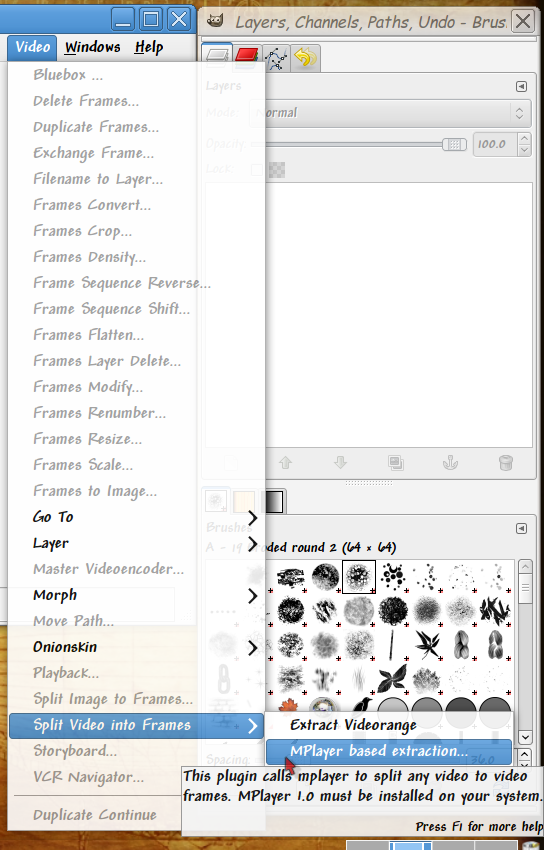
In GIMP I go to the Movie Menu and choose "Mplayer based extraction"
Image

that's because at least on my system the "Extract videorange" doesn't work. I get the same load error messages you got.

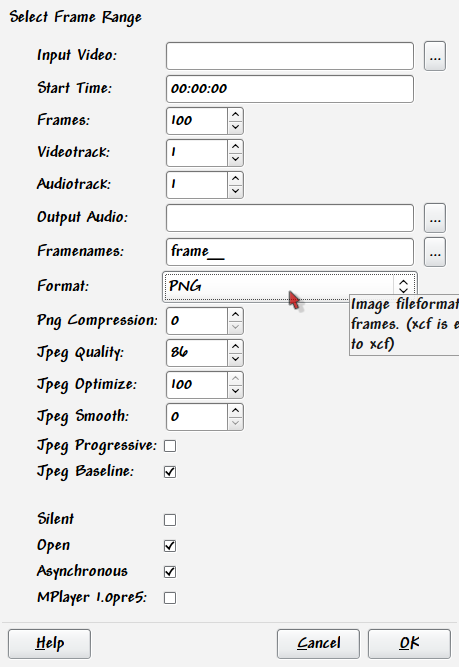
this brings up this window:
Image

add your video file from the 1st field.

you will have to calculate how many frames there are in your video if you wish all your frames rendered. If your video is 2 minutes long and it's 25 frames per second that's 1500 frames.

choose your file name and the location of your rendered files.

then choose the format: I prefer png if I will be doing processing in another program.

_________________
Ubuntu 24.04.1, Kernel i686, 6.8.0-52-generic
python3 v3.12.3 ----- GIMP - ver 2.10.38


Last edited by cecilia on Sun Mar 03, 2013 11:11 pm, edited 1 time in total.

Top
 Post subject: Re: GAP not working, cannot open any movie files
PostPosted: Fri Mar 01, 2013 12:18 pm  (#5) 
Offline
GimpChat Member

Joined: Sep 13, 2011
Posts: 77
Camstudio by default creates AVI files not WMV. Also GIMP GAP's video extraction works in many containers and encoders for example MPEG-PS container with MPEG 1 encoder. It has worked also with the AVI container with camstudio lossless codec, microsoft Video 1, Xvid Mpeg 4 and MSU screen capture endocer.

I used the GIMP GAP for GIMP 2.6 and also GIMP GAP for GIMP 2.8.

_________________
Using Windows Vista 32 bits, 3GBRAM, Intel core 2 Quad Q6600 2.4Ghz, Radeon HD 3450 graphics card, Lambda Lexicon USB audio interface.


Top
 Post subject: Re: GAP not working, cannot open any movie files
PostPosted: Fri May 04, 2018 8:15 pm  (#6) 
Offline
New Member

Joined: May 04, 2018
Posts: 1
I had a similar problem. I got the error message: Execution error for procedure 'gimp-file-load': Unknown file type
when trying to open the video file in "Extract Videorange".
The weird thing was that I could open older video files. So what I tried was exchanging video files to the respective folders and it resulted that in the case of the longer folder direction path the video could not be opened. So then I put the video files in lower-level folders and the problem was solved, that is GIMP started to open my video files without any problem!

Hope this can help people en some cases, I am not sure if it solves all these error cases but it is worth the try!

:yes


Top
Post new topic Reply to topic  [ 6 posts ] 

All times are UTC - 5 hours [ DST ]


* Login  


Powered by phpBB3 © phpBB Group