It is currently Sat Jun 27, 2026 2:04 am


All times are UTC - 5 hours [ DST ]


Post new topic Reply to topic  [ 8 posts ] 
Author Message
 Post subject: how to unGimp a .jpg :)
PostPosted: Wed Mar 06, 2013 2:53 pm  (#1) 
Offline
New Member

Joined: Mar 06, 2013
Posts: 2
GIMP Version: 2.6.11
Operating System: Windows
OS Version: XP - SP3
GIMP Experience: Beginner Level


Hi,

New to Gimp.
I scanned some old photos with a Pixma 3150. Some were very dark and i corrected them with Gimp 2.8.4. - primarily colors ->auto->white balance.
I exported those as .jpgs.
Now when I browse my photos on Sony smart TV - accessing a NAS drive - the photos I adjusted will not display, while those scanned and unadjusted display perfectly. All are .jpg but it seem like Gimp exported to a slightly different standard.
Question: How can I reverse the action ? or do i have to rescan all of the adjusted ones again ?

TIA

DenisM


Share on Facebook Share on Twitter Share on Orkut Share on Digg Share on MySpace Share on Delicious Share on Technorati
Top
 Post subject: Re: how to unGimp a .jpg :)
PostPosted: Wed Mar 06, 2013 3:24 pm  (#2) 
Offline
Script Coder
User avatar

Joined: Jun 22, 2010
Posts: 1171
Location: Here and there
If I had to guess I'd say it's because since 2.8, GIMP has defaulted to saving JPGs as progressive. So I'd suggest loading your adjusted images into GIMP then re-exporting them, but check the Advanced Options and de-select Progressive:

Attachment:
Untitled.png
Untitled.png [ 9.52 KiB | Viewed 3061 times ]


Top
 Post subject: Re: how to unGimp a .jpg :)
PostPosted: Wed Mar 06, 2013 8:27 pm  (#3) 
Offline
GimpChat Member
User avatar

Joined: Apr 30, 2010
Posts: 1937
Location: Missouri
jpgs are really not a good format to store anything important in. Tif or Png would be better and I never manipulate my originals.

_________________
Image
The last time I kept an open mind,
my brain fell out and the dog grabbed it.
Now it's full of dirt, toothmarks, and dog slobber.
No more open minds or dogs for me.


Top
 Post subject: Re: how to unGimp a .jpg :)
PostPosted: Wed Mar 06, 2013 9:02 pm  (#4) 
Offline
GimpChat Member

Joined: Feb 13, 2013
Posts: 86
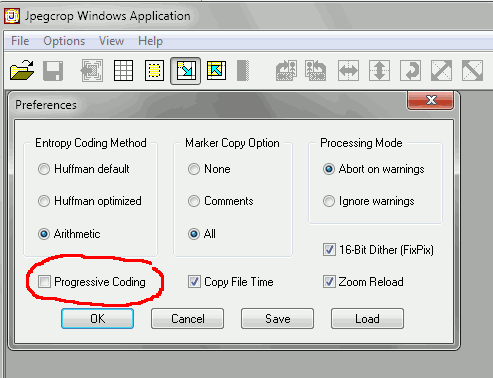
The best way to convert these files is to use JPEGcrop http://sylvana.net/jpegcrop/.

It is a windows program that can do limited adjustments to a JPEG file without having to decode-recode the jpeg, so no quality is lost.

Image

Make sure the progressive coding is left unchecked in the preferences. Then all you need to do is load and save your JPEG and it will remove the progressive coding without re-compressing the image.


Top
 Post subject: Re: how to unGimp a .jpg :)
PostPosted: Wed Mar 06, 2013 9:22 pm  (#5) 
Offline
GimpChat Member
User avatar

Joined: May 26, 2012
Posts: 342
Location: France
Iain wrote:
without re-compressing the image.

I never thought about that, so when you import then export a jpg in Gimp (even with 'use settings from original image') you're forced to re-compress the jpg ?


Top
 Post subject: Re: how to unGimp a .jpg :)
PostPosted: Wed Mar 06, 2013 9:30 pm  (#6) 
Offline
GimpChat Member

Joined: Feb 13, 2013
Posts: 86
anarkhya wrote:
Iain wrote:
without re-compressing the image.

I never thought about that, so when you import then export a jpg in Gimp (even with 'use settings from original image') you're forced to re-compress the jpg ?


Yes, the original settings are the original compression settings, that is, when you save the image it gets compressed with the same settings you used to save the original JPG.

All but a few specialised programs recompress a JPEG each time you save it as a JPEG, which degrades quality.


Top
 Post subject: Re: how to unGimp a .jpg :)
PostPosted: Sat Mar 09, 2013 3:05 pm  (#7) 
Offline
New Member

Joined: Mar 06, 2013
Posts: 2
Thanks for such helpful responses :)

Denis


Top
 Post subject: Re: how to unGimp a .jpg :)
PostPosted: Sat Mar 09, 2013 5:29 pm  (#8) 
Offline
GimpChat Member
User avatar

Joined: May 26, 2012
Posts: 342
Location: France
Iain wrote:
All but a few specialised programs recompress a JPEG each time you save it as a JPEG, which degrades quality.


Good to know, thanks.


Top
Post new topic Reply to topic  [ 8 posts ] 

All times are UTC - 5 hours [ DST ]


* Login  


Powered by phpBB3 © phpBB Group