It is currently Thu Jun 11, 2026 10:12 am


All times are UTC - 5 hours [ DST ]


Post new topic Reply to topic  [ 74 posts ]  Go to page Previous  1, 2, 3, 4  Next
Author Message
 Post subject: Re: Water Drops Script Rel 4
PostPosted: Thu Sep 20, 2012 6:44 pm  (#41) 
Offline
GimpChat Member
User avatar

Joined: Apr 07, 2010
Posts: 14182
COOL, makes me thirsty.

_________________
Image


Top
 Post subject: Re: Water Drops Script Rel 4
PostPosted: Thu Mar 21, 2013 9:25 am  (#42) 
Offline
GimpChat Member
User avatar

Joined: Apr 07, 2010
Posts: 14182
alc, that is great. luv it.

_________________
Image


Top
 Post subject: Re: Water Drops Script Rel 4
PostPosted: Thu Mar 21, 2013 3:39 pm  (#43) 
Offline
GimpChat Member
User avatar

Joined: Apr 07, 2010
Posts: 14182
Here is a nice tutorial by mahvin for you to do. I did this one a couple years ago and its cool.[/align][/b]
http://www.mahvin.com/2009/09/gimp-disp ... ction.html
Have you ever used this script for animation?

Image


Attachments:
's script pack.7z [3.16 KiB]
Downloaded 209 times

_________________
Image
Top
 Post subject: Re: Water Drops Script Rel 4
PostPosted: Fri Mar 22, 2013 6:48 am  (#44) 
Offline
GimpChat Member
User avatar

Joined: Apr 07, 2010
Posts: 14182
you are welcome...In my Gimp, they are under filters > Will's Script Pack.

_________________
Image


Top
 Post subject: Re: Water Drops Script Rel 4
PostPosted: Fri Mar 22, 2013 12:23 pm  (#45) 
Offline
GimpChat Member
User avatar

Joined: May 27, 2011
Posts: 707
Graechan

I can't find the filter,i don't know if it is made for2.6


Top
 Post subject: Re: Water Drops Script Rel 4
PostPosted: Fri Mar 22, 2013 12:28 pm  (#46) 
Offline
GimpChat Member
User avatar

Joined: Dec 22, 2011
Posts: 399
Thank you :)

_________________
Image


Top
 Post subject: Re: Water Drops Script Rel 4
PostPosted: Fri Mar 22, 2013 6:13 pm  (#47) 
Offline
GimpChat Member
User avatar

Joined: May 27, 2011
Posts: 707
gramg
That's the one i D/l into my scrip folder.but I can't find it when I open Gimp.


Top
 Post subject: Re: Water Drops Script Rel 4
PostPosted: Fri Mar 22, 2013 8:47 pm  (#48) 
Offline
GimpChat Member
User avatar

Joined: May 27, 2011
Posts: 707
gramg
I have scriptfu,but I still can't find it anywhere.
In logo and alpha logo I have fur and dymo label maker along with other scripts,but
no water
:(


Top
 Post subject: Re: Water Drops Script Rel 4
PostPosted: Fri Mar 22, 2013 10:18 pm  (#49) 
Offline
Script Coder
User avatar

Joined: Feb 18, 2011
Posts: 4826
Location: Bendigo Vic. Australia
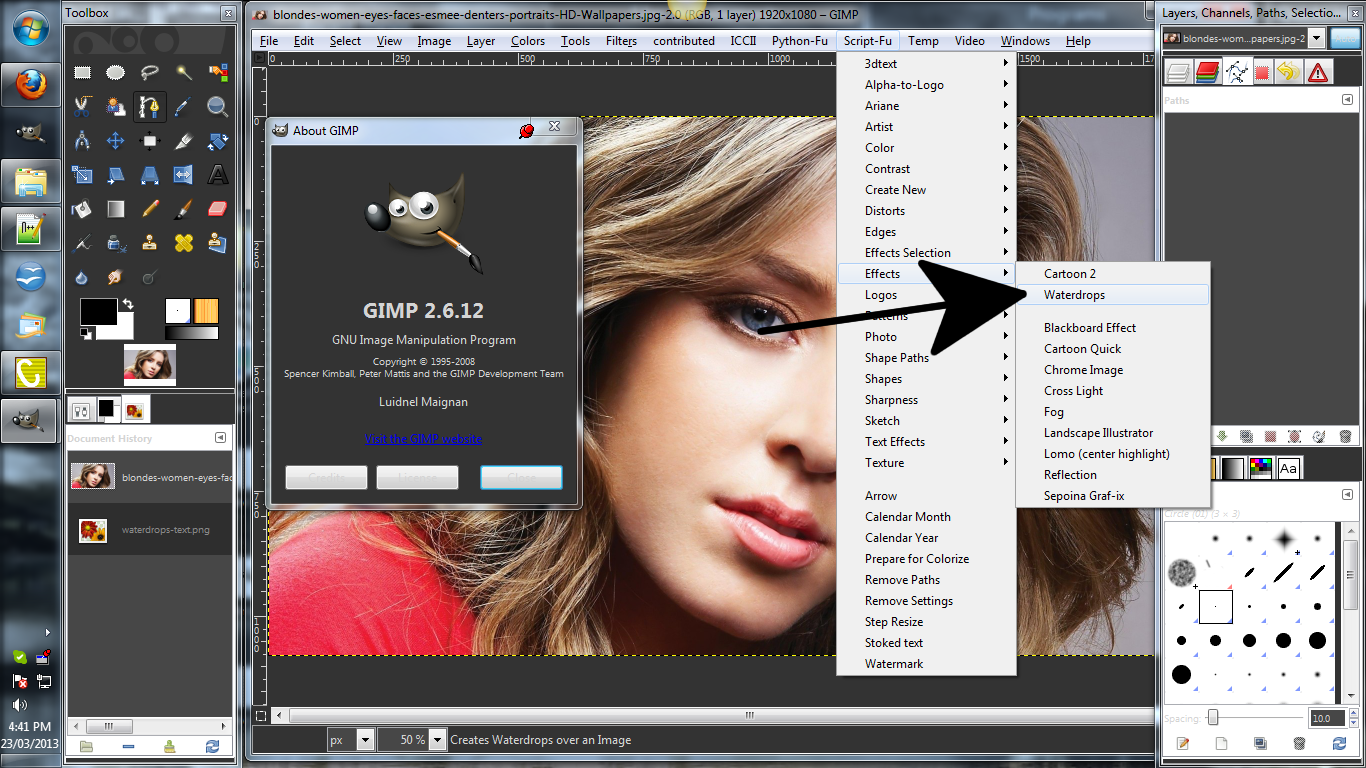
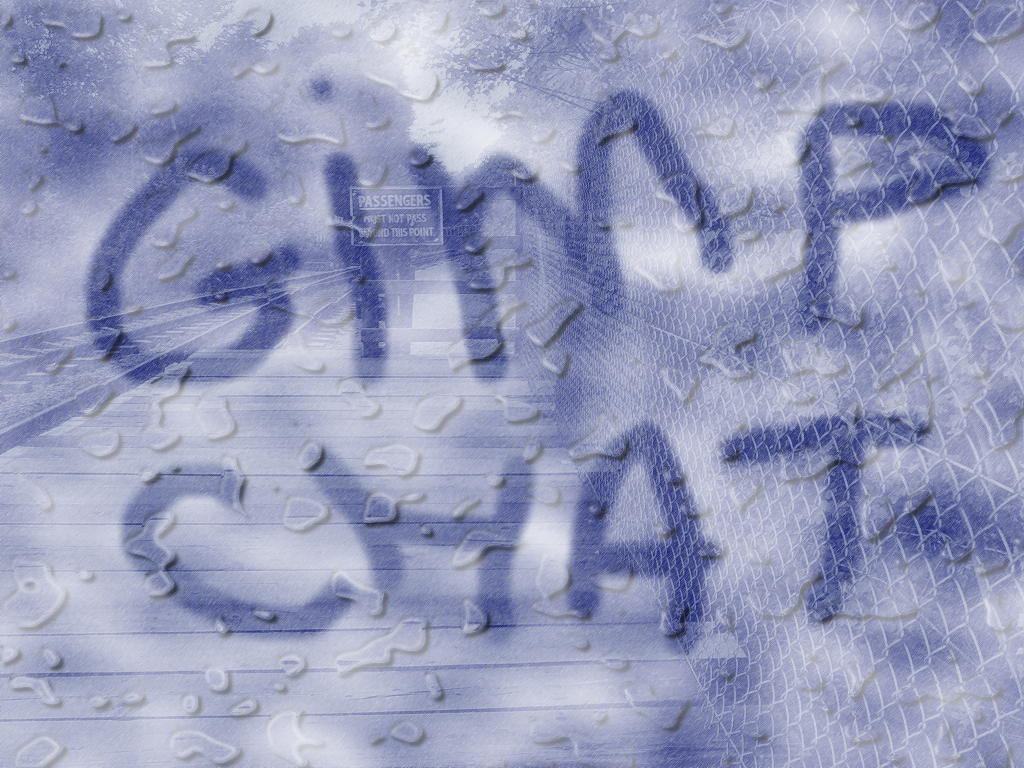
If your wanting to do something like this↓ use Waterdrops from Script-fu/Effects on an open image

Image

_________________
Image
No matter how much you push the envelope, it'll still be stationery.


Top
 Post subject: Re: Water Drops Script Rel 4
PostPosted: Fri Mar 22, 2013 11:58 pm  (#50) 
pirate541 wrote:
Graechan

I can't find the filter,i don't know if it is made for2.6


Hi pirate541,
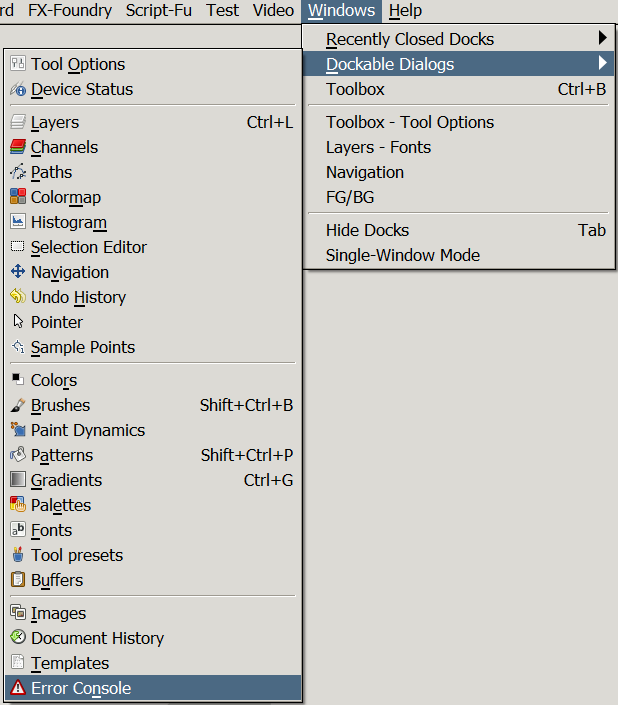
When you download and save a new script, you need to either restart Gimp, or refresh the scripts (Filters->Script-Fu->Refresh Scripts).
Then open the error console to make sure there are no entries relating to script loading errors.
Image
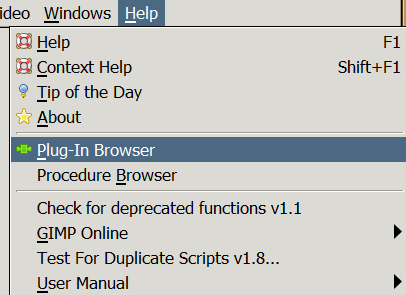
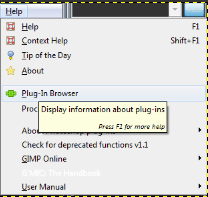
If clear of errors, then open the Plug-In Browser to find which menu it is under.
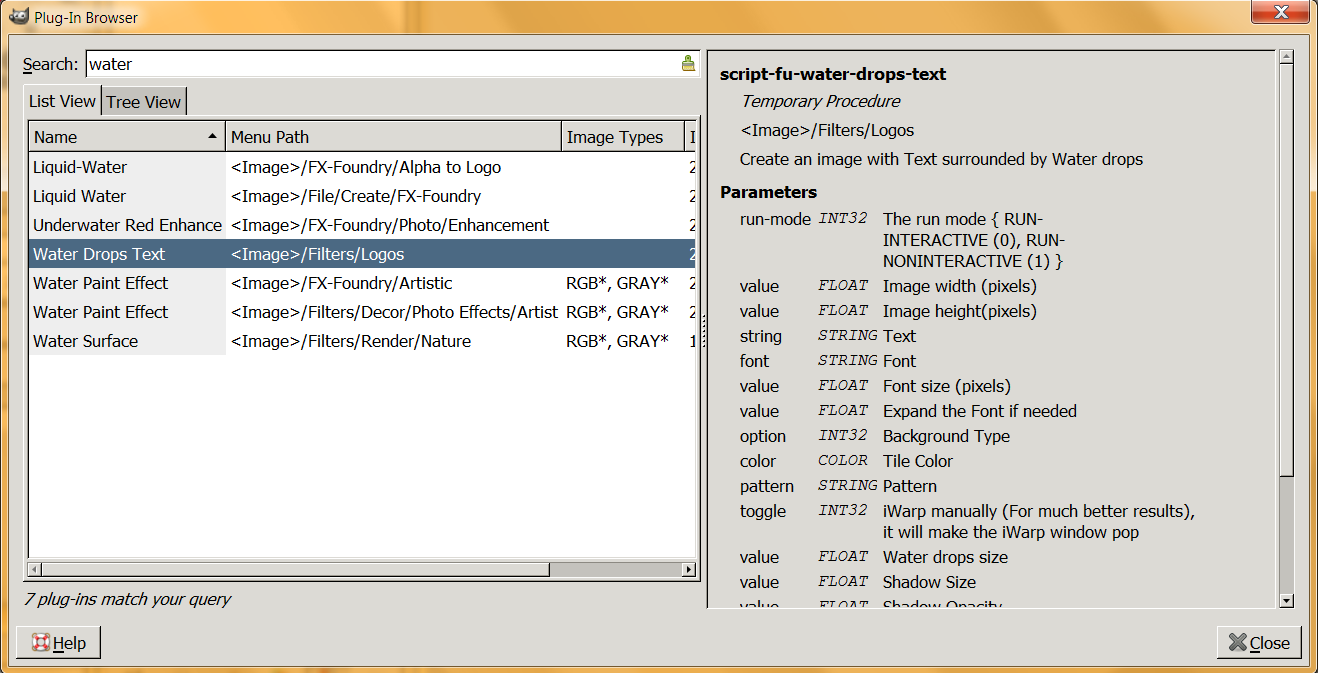
Image
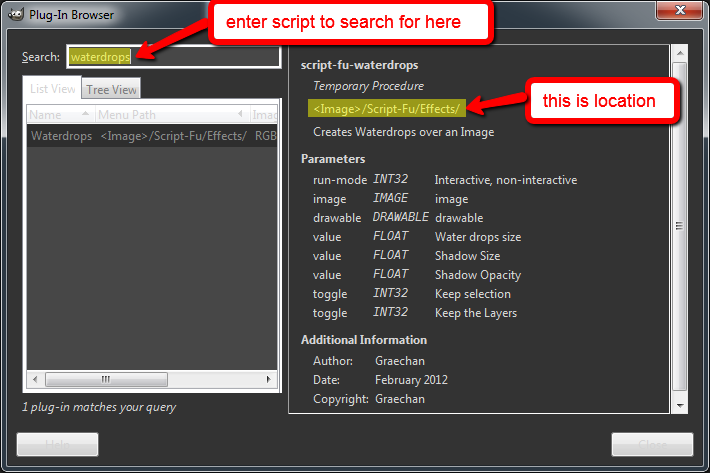
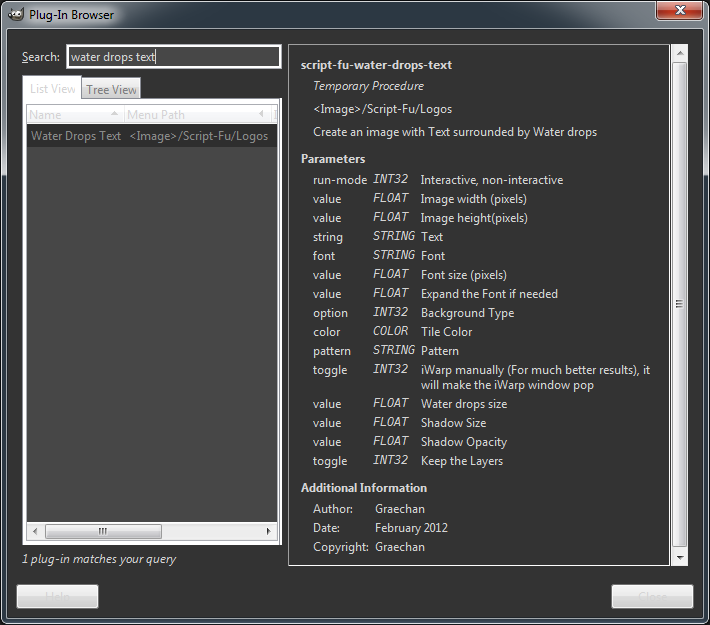
Then type what you think it is called, in this case I typed 'Water', but as you can see by the results I don't have this particular Water Drops filter, but you get the idea...
Image

Hope this helps you find the right menu for any scripts in the future.
fluffybunny


Top
 Post subject: Re: Water Drops Script Rel 4
PostPosted: Sat Mar 23, 2013 1:29 am  (#51) 
Offline
Script Coder
User avatar

Joined: Feb 18, 2011
Posts: 4826
Location: Bendigo Vic. Australia
Fluffybunny the script was written before 2.8 was released so I think it will work in 2.6 and I do not know why you cannot find it

Image

Image

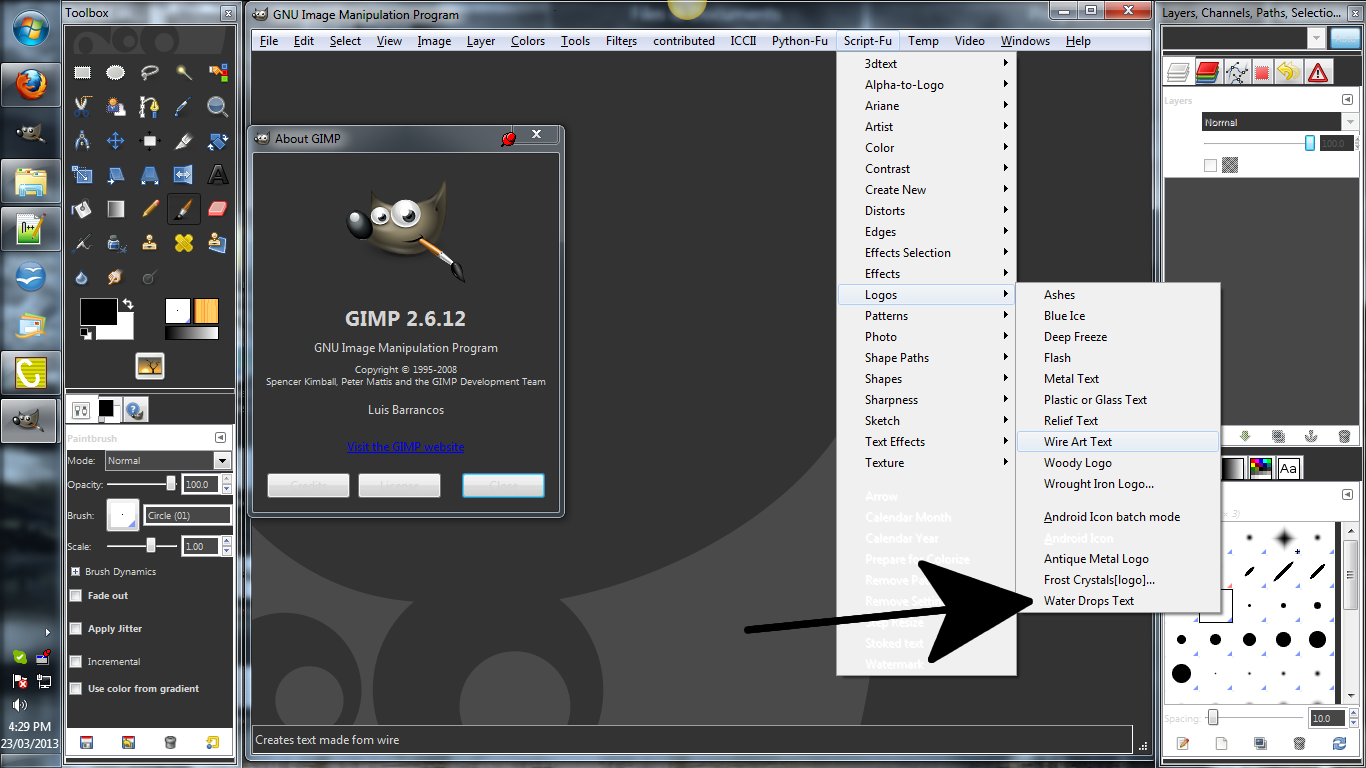
if you downloaded the script from the 1st page or GimpScripts and installed in your scripts folder then There is something wrong and maybe you should go to the help menu and open your plug-in browser

Image

then type in the script name as below

Image

Image

_________________
Image
No matter how much you push the envelope, it'll still be stationery.


Top
 Post subject: Re: Water Drops Script Rel 4
PostPosted: Sat Mar 23, 2013 7:28 am  (#52) 
Offline
GimpChat Member

Joined: Aug 27, 2010
Posts: 491
Need more time to play with this ...

Image


Top
 Post subject: Re: Water Drops Script Rel 4
PostPosted: Sat Mar 23, 2013 7:55 am  (#53) 
Offline
GimpChat Member
User avatar

Joined: Jan 20, 2013
Posts: 14831
Location: roma, italy
Hi.
Just started playing on Effects>Waterdrops; in my environment it seems that the parameter water drops size is not working as expected, the drops are always about of the same size (I range from 10 to 100), only the number of them is changing; what's wrong in my test? (my goal was to apply small drops on a face...)

_________________
"Where am I ?"


Top
 Post subject: Re: Water Drops Script Rel 4
PostPosted: Sat Mar 23, 2013 5:35 pm  (#54) 
Offline
Script Coder
User avatar

Joined: Feb 18, 2011
Posts: 4826
Location: Bendigo Vic. Australia
Scale image size up first then apply drops and scale back to original size

_________________
Image
No matter how much you push the envelope, it'll still be stationery.


Top
 Post subject: Re: Water Drops Script Rel 4
PostPosted: Sun Mar 24, 2013 4:22 am  (#55) 
Offline
GimpChat Member
User avatar

Joined: Jan 20, 2013
Posts: 14831
Location: roma, italy
OK Graechan, thanks.
But a simple question stays alive: what's the reason for the description of that parameter? Better to change it into "Number of Water drops"

_________________
"Where am I ?"


Top
 Post subject: Re: Water Drops Script Rel 4
PostPosted: Sun Mar 24, 2013 4:26 am  (#56) 
Offline
GimpChat Member
User avatar

Joined: Jan 20, 2013
Posts: 14831
Location: roma, italy
Post Scriptum:
better to eliminate the parameter, I made another try putting the "size" to 1 and I got the same number of drops, so it is not even the number of drops....
Another comment: in my environment (32 bits) I cannot increase an already big (width around 1500) image to -let say- width=4500, without having a system crash (limit of memory); DURING THE PROCESS BEFORE THE CRASH I ALSO NOTICED THAT THE SIZE OF EACH DROP SEEMED TO INCREASE (?)
Also, another comment: if you put that parameter to the maximum you get a strange lighting effect...
Sorry for all this criticism, so let me say at the end: used as proposed, without playing around on the parameters, the script works great.

_________________
"Where am I ?"


Top
 Post subject: Re: Water Drops Script Rel 4
PostPosted: Sun Mar 24, 2013 3:33 pm  (#57) 
Offline
GimpChat Member
User avatar

Joined: Aug 30, 2012
Posts: 2174
So couldn't resist having a play

Image

_________________
Image


Top
 Post subject: Re: Water Drops Script Rel 4
PostPosted: Sun Mar 24, 2013 4:44 pm  (#58) 
Offline
GimpChat Member
User avatar

Joined: May 27, 2011
Posts: 707
Thank You all for Your help
Ihad done all You all said,but it still didn't work.so I open my script file and for some weird
reason there was a nameless folder sitting there.I opened it and the script was in it.moved the script from the folder and now it works.
Thank You again


Top
 Post subject: Re: Water Drops Script Rel 4
PostPosted: Sun Mar 24, 2013 4:56 pm  (#59) 
Offline
GimpChat Member
User avatar

Joined: Aug 16, 2012
Posts: 4271
Location: Göteborg, Sweden
he4rty: that's fun! were you bored waiting for the commuter train?

_________________


Top
 Post subject: Re: Water Drops Script Rel 4
PostPosted: Sat Jul 18, 2015 9:31 am  (#60) 
Offline
Administrator
User avatar

Joined: Aug 10, 2012
Posts: 14017
Location: Native to NYC living in Arizona, Gimp 2.8 - 3.0, Win 11 PC.
With the addition of the new G'MIC Drop Water filter. I wanted to run your Water Drops Script Rel 4 on an image to compare the outcomes.

I received this error message while attempting to use the script on an image. I think It seems to be calling for a plug-in that I don't have.

Here's a screenshot of the error message and the settings used.
Attachment:
Screenshot (22).png
Screenshot (22).png [ 532.57 KiB | Viewed 1925 times ]


Here's the XCF of the image.
Attachment:
paisley & vine.xcf [562 KiB]
Downloaded 155 times

_________________
Image
"A wise man learns more from a foolish question than a fool can learn from a wise answer"
Image


Top
Post new topic Reply to topic  [ 74 posts ]  Go to page Previous  1, 2, 3, 4  Next

All times are UTC - 5 hours [ DST ]


* Login  


Powered by phpBB3 © phpBB Group