It is currently Wed Sep 16, 2026 8:44 am


All times are UTC - 5 hours [ DST ]


Post new topic Reply to topic  [ 3 posts ] 
Author Message
 Post subject: Gimp font size
PostPosted: Sun Dec 12, 2010 4:48 pm  (#1) 
Offline
GimpChat Member
User avatar

Joined: Nov 22, 2010
Posts: 42
How can i make the font bigger in gimp? because when i install fonts, and then click the fonts, then choose my font, then select use selected font, it shows up what looks to be around 14 or 16 px font, can someone help me out?
Thanks in advance

_________________
Image


Share on Facebook Share on Twitter Share on Orkut Share on Digg Share on MySpace Share on Delicious Share on Technorati
Top
 Post subject: Re: Gimp font size
PostPosted: Sun Dec 12, 2010 4:54 pm  (#2) 
Offline
GimpChat Member
User avatar

Joined: Apr 07, 2010
Posts: 14182
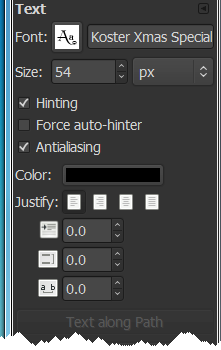
on the tool box, when you have a font selected, you will see the name of your font then below it you will see the size, use the up and down arrows to make them the size of your choice.
Image

Just run your mouse over the other images and it will say what they are. line spacing, text spacing etc....

_________________
Image


Top
 Post subject: Re: Gimp font size
PostPosted: Sun Dec 12, 2010 7:50 pm  (#3) 
Offline
GimpChat Member
User avatar

Joined: Nov 22, 2010
Posts: 42
oops haha, how dumb am i? my bad....

_________________
Image


Top
Post new topic Reply to topic  [ 3 posts ] 

All times are UTC - 5 hours [ DST ]


* Login  


Powered by phpBB3 © phpBB Group