It is currently Mon Jun 15, 2026 6:05 pm


All times are UTC - 5 hours [ DST ]


Post new topic Reply to topic  [ 3 posts ] 
Author Message
 Post subject: Script-fu: Offset Path
PostPosted: Tue Apr 23, 2013 10:02 pm  (#1) 
Offline
Script Coder
User avatar

Joined: Jul 14, 2010
Posts: 697
After playing around with ways to grow corners and keep them sharp I decided to try something with paths.

I wrote this initial script: http://www.silent9.com/incoming/scripts/offset_path.scm

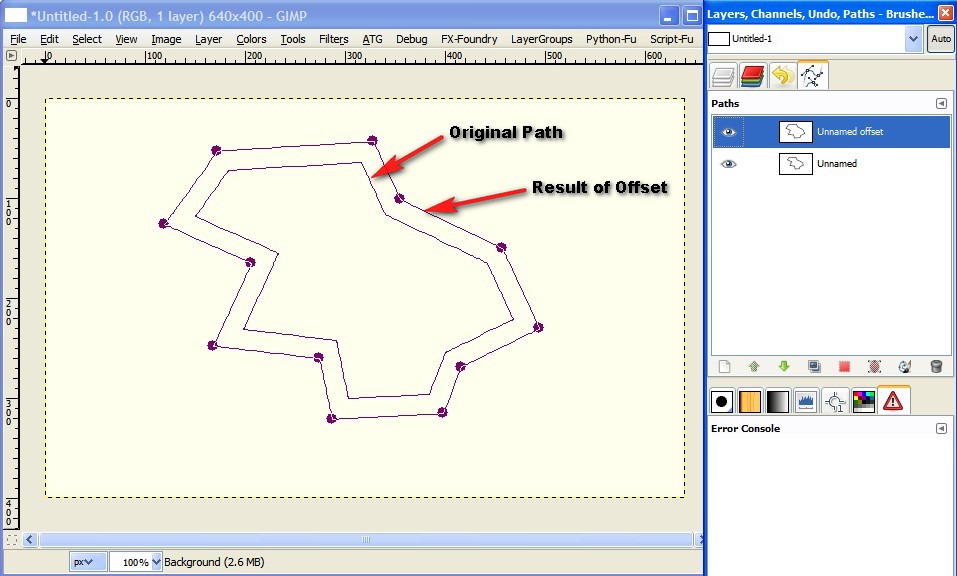
Once installed, right click on a path (only works with the path nodes - so curves don't work) in the paths dialog, and select "Offset Path..."

It will create a new path, with all the nodes offset in a way that the new path lines are all parallel and offset those of the original:
Attachment:
2013-04-23_224430.jpg
2013-04-23_224430.jpg [ 96.26 KiB | Viewed 3446 times ]


It will do some funky things (like invert path segments) if the offset calculation crosses itself.

-Rob A>

_________________
Image
Fantasy Cartography and Mapping by RobA


Share on Facebook Share on Twitter Share on Orkut Share on Digg Share on MySpace Share on Delicious Share on Technorati
Top
 Post subject: Re: Script-fu: Offset Path
PostPosted: Tue Apr 23, 2013 11:29 pm  (#2) 
Offline
Script Coder
User avatar

Joined: Feb 18, 2011
Posts: 4826
Location: Bendigo Vic. Australia
RobA while your playing with paths could you do a 'scale path script' :)

Perhaps something using gimp-vectors-stroke-scale

pleeeze I've been trying to but without success

I was using the wrong tool the perspective tool did the job

original text at bottom

Image

_________________
Image
No matter how much you push the envelope, it'll still be stationery.


Top
 Post subject: Re: Script-fu: Offset Path
PostPosted: Wed Apr 24, 2013 12:52 am  (#3) 
Offline
Global Moderator
User avatar

Joined: May 16, 2010
Posts: 16028
Thanks Rob!

_________________
Image


Top
Post new topic Reply to topic  [ 3 posts ] 

All times are UTC - 5 hours [ DST ]


* Login  


Powered by phpBB3 © phpBB Group