It is currently Thu Sep 17, 2026 6:44 pm


All times are UTC - 5 hours [ DST ]


Post new topic Reply to topic  [ 13 posts ] 
Author Message
 Post subject: Jelly Text Effect
PostPosted: Mon Dec 20, 2010 4:25 pm  (#1) 
Offline
GimpChat Member

Joined: Dec 20, 2010
Posts: 49
Hi

I'm new here and I would like to create a jelly text effect. I have tried to follow a photoshop tutorial but it is difficult with the different layouts.

Any help would be appreciated. :)

A


Share on Facebook Share on Twitter Share on Orkut Share on Digg Share on MySpace Share on Delicious Share on Technorati
Top
 Post subject: Re: Jelly Text Effect
PostPosted: Mon Dec 20, 2010 4:38 pm  (#2) 
Offline
Retired Staff
User avatar

Joined: May 22, 2008
Posts: 6946
Location: Somewhere in GIMP
AeonTown wrote:
I would like to create a jelly text effect. I have tried to follow a photoshop tutorial but it is difficult

:welcome to Gimp Chat AeonTown. If you would post a link to the PhotoShop tutorial there are people in here that could probably translate it into a GIMP tutorial for you.


Check out Rod's Plastic Text tutorial here. It looks like it has everything you need in it for a jelly-like effect. :mrgreen:

_________________
Image
World War IV will be fought with sticks and stones. - Albert Einstein


Top
 Post subject: Re: Jelly Text Effect
PostPosted: Mon Dec 20, 2010 5:03 pm  (#3) 
Offline
GimpChat Member

Joined: Dec 20, 2010
Posts: 49
Oregonian wrote:
If you would post a link to the PhotoShop tutorial there are people in here that could probably translate it into a GIMP tutorial for you.


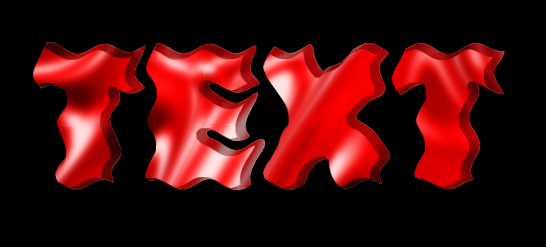
Thx for replying. Link attached: http://www.webdesign.org/photoshop/text ... 13467.html. One other problem with this tutorial is that it doesn't make it clear what layer I should be working on and I get confused. I think it assumes you are an experienced GIMP user.

Meanwhile I will check out that other tutorial.

Thanks again.


Top
 Post subject: Re: Jelly Text Effect
PostPosted: Mon Dec 20, 2010 6:47 pm  (#4) 
Offline
GimpChat Member
User avatar

Joined: Oct 06, 2010
Posts: 4050
I'll be working on this tutorial. I simplified it a great deal, to cut out more than half the steps from the original tutorial. Let me know if you like this result:

Image

_________________
"In order to attain the impossible, one must attempt the absurd."
~ Miguel de Cervantes


Top
 Post subject: Re: Jelly Text Effect
PostPosted: Mon Dec 20, 2010 7:08 pm  (#5) 
Offline
GimpChat Member
User avatar

Joined: Apr 07, 2010
Posts: 14182
I love it... looks like strawberry Jell-o very nice mav.

_________________
Image


Top
 Post subject: Re: Jelly Text Effect
PostPosted: Mon Dec 20, 2010 7:14 pm  (#6) 
Offline
GimpChat Member

Joined: Dec 20, 2010
Posts: 49
I love it. Thx mahvin.


Top
 Post subject: Re: Jelly Text Effect
PostPosted: Mon Dec 20, 2010 8:46 pm  (#7) 
Offline
GimpChat Member
User avatar

Joined: Oct 06, 2010
Posts: 4050
Tutorial is up. :)

_________________
"In order to attain the impossible, one must attempt the absurd."
~ Miguel de Cervantes


Top
 Post subject: Re: Jelly Text Effect
PostPosted: Mon Dec 20, 2010 11:18 pm  (#8) 
Offline
GimpChat Member
User avatar

Joined: Sep 24, 2010
Posts: 12845
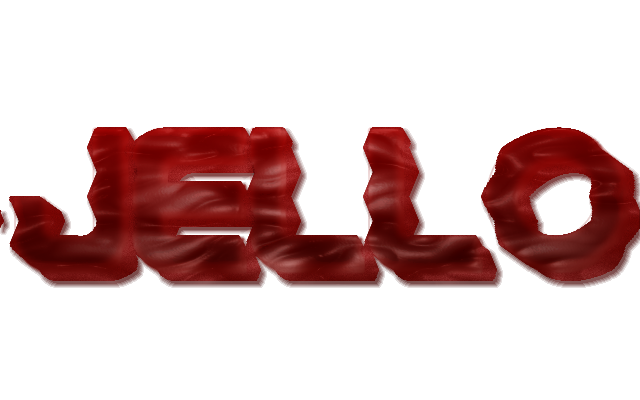
Yes; I cheated. I used Eyecandy3's Glass filter (can get Eyecandy3 for free here: http://pircnet.com/downloads.html), but it still took 90% of GIMP stuff to complete (some help Glossy Stroke 3D, so you will have to have Python installed too even though the effect I chose is quite subtle). :)


Attachments:
mc_jello.png
mc_jello.png [ 420.43 KiB | Viewed 4167 times ]

_________________
Lyle

Psalm 109:8

Image
Top
 Post subject: Re: Jelly Text Effect
PostPosted: Tue Dec 21, 2010 12:16 am  (#9) 
Offline
Global Moderator
User avatar

Joined: May 16, 2010
Posts: 16173
Oh i wanna see it animated now! (jiggle..jiggle) =)

_________________
Image


Top
 Post subject: Re: Jelly Text Effect
PostPosted: Tue Dec 21, 2010 1:14 am  (#10) 
Offline
GimpChat Member
User avatar

Joined: Apr 30, 2010
Posts: 1937
Location: Missouri
I know it's kind of cheating but I thought it worth mentioning that Inkscape has built in filters to make jelly effects. I also think anyone who has Gimp should also have Inkscape.

_________________
Image
The last time I kept an open mind,
my brain fell out and the dog grabbed it.
Now it's full of dirt, toothmarks, and dog slobber.
No more open minds or dogs for me.


Top
 Post subject: Re: Jelly Text Effect
PostPosted: Tue Dec 21, 2010 1:51 am  (#11) 
Offline
GimpChat Member
User avatar

Joined: Sep 24, 2010
Posts: 12845
Looks cool; see nothing wrong with cheating and I agree with you about Inkscape. Don't use it that often, but do use it enough to keep it. :)

_________________
Lyle

Psalm 109:8

Image


Top
 Post subject: Re: Jelly Text Effect
PostPosted: Tue Dec 21, 2010 1:58 am  (#12) 
Offline
GimpChat Member
User avatar

Joined: Apr 30, 2010
Posts: 1937
Location: Missouri
I paid for Xara Extreme then started using Inkscape and found that it does a lot of things much better. When I first saw it I half halfheartedly fooled around with it, now I use it a lot. I'm completely sold on it. Gimp is great for bitmaps but it's not very good for vectors. When a person has both gimp and inkscape they have all the bases covered. I tried Raven, the online vector editor by Aviary but not only do I not like online applications but it just didn't work all that well.

_________________
Image
The last time I kept an open mind,
my brain fell out and the dog grabbed it.
Now it's full of dirt, toothmarks, and dog slobber.
No more open minds or dogs for me.


Top
 Post subject: Re: Jelly Text Effect
PostPosted: Tue Dec 21, 2010 2:00 am  (#13) 
Offline
Global Moderator
User avatar

Joined: May 16, 2010
Posts: 16173
Here is my attempt using the molten material python script.
Image

woops got a little artifact in there..oh well


Attachments:
File comment: Jello-Tut xcf file
jello-tut.xcf [1.88 MiB]
Downloaded 120 times

_________________
Image
Top
Post new topic Reply to topic  [ 13 posts ] 

All times are UTC - 5 hours [ DST ]


* Login  


Powered by phpBB3 © phpBB Group