It is currently Tue Nov 03, 2026 6:10 am


All times are UTC - 5 hours [ DST ]


Post new topic Reply to topic  [ 112 posts ]  Go to page Previous  1, 2, 3, 4, 5, 6  Next
Author Message
 Post subject: Re: GC Shadow V0.6
PostPosted: Fri May 31, 2013 6:51 am  (#61) 
Offline
GimpChat Founder
User avatar

Joined: May 22, 2008
Posts: 5241
Location: Gimpville
@Graechan - Looks good! That should do it for maintaining 2.6 compatibility in a single script. :hi5

@Saulgoode - Thanks for the link and the explanation. I've bookmarked that site and will make sure it's included in the scripting resource sticky.

I'll start incorporating these changes into the script this evening and we will get this one buttoned up. I think I'll dump the feather (even though it does produce a slightly different shadow effect) so I can free up some more menu space for gradient fill support. Creating a shadow or glow from a gradient produces a cool effect and will come in handy.

Did y'all notice that I improved the code tags? I made the font more visible, added a selection tag at the top and set the code to scroll, instead of filling up the whole page. :bigthup

_________________
“If you reach for the stars, you just might land on a decently sized hill.” - Stuart Hill


Top
 Post subject: Re: GC Shadow V0.6
PostPosted: Fri May 31, 2013 6:54 am  (#62) 
Offline
GimpChat Member
User avatar

Joined: Apr 07, 2010
Posts: 14182
Great...nice job

_________________
Image


Top
 Post subject: Re: GC Shadow V0.6
PostPosted: Fri May 31, 2013 9:10 am  (#63) 
Offline
GimpChat Member
User avatar

Joined: Nov 09, 2011
Posts: 726
Thank you for this script!
I think with this script you can make everything related to shadows and low relief or relief effects. That is, a good alternative to replace "Drop Shadow" and "Xach Effect". If you can add blur effects, we could also do what "Xach Blurry thing" does: :)
http://www.gimpchat.com/viewtopic.php?f ... 5&start=10

It would also be good that the script can work directly on a selection. That is, you make a selection over an image (not in a new layer) and the script makes a drop shadow of the selected area. That's good for achieve relief or low relief effects.
Edit:
You forget the last thing I had said. You can work directly on a selected area only if the image has alpha channel. Maybe this should be applicable in an image without alpha channel too.
Edit 2:
Well, I'm confused about the possibility of working directly on a selection in a single layer. Eg
Image
If I have that text with white background in a single layer and I select the text using the "Select by color", with "Drop Shadow" or "Xach" I get a text shadow as shown in the image, and the shadow is placed in the top layer. If I apply GC Shadow, then I do not get the text shadow and the shadow layer is placed below.
For cases where it is applied inner shadows I think it is working well.

_________________
Image
Be patient, English is not my language.


Top
 Post subject: Re: GC Shadow V0.6
PostPosted: Fri May 31, 2013 3:44 pm  (#64) 
Offline
GimpChat Founder
User avatar

Joined: May 22, 2008
Posts: 5241
Location: Gimpville
YAFU, you've pointed out possibilities that I have yet to consider.

I now see that the only time GIMP's drop shadow script actually produces a full drop shadow below the image is when it automatically does an alpha to selection. If a selection exists, GIMP's drop shadow script knocks out the shadow inside the selection and places the layer on top. I see that as desirable behavior much of the time, but not all of the time.

For my workflow, most of the time, I would prefer to manually select an object (or objects) in a single layer transparent image and create a full drop shadow layer below that selection, which allows me to move around the drop shadow and position it like I want. I can't do that with GIMP's drop shadow script because it knocks out the selection. I have to move the object to its own layer to accomplish that, which is probably the optimum way to go but it forces me into extra steps that require extra time.

I now understand why GIMP's default drop shadow script operates the way does. It's because you cannot assume the manual selection is on a transparent layer.

Thanks for testing out the script YAFU. You have given me several things to consider here and left me scratching my head on how to proceed. My workflow is probably atypical and I'm coding for how I work.

I'm thinking now that I should probably just mirror the behavior of GIMP's drop shadow procedure, when it comes to manual selections, even though it's not necessarily conducive to my workflow.

Opinions?

_________________
“If you reach for the stars, you just might land on a decently sized hill.” - Stuart Hill


Top
 Post subject: Re: GC Shadow V0.6
PostPosted: Sat Jun 01, 2013 1:22 am  (#65) 
Offline
Script Coder
User avatar

Joined: Feb 18, 2011
Posts: 4826
Location: Bendigo Vic. Australia
here is the finished code I wrote and tested OK, I used a previous version to test

examples of use are below

(gc-shadow-add-layer img shadow-layer in-layer 0)= add above

(gc-shadow-add-layer img shadow-layer in-layer 1)= add below

I placed the routine at the top as a convenience if adding additional layers
; ------------
;| Change Log |
; ------------
; RC V0.1 - Initial Release Candidate
; RC V0.2 - Fix Gausian limits, Merge visible layers, Clear script's selections on exit
; RV V0.3 - Resize shadow layer to compensate for shadow offset, blur & feather
; Allow resize option, Correct shadow X & Y mininum limits
;
;
;
;
; GC Shadow Add layer Procedure
(define (gc-shadow-add-layer image newlayer oldlayer stack) ;stack=0 'above stack=1 ;below
(cond ((defined? 'gimp-image-get-item-position) ;test for 2.8 compatability
(gimp-image-insert-layer image newlayer (car (gimp-item-get-parent oldlayer))
(+ (car (gimp-image-get-layer-position image oldlayer)) stack)) ;For GIMP 2.8
)
(else
(gimp-image-add-layer image newlayer (+ (car (gimp-image-get-layer-position image oldlayer)) stack)) ;For GIMP 2.6
)
) ;end cond
) ;end add layer procedure

;
; Define GC Shadow Procedure
;
(define (script-fu-gc-shadow
img ; Image in which to apply procedure
in-layer ; Layer used to create shadowto
shadow-name ; Shadow Name
shadow-color ; Shadow Color
shadow-opacity ; Shadow Opacity
shadow-feather ; Feather Shadow Amount
shadow-blur-radiusx ; Blur Radius
shadow-blur-radiusy ; Blur Radius
shadow-blur-method ; Shadow Blur Method
shadow-offsetx ; Shadow Offset X
shadow-offsety ; Shadow Offset Y
inner-shadow-toggle ; Inner Shadow Toggle
glow-toggle ; Glow Toggle
merge-visible-layers ; Merge Visible layers Toggle
allow-resize ; Resize toggle
)
(let* (
(shadow-layer -1) ; Shadow layer
(saved-selection -1) ; Save Selection Variable
(new-image-height -1) ; New Image Height
(radiusx-value -1) ; Varibale to hold radiusx for resize
(radiusy-value -1) ; Varibale to hold radiusy for resize
(new-image-width -1) ; New Image Width
(selection-empty -1) ; Incoming Selection Flag
(layer-name (car (gimp-drawable-get-name in-layer)))
)

;
; Save current GIMP context
;
(gimp-context-push) ; Push context onto stack
(gimp-image-undo-group-start img) ; Begin undo group

(set! selection-empty (car (gimp-selection-is-empty img))) ; Incoming Selection Flag
(set! shadow-layer (car (gimp-layer-new-from-drawable in-layer img))) ; New Shadow Layer

(gc-shadow-add-layer img shadow-layer in-layer 0) ;add above

_________________

Image
No matter how much you push the envelope, it'll still be stationery.


Top
 Post subject: Re: GC Shadow V0.6
PostPosted: Sat Jun 01, 2013 1:45 am  (#66) 
Offline
GimpChat Founder
User avatar

Joined: May 22, 2008
Posts: 5241
Location: Gimpville
You insertion procedure looks good Graechan. Thanks! I see that it supports GIMP 2.6.x and above. :2thup

I'm still not crazy about knocking out the selection and placing the shadow on top, whenever I do a manual selection of an object, as GIMP's drop shadow script does. I guess I could add an option that toggles off that behavior. That way, I can handle all cases, such as being able to select an object in a transparent layer and have the script create a full drop shadow, placing it below the selected image, as it does now.

What do y'all think about that, as a solution? It would make the script more versatile than GIMP's default Drop Shadow script.

_________________
“If you reach for the stars, you just might land on a decently sized hill.” - Stuart Hill


Top
 Post subject: Re: GC Shadow V0.6
PostPosted: Sat Jun 01, 2013 2:29 am  (#67) 
Offline
Script Coder
User avatar

Joined: Feb 18, 2011
Posts: 4826
Location: Bendigo Vic. Australia
GnuTux by always having the shadows above allows you to run the script on RGB(with selection) and RGBA images, should also run on Gray and GrayA

I've never seen any reason to have a drop-shadow below the layer

_________________
Image
No matter how much you push the envelope, it'll still be stationery.


Top
 Post subject: Re: GC Shadow V0.6
PostPosted: Sat Jun 01, 2013 2:35 am  (#68) 
Offline
GimpChat Founder
User avatar

Joined: May 22, 2008
Posts: 5241
Location: Gimpville
Graechan wrote:
I've never seen any reason to have a drop-shadow below the layer

It's so you can move it around and position it anywhere you want, which is an essential part of my workflow. I never create a drop shadow above the selected layer. I find that way too limiting.

If you create text on a transparent layer and run GIMP's default Drop Shadow procedure, it will put a full drop shadow below the layer. I believe that is what most people do.

_________________
“If you reach for the stars, you just might land on a decently sized hill.” - Stuart Hill


Top
 Post subject: Re: GC Shadow V0.6
PostPosted: Sat Jun 01, 2013 3:13 am  (#69) 
Offline
Script Coder
User avatar

Joined: Feb 18, 2011
Posts: 4826
Location: Bendigo Vic. Australia
Gimps drop shadow does not even look for layer groups, as it uses the call (gimp-image-insert-layer image shadow-layer 0 -1)

and with the drop shadow on top your less limited to where you can move it as only the shadow is visible

for you it would mean ease of programming though the procedure I posted will put layers above or below the in-layer

I used an old version 3 copy of the script to test the procedure

_________________
Image
No matter how much you push the envelope, it'll still be stationery.


Top
 Post subject: Re: GC Shadow V0.6
PostPosted: Sat Jun 01, 2013 3:30 am  (#70) 
Offline
GimpChat Founder
User avatar

Joined: May 22, 2008
Posts: 5241
Location: Gimpville
I think you're missing my point, Graechan.

When you create a drop shadow, it is supposed to be below the image. That is the way GIMP's default Drop shadow procedure works, unless you manually select the object. if you manually select the object, then GIMP's Drop Shadow procedure has no choice but to knock out the selection in the Drop Shadow and place it above the selected layer. The reason the Drop Shadow procedure does that is because it has no way to know if the selection is on a transparent layer, so it has to assume that it isn't. Once the selection is knocked out of the drop shadow and it's placed on top, it can't really be moved. Well it can, but it won't look right.

Try it yourself and you'll see what I mean.

Create some text on a transparent layer and don't select anything. Then run Filters/Drop Shadow. GIMP will create a full shadow and place that shadow below the text layer. This is what you want because you can move the shadow layer to anywhere you like.

Now, do it again but this time, select the text before running Filters/Drop Shadow. GIMP will knock out the selection and place the shadow layer above the text layer. At that point, moving the shadow layer around gets you nothing because the selection has been knocked out.

_________________
“If you reach for the stars, you just might land on a decently sized hill.” - Stuart Hill


Top
 Post subject: Re: GC Shadow V0.6
PostPosted: Sat Jun 01, 2013 12:26 pm  (#71) 
Offline
GimpChat Member
User avatar

Joined: Nov 09, 2011
Posts: 726
With Drop Shadow you can shade images easily directly selecting parts with Fuzzy Select or Select by color tools:
Image
But you can get the same result with GC Shadow if after applying the filter does not remove the selection and choose the shadow layer and clean the area that was previously selected (I assume that's what you mean with "knock out the selection"?). Then move the shadow layer on top.
Then perhaps the GC Shadow could have two options, an option to put the shadow below and other for the top.
Sorry if I say something that you already know, I'm totally out of the technical discussions that you are having.

_________________
Image
Be patient, English is not my language.


Top
 Post subject: Re: GC Shadow V0.6
PostPosted: Sat Jun 01, 2013 12:47 pm  (#72) 
Offline
Retired Staff
User avatar

Joined: May 22, 2008
Posts: 6946
Location: Somewhere in GIMP
I have quite a few gradients that have a white strip in them and using them on text against a white background even with a drop shadow looks kind of blah. I think using the inner shadow along with the drop makes them quite spectacular. My favorite function in the GC-Shadow script is the inner shadow.
Drop shadow only
Image

Inner shadow with drop shadow
Image

_________________
Image
World War IV will be fought with sticks and stones. - Albert Einstein


Top
 Post subject: Re: GC Shadow V0.6
PostPosted: Sat Jun 01, 2013 12:56 pm  (#73) 
Offline
GimpChat Member
User avatar

Joined: Apr 07, 2010
Posts: 14182
Very nice, yes it does look a lot richer with inner shadow.

_________________
Image


Top
 Post subject: Re: GC Shadow V0.6
PostPosted: Sat Jun 01, 2013 6:32 pm  (#74) 
Offline
Script Coder
User avatar

Joined: Feb 18, 2011
Posts: 4826
Location: Bendigo Vic. Australia
GnuTux you are right you need to use the power of Undo and change your settings but as a trade of against being able to work with RGB images Gimps drop-shadow places shadow above when originaly selection is present which would not be to hard to implement

_________________
Image
No matter how much you push the envelope, it'll still be stationery.


Top
 Post subject: Re: GC Shadow V0.6
PostPosted: Sat Jun 01, 2013 8:26 pm  (#75) 
Offline
GimpChat Founder
User avatar

Joined: May 22, 2008
Posts: 5241
Location: Gimpville
@O - Great results!

@Yafu - Ditto to the two options!

@Graechan - I agree the option will not be difficult to implement. We can just have a toggle to tell the script whether to delete out the selection and place above the selected later or create a full shadow and place below the selected layer. That will cover all possibilities we might encounter.

I'll pick back up on the script tomorrow. I'm too tired to think about it today.

_________________
“If you reach for the stars, you just might land on a decently sized hill.” - Stuart Hill


Top
 Post subject: Re: GC Shadow V0.6
PostPosted: Sun Jun 02, 2013 12:17 am  (#76) 
Offline
Retired Staff
User avatar

Joined: May 22, 2008
Posts: 6946
Location: Somewhere in GIMP
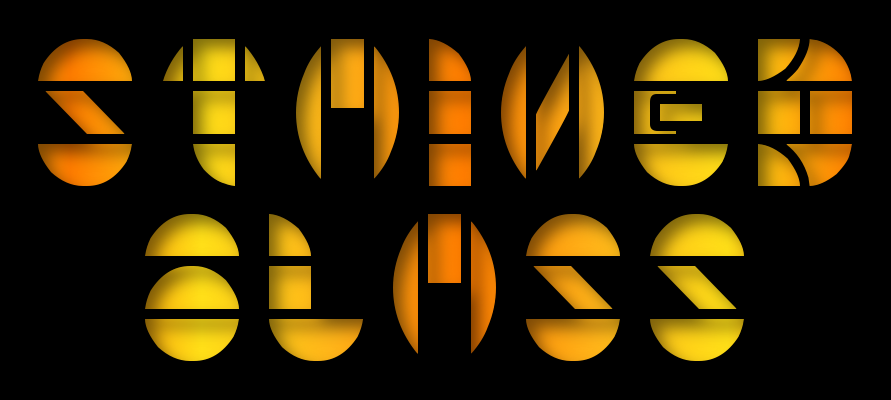
Trying stained glass with the inner shadow.
Image


Stained glass fonts
http://www.fontspace.com/category/stained%20glass

_________________
Image
World War IV will be fought with sticks and stones. - Albert Einstein


Top
 Post subject: Re: GC Shadow V0.6
PostPosted: Sun Jun 02, 2013 3:03 am  (#77) 
Offline
GimpChat Member
User avatar

Joined: Aug 16, 2012
Posts: 4271
Location: Göteborg, Sweden
O: looking really good! thanks for sharing the font too. i've decided to wait with the download until i see if gnu tux makes any more changes, but it looks very promising.

_________________


Top
 Post subject: Re: GC Shadow V0.6
PostPosted: Sun Jun 02, 2013 3:13 am  (#78) 
Offline
Script Coder
User avatar

Joined: Feb 18, 2011
Posts: 4826
Location: Bendigo Vic. Australia
GnuTux I have posted file for you to look at and test

_________________
Image
No matter how much you push the envelope, it'll still be stationery.


Top
 Post subject: Re: GC Shadow V0.6
PostPosted: Mon Jun 03, 2013 11:27 am  (#79) 
Offline
Retired Staff
User avatar

Joined: May 22, 2008
Posts: 6946
Location: Somewhere in GIMP
One thing I do not understand is why it would resize with an inner shadow? AFAIK, there's no need, but the image does resize if it's checked to resize.

It also resizes with a drop shadow whether the image needs to resize or not so that after a drop shadow and an inner shadow my image has grown considerably in dimension.

_________________
Image
World War IV will be fought with sticks and stones. - Albert Einstein


Top
 Post subject: Re: GC Shadow V0.6
PostPosted: Mon Jun 03, 2013 1:13 pm  (#80) 
Offline
GimpChat Founder
User avatar

Joined: May 22, 2008
Posts: 5241
Location: Gimpville
You're right, O. I'm aware of the re-sizing issues and they will be addressed in the next release. I just haven't had the chance to continue working on the script. I should have some free time over the next couple of days and I'll pick back up on it.

_________________
“If you reach for the stars, you just might land on a decently sized hill.” - Stuart Hill


Top
Post new topic Reply to topic  [ 112 posts ]  Go to page Previous  1, 2, 3, 4, 5, 6  Next

All times are UTC - 5 hours [ DST ]


* Login  


Powered by phpBB3 © phpBB Group