It is currently Sun Sep 20, 2026 11:47 pm


All times are UTC - 5 hours [ DST ]


Post new topic Reply to topic  [ 10 posts ] 
Author Message
 Post subject: PSPI plugin GIMP 2.8.4 not run
PostPosted: Tue Jun 25, 2013 9:18 pm  (#1) 
Offline
GimpChat Member

Joined: Jun 24, 2013
Posts: 10
GIMP Version: 2.8.4
Operating System: Linux
GIMP Experience: Beginner Level


Introduce me from Indonesia GIMP lovers. I have a problem installing GIMP PSPI plugin 2.8.4 in ubuntustudio 13:04 - 32 bit. writing "photoshop plugin settings" does not appear. I've followed the installation instructions but does not run. I am very grateful if anyone can help me.


Share on Facebook Share on Twitter Share on Orkut Share on Digg Share on MySpace Share on Delicious Share on Technorati
Top
 Post subject: Re: PSPI plugin GIMP 2.8.4 not run
PostPosted: Tue Jun 25, 2013 9:23 pm  (#2) 
Offline
Script Coder
User avatar

Joined: Feb 18, 2011
Posts: 4826
Location: Bendigo Vic. Australia
Jatra although I am using Windows the principle should be the same

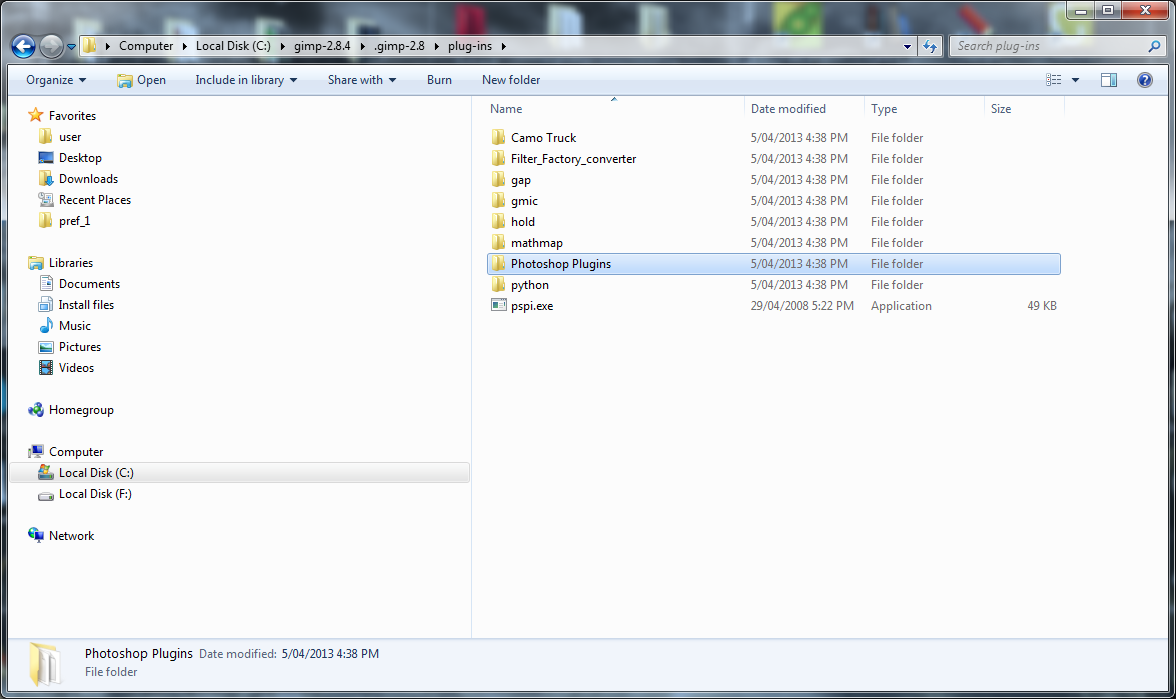
It does not give problems if you install your photoshop folder and pspi in a particular way

Place your photoshop folder and pspi in your plugins folder

Image

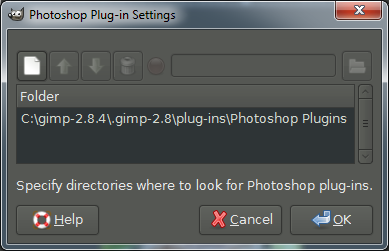
Do not point to the photoshop folder in preferences

Image

Point to your photoshop folder here

Image

_________________
Image
No matter how much you push the envelope, it'll still be stationery.


Top
 Post subject: Re: PSPI plugin GIMP 2.8.4 not run
PostPosted: Thu Jun 27, 2013 12:33 am  (#3) 
Offline
GimpChat Member

Joined: Jun 24, 2013
Posts: 10
OK Graechan and Rod. I will tell you that I use GIMP 2.8.2 and Wine 1.4 is already in Ubuntu Studio 13.04 .. I just want to PSPI can run on my Ubuntu. Regarding the plugin to use I would do next, which is important PSPI can be used. I've tried to upgrade GIMP 2.8.6 and Wine 1.5, but PSPI still not running.
I use gimp-PSPI-1.0.5.ubuntu.i386, now what do I do?


Top
 Post subject: Re: PSPI plugin GIMP 2.8.4 not run
PostPosted: Fri Jun 28, 2013 9:06 pm  (#4) 
Offline
GimpChat Member
User avatar

Joined: Jan 13, 2011
Posts: 2648
Location: Poland
In my attempts to Ubuntu:
PSPI (old program) can only be run with the old version of Wine (1.1.14)
http://www.oldapps.com/linux/winehq_for_linux.php?old_winehq_for_linux=11444
And so most filters do not work!
A better solution is ShellOut.py -> XNView (from Wine)

_________________
Image


Top
 Post subject: Re: PSPI plugin GIMP 2.8.4 not run
PostPosted: Sat Jun 29, 2013 12:48 am  (#5) 
Offline
Global Moderator
User avatar

Joined: May 16, 2010
Posts: 16173
MareroQ wrote:
In my attempts to Ubuntu:
PSPI (old program) can only be run with the old version of Wine (1.1.14)
http://www.oldapps.com/linux/winehq_for_linux.php?old_winehq_for_linux=11444
And so most filters do not work!
A better solution is ShellOut.py -> XNView (from Wine)


I installed the latest WINE version, installed GIMP for Win32, and then installed the PSPI plugin.That worked fairly well. :)
That allowed me to install, and run Web Builder 8, SWiSH Max 4, and Xara 7 through the newest WINE version also.

Just another way to do it if you need some commercial programs to run in Linux.

_________________
Image


Top
 Post subject: Re: PSPI plugin GIMP 2.8.4 not run
PostPosted: Sat Jun 29, 2013 2:10 am  (#6) 
Offline
GimpChat Member

Joined: Jun 24, 2013
Posts: 10
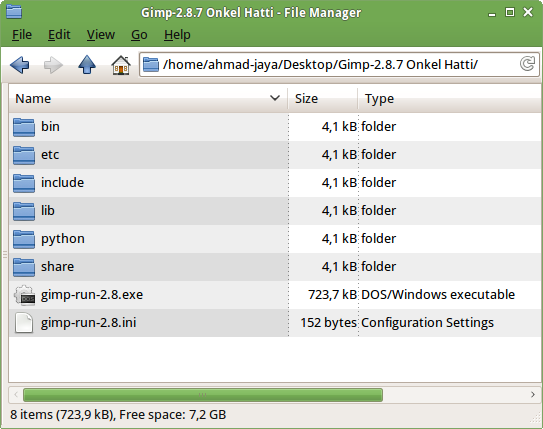
For a while, I have found the solution to my work, I use GIMP 2.8.7 of Onkel Hatti. Onkel_Hatti thanks, may God give you Hidayah. GIMP 2.8.7 is to win 32, but it runs very well on my Ubuntu (with Wine of course). And another, PSPI (for Linux) runs very good. So now I feel my problem is resolved. Thank you to Rod, Graechan, MareroQ, and of course Onkel Hatti, hopefully God will repay you.

Image

Image

Image


Top
 Post subject: Re: PSPI plugin GIMP 2.8.4 not run
PostPosted: Sat Jun 29, 2013 7:00 am  (#7) 
Offline
Global Moderator
User avatar

Joined: May 16, 2010
Posts: 16173
Jatra wrote:
For a while, I have found the solution to my work, I use GIMP 2.8.7 of Onkel Hatti. Onkel_Hatti thanks, may God give you Hidayah. GIMP 2.8.7 is to win 32, but it runs very well on my Ubuntu (with Wine of course). And another, PSPI (for Linux) runs very good. So now I feel my problem is resolved. Thank you to Rod, Graechan, MareroQ, and of course Onkel Hatti, hopefully God will repay you.

[ Image ]

[ Image ]

[ Image ]

Glad to see you got it running. :)

_________________
Image


Top
 Post subject: Re: PSPI plugin GIMP 2.8.4 not run
PostPosted: Sat Jun 29, 2013 9:35 am  (#8) 
Offline
GimpChat Member

Joined: Jun 24, 2013
Posts: 10
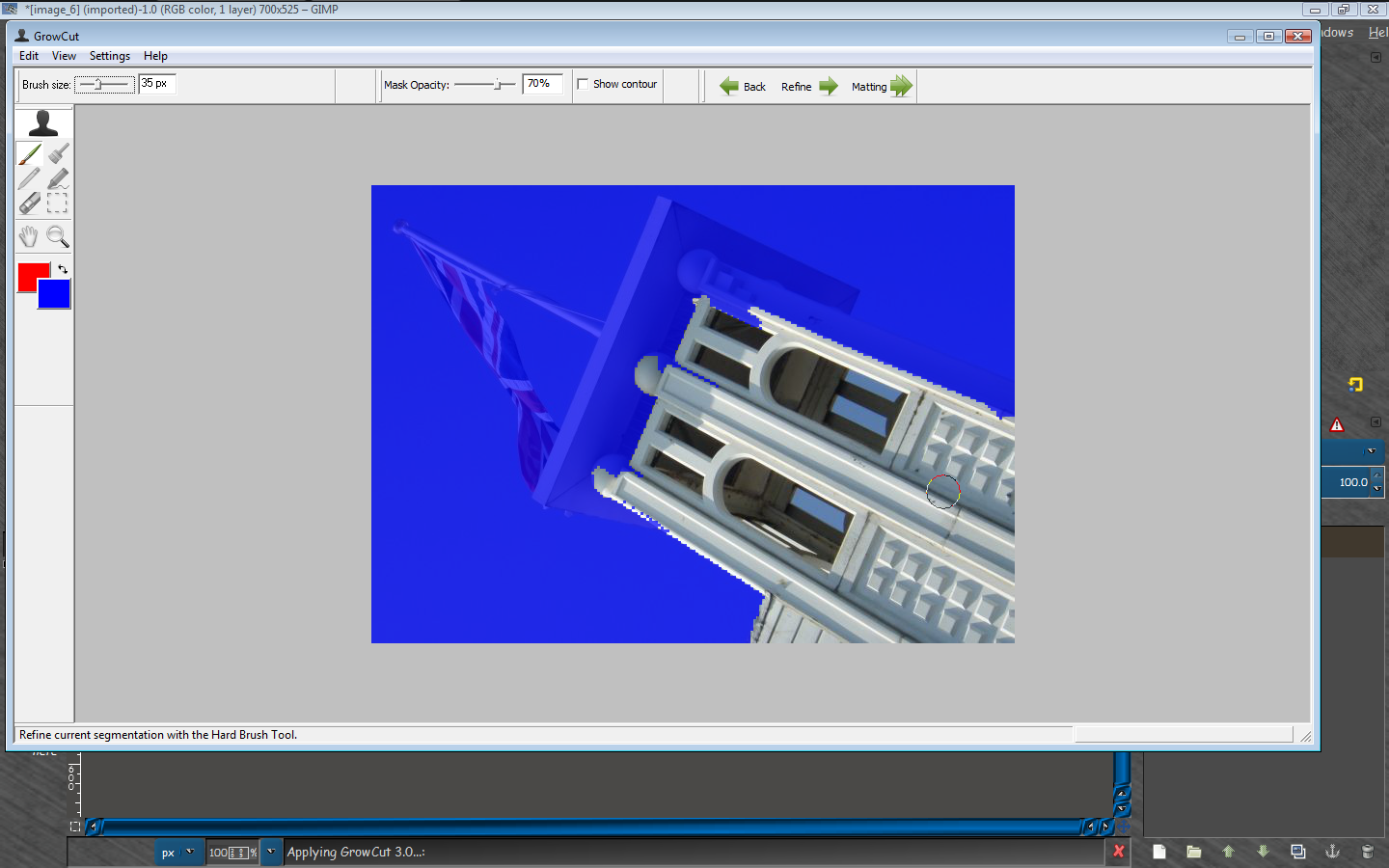
Once again Rod, how to use Matting tools to replace the background. I usually use GML matting.

Image


Top
 Post subject: Re: PSPI plugin GIMP 2.8.4 not run
PostPosted: Sat Jun 29, 2013 11:39 am  (#9) 
Offline
Global Moderator
User avatar

Joined: May 16, 2010
Posts: 16173
Jatra wrote:
Once again Rod, how to use Matting tools to replace the background. I usually use GML matting.

[ Image ]


Same way you use the old fg color select tool. :)
Select the matting tool
Make a selection (roughly), around the rendered (FG) area you want cut out.
Release the mouse button after selection is complete and you now can adjust the brush size to brush in FG area.
Brush over the COLORS in the image you want taken as FG.
Refine as needed. I find normally brushing just to the edge of the FG mask will get pretty good results.
The matting tool calculates (including partially transparent pixels), the colors you painted over.
If needed use a very small brush to get a real good refined FG selection.
Release the mouse button after painting FG colors and the tool calculates FG selection.
Select ENTER if you are happy with the selection and the FG will be extracted to a new layer.
YouTube Video
www.youtube.com Video from : www.youtube.com


Hope that helps. :bigthup

_________________
Image


Top
 Post subject: Re: PSPI plugin GIMP 2.8.4 not run
PostPosted: Sat Jun 29, 2013 11:55 am  (#10) 
Offline
Global Moderator
User avatar

Joined: May 16, 2010
Posts: 16173
By the way i also use GML matting but the newer one iPhotoSoft (from Growcut).

Image

_________________
Image


Top
Post new topic Reply to topic  [ 10 posts ] 

All times are UTC - 5 hours [ DST ]


* Login  


Powered by phpBB3 © phpBB Group