It is currently Mon Sep 21, 2026 11:17 pm


All times are UTC - 5 hours [ DST ]


Post new topic Reply to topic  [ 33 posts ]  Go to page Previous  1, 2
Author Message
 Post subject: Re: Extended Text Help...
PostPosted: Thu Jun 27, 2013 7:22 pm  (#21) 
Offline
GimpChat Member
User avatar

Joined: Apr 07, 2010
Posts: 14182
There ya go Wallace you are all set. I have seen some beautiful stuff come out of Blender by some of our members.

_________________
Image


Top
 Post subject: Re: Extended Text Help...
PostPosted: Thu Jun 27, 2013 7:24 pm  (#22) 
Offline
Administrator
User avatar

Joined: Aug 10, 2012
Posts: 14206
Location: Native to NYC living in Arizona, Gimp 2.8 - 3.0, Win 11 PC.
K1TesseraEna wrote:
You sure can Wallace. But that could take a lot of time to figure out.
There are thousands of good Blender tuts and they multiply hourly.
Look up this tutorial http://www.youtube.com/watch?v=aFmvpt4Zr3k
All you need to change is the extrusion value and camera view perspective.
Any questions - ask me. Would be my pleasure to help you out.


Thanks K1TesseraEna! :bigthup

_________________
Image
"A wise man learns more from a foolish question than a fool can learn from a wise answer"
Image


Top
 Post subject: Re: Extended Text Help...
PostPosted: Thu Jun 27, 2013 8:06 pm  (#23) 
Offline
Global Moderator
User avatar

Joined: May 16, 2010
Posts: 16173
Good luck with Blender Wallace. :)

_________________
Image


Top
 Post subject: Re: Extended Text Help...
PostPosted: Thu Jun 27, 2013 8:41 pm  (#24) 
Offline
GimpChat Member
User avatar

Joined: Jun 02, 2013
Posts: 2090
I have Blender, but didn't stick with it long enough to learn anything, haha. It is an awesome program though.

_________________
Image


Top
 Post subject: Re: Extended Text Help...
PostPosted: Thu Jun 27, 2013 8:53 pm  (#25) 
Offline
Administrator
User avatar

Joined: Aug 10, 2012
Posts: 14206
Location: Native to NYC living in Arizona, Gimp 2.8 - 3.0, Win 11 PC.
Rod wrote:
Good luck with Blender Wallace. :)


Thanks Rod.
I'm going to try out your suggestion before I delve into Blender. At least I already know Gimp.

molly wrote:
There ya go Wallace you are all set. I have seen some beautiful stuff come out of Blender by some of our members.

Yeah, I hear you. I'll always be a Gimper though.

The Warrior wrote:
I have Blender, but didn't stick with it long enough to learn anything, haha. It is an awesome program though.


I had an older copy of Blender, but like you... I never stuck with it.

_________________
Image
"A wise man learns more from a foolish question than a fool can learn from a wise answer"
Image


Top
 Post subject: Re: Extended Text Help: (Thanks for all the Suggestions)...
PostPosted: Thu Jun 27, 2013 9:24 pm  (#26) 
Offline
GimpChat Member
User avatar

Joined: Aug 30, 2012
Posts: 2174
https://skydrive.live.com/redir?resid=6 ... Kyt98in3bI

The above link is an example of a perspective image created using the multi replicate script

_________________
Image


Top
 Post subject: Re: Extended Text Help: (Thanks for all the Suggestions)...
PostPosted: Thu Jun 27, 2013 9:31 pm  (#27) 
Offline
Administrator
User avatar

Joined: Aug 10, 2012
Posts: 14206
Location: Native to NYC living in Arizona, Gimp 2.8 - 3.0, Win 11 PC.
he4rty wrote:
https://skydrive.live.com/redir?resid=6F37715A630A0A2D!123&authkey=!ADBDLKyt98in3bI

The above link is an example of a perspective image created using the multi replicate script


Thanks for the link.
That image looked good, but it still lacks the depth I'm looking to emulate. I'm going to try that script out and see what I can come up with.

_________________
Image
"A wise man learns more from a foolish question than a fool can learn from a wise answer"
Image


Top
 Post subject: Re: Extended Text Help: (Thanks for all the Suggestions)...
PostPosted: Thu Jun 27, 2013 10:09 pm  (#28) 
Offline
Administrator
User avatar

Joined: Aug 10, 2012
Posts: 14206
Location: Native to NYC living in Arizona, Gimp 2.8 - 3.0, Win 11 PC.
conbagui wrote:
Here is one I know how.
[ Image ]


Good try, but the effect behind your text is difficult at best to tell that it's suppose to be an extension of the text and not just some kind of shadow or something else, the text form is lost in the effect.

_________________
Image
"A wise man learns more from a foolish question than a fool can learn from a wise answer"
Image


Top
 Post subject: Re: Extended Text Help: (Thanks for all the Suggestions)...
PostPosted: Thu Jun 27, 2013 11:41 pm  (#29) 
Offline
Global Moderator
User avatar

Joined: May 16, 2010
Posts: 16173
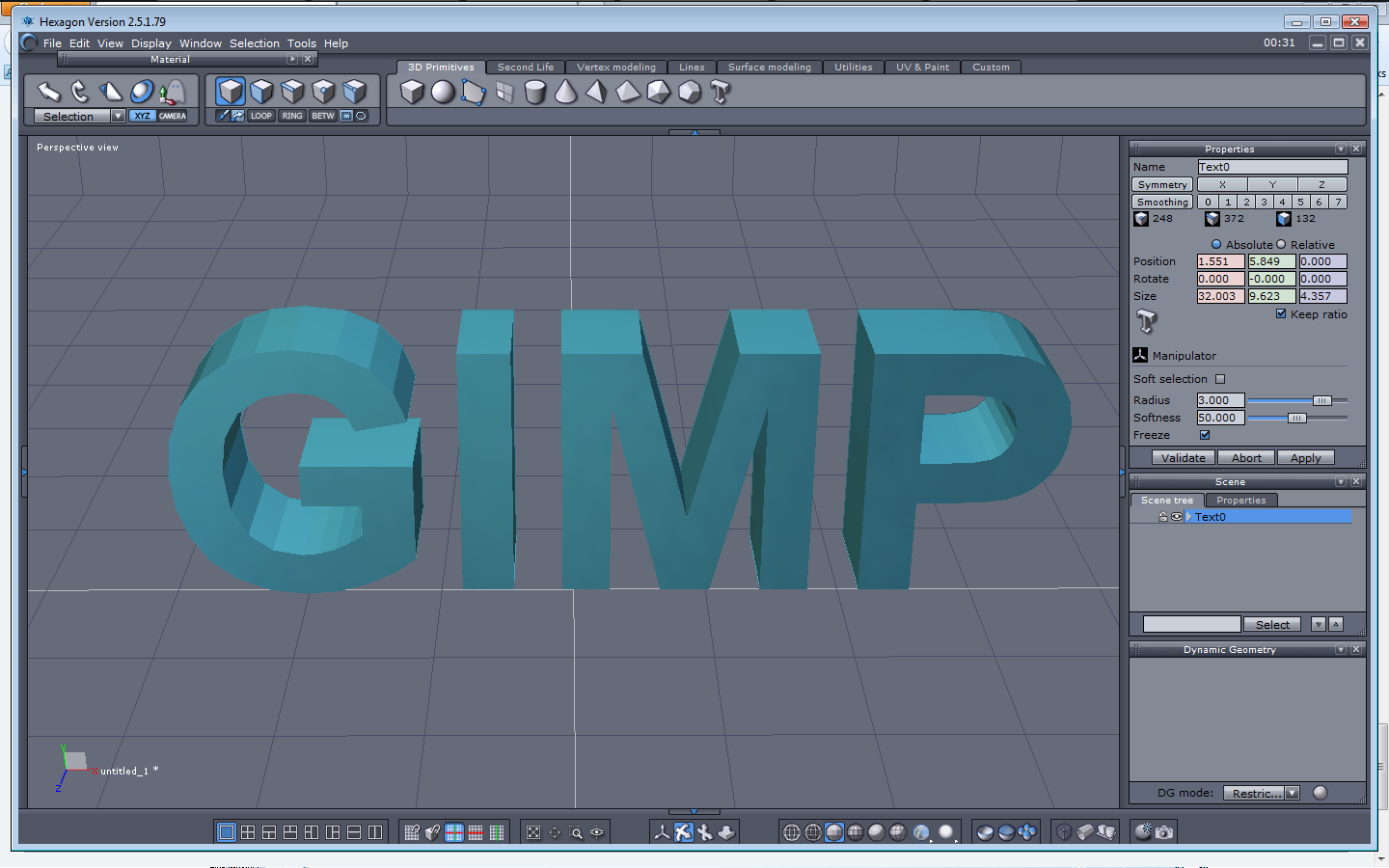
This is extremely easy to do in Hexagon but Hex is no longer free. :(

Image

_________________
Image


Top
 Post subject: Re: Extended Text Help: (Thanks for all the Suggestions)...
PostPosted: Fri Jun 28, 2013 1:40 am  (#30) 
Offline
Administrator
User avatar

Joined: Aug 10, 2012
Posts: 14206
Location: Native to NYC living in Arizona, Gimp 2.8 - 3.0, Win 11 PC.
Rod wrote:
This is extremely easy to do in Hexagon but Hex is no longer free. :(

[ Image ]


That looks really good Rod! I tried it in Blender, needless to say it took me a while just to figure out what I was doing, but this is what I got, after all was said and done.
This is my first ever Blender image.
Image
I did try it using the way you suggested as well, but with not very good results.

_________________
Image
"A wise man learns more from a foolish question than a fool can learn from a wise answer"
Image


Top
 Post subject: Re: Extended Text Help: (Thanks for all the Suggestions)...
PostPosted: Fri Jun 28, 2013 2:38 am  (#31) 
Offline
GimpChat Member
User avatar

Joined: Sep 22, 2012
Posts: 2089
Location: US
awesome job Wallace! You're a quick learner!


Top
 Post subject: Re: Extended Text Help: (Thanks for all the Suggestions)...
PostPosted: Fri Jun 28, 2013 2:50 am  (#32) 
Offline
Administrator
User avatar

Joined: Aug 10, 2012
Posts: 14206
Location: Native to NYC living in Arizona, Gimp 2.8 - 3.0, Win 11 PC.
K1TesseraEna wrote:
awesome job Wallace! You're a quick learner!


Thanks K1, I had a look at a few tutorials and the one you linked me to and found out where the geometry stuff was to add dimension to text.
I wish I could say that it was easy, but it wasn't and I have a long way to go with Blender. I had trouble saving the image, I couldn't get blender to save it as a png. That's why I posted a screenshot and not a completed image.

_________________
Image
"A wise man learns more from a foolish question than a fool can learn from a wise answer"
Image


Top
 Post subject: Re: Extended Text Help: (Thanks for all the Suggestions)...
PostPosted: Fri Jun 28, 2013 3:30 am  (#33) 
Offline
GimpChat Member
User avatar

Joined: Sep 22, 2012
Posts: 2089
Location: US
Wallace wrote:
K1TesseraEna wrote:
awesome job Wallace! You're a quick learner!


Thanks K1, I had a look at a few tutorials and the one you linked me to and found out where the geometry stuff was to add dimension to text.
I wish I could say that it was easy, but it wasn't and I have a long way to go with Blender. I had trouble saving the image, I couldn't get blender to save it as a png. That's why I posted a screenshot and not a completed image.


After you get used to Blender a little more you can try something more advanced.
I did this text effect viewtopic.php?f=22&t=6747&hilit=blender+text+effect following the tutorial by Andrew Price.
Check out his Blender Guru website. You'll learn Blender quicker with his tutorials but you need to know the basic Blender.


Top
Post new topic Reply to topic  [ 33 posts ]  Go to page Previous  1, 2

All times are UTC - 5 hours [ DST ]


* Login  


Powered by phpBB3 © phpBB Group