GIMP Version: 2.8.10
Operating System: Mac OS
OS Version: 10.6.2
GIMP Experience: Beginner Level
List any relevant plug-ins or scripts:Match Color
The sample points don't even work for me.
No, "To create a sample point, Ctrl-click on one of the two measure rules of the image window and drag the mouse pointer. Two perpendicular guides appear. The sample point is where both guides intersect. You can see its coordinates in the lower left corner and the information bar of the image window. Release the mouse button."
I also don't get the sample points dialog to function.
Like, the second image light grey background image with the green rectangle.
But instead, it looks like the first dark grey background image.
Attachment:
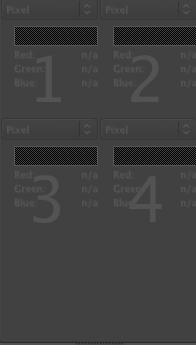 Sample Points 1.jpg [ 17.76 KiB | Viewed 1765 times ]
 Login
 Register
 Tweets
 FAQ
 Advanced Search



