It is currently Sun Sep 27, 2026 6:37 pm


All times are UTC - 5 hours [ DST ]


Post new topic Reply to topic  [ 6 posts ] 
Author Message
 Post subject: Plug-in resynthesizer throws "error: procedure not found"
PostPosted: Fri May 23, 2014 11:24 pm  (#1) 
Offline
New Member

Joined: May 23, 2014
Posts: 2
GIMP Version: 2.8.10
Operating System: Linux Light (Ubuntu dirivitive)
GIMP Experience: Basic Level

List any relevant plug-ins or scripts:
/plugin-heal-selection.py

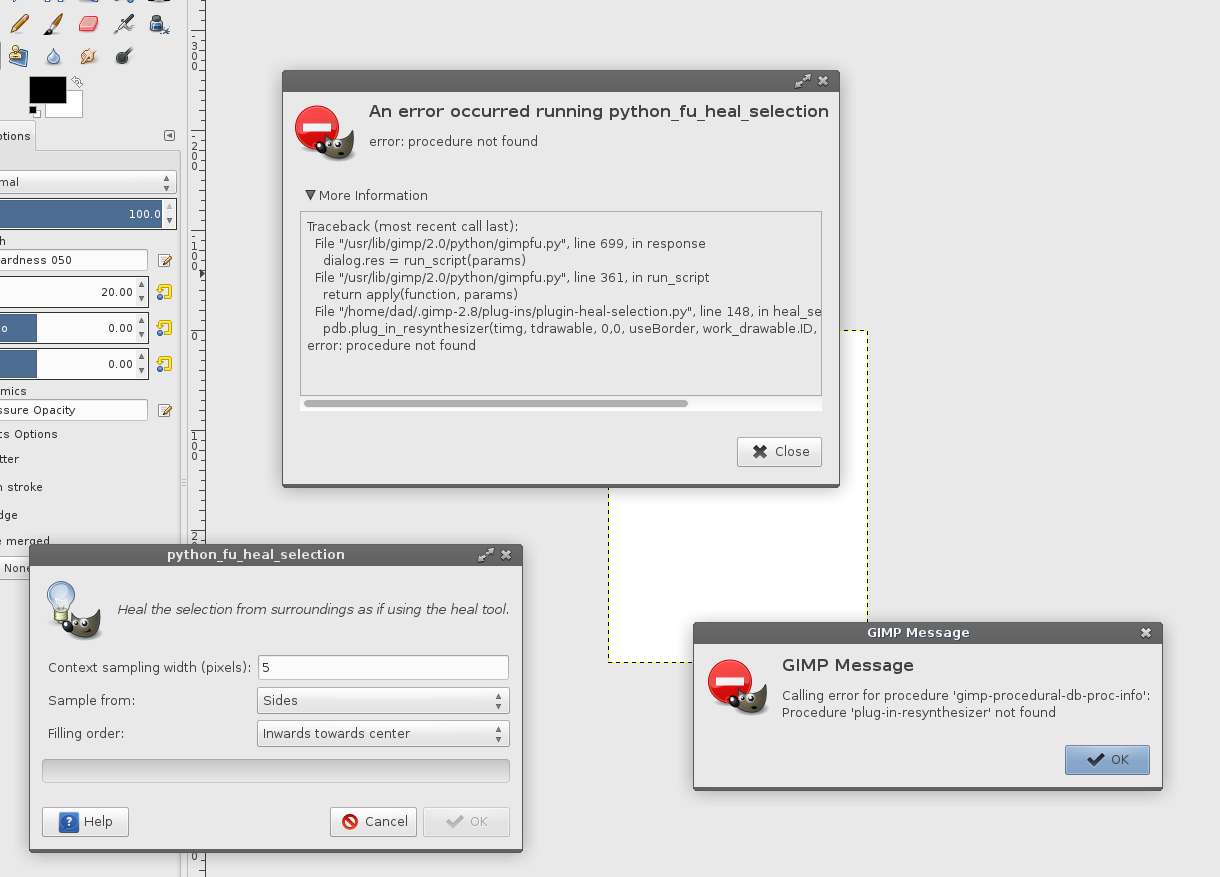
List any ERROR messages you received:
Calling error for procedure 'gimp-procedural-db-proc-info':
Procedure 'plug-in-resynthesizer' not found

-and-

Traceback (most recent call last):
File "/usr/lib/gimp/2.0/python/gimpfu.py", line 699, in response
dialog.res = run_script(params)
File "/usr/lib/gimp/2.0/python/gimpfu.py", line 361, in run_script
return apply(function, params)
File "/home/dad/.gimp-2.8/plug-ins/plugin-heal-selection.py", line 148, in heal_selection
pdb.plug_in_resynthesizer(timg, tdrawable, 0,0, useBorder, work_drawable.ID, -1, -1, 0.0, 0.117, 16, 500)
error: procedure not found


Been trying to remove some text from a photograph and resynthesizer seems like the tool I need. But I can't, for the life of me, get it to work without crashing.

1. I run gimp as normal.
2. Load picture.
3. "Lasso" the selection.
4. Choose Filters>Enhance>Heal Selection
5. Set the settings in the dialog box that comes up.
6. BAM! It crashes like a big dog.

I've tried re-installing GIMP, the plugins, rebooting, everything I can think of!

I've seen other folks having similar problems, but I don't see how anyone has been able to help.

Anybody seen this problem, or, more importantly, it's solution?

Thanks!

HJ :O)


Attachments:
gimp.plug-in.nightmare.png
gimp.plug-in.nightmare.png [ 110.95 KiB | Viewed 11889 times ]
Share on Facebook Share on Twitter Share on Orkut Share on Digg Share on MySpace Share on Delicious Share on Technorati
Top
 Post subject: Re: Plug-in resynthesizer throws "error: procedure not found"
PostPosted: Fri May 23, 2014 11:47 pm  (#2) 
Offline
GimpChat Member
User avatar

Joined: Jun 02, 2013
Posts: 2090
Try "Inpainting Patch-Based" on G'MIC. Works like a charm: viewtopic.php?f=28&t=6817&

_________________
Image


Top
 Post subject: Re: Plug-in resynthesizer throws "error: procedure not found"
PostPosted: Sat May 24, 2014 1:12 am  (#3) 
Offline
GimpChat Member
User avatar

Joined: Jan 10, 2013
Posts: 863
The Warrior wrote:
Try "Inpainting Patch-Based" on G'MIC. Works like a charm: http://www.gimpchat.com/viewtopic.php?f=28&t=6817&

The Warrior thx very much! :hi5
I complentamente was unaware of that filter. :oops: :shock:
I do not I change on one layer and then I merge with the bottom layer.
I simply edit directly in the layer, and apply the filter.
Very good filter!
:tyspin

_________________
bbbbbbbbbbbImage
bbbbbbbbbbb Be patient, English is not my language.


Top
 Post subject: Re: Plug-in resynthesizer throws "error: procedure not found"
PostPosted: Sat May 24, 2014 1:26 am  (#4) 
Offline
GimpChat Member
User avatar

Joined: Jun 02, 2013
Posts: 2090
Akros wrote:
The Warrior wrote:
Try "Inpainting Patch-Based" on G'MIC. Works like a charm: viewtopic.php?f=28&t=6817&

The Warrior thx very much! :hi5
I complentamente was unaware of that filter. :oops: :shock:
I do not I change on one layer and then I merge with the bottom layer.
I simply edit directly in the layer, and apply the filter.
Very good filter!
:tyspin

The only reason I do 2 layers, and then merge, is because I can set the opacity of my patch lower, and be able to see the layer under it. That way, I can see to get really close to the edge I'm wanting to cover.

_________________
Image


Top
 Post subject: Re: Plug-in resynthesizer throws "error: procedure not found"
PostPosted: Sat May 24, 2014 1:27 am  (#5) 
Offline
Script Coder
User avatar

Joined: Feb 18, 2011
Posts: 4826
Location: Bendigo Vic. Australia
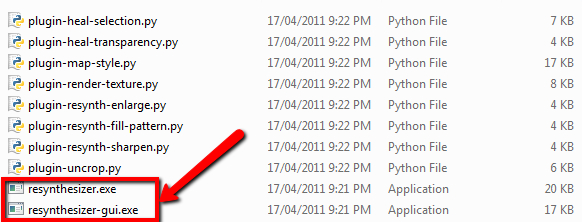
It looks like you don't have the resynthesizer Plugin installed you should have all these files in you plugin directory, especially the 2
I have outlined
Image

_________________
Image
No matter how much you push the envelope, it'll still be stationery.


Top
 Post subject: Re: Plug-in resynthesizer throws "error: procedure not found"
PostPosted: Sat May 24, 2014 7:58 am  (#6) 
Offline
New Member

Joined: May 23, 2014
Posts: 2
That's what I thought at first. Either I didn't have them or I had them with the wrong permissions. But this "ls -l" indicates that I do have them and they are in the right place.

Thanks for your quick response!

HJ


Attachments:
gimp.plugins.png
gimp.plugins.png [ 50.02 KiB | Viewed 11823 times ]
Top
Post new topic Reply to topic  [ 6 posts ] 

All times are UTC - 5 hours [ DST ]


* Login  


Powered by phpBB3 © phpBB Group