geordief wrote:
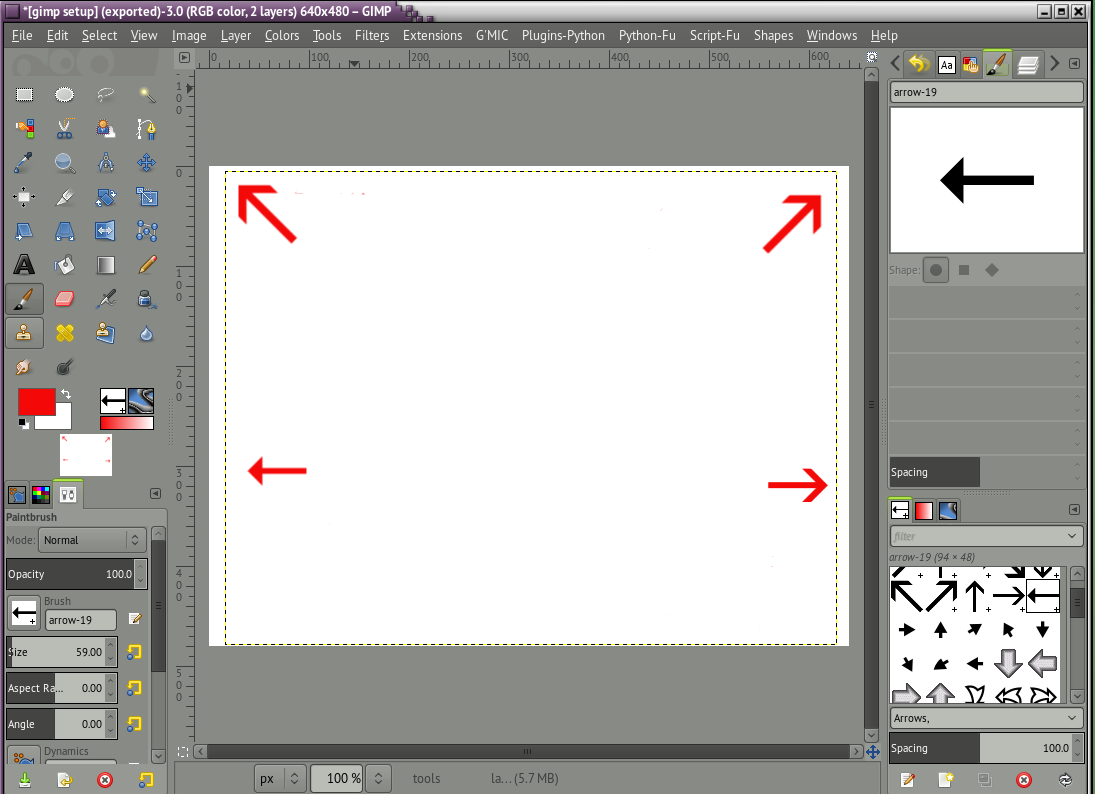
Attachment:
gimp.jpg
Well I couldn't see "device status" but I did find "new toolbox" (somewhere!) which opens up a set of icons on the left of the screen .Is that progress?
Edit: it looks like the icons on the left
do control what is displayed on the right hand side......
The unusual arrangement is because of the position of the docks
before switching to single window mode.
Go to Edit -> Preferences -> Window Management -> Reset Saved Window Positions...
Restart Gimp.
There should be 3 windows, Tools & options - The image window - Dialogs for layers, brushes etc.
Now Use Windows -> Single Window Mode, then resize to fit your display.
A couple of very short videos that I made for other people.
Getting the tool options back to that box which says You can drop dockable dialogs here
http://www.youtube.com/watch?v=vqEUZvvhFKY&hd=1Dialogs all jumbled up? Revert Gimp back to a default state
http://www.youtube.com/watch?v=i2sKkA3vqvw&hd=1 Login
Login Register
 Tweets
 FAQ
FAQ Advanced Search