It is currently Thu Nov 26, 2026 8:34 pm


All times are UTC - 5 hours [ DST ]


Post new topic Reply to topic  [ 71 posts ]  Go to page Previous  1, 2, 3, 4  Next
Author Message
 Post subject: Re: Can't open Ubuntu
PostPosted: Thu Jan 05, 2012 1:19 pm  (#41) 
Offline
GimpChat Member
User avatar

Joined: Apr 07, 2010
Posts: 14182
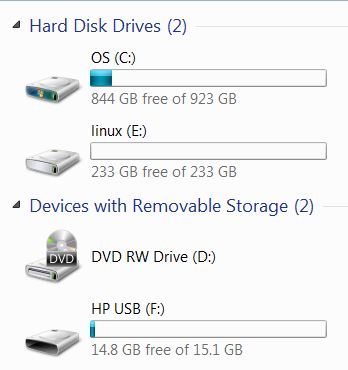
What I think I must do now is to dump my Ubuntu installation and reformat the new 500GB hard drive. I want to make it into just one space, right now it is partitioned into two, one for Ubuntu and the other half is empty. I don't even see where it shows the Ubuntu side of the partition.
This what I see when I open My Computer:

I need to know step by step how to do this if anyone has the time. There is no hurry, but I think I have made a decision what will work best for me being such a n00b.

Image

_________________
Image


Top
 Post subject: Re: Can't open Ubuntu
PostPosted: Thu Jan 05, 2012 1:26 pm  (#42) 
Offline
GimpChat Member
User avatar

Joined: Oct 07, 2010
Posts: 439
Location: home/Nixnine/.gimp-2.0/scripts/nixnine.scm
just out of curiosity, have you tried to boot into the computer without the flash drive connected? Did you have linux on the flash drive before? I have problems booting in if I start the computer with a flash drive that had linux installed. Just grasping at straws now, but that has been an issue for me.

_________________
I refuse to be confused, but am often confused at this refusal.


Top
 Post subject: Re: Can't open Ubuntu
PostPosted: Thu Jan 05, 2012 1:55 pm  (#43) 
Offline
GimpChat Member
User avatar

Joined: Oct 29, 2010
Posts: 711
Location: Netherlands
Hi Molly,
May I suggest you partition the drive into 3 partitions.
1. about 30 GB for Linux
2. about 5 GB for swap
3. the rest for /home.
This way when you re-install or upgrade your personal files and configuration files can be used again.
Mint and ubuntu and most distro's will allow you to do this.
When you reach the part of the installation where you do disk partition you'll have to choose expert or something like that.
I used kubuntu years ago so I don't quite remember the procedure.
Here's a link to a very useful collection of tools.
http://www.sysresccd.org/Download
Hope this helps.
Gerard.
Edit: Windows will never show a Linux partition.
What you see is the unused part that's probably still formatted for NTFS (Windows file system)

_________________
Gentoo Linux always up-to-date.
Kernel-3.17.4 Python-2.7.8/3.3.5
Gimp-2.8.14

I use Linux only.
And Virtualbox with Win 7


Top
 Post subject: Re: Can't open Ubuntu
PostPosted: Thu Jan 05, 2012 2:16 pm  (#44) 
Offline
GimpChat Member
User avatar

Joined: Apr 07, 2010
Posts: 14182
nixnine wrote:
just out of curiosity, have you tried to boot into the computer without the flash drive connected? Did you have linux on the flash drive before? I have problems booting in if I start the computer with a flash drive that had linux installed. Just grasping at straws now, but that has been an issue for me.

No, Nix, all I have on the flash at this time is some Gimp files, tutorials, etc. and I tried it with and without that plugged in.

Gerard, thank you for the advice. I will save this to use when I feel ready to take this step :oops:

_________________
Image


Top
 Post subject: Re: Can't open Ubuntu
PostPosted: Thu Jan 05, 2012 4:19 pm  (#45) 
Offline
GimpChat Member

Joined: Mar 04, 2011
Posts: 2630
Ask 100 people the best way to partition a drive and you will get 100 different answers.

One thing to note, unlike Windows, linux will happily boot from a logical partition (in an extended partition)

What you do need is a plan of action. In the past I have had "organically" growing installations and ended up with a mess, working but still a mess.

Linux does not need big partitions, neither does windows if you organise it.

Here are my 2 computers, each very different but work on much the same principle. Keep the OS away from the data. Makes backing up a lot easier.

Image


Top
 Post subject: Re: Can't open Ubuntu
PostPosted: Thu Jan 05, 2012 5:49 pm  (#46) 
Offline
GimpChat Member
User avatar

Joined: Oct 29, 2010
Posts: 711
Location: Netherlands
Please remember molly is a beginner with Linux.
I could show my setup which is a total of 11 partitions spread over 3 disks.
But she wants to keep it simple I am sure.
What I proposed is sufficient for a start.
Gerard.

_________________
Gentoo Linux always up-to-date.
Kernel-3.17.4 Python-2.7.8/3.3.5
Gimp-2.8.14

I use Linux only.
And Virtualbox with Win 7


Top
 Post subject: Re: Can't open Ubuntu
PostPosted: Thu Jan 05, 2012 8:44 pm  (#47) 
Offline
GimpChat Member

Joined: Mar 29, 2011
Posts: 346
Location: Wisconsin
molly wrote:
I need to know step by step how to do this if anyone has the time. There is no hurry, but I think I have made a decision what will work best for me being such a n00b.

You can do everything you need to do from Windows. This is what I would do:

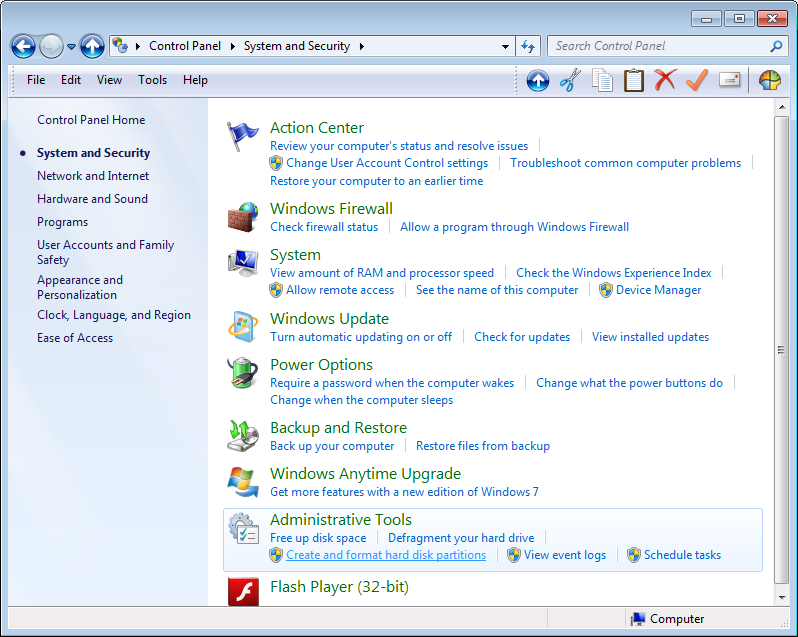
Go to the Control Panel and click on System and Security

Image

Near the bottom of that page is "Administrative Tools" Click on the "Create and format hard disk partitions"
Image

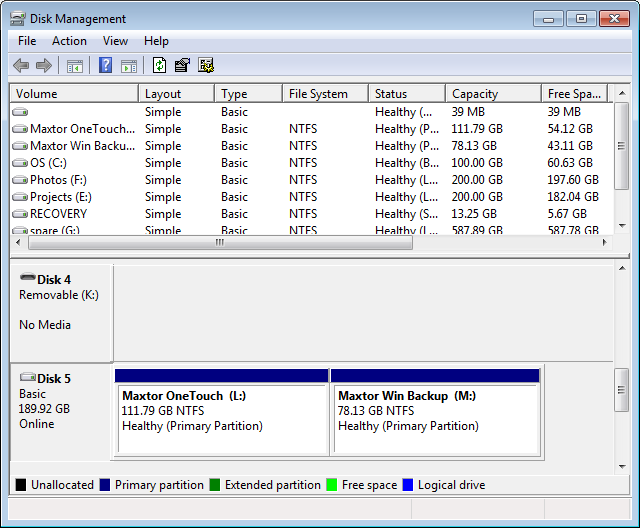
This brings up the Disk Management window. The bottom half of the window contains graphic representations of your disk drives. Scroll down until you find your second drive. In my case, my second drive is an external backup drive and it is Disk 5. (Disks 1-4 are memory card readers)
Image

You will probably see several partitions there, only one of which is a Windows partition. The others are the Linux partitions.

What you want to do is to delete all the partitions on your second drive, leaving it blank.

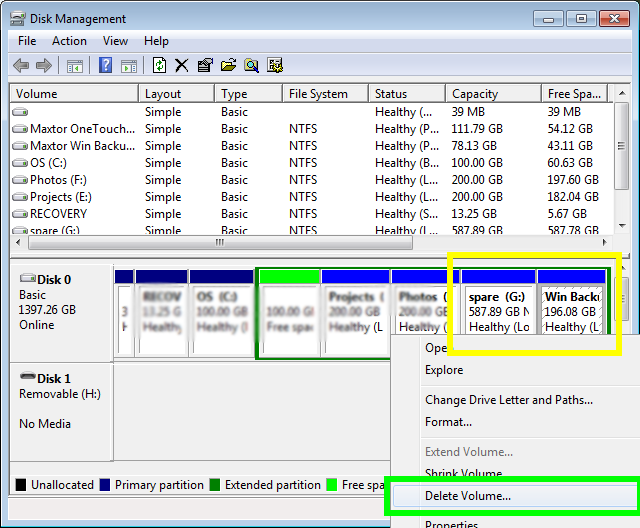
It is really simple. I'm going to delete the last two partitions (yellow box) on my main drive because I don't want to mess up my backup drive. :)
Right click on one of the partitions on your second drive. The pop-up menu will look like this
Image

Click "Delete volume"
It will ask you if you are sure. Answer yes.
(You won't have the delete option on your Windows system drive so it's really hard to make a mistake.)
Delete all of the volumes on your second drive.

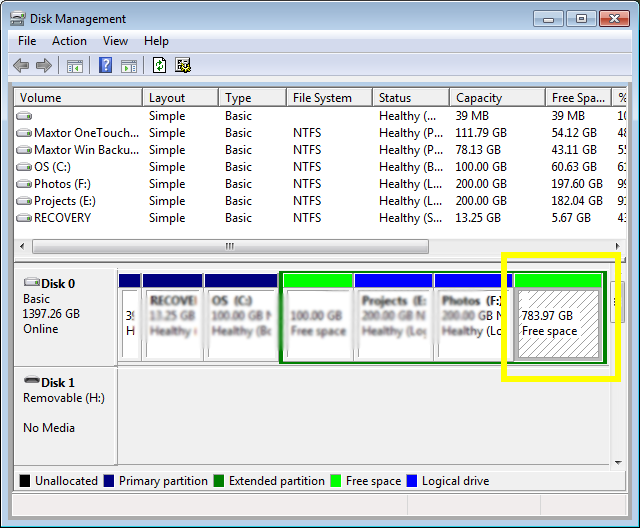
The free space should be automatically combined, like it was when I deleted the last two partitions on my main drive.
Image

I'd stop right there and let Linux handle all the rest.

But...

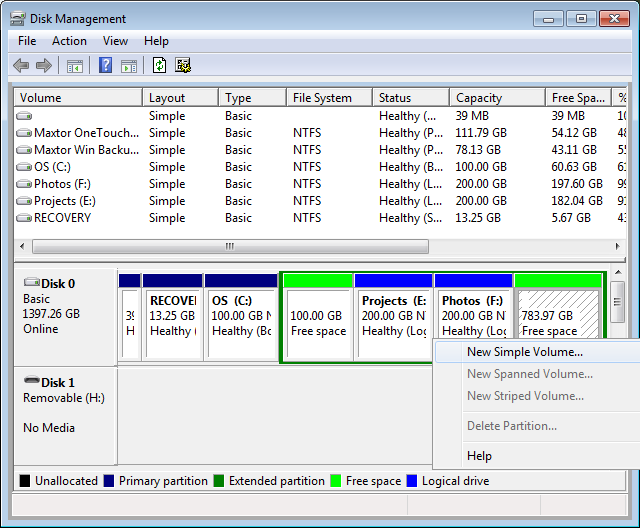
...If you want to, you can create a Windows readable partition on that drive, right click on the Free Space block and select "New Simple Volume".
Image

A "Wizard" will open. Select the size you want in MB, I'd suggest something around 200 GB on a 500 GB drive. So enter about 202500 MB as the size. It will format that section of the disk as a Windows file system and leave the other 300 GB empty. When you install Linux, it should automatically find that space and format it as needed ... at least that's what it did when I tried installing Ubuntu last month.

Hope that helps and no one ninja'd me.

P.S. You could use the Windows partition on your second drive as a backup for you main Windows drive. Plenty of room on that drive. I'd use the Windows backup utility and set it up to do it automatically. You could also backup your flash drive in that partition so you won't accidentally loose the data again.

_________________
Image


Top
 Post subject: Re: Can't open Ubuntu
PostPosted: Fri Jan 06, 2012 2:38 am  (#48) 
Offline
GimpChat Founder
User avatar

Joined: May 22, 2008
Posts: 5248
Location: Gimpville
gerard82 wrote:
Please remember molly is a beginner with Linux.

That's right.

And also consider that it appears whoever installed Ubuntu on her system allowed the boot sector of her Windows drive to be overwritten with the Ubuntu boot loader. So, who know what kind of problems might be caused if she attempts to install another version of Linux or another distro that handles booting differently.

Given that, one needs to be careful so they aren't responsible for suggesting something that might keep her from getting back into Windows (at least without jumping through a few hoops).

At minimum, Molly needs to Create a Windows 7 recovery CD. With that, she can restore the Windows 7 MBR if she gets in trouble (bootrec.exe /fixmbr). bootrec.exe

Personally, knowing her situation and the fact that she has a separate drive to dedicated to Linux, I would have installed Linux "stand alone" on her 2nd drive, left the boot sector of her Windows drive untouched and simply booted to each OS via the BIOS boot menu. Using that approach, she could play around all she wants with that 2nd drive without worry of corrupting the boot sector of the Windows drive. Imo, that's the smart approach for Linux newbies who are dual booting Windows/Linux from separate physical drives.

Having said all that, my recommendation is to continue to troubleshoot and solve the problem you have now. If there are no Ubuntu experts here that can help you, perhaps starting a thread on the Ubuntu forums might be the best approach at this point.

_________________
Image


Top
 Post subject: Re: Can't open Ubuntu
PostPosted: Fri Jan 06, 2012 4:21 am  (#49) 
Offline
GimpChat Member

Joined: Mar 04, 2011
Posts: 2630
I agree 100% about making a rescue disk, Windows7? Another more colourful reference here that might be useful. Not tried it but one of the options is restore the MBR (master boot record).
http://www.sevenforums.com/tutorials/20 ... reate.html

I am also a great believer in backing up before making any big changes.

The screen shots were only there to indicate that there are as many possible scenarios as users not as a recommendation, although keeping OS and data separate is a recommendation.

Also, I still stick with, try out a few live versions before installing. I have that Ubuntu 11 running in a VM and IMHO it has gone the way of windows and buries any tools away from the user. eg Midnight Commander, not there on the CD installation, maybe on the DVD version. The live version is not an easy tool to use for repair, something like the 'Parted Magic' live CD is better suited. http://partedmagic.com/

I hope Molly does get it up and running but not a lot of progress so far.

Keep trying Molly.


Top
 Post subject: Re: Can't open Ubuntu
PostPosted: Fri Jan 06, 2012 5:00 am  (#50) 
Offline
GimpChat Member
User avatar

Joined: Apr 07, 2010
Posts: 14182
You guys are all being so helpful and I just wish I was more techie savvy. I am scared to do every one of these things suggested.
It is not that I don't want to but I know if I get into the middle of one of these things and don't understand what they are saying, I will screw up. My only idea would be to reinstall it over again the way it says in this link, but I don't know if that is possible either.
http://sites.google.com/site/easylinuxt ... stallation

For now I might have to abort this whole thing unless I just unhook my tower and take it somewhere so they can screw it up. lol.

_________________
Image


Top
 Post subject: Re: Can't open Ubuntu
PostPosted: Fri Jan 06, 2012 8:45 am  (#51) 
Offline
GimpChat Member

Joined: Mar 29, 2011
Posts: 346
Location: Wisconsin
I thought Molly was using the BIOS boot-time option (F12 on her computer at start-up) to control which device to boot from.

That should have left her Windows drive master boot record untouched. Obviously she is having no trouble booting into Windows and she is able to post messages here.

_________________
Image


Top
 Post subject: Re: Can't open Ubuntu
PostPosted: Fri Jan 06, 2012 8:49 am  (#52) 
Offline
GimpChat Member
User avatar

Joined: Oct 29, 2010
Posts: 711
Location: Netherlands
Maybe this link will be of use to you.
It's a bit old but in general still usable.
http://www.dedoimedo.com/computers/install_kubuntu.html
Some more Linux pointers:
In Windows disks and partitions are given capital letters.
You might wonder why it starts with C:\.
That's because A and B were used for floppy disks.
Now in Linux this is completely different.
All devices in a computer are stored in a folder called "/dev".
So /dev/sda is your first harddisk (the whole disk)
/dev/sda1 is the first partition of the first disk.
It appears that your C: disk has only one partition.
Your second disk in Linux will be /dev/sdb.
Since you partitioned this disk you'll have /dev/sdb1 and /dev/sdb2.
The howto in the link shows /dev/hda and not /dev/sda.
Don't worry,just use sdx where it says hdx.
Since this howto was written things changed.
hd stands for hard disk while sd stands for scsi disk even if you don't have a scsi system.
I will not elaborate on the how and why of this change.
I want you to succeed in installing Linux,the more the merrier.
Gerard.

_________________
Gentoo Linux always up-to-date.
Kernel-3.17.4 Python-2.7.8/3.3.5
Gimp-2.8.14

I use Linux only.
And Virtualbox with Win 7


Top
 Post subject: Re: Can't open Ubuntu
PostPosted: Fri Jan 06, 2012 10:45 am  (#53) 
Offline
GimpChat Member
User avatar

Joined: Apr 07, 2010
Posts: 14182
wow, thank you gerard, that is like going back to school. I am going to print those commands or short forms so I can recognize what they are. :tyspin

_________________
Image


Top
 Post subject: Re: Can't open Ubuntu
PostPosted: Fri Jan 06, 2012 10:53 am  (#54) 
Offline
GimpChat Member
User avatar

Joined: Oct 29, 2010
Posts: 711
Location: Netherlands
You're quite welcome.
Gerard.

_________________
Gentoo Linux always up-to-date.
Kernel-3.17.4 Python-2.7.8/3.3.5
Gimp-2.8.14

I use Linux only.
And Virtualbox with Win 7


Top
 Post subject: Re: Can't open Ubuntu
PostPosted: Fri Jan 06, 2012 1:26 pm  (#55) 
Offline
GimpChat Member
User avatar

Joined: Apr 07, 2010
Posts: 14182
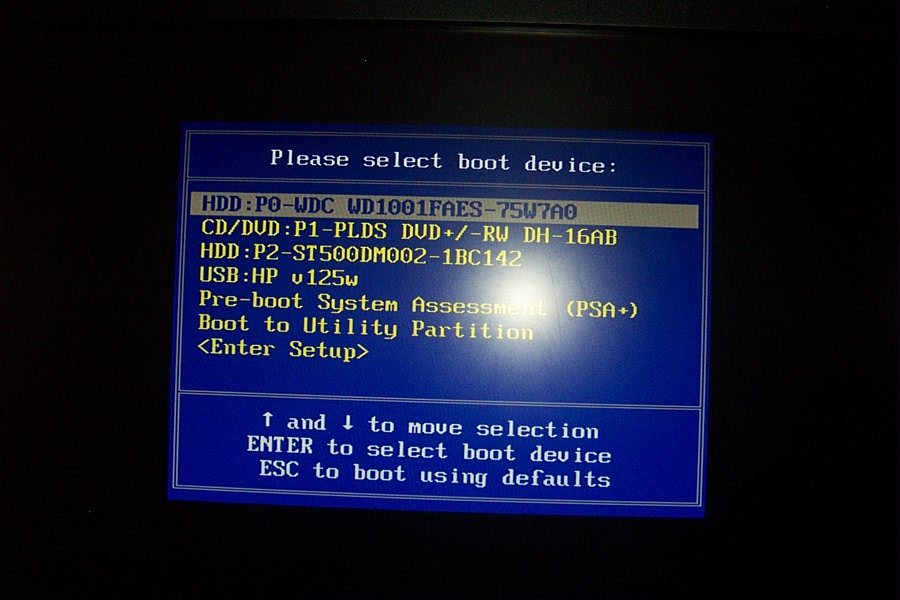
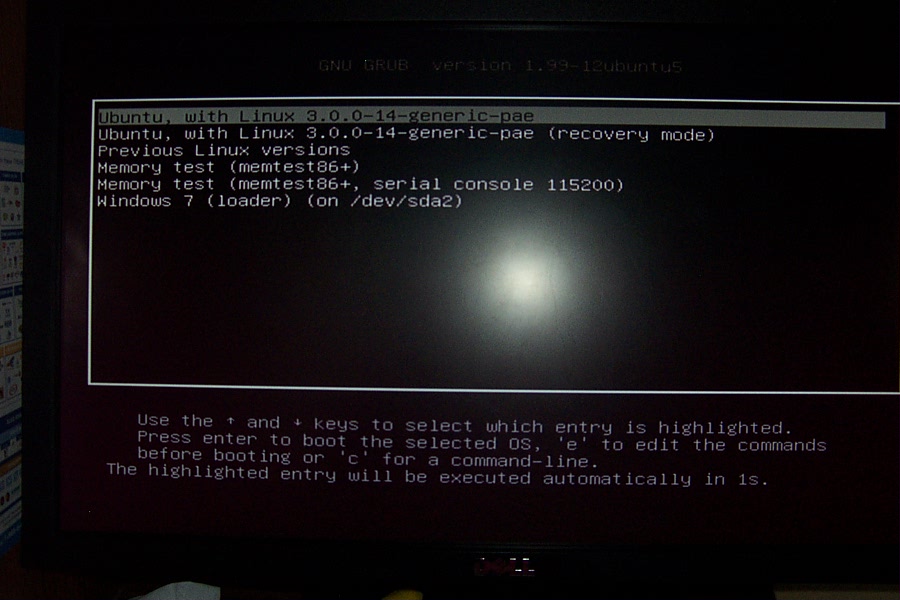
These don't look right to me
Image

Image

_________________
Image


Top
 Post subject: Re: Can't open Ubuntu
PostPosted: Fri Jan 06, 2012 1:42 pm  (#56) 
Offline
GimpChat Member

Joined: Mar 29, 2011
Posts: 346
Location: Wisconsin
Could you be a little more specific?

On the first screen,
HDD:P0 is your primary drive and it is on disk controller port 0 (your Windows drive)
CD/DVD:P1 is your CD/DVD drive and it's on controller port 1
HDD:P2 is your second hard drive and it's on controller port 2
USB:HP is your USB flash drive / memory stick
The other two are special features to test the system or to boot to the special utility partition on you primary drive.

The last screen looks the way mine did when I had Ubuntu installed.

_________________
Image


Top
 Post subject: Re: Can't open Ubuntu
PostPosted: Fri Jan 06, 2012 1:49 pm  (#57) 
Offline
GimpChat Member
User avatar

Joined: Oct 29, 2010
Posts: 711
Location: Netherlands
I assume the first picture is your bios.
The second one must be ubuntu grub.
The grub menu looks fine to me.
What happens when you start the second entry in the grub window?
Gerard.

_________________
Gentoo Linux always up-to-date.
Kernel-3.17.4 Python-2.7.8/3.3.5
Gimp-2.8.14

I use Linux only.
And Virtualbox with Win 7


Top
 Post subject: Re: Can't open Ubuntu
PostPosted: Fri Jan 06, 2012 2:03 pm  (#58) 
Offline
GimpChat Member
User avatar

Joined: Apr 07, 2010
Posts: 14182
I just didn't think the windows one should have (on /dev/sda2) beside it. why does it have that. shouldn't it say C: beside the windows one

_________________
Image


Top
 Post subject: Re: Can't open Ubuntu
PostPosted: Fri Jan 06, 2012 2:16 pm  (#59) 
Offline
GimpChat Founder
User avatar

Joined: May 22, 2008
Posts: 5248
Location: Gimpville
bkh1914 wrote:
I thought Molly was using the BIOS boot-time option (F12 on her computer at start-up) to control which device to boot from.

That should have left her Windows drive master boot record untouched. Obviously she is having no trouble booting into Windows and she is able to post messages here.

She can still boot into Windows Just fine. I was suggesting that she go ahead and create a a Windows Repair CD for future use. Better safe than sorry.

I don't see that she is using F12 BIOS boot menu to boot between the two drives. It appears whoever installed Ubuntu installed grub on the Windows drive (same as you would when dual booting using a single physical drive). That's the way it's gonna get installed by default, unless the person installing specifies otherwise (or unless you physically disconnect the Windows drive first).

_________________
Image


Top
 Post subject: Re: Can't open Ubuntu
PostPosted: Fri Jan 06, 2012 2:17 pm  (#60) 
Offline
GimpChat Member
User avatar

Joined: Oct 29, 2010
Posts: 711
Location: Netherlands
Linux never uses Windows nomenclature.
I was puzzled by sda2 also,I'd expected sda1.
If you manage to run ubuntu please run "fdisk -l" in a console and post the output.
Gerard.

_________________
Gentoo Linux always up-to-date.
Kernel-3.17.4 Python-2.7.8/3.3.5
Gimp-2.8.14

I use Linux only.
And Virtualbox with Win 7


Top
Post new topic Reply to topic  [ 71 posts ]  Go to page Previous  1, 2, 3, 4  Next

All times are UTC - 5 hours [ DST ]


* Login  


Powered by phpBB3 © phpBB Group