It is currently Mon Sep 28, 2026 5:10 am


All times are UTC - 5 hours [ DST ]


Post new topic Reply to topic  [ 6 posts ] 
Author Message
 Post subject: Text Box Help: Won't center, acts as if it has a wide margin on right
PostPosted: Tue Jun 03, 2014 7:09 pm  (#1) 
Offline
New Member

Joined: Jun 03, 2014
Posts: 3
GIMP Version: 2.8.10
Operating System: Windows
GIMP Experience: Beginner Level


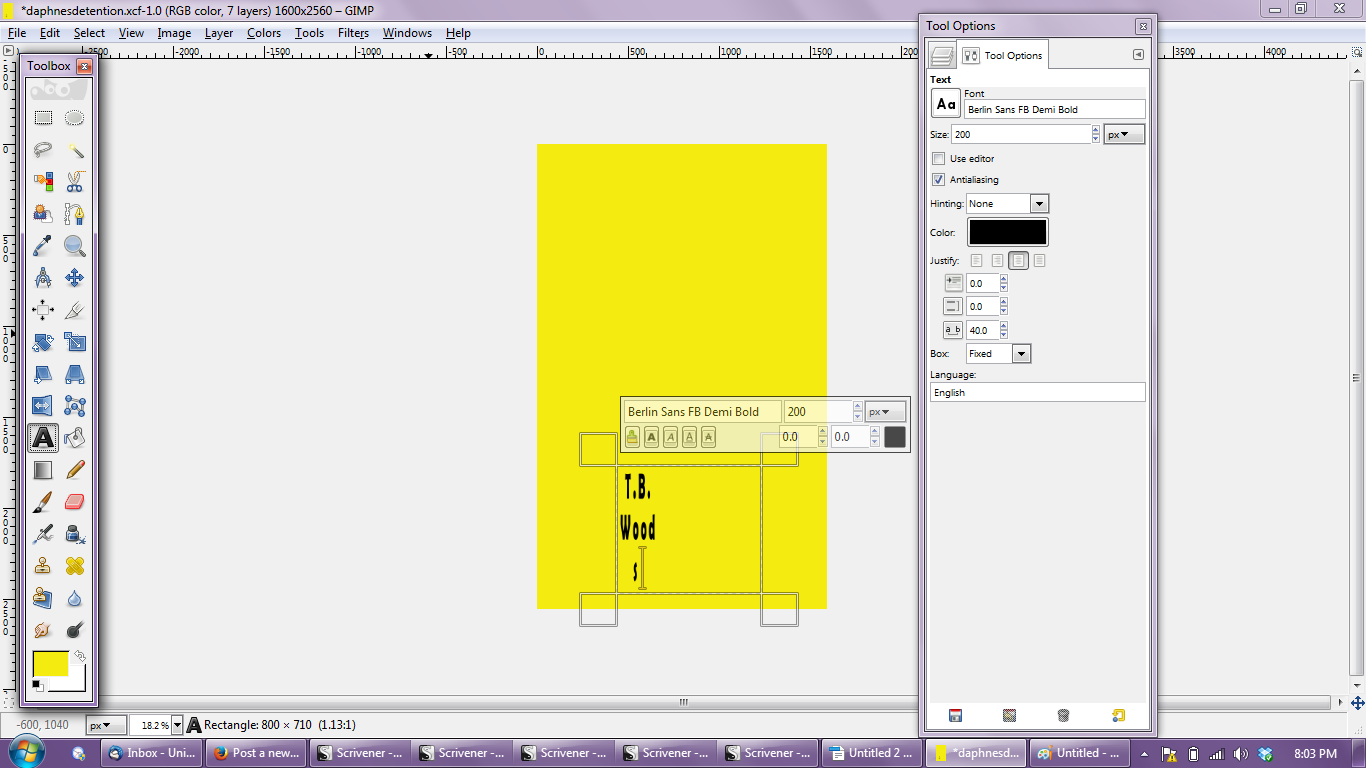
Hi! My text box is acting wonky, and I don't know why. I've never had this problem before.

It kind of acts like it has a wide margin on the right. When I try to center the text, it still is kind of left justified. And if I widen the text box, almost everything except a few letters drop down to the next line. And the font just looks... funny.

I've tried playing with the text box being fixed or dynamic. When dynamic and I enter the text, it's okay, but as soon as I adjust the size of the text box, it goes wonky again.

Any ideas? I have no idea why this happened.

In the attached screen shot, the text is supposed to read "T.B. Woods" and be centered.

Thanks so much for any help you can offer!

Attachment:
GimpPic.png
GimpPic.png [ 147.87 KiB | Viewed 2697 times ]


Share on Facebook Share on Twitter Share on Orkut Share on Digg Share on MySpace Share on Delicious Share on Technorati
Top
 Post subject: Re: Text Box Help: Won't center, acts as if it has a wide margin on ri
PostPosted: Tue Jun 03, 2014 7:34 pm  (#2) 
Offline
Script Coder
User avatar

Joined: Feb 18, 2011
Posts: 4826
Location: Bendigo Vic. Australia
You can select Windows>Single Window Mode Woops I got that all wrong (tired)

_________________
Image
No matter how much you push the envelope, it'll still be stationery.


Last edited by Graechan on Wed Jun 04, 2014 2:53 am, edited 1 time in total.

Top
 Post subject: Re: Text Box Help: Won't center, acts as if it has a wide margin on ri
PostPosted: Tue Jun 03, 2014 7:49 pm  (#3) 
Offline
GimpChat Member
User avatar

Joined: Jan 10, 2013
Posts: 863
Try changing the Fixed box to Dynamic.
When you adjust the size of the text box, make sure the Fixed mode does not return automatically.
If you are on Dynamics, but you reduce too much the text area, the setting returns to Fixed.

_________________
bbbbbbbbbbbImage
bbbbbbbbbbb Be patient, English is not my language.


Top
 Post subject: Re: Text Box Help: Won't center, acts as if it has a wide margin on ri
PostPosted: Tue Jun 03, 2014 8:03 pm  (#4) 
Offline
GimpChat Member
User avatar

Joined: Nov 16, 2011
Posts: 5127
Location: Metro Vancouver, BC
Someone had a similar problem a while ago with mismatched x and y resolutions so check, Print Size for that. Also it might be worth looking at (before you add the text box), Layer Boundary Size & Layer to Image Size.

_________________
Image
Gimp 2.8.18, Linux, median user
Gimp Chat Tutorials Index
Spirit Bear (Kermode)


Top
 Post subject: Re: Text Box Help: Won't center, acts as if it has a wide margin on ri
PostPosted: Wed Jun 04, 2014 7:15 am  (#5) 
Offline
New Member

Joined: Jun 03, 2014
Posts: 3
Is there a way to stop the Fixed mode from returning automatically when I adjust the size of the text box?


Top
 Post subject: Re: Text Box Help: Won't center, acts as if it has a wide margin on ri
PostPosted: Wed Jun 04, 2014 7:19 am  (#6) 
Offline
New Member

Joined: Jun 03, 2014
Posts: 3
Nevermind. I did have mismatched X/Y resolutions under Print Size. THANK YOU!!!!


Top
Post new topic Reply to topic  [ 6 posts ] 

All times are UTC - 5 hours [ DST ]


* Login  


Powered by phpBB3 © phpBB Group





