abrogard wrote:
Rod wrote:
You can try this filter also.
[
Image ]
Yes that begins to look good. I had some apparent success there for a while with G'mic when I selected black and white. But it didn't take. Didn't appear in the GIMP screen.
Excuse my ignorance but could you spell it out for me? Open a bunch (for testing I opened only two) files as layers. Then open G'mic. Then find a layer in g'mic that seems to work. Then click 'apply' in g'mic (which I did and it reported how many seconds it was working) and then it will automatically apply that filter to all the files I've selected?
Or it then needs to be told which to apply it to?
Or it does nothing failing some other instruction (i.e. it apparently did nothing for me) ?
I guess I don't need to say that the colors/levels/slide the pointers thing is right there in gimp and that's what I'm currently doing, one file at a time? Like it's not some idea off the top of my head... I might look for a macro tool...
Install this filter (export_layers.py and the export_layers folder it requires restart of GIMP) They both go in the plug-ins folder.
https://github.com/khalim19/gimp-plugin ... rs-2.4.zipThis exports all the layers as the extension of your choice to a present or new directory folder.
1) Open images in GIMP as LAYERS - Edit>Open as layers
2) After GIMP opens all the images on separate layers - Filters>G'MIC
3) Go to the "Black and White" menu and select ALL for input layers and IN PLACE for output layers
4) Set your values with the slider controls and preview of your choice (i use FULL)
5) DO NOT adjust the + - in preview zoom or you'll get different results then previewed after the filter is finished running
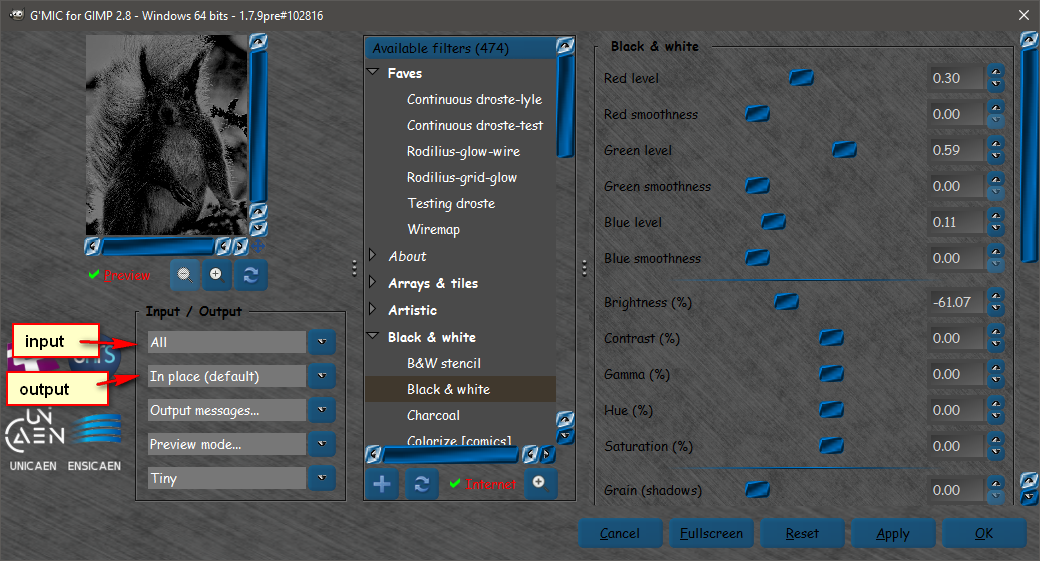
CLICK OK

6)File>Export Layers.
7) Select an extension type (jpg, png, gif...ect) and select where to save the images
8) Select "Export Layers"
Done
 Login
Login Register
 Tweets
 FAQ
FAQ Advanced Search





 Going well, though. Much appreciate your help. Your patience and careful and considerate picture/text explanations. I do. I would never have got there/here by myself.
