It is currently Sun Nov 08, 2026 4:31 pm


All times are UTC - 5 hours [ DST ]


Post new topic Reply to topic  [ 10 posts ] 
Author Message
 Post subject: Drop Shadow
PostPosted: Wed Apr 25, 2018 11:19 am  (#1) 
Offline
Global Moderator
User avatar

Joined: Apr 01, 2012
Posts: 8498
Location: On the other side of your screen
GIMP Version: 2.10 RC1
Operating System: Windows
OS Version: Home 10
GIMP Experience: New User

List any relevant plug-ins or scripts:
Layer effects and light & shadow filter

List any ERROR messages you received:
NA


My drop shadow for text has suddenly stopped working!
It was working kind of, earlier but now has stopped altogether. Seems to be just for adding drop shadow on text and it is in the layer effects and the Light & Shadow Filter.
Oh, I forgot to mention. It isn't even leaving a message of any sort. It is going through the motions but nothing eventuates.

_________________
Image
Free Fun Photo Editing & resources
Poems from the Lord
Gimp Newby
Gimp version 3.2.6 and GMIC-Qt 4.0.2 OS :- Windows 10 Home 64


Share on Facebook Share on Twitter Share on Orkut Share on Digg Share on MySpace Share on Delicious Share on Technorati
Top
 Post subject: Re: Drop Shadow
PostPosted: Wed Apr 25, 2018 11:31 am  (#2) 
Offline
Administrator
User avatar

Joined: Aug 10, 2012
Posts: 14265
Location: Native to NYC living in Arizona, Gimp 2.8 - 3.0, Win 11 PC.
sallyanne wrote:
GIMP Version: 2.10 RC1
Operating System: Windows
OS Version: Home 10
GIMP Experience: New User

List any relevant plug-ins or scripts:
Layer effects and light & shadow filter

List any ERROR messages you received:
NA


My drop shadow for text has suddenly stopped working!
It was working kind of, earlier but now has stopped altogether. Seems to be just for adding drop shadow on text and it is in the layer effects and the Light & Shadow Filter.
Oh, I forgot to mention. It isn't even leaving a message of any sort. It is going through the motions but nothing eventuates.

Can you post an XCF file with an example of this?

_________________
Image
"A wise man learns more from a foolish question than a fool can learn from a wise answer"
Image


Top
 Post subject: Re: Drop Shadow
PostPosted: Wed Apr 25, 2018 11:55 am  (#3) 
Offline
GimpChat Member

Joined: Oct 30, 2016
Posts: 145
Are you using the legacy Drop Shadow?
Drop Shadow (gegl) works ok in Partha's 2.10 rc2


Last edited by TimeLord on Wed Apr 25, 2018 12:55 pm, edited 1 time in total.

Top
 Post subject: Re: Drop Shadow
PostPosted: Wed Apr 25, 2018 12:18 pm  (#4) 
Offline
GimpChat Member

Joined: Mar 04, 2011
Posts: 2629
Is the problem plugin the LayerFX python script?

Should work in Gimp 2.10 From memory you are using Parthas version. A good idea would be update to Gimp 2.10 RC2

I remember the layerfx plugin not working with Gimp 2.9.something. Looks like a bit of compatibility has crept in.

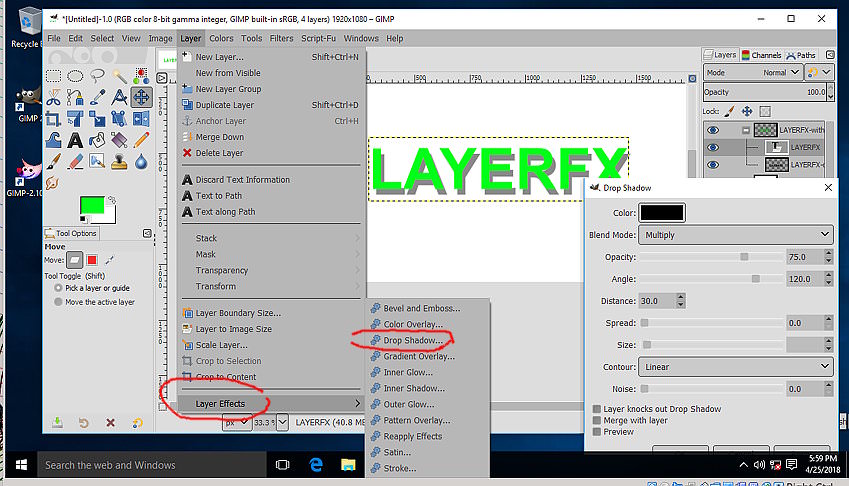
It should work as (all-in-one-screenshot)

Image

Not too sure about the other options ;) Even the older layerfx.scm script-fu works, sort of.

However, why not use the regular Gimp 2.10 drop shadow. It is now a GEGL filter and edits straight on the canvas.

Image


Top
 Post subject: Re: Drop Shadow
PostPosted: Thu Apr 26, 2018 1:02 am  (#5) 
Offline
Global Moderator
User avatar

Joined: Apr 01, 2012
Posts: 8498
Location: On the other side of your screen
Attachment:
drop shadow.xcf [177.55 KiB]
Downloaded 191 times

Looks like Layer effects and legacy are working again but the other isn't.

_________________
Image
Free Fun Photo Editing & resources
Poems from the Lord
Gimp Newby
Gimp version 3.2.6 and GMIC-Qt 4.0.2 OS :- Windows 10 Home 64


Top
 Post subject: Re: Drop Shadow
PostPosted: Thu Apr 26, 2018 2:23 am  (#6) 
Offline
GimpChat Member

Joined: Mar 04, 2011
Posts: 2629
Not able to reproduce a fault.

This is the dialogue again.
Does that come up in your Gimp? If it does what happens when you 'ok' it?
From your file it looks like it has been applied but nothing happened.

screenshot https://i.imgur.com/4I4xvli.jpg

The text layer loses its text 'status' flattened to include the drop shadow.

screenshot https://i.imgur.com/c10R8KE.jpg

Your drop shadow legacy layers are a bit strange. The drop shadow has a bit of an outline, looks like a composite of coloured text / white text / shadow.

-------------
Edit: Noticed this before but just got round to looking at the problem text.

The flattened text is GIMP DROP SHADOW ie. all upper case.
From the layer the text should be Gimp Drop Shadow ie. lower case, capitalised.

screenshot: https://i.imgur.com/vR4kEzQ.jpg

Do not know how you managed that, suggest trying the GEGL filter on an un-modified layer until you get the hang of it.

----------------

Unrelated but just a note. Gimp 2.9/10 has two layer types 'default' and 'legacy' If you need to save an xcf file that will open with Gimp 2.8 then all layers need to be legacy.


Top
 Post subject: Re: Drop Shadow
PostPosted: Thu Apr 26, 2018 6:08 am  (#7) 
Offline
Global Moderator
User avatar

Joined: Apr 01, 2012
Posts: 8498
Location: On the other side of your screen
Might leave it for now until the end of the month and download another gimp and see if it is still happening. (end of the month because my downloads are nearly full up - refills at the start of the month). I can use it up but if I do I will be put back to dial up speed.


Wanted to wait until the stable 2.10 came out.

Oh I didn't mention before either. I am using 64bit now. (2.10.0 RC1, 64 bit)

By the way, I have a 2.8 on my computer as well. Could that be the problem?

_________________
Image
Free Fun Photo Editing & resources
Poems from the Lord
Gimp Newby
Gimp version 3.2.6 and GMIC-Qt 4.0.2 OS :- Windows 10 Home 64


Top
 Post subject: Re: Drop Shadow
PostPosted: Thu Apr 26, 2018 6:33 am  (#8) 
Offline
Global Moderator
User avatar

Joined: Apr 01, 2012
Posts: 8498
Location: On the other side of your screen
It was white text I was trying to do drop shadow on last night rich. Didn't change the colour of the shadow but made the opacity a little stronger.
I have no idea how the two different texts happened either. Thanks for that other info re the legacy as well. If I keep having a problem for now I know what to do so I can take it back to 2.8.

_________________
Image
Free Fun Photo Editing & resources
Poems from the Lord
Gimp Newby
Gimp version 3.2.6 and GMIC-Qt 4.0.2 OS :- Windows 10 Home 64


Top
 Post subject: Re: Drop Shadow
PostPosted: Fri Apr 27, 2018 3:57 am  (#9) 
Offline
GimpChat Member
User avatar

Joined: Apr 15, 2017
Posts: 1837
The default parameters on the gimp drop shadow in v 2.10 RC2 are set ridiculously too high. adjust the blur down and opacity up. When you find something you like, save as a preset.


Top
 Post subject: Re: Drop Shadow
PostPosted: Fri Apr 27, 2018 6:21 am  (#10) 
Offline
GimpChat Member

Joined: Mar 04, 2011
Posts: 2629
sallyanne wrote:
...snip...Thanks for that other info re the legacy as well. If I keep having a problem for now I know what to do so I can take it back to 2.8.


Hope the project goes ok.

You spurred me into action and that takes a bit of doing these days ;)

A short guide into the why and wherefores

https://www.gimp-forum.net/Thread-Gimp- ... 02#pid7702


Top
Post new topic Reply to topic  [ 10 posts ] 

All times are UTC - 5 hours [ DST ]


* Login  


Powered by phpBB3 © phpBB Group