It is currently Sat Sep 19, 2026 10:47 am


All times are UTC - 5 hours [ DST ]


Post new topic Reply to topic  [ 11 posts ] 
Author Message
 Post subject: Understanding where and how to get GIMP plugins
PostPosted: Mon Jun 28, 2021 2:04 pm  (#1) 
Offline
New Member

Joined: Jun 28, 2021
Posts: 3
GIMP Version: 2.10.18
Operating System: Linux
OS Version: Mint
GIMP Experience: New User


I want to switch to FOSS tools and have been having trouble finding a few things. The GIMP Chat membership email I received said I can't post links until I have 5 posts in to prove I'm not a spammer, so I will "break" the links I'm posting. This way humans know what I am talking about.
[EDIT: THE BOARD SAYS "Your post looks too spamy for a new user, please remove off-site URLs. " so all the slightly broken URLS were changed to look even less like URLs or taken out entirely]

From this article, it had a lot of ways GIMP could be used as a total photoshop replacement, especially with Layer Styles:
[smashingmagazine had an article]

It linked to a GIMP plugin directory:
[from gimp org slash repository ]

It said it was down but archived here:
[a github site to copy the plugin registry]

But that is impossible for me to navigate or put in a search. My primary goal is to set up layer styles so they match (or improve) on what my old Photoshop could do. But as a new Linux user I have questions:

1) What is are some links to reliable GIMP plugin directories?
2) Is there any virus risk from using GIMP plugins?
3) What are the best photoshop-like layer style plugins. In photoshop I practically lived on layer styles and want to be able to continue to do so.
4) Is there a way to navigate that github GIMP plugin repository for plugin searches? Or do I need to know EXACTLY what I'm looking for there in order to find a copy of it?
5) How do I know a plugin is legit, as opposed to a virus (if GIMP plugin virus problems are possible?)

I asked #5 because this looks cool:
[I guess since the board doesn't like links, search for PGEI and GIMP in the same line to see what I was talking about]

But I have no idea about that page or anything else with the new program. I apologize about the links being what they are. Thank you for all your assistance!


Share on Facebook Share on Twitter Share on Orkut Share on Digg Share on MySpace Share on Delicious Share on Technorati
Top
 Post subject: Re: Understanding where and how to get GIMP plugins
PostPosted: Mon Jun 28, 2021 2:40 pm  (#2) 
Offline
GimpChat Member

Joined: Mar 04, 2011
Posts: 2615
linux and viruses. Not saying there are none, there is an entity called a rootkit but in general it is a MS Windows and to a lesser extent a MacOS 'thing'. Sometimes a when downloading a python plugin 'something'.py a browser might tag as possibly dangerous and you have to confirm the download. The same might apply Debian .deb packages. In short, do not worry.

The old Gimp plugin registry site archive https://github.com/pixlsus/registry.gim ... .org/files No real way to search apart from by file name, however most of these are ancient and might not work. Mostly interesting from a historical viewpoint.

Scripts and plugins: Gimp can use a script-fu something.scm (which is text) or a plugin something.py (which is usually text) and a linux binary. No good trying to use a Windows something.exe, it will not work.

Using LinuxMint & Gimp 2.10.18 - That sounds like LM 20 - no python 2.7 support unless you manage to install it yourself - so no python plugins will work. There are other version that you can install a flatpak or an appimage both support python 2 out-of-the-box. Newcomer to linux ? Going to be an experience ;)

There is a collection started here: www.gimpscripts.net have a browse through that. A big plugin gmic_gimp_qt you can get from www.gmic.eu You probably want the zip for Ubuntu 20.04 focal.

Otherwise, a general web search usually turns up a recommendation or just ask here.

Quote:
My primary goal is to set up layer styles so they match (or improve) on what my old Photoshop could do
.....
What are the best photoshop-like layer style plugins. In photoshop I practically lived on layer styles and want to be able to continue to do so.


Prepare to be dissapointed. Gimp is not PS. Gimp does not mimic PS. The end result can be equivalent but getting there is different.
There are no layer styles / adjustment layers as you know them.
It has been said that Gimp has a steep learning curve and PS a steeper un-learning curve.

Easy for me, I have been using linux and Gimp for 17 years but still remember how difficult it could be.
Best of luck.


Top
 Post subject: Re: Understanding where and how to get GIMP plugins
PostPosted: Tue Jun 29, 2021 3:39 am  (#3) 
Offline
Script Coder
User avatar

Joined: Oct 25, 2010
Posts: 4812
1) I'll avoid self-advertisement :) But my recommendation is not install plugins until you really need them.
2) Many plugins/scripts are source files (script-fu/python-fu) so a naughty plugin would be very easily spotted. Otherwise, the source code of the binary ones is normaly easy to find, and since you run Linux, you can compile your own from source code.
3) Forget it, see Rich's answer
4) Since you are on Linux, you can easily do a `git clone` of the whole thing to your disk (it is not that big) and then search the local files with any utility at hand (find/grep or else)
5) See 2)

_________________
Image


Top
 Post subject: Re: Understanding where and how to get GIMP plugins
PostPosted: Tue Jun 29, 2021 10:00 am  (#4) 
Offline
New Member

Joined: Jun 28, 2021
Posts: 3
Thank you very much for your responses. I am kind of disappointed about the layer styles since that has been key to my workflow and making adjustments quickly.

ofnuts: I'm so new at Linux had no idea that was possible. I will look up a git clone tutorial and that sounds like an easy way to use it.

Rich2005: "Newcomer to linux ? Going to be an experience "
Yes it is :) The GUI is so simple though it is much easier than the last time I tried. That's my main reason for learning GIMP, just to have something native to run that actually has more features than my older version of Photoshop. Thank you for the plugin directory links. Just browsing them gives me ideas.

I don't think the learning curve for GIMP is so terrible - I did some simple edits without difficulty, and the color tool usage was pretty intuitive. I probably need to learn a lot more about layer masking and the selection tools from the manual, but it's really the lack of clickable Layer Styles/Layer Effects that had been cramping my style. Is there an "adjustment layer" or similarly named feature that could be used to be the "infinitely re-editable" replacement for layer styles?

I love that GIMP has features of newer Photoshop software than the version I purchased in the medieval era, but I may have to turn to a VM or Wine to keep my original work going.


Top
 Post subject: Re: Understanding where and how to get GIMP plugins
PostPosted: Tue Jun 29, 2021 10:27 am  (#5) 
Offline
GimpChat Member

Joined: Mar 04, 2011
Posts: 2615
Quote:
...Is there an "adjustment layer" or similarly named feature that could be used to be the "infinitely re-editable" replacement for layer styles?...


Not at the moment..maybe in a future Gimp 3.something

Depends on the complexity of the image. All changes are permanent. Various options. For a simple image, a new-from-visible leaves anything under that editable...or... Make a layer group add a layer, duplicate layer and apply effect. Want to change it, delete change and start again.

Certainly possible to run some PS versions under WINE. I have a v.old PS7 that I sometimes drag out to open an equally old .psd file. I do know people who use PS CS2 (from when the Ad*be registration server closed) in a Windows VM.


Top
 Post subject: Re: Understanding where and how to get GIMP plugins
PostPosted: Tue Jun 29, 2021 10:49 am  (#6) 
Offline
GimpChat Member
User avatar

Joined: Apr 27, 2010
Posts: 1510
Location: Sweden
While this is a GIMP forum and a GIMP-question, I guess there's no harm in mentioning an alternative - Krita is another free & open-source painting program on Linux that does have non-destructive adjustment layers (called 'filter layers'). Krita is more focused on painting than on photo-manipulation (which is GIMP's focus), but it's worth to look into if you specifically want non-destructive editing. Neither tries to be similar to Photoshop, so there is a learning curve transitioning no matter what you choose.
.
Griatch

_________________


Top
 Post subject: Re: Understanding where and how to get GIMP plugins
PostPosted: Tue Jun 29, 2021 11:44 pm  (#7) 
Offline
GimpChat Member
User avatar

Joined: May 24, 2021
Posts: 859
Location: SEA - South East Asia
ofnuts wrote:
1) I'll avoid self-advertisement :) But my recommendation is not install plugins until you really need them.

I agree with ofnuts! In the beginning, I would say only add G'MIC and Resynthesizer (a content aware like on PS), but nothing else! You will be overwhelmed with huge menu and sub-menus

anyway you can keep this links as well for later use
https://www.gimphelp.org/ It's some one who is updating scripts to work on a GIMP 2.10.x version

I do agree with @Griatch Krita not only has non destructive adjustment layers, but also, adjustment mask, transform mask and so on... But it's not GIMP, it's a different learning curve as well, but Krita might be able to keep your layer adjustment, which would be better IMHO than installing wine or a VM of windows...

GIMP or Krita without G'MIC it' is like a car without a turbo IMHO, or a computer without internet... (starting with Krita 5 (pre-alpha) G'MIC is auto embedded with Krita for all OS)
To download G'MIC => https://gmic.eu on the download page chose carefully the G'MIC for your OS, Linux Mint is based on Ubuntu, so you need to download for Ubuntu and for the software you want to use with it (GIMP)

To know the version of your distro, in the terminal (Ctrl+Alt+T to open terminal on the fly) type (or copy the code below, then in the terminal Ctrl+Shift+V to paste it, (Ctrl+C or V in terminal are for something else))
lsb_release -a

then hit Enter key

Image

To get the latest GIMP with the most important plugins included (like G'MIC and more) or without plugins https://github.com/aferrero2707/gimp-ap ... continuous (scroll down to GIMP_AppImage-git-2.10.25-20210610-withplugins-x86_64.AppImage or GIMP_AppImage-git-2.10.25-20210603-x86_64.AppImage as of today, (the guy update it 2 times a month))

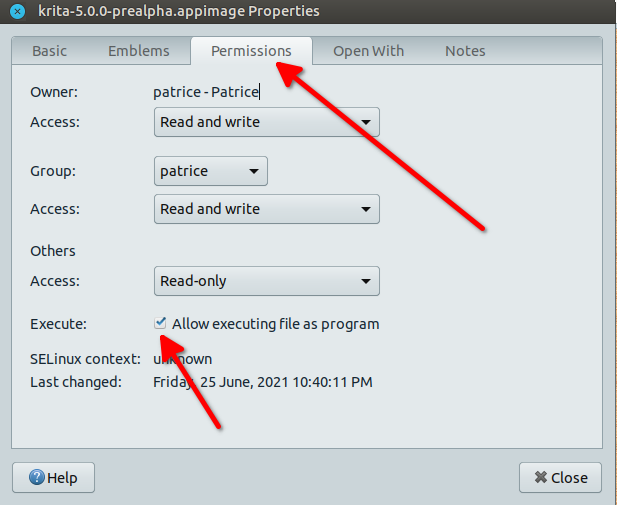
AppImage... If you're new on Linux (BTW Welcome to the Bazaar :hehe ), you might not be aware how appimage works, you do not need to install them, once you've downloaded it, right click on it=> select "Properties", => a window opens go to the tab "Permissions" and check the box "Allow Executing file as program" => OK/Close, you're done, now just double click on the appimage and it will opens,
Image

if you don't like the appimage, just throw it in the trash, done as well. your system might ask you if you want to put the link in the menu the first time you click on the appimage, in a super duper technical way that might scares you (programmers should never write messages to the end users, ever),
But yes, it's nice to open it from the menu as well so click OK even if you don't understand what's the message is speaking about (Should a Desktop file blablabla/bla/ = Do you want a shortcut in the menu?), but you can refuse if you want and the app will continue to work as intended, in all case when you throw an appimage to the trash, it will automatically be removed from the menu.

_________________
Patrice


Top
 Post subject: Re: Understanding where and how to get GIMP plugins
PostPosted: Wed Jun 30, 2021 6:47 pm  (#8) 
Offline
New Member

Joined: Jun 28, 2021
Posts: 3
Thank you for all the additional comments. I'll definitely be doing some playing around with Krita to see whether the layer style matches the kind of workflow I was looking for (mainly with text).

I'm familiar with WINE because Windows kept depreciating my old software. The benefit of having old versions of PS on disk (CD-ROM as the disk not even DVD in one case!) may get that to work without a VM. The older it is, the better WINE seems to like it. Or maybe ReactOS will get better by the time I need it.

I was not aware of Flatpack software and this will be a nice way of making sure I know enough about Linux that I don't type in the self destruct code.

Regardless of how much I may continue to use PS, GIMP gives me an upgrade on a lot of other tools. I think GMIC and Resynthesizer sound exciting, especially since that's an upgrade from my older versions of PS. The GIF animation toolset also looks very appealing.

I have a feeling this will work out well.


Top
 Post subject: Re: Understanding where and how to get GIMP plugins
PostPosted: Wed Jun 30, 2021 11:32 pm  (#9) 
Offline
GimpChat Member
User avatar

Joined: May 24, 2021
Posts: 859
Location: SEA - South East Asia
Megafrog wrote:
I was not aware of Flatpack software and this will be a nice way of making sure I know enough about Linux that I don't type in the self destruct code.

I did not wanted to speak about that as you're new on the Linux world, but....
There is a huge Elephant in the room, and everyone is closing its eyes, but a war is going on Linux... Literally! (multiple wars in fact)

One of these war is packaging (.deb (debian), snap, flatpak, appimage, and so), I will not get in details.
but just to let you know as I tried all packaging:
GIMP flatpak is something like 2GB in size to download and slow to open (few more seconds than a .deb)
GIMP .deb is something like a mere 40 MB to download and quick to open (in a matter of 1-2 second)
GIMP appimage is something like 150 MB to download and quick to open (in a matter of 2-3 second)
GIMP snap is something near 800 MB ~ 1 GB to download and slow to open (few more seconds than a .deb and I'm nice saying "few seconds more")

(although Linux Mint disabled/locked a part of snapd, so you should not have to deal with snaps)

_________________
Patrice


Top
 Post subject: Re: Understanding where and how to get GIMP plugins
PostPosted: Thu Jul 01, 2021 5:01 am  (#10) 
Offline
Script Coder
User avatar

Joined: Oct 25, 2010
Posts: 4812
PixLab wrote:
Megafrog wrote:
I was not aware of Flatpack software and this will be a nice way of making sure I know enough about Linux that I don't type in the self destruct code.

I did not wanted to speak about that as you're new on the Linux world, but....
There is a huge Elephant in the room, and everyone is closing its eyes, but a war is going on Linux... Literally! (multiple wars in fact)

One of these war is packaging (.deb (debian), snap, flatpak, appimage, and so), I will not get in details.
but just to let you know as I tried all packaging:
GIMP flatpak is something like 2GB in size to download and slow to open (few more seconds than a .deb)
GIMP .deb is something like a mere 40 MB to download and quick to open (in a matter of 1-2 second)
GIMP appimage is something like 150 MB to download and quick to open (in a matter of 2-3 second)
GIMP snap is something near 800 MB ~ 1 GB to download and slow to open (few more seconds than a .deb and I'm nice saying "few seconds more")

(although Linux Mint disabled/locked a part of snapd, so you should not have to deal with snaps)


There are not "wars", these are options.

.DEB is the usual Linux packaging (for the Debian family, .rmp in the Redhat family). Packages installed that way depends on libraries installed on the system (all this complexisty is somehow handled by the package manager that will also install missing dependencies).

Snap/Flatpak are all-in-one containers, where the application comes with all its dependencies. The other side of the coin is that many of these duplicate what you have on your system (hence the bloat) and these applications are often "sandboxed": they run in a virtual world where the files aren't always the system ones. This is OK for their executables, but when they have their own /tmp they can't share files with other apps (for instance my screenshot app wouldn't export to a flatpak Gimp), and their "most recent" files isn't shared by others (so if you want to upload yourr latest Gimp masterpiece, you won't find it in the recent files selector in Firefox/Chrome). Very ofnt taht also cannot access mounted media (the SD card from your camera, for instance). They are quite popular right now because they often include Python support(see below).

Never used AppImage, so I cannot comment.

Python support is a bit of a sore point right now. Gimp 2.X uses Python 2.7 by all of Python V2 is suddenly deprecated (after years of warning...). It used to be the default python on Linux until 2020. So when you use .DEB Gimp on Ubuntu 20.04 or later, you have to retrofit the Python support.

Last, there is a final option: compile your own from source. This give you access to all the secret options (and secret bugs...).

_________________
Image


Top
 Post subject: Re: Understanding where and how to get GIMP plugins
PostPosted: Fri Jul 02, 2021 1:27 am  (#11) 
Offline
GimpChat Member
User avatar

Joined: May 24, 2021
Posts: 859
Location: SEA - South East Asia
ofnuts wrote:
There are not "wars", these are options.


That's an awesome point of view, and indeed we have many choices about the way we want to have our software :bigthup
Thanks ofnuts

_________________
Patrice


Top
Post new topic Reply to topic  [ 11 posts ] 

All times are UTC - 5 hours [ DST ]


* Login  


Powered by phpBB3 © phpBB Group

