smp: when you make a path from selection your path inherits any unevenness in the selected region, in this case the original rectangle already has the problem with the rounding not being perfect. i've also noticed that the path created isn't always optimal - lots of unnecessary nodes that can be removed to advantage, and some node handles that can be adjusted. so if i were you i'd try making both rectangles with the shape paths script. usually, though, i work with selections i can't make in the shape paths script and then i go in and edit the path i made from selection to optimize it. i did that to a rounded rectangle and found i could improve it. look at this:

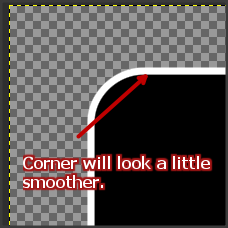
i was stupid enough not to take a screen shot of my original rectangle stroke, but it looked just like yours, with a clearly visible dent where the rounding started. i fixed that up just by clicking the nodes closest to the corners and dragging out the handles a little.
also, sometimes when i'm working with for example text with an outer stroke that is likely to get jagged edges i make the text a little bigger (two or three sizes) than i want it and feather the edges a little (2-3 px) of both the original text and the stroke. when i scale it down to the size i want it it looks sharp again and the edges don't look so jagged. make sure the difference in size isn't too big, though, that will make the edges even more jagged.
 Login
Login Register
 Tweets
 FAQ
FAQ Advanced Search









 haha, molly, you posted just as i was about to click submit - you're a master ninja
  .
.
 This help?





