It is currently Mon Jun 08, 2026 2:52 pm


All times are UTC - 5 hours [ DST ]


Post new topic Reply to topic  [ 8 posts ] 
Author Message
 Post subject: Looking for tip and preset for Convolution Matrix filter
PostPosted: Wed Jul 03, 2013 4:39 pm  (#1) 
Offline
GimpChat Member

Joined: Apr 12, 2010
Posts: 5870
Anybody here tried the gimp Convolution Matrix plugin ?

GIMP> FILTERS> GENERIC> CONVOLUTION MATRIX

It is quite powerful , it may create preset to blur sharpen, make edge detection , and quite a lot of other effects, but seems for very mathematical mind and as far i know there are not even preset that may help as guide for the various effect that then may be ...roughly used as they are or fine tuned ( the filter has a good preview that help much to control the effect )

May be a old fashion filter, not sure if may offer effects that are not already available in gimp or gmic , but will be nice have some preset

The convolution matrix filter is not a peculiarity of gimp, there is something similar is in almost any image editor (and even imagine viewers ) and presets should be easy to adapt ...but no idea where to search ...and even if would be worth

Anyway the question is , anybody had experiences with this filter ?

And are some presets for effect that are not just a clone of what already in other gimp filters (as blur, sharpen, emboss )

I mean blur, sharpen, emboss are all fine but IF the results is identical to the built in filters why to fight with the math of convolution matrix ?

IF not and are differences or something that c.m. does better , then fine but what is ? and how to replicate ?


Just curious ...

_________________
My 3D Gallery on Deviantart http://photocomix2.deviantart.com/
Main gallery http://www.flickriver.com/photos/photocomix-mandala/
Mandala and simmetry http://www.flickriver.com/photos/photocomix_mandala/

Image

Mrs Wilbress


Share on Facebook Share on Twitter Share on Orkut Share on Digg Share on MySpace Share on Delicious Share on Technorati
Top
 Post subject: Re: Looking for tip and preset for Convolution Matrix filter
PostPosted: Wed Jul 03, 2013 5:07 pm  (#2) 
Offline
GimpChat Member
User avatar

Joined: Jul 17, 2012
Posts: 2769
have you seen this, PC ?

http://blog.meetthegimp.org/tag/convolution-matrix/


Top
 Post subject: Re: Looking for tip and preset for Convolution Matrix filter
PostPosted: Wed Jul 03, 2013 6:21 pm  (#3) 
Offline
GimpChat Member

Joined: Apr 12, 2010
Posts: 5870
No , cool video.

But doesn't answer to my questions that i may rephrase better :

There is some peculiar effect that only Convolution Matrix may offer ?
if there is ...i will love a visual example and indication to recreate the matrix.

_________________
My 3D Gallery on Deviantart http://photocomix2.deviantart.com/
Main gallery http://www.flickriver.com/photos/photocomix-mandala/
Mandala and simmetry http://www.flickriver.com/photos/photocomix_mandala/

Image

Mrs Wilbress


Top
 Post subject: Re: Looking for tip and preset for Convolution Matrix filter
PostPosted: Wed Jul 03, 2013 11:42 pm  (#4) 
Offline
GimpChat Member
User avatar

Joined: Sep 24, 2010
Posts: 12775
Set the result to Grain merge and see what happens PC. :)

_________________
Lyle

Psalm 109:8

Image


Top
 Post subject: Re: Looking for tip and preset for Convolution Matrix filter
PostPosted: Fri Jul 05, 2013 3:09 am  (#5) 
Offline
Script Coder
User avatar

Joined: Feb 18, 2011
Posts: 4826
Location: Bendigo Vic. Australia
Here is the result of convolution matrix as used in a script

Image

Image

I could not see what the convolution matrix did as the dog plugin seemed to do most of the work
These are the steps as outlined by Alex Turner

How The Filter Works

Below are the steps described

1/ gimp-image-add-layer lineLayer
2/ gimp-layer-set-mode lineLayer MULTIPLY-MODE
3/ gimp-desaturate lineLayer
4/ gimp-desaturate shadeLayer
5/ plug-in-apply-canvas shadeLayer
5a/ flatten shadeLayer *added because dog requires RGB*
6/ plug-in-dog shadeLayer 35 3 *inner and outer blur settings*
7/ plug-in-convmatrix shadeLayer
8/ plug-in-sharpen shadeLayer 45 *fail*
9/ plug-in-convmatrix shadeLayer
10/ plug-in-sharpen shadeLayer 85 *fail*
10a/flatten lineLayer *added because dog requires RGB*
11/ plug-in-dog lineLayer 3 1 *inner and outer blur settings*
12/ plug-in-unsharp-mask lineLayer 4 4 5
13/ gimp-layer-set-opacity lineLayer 50

_________________

Image
No matter how much you push the envelope, it'll still be stationery.


Top
 Post subject: Re: Looking for tip and preset for Convolution Matrix filter
PostPosted: Fri Jul 05, 2013 10:11 pm  (#6) 
Offline
Script Coder
User avatar

Joined: Feb 18, 2011
Posts: 4826
Location: Bendigo Vic. Australia
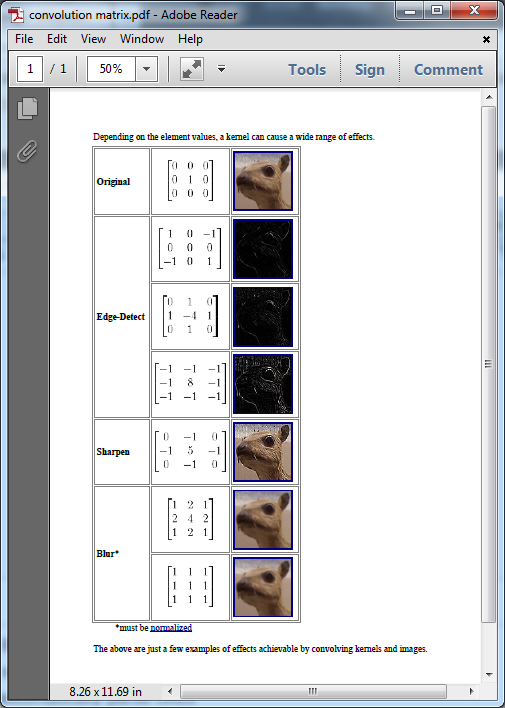
I found more info on the web than what was in the gimp docs

Image

_________________
Image
No matter how much you push the envelope, it'll still be stationery.


Top
 Post subject: Re: Looking for tip and preset for Convolution Matrix filter
PostPosted: Sun Jul 07, 2013 2:29 am  (#7) 
Offline
Script Coder
User avatar

Joined: Feb 18, 2011
Posts: 4826
Location: Bendigo Vic. Australia
I've done 2 scripts using the convolution matrix and it is a very fast plugin to use

_________________
Image
No matter how much you push the envelope, it'll still be stationery.


Top
 Post subject: Re: Looking for tip and preset for Convolution Matrix filter
PostPosted: Sun Jul 07, 2013 5:57 am  (#8) 
Offline
GimpChat Member

Joined: Apr 12, 2010
Posts: 5870
what scripts ?

_________________
My 3D Gallery on Deviantart http://photocomix2.deviantart.com/
Main gallery http://www.flickriver.com/photos/photocomix-mandala/
Mandala and simmetry http://www.flickriver.com/photos/photocomix_mandala/

Image

Mrs Wilbress


Top
Post new topic Reply to topic  [ 8 posts ] 

All times are UTC - 5 hours [ DST ]


* Login  


Powered by phpBB3 © phpBB Group