It is currently Wed Sep 30, 2026 1:47 pm


All times are UTC - 5 hours [ DST ]


Post new topic Reply to topic  [ 28 posts ]  Go to page 1, 2  Next
Author Message
 Post subject: How to Create Icons, Themes
PostPosted: Sat Jul 06, 2013 5:15 pm  (#1) 
Offline
GimpChat Member
User avatar

Joined: Jul 06, 2013
Posts: 2663
Location: California
I have a question

How do I create social media icons, wordpress themes, and Coppermine Photo Gallery themes in Gimp? Is it even possible to do that? I've looked around and I can't seem to find any tutorials on what I'm looking for.


Share on Facebook Share on Twitter Share on Orkut Share on Digg Share on MySpace Share on Delicious Share on Technorati
Top
 Post subject: Re: Hi!
PostPosted: Sat Jul 06, 2013 6:01 pm  (#2) 
Offline
Administrator
User avatar

Joined: Aug 10, 2012
Posts: 14219
Location: Native to NYC living in Arizona, Gimp 2.8 - 3.0, Win 11 PC.
mackenzieh wrote:
Thanks for the welcome! I have a question.

How do I create social media icons, wordpress themes, and Coppermine Photo Gallery themes in Gimp? Is it even possible to do that? I've looked around and I can't seem to find any tutorials on what I'm looking for.

I'm not sure what your asking, but I do know what icons are. I'm not familiar with wordpress themes, and Coppermine Photo Gallery themes.
Can you offer us an example image of what you're looking to create with Gimp?

_________________
Image
"A wise man learns more from a foolish question than a fool can learn from a wise answer"
Image


Top
 Post subject: Re: How to Create Icons, Themes
PostPosted: Sat Jul 06, 2013 7:40 pm  (#3) 
Offline
GimpChat Member
User avatar

Joined: Jul 06, 2013
Posts: 2663
Location: California
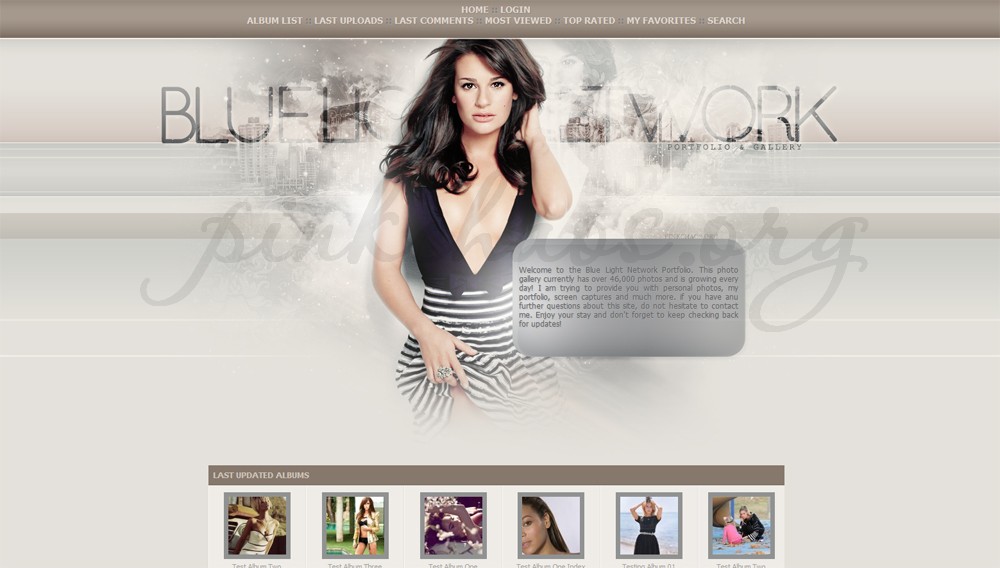
Here are what I'd like to create... they are attached.

Image

Image

ImageImage
Image
Image

I hope this helps.


Top
 Post subject: Re: How to Create Icons, Themes
PostPosted: Sat Jul 06, 2013 7:55 pm  (#4) 
Offline
GimpChat Member
User avatar

Joined: Jul 17, 2012
Posts: 2769
ther are countless tutorials for how to make a button in Gimp

here is one example by the great 'tutor4u'

http://www.youtube.com/watch?v=Ecs0yk4Vasw


Top
 Post subject: Re: How to Create Icons, Themes
PostPosted: Sat Jul 06, 2013 8:22 pm  (#5) 
Offline
GimpChat Founder
User avatar

Joined: May 22, 2008
Posts: 5241
Location: Gimpville
mackenzieh wrote:
I have a question

How do I create social media icons, wordpress themes, and Coppermine Photo Gallery themes in Gimp? Is it even possible to do that?

Hello, mackenzieh.

You can use GIMP to create the graphics that go into a theme. However, a theme for Wordpress, for example, is much more than the raw graphic images you create in GIMP. A Wordpress theme also consists of html, javascript, php and css code, which provides the functionality of the theme and the layout/position of the graphics within the theme. This would also hold true for any type of website theme development.

One technique, commonly used by non-programmers/developers, is to "skin" an existing theme, which basically involves replacing the existing graphics in a predefined theme template, with your own graphics, perhaps making only minor adjustments to the template's css. This is where GIMP comes into play.

If you would like to learn more about creating or skinning Wordpress themes, you can consult the Wordpress Codex, which contains all the information you need to learn how to skin an existing theme or to create new custom themes.

http://codex.wordpress.org/Theme_Development

_________________
“If you reach for the stars, you just might land on a decently sized hill.” - Stuart Hill


Top
 Post subject: Re: How to Create Icons, Themes
PostPosted: Sat Jul 06, 2013 8:48 pm  (#6) 
Offline
Script Coder
User avatar

Joined: Feb 18, 2011
Posts: 4826
Location: Bendigo Vic. Australia
You could create your background Image, then paste your icons on and go to Filters/Web/'Image Map' to set your click-able areas

You can go to this tutorial Here or download the PDF below↓

Attachment:
Image Map.pdf [310.73 KiB]
Downloaded 335 times

_________________
Image
No matter how much you push the envelope, it'll still be stationery.


Top
 Post subject: Re: How to Create Icons, Themes
PostPosted: Sat Jul 06, 2013 8:51 pm  (#7) 
Offline
Administrator
User avatar

Joined: Aug 10, 2012
Posts: 14219
Location: Native to NYC living in Arizona, Gimp 2.8 - 3.0, Win 11 PC.
There's also a plugin for gimp called 'B&P Glossy Button 02'. This plugin generates a glossy button using a set of parameters such as: dimensions, color, text, button states etc. One thing is that you will need to have the 'Python' module for GIMP installed to use this plugin, due to the fact that it is a Python plugin for Gimp.
I've included the plugin, along with it's read me file, but of course if you don't have the Python module installed it won't do you much good.


Attachments:
glossy_btn_02.zip [9.07 KiB]
Downloaded 175 times

_________________
Image
"A wise man learns more from a foolish question than a fool can learn from a wise answer"
Image
Top
 Post subject: Re: How to Create Icons, Themes
PostPosted: Sun Jul 07, 2013 12:54 am  (#8) 
Offline
GimpChat Member
User avatar

Joined: Jul 06, 2013
Posts: 2663
Location: California
I have python installed. I have gimp 2.8. I'm not sure how to install the glossy button download that Wallace has kindly attached. Any idea on how I can install it?


Top
 Post subject: Re: How to Create Icons, Themes
PostPosted: Sun Jul 07, 2013 1:49 pm  (#9) 
Offline
Administrator
User avatar

Joined: Aug 10, 2012
Posts: 14219
Location: Native to NYC living in Arizona, Gimp 2.8 - 3.0, Win 11 PC.
mackenzieh wrote:
I have python installed. I have gimp 2.8. I'm not sure how to install the glossy button download that Wallace has kindly attached. Any idea on how I can install it?

Once the zip file is downloaded, extract the files for the zip and cut or copy the Python Plugin file 'b&p glossy btn 02.py', and past it into your Gimp 'plug-ins folder'.
I'm using Windows OS and this is where my 'plug-ins folder' is located... 'C:\Documents and Settings\Your administrator username\Your version of Gimp\plug-ins'.

Image

I've also posted some 'Gimp Web Buttons Brushes' that you can download from here... viewtopic.php?f=12&t=7844#p101438

_________________
Image
"A wise man learns more from a foolish question than a fool can learn from a wise answer"
Image


Top
 Post subject: Re: How to Create Icons, Themes
PostPosted: Sun Jul 07, 2013 2:15 pm  (#10) 
Offline
GimpChat Member
User avatar

Joined: Jul 06, 2013
Posts: 2663
Location: California
Thanks Wallace! The plug in & the brushes are installed. Awesome brushes by the way. Now if I could only figure out a way to create a coppermine gallery skin in gimp. I think I've found a way to create a wordpress theme in gimp. I managed to look it up and something popped up.


Top
 Post subject: Re: How to Create Icons, Themes
PostPosted: Sun Jul 07, 2013 2:41 pm  (#11) 
Offline
Administrator
User avatar

Joined: Aug 10, 2012
Posts: 14219
Location: Native to NYC living in Arizona, Gimp 2.8 - 3.0, Win 11 PC.
mackenzieh wrote:
Thanks Wallace! The plug in & the brushes are installed. Awesome brushes by the way. Now if I could only figure out a way to create a coppermine gallery skin in gimp. I think I've found a way to create a wordpress theme in gimp. I managed to look it up and something popped up.


You're welcome and thanks for complementing me about the button brushes. :bigthup
If you haven't noticed, GnuTux had a very good suggestion here...
viewtopic.php?f=8&t=7843&p=101565#p101435

Basically you're just copying all the html, javascript, php and css codings for the theme and insert your own graphics as replacement for what was already there. Which is commonly called a 'skin'.

_________________
Image
"A wise man learns more from a foolish question than a fool can learn from a wise answer"
Image


Top
 Post subject: Re: How to Create Icons, Themes
PostPosted: Sun Jul 07, 2013 11:29 pm  (#12) 
Offline
GimpChat Member
User avatar

Joined: Aug 04, 2012
Posts: 32
Finally, after 2 days I finished a 'Theme, Layout, Template' or whatever you guys want to call it. The images were downloaded from www.morguefile.com , I used some brushes from DevianArt http://browse.deviantart.com/resources/applications/gimpbrushes/?order=9 . If you, mackenzieh or anyone, want to use it for personal or commercial use, go ahead. I liked the brown theme that's why I try to create that one. Below is the sample and the download link. The name of the file is WebThemeBrown.xcf , size: 8.46 MB. The only things that might look different are the fonts though. I hope you like it.

Image


http://www.mediafire.com/download/u839weaumh2cytv/WebThemeBrown.xcf

_________________
In a world without walls and fences, who needs Windows and Gates


Top
 Post subject: Re: How to Create Icons, Themes
PostPosted: Mon Jul 08, 2013 10:16 am  (#13) 
Offline
GimpChat Member
User avatar

Joined: Jul 06, 2013
Posts: 2663
Location: California
Xgeous wrote:
Finally, after 2 days I finished a 'Theme, Layout, Template' or whatever you guys want to call it. The images were downloaded from www.morguefile.com , I used some brushes from DevianArt http://browse.deviantart.com/resources/applications/gimpbrushes/?order=9 . If you, mackenzieh or anyone, want to use it for personal or commercial use, go ahead. I liked the brown theme that's why I try to create that one. Below is the sample and the download link. The name of the file is WebThemeBrown.xcf , size: 8.46 MB. The only things that might look different are the fonts though. I hope you like it.

[ Image ]


http://www.mediafire.com/download/u839weaumh2cytv/WebThemeBrown.xcf


I do like it. I can't believe you created it in gimp. That's great! Anyway, I was wondering if you could explain to me what steps you took to create it. I'd like to follow a tutorial & keep it as a reference, if I may. If you want, you can send me a PM.


Top
 Post subject: Re: How to Create Icons, Themes
PostPosted: Mon Jul 08, 2013 10:20 am  (#14) 
Offline
GimpChat Member
User avatar

Joined: Jul 17, 2012
Posts: 2769
xgeous is the GimpNinja

from time to time he drops another amazing piece of art on us
then vanishes

whats not to like

:clap


Top
 Post subject: Re: How to Create Icons, Themes
PostPosted: Mon Jul 08, 2013 10:42 am  (#15) 
Offline
GimpChat Member
User avatar

Joined: Jul 06, 2013
Posts: 2663
Location: California
Esper wrote:
xgeous is the GimpNinja

from time to time he drops another amazing piece of art on us
then vanishes

whats not to like

:clap


I know right! wow! I wish I was that good. All I made was a template and it's no where near as good as Xgeous's masterpieces.


Top
 Post subject: Re: How to Create Icons, Themes
PostPosted: Mon Jul 08, 2013 10:45 am  (#16) 
Offline
GimpChat Member
User avatar

Joined: Jul 17, 2012
Posts: 2769
yes hes very good good and an inspiration

im pretty sure, you will be a master soon if you keep practicing

you may want to have a look at Inkscape as well, because a lot of that stuff is easier to do with vectorgraphics (and scalable, which is a huge advantage)


Top
 Post subject: Re: How to Create Icons, Themes
PostPosted: Mon Jul 08, 2013 11:52 am  (#17) 
Offline
GimpChat Member
User avatar

Joined: Jul 06, 2013
Posts: 2663
Location: California
I may take a look at Inkscape. I really would like to know how xgeous made that awesome theme in gimp. I'd really love to see a tutorial on it somewhere on the board if he'd be willing to do it.


Top
 Post subject: Re: How to Create Icons, Themes
PostPosted: Mon Jul 08, 2013 4:33 pm  (#18) 
Offline
GimpChat Member
User avatar

Joined: Jul 17, 2012
Posts: 2769
i dont see anything that is like terribly difficult or anything
its just very well made and with a lot of taste too

for example the video and gallery boxes are made of a rectangular selection with rounded edges, then probably converted to a path and stroked, plus an inner shadow

i have written tutorials for both effects here and on my blog

http://gimp-science-labs.blogspot.de/20 ... order.html
http://gimp-science-labs.blogspot.de/20 ... hadow.html


Top
 Post subject: Re: How to Create Icons, Themes
PostPosted: Mon Jul 08, 2013 4:45 pm  (#19) 
Offline
GimpChat Member
User avatar

Joined: Jul 06, 2013
Posts: 2663
Location: California
I realize it doesn't look complicated but maybe other users, as well as myself could use a tutorial.


Top
 Post subject: Re: How to Create Icons, Themes
PostPosted: Mon Jul 08, 2013 4:59 pm  (#20) 
Offline
GimpChat Member
User avatar

Joined: Jul 17, 2012
Posts: 2769
i just gave you two :mrgreen:

i cant speak for xgeous but i know he doesnt speak english very well
last time he made a tutorial for us, it was a video
and my guess is, making a tutorial for the whole piece he posted is a very complex task


Top
Post new topic Reply to topic  [ 28 posts ]  Go to page 1, 2  Next

All times are UTC - 5 hours [ DST ]


* Login  


Powered by phpBB3 © phpBB Group