It is currently Thu Sep 17, 2026 7:28 pm


All times are UTC - 5 hours [ DST ]


Post new topic Reply to topic  [ 16 posts ] 
Author Message
 Post subject: GIMP iceberg - Wallpaper (GIMP+Blender 3D)
PostPosted: Fri Jul 12, 2013 3:01 pm  (#1) 
Offline
GimpChat Member
User avatar

Joined: Nov 09, 2011
Posts: 726
Image

Old version here:
http://nsae01.casimages.net/img/2013/07/12/130712095226355115.jpg

Well, practicing with Blender 3D...

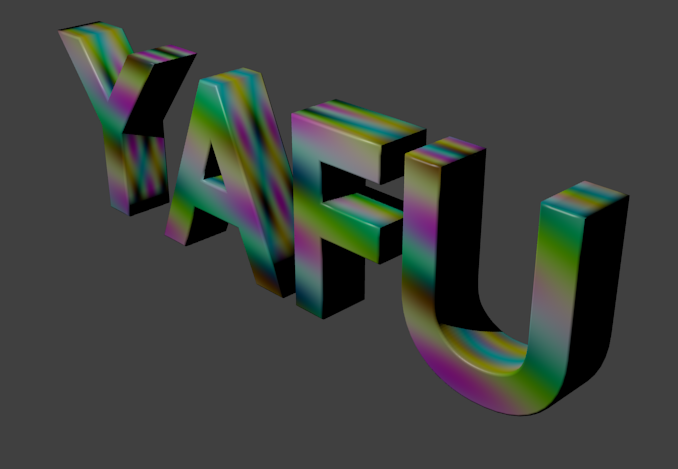
The letters have been made with Blender (internal). Shadows on the water and some tweaks with GIMP. The original photograph of the iceberg I borrowed it from there ... I hope the owner does not mind that.

For the letters I've had to mix two textures of ice and snow, so I had to read and learn something about the node editor, which I had been trying to avoid for now :hehe

_________________
Image
Be patient, English is not my language.


Last edited by YAFU on Sun Jul 14, 2013 10:26 am, edited 2 times in total.

Share on Facebook Share on Twitter Share on Orkut Share on Digg Share on MySpace Share on Delicious Share on Technorati
Top
 Post subject: Re: GIMP iceberg - Wallpaper (GIMP+Blender 3D)
PostPosted: Fri Jul 12, 2013 3:02 pm  (#2) 
Offline
Retired Staff
User avatar

Joined: May 22, 2008
Posts: 6946
Location: Somewhere in GIMP
That's awesome, YAFU!

_________________
Image
World War IV will be fought with sticks and stones. - Albert Einstein


Top
 Post subject: Re: GIMP iceberg - Wallpaper (GIMP+Blender 3D)
PostPosted: Fri Jul 12, 2013 3:22 pm  (#3) 
Offline
GimpChat Member
User avatar

Joined: Jun 02, 2013
Posts: 2090
Sweeeet.

_________________
Image


Top
 Post subject: Re: GIMP iceberg - Wallpaper (GIMP+Blender 3D)
PostPosted: Fri Jul 12, 2013 3:35 pm  (#4) 
Offline
GimpChat Member

Joined: Jun 04, 2013
Posts: 38
Location: South TX
Wow, awesome work! Gotta admire anybody who can make any sense at all out of Blender. I tried. Boggles my brain.


Top
 Post subject: Re: GIMP iceberg - Wallpaper (GIMP+Blender 3D)
PostPosted: Fri Jul 12, 2013 3:54 pm  (#5) 
Offline
GimpChat Member
User avatar

Joined: Nov 09, 2011
Posts: 726
Thank you all! :)

@sb158, The first time I had tried just reading some text tutorials. My head almost exploded and it did not help much. The best way to learn blender is following the video tutorials out there on YouTube and endlessly repeating everything they do in those videos, even if you do not understand much what you are doing.

_________________
Image
Be patient, English is not my language.


Top
 Post subject: Re: GIMP iceberg - Wallpaper (GIMP+Blender 3D)
PostPosted: Fri Jul 12, 2013 8:56 pm  (#6) 
Offline
GimpChat Member
User avatar

Joined: Sep 22, 2012
Posts: 2089
Location: US
WOW! Great job, YAFU!

Two beasts you were trying to avoid (node and comp editors) are absolutely must know things in Blender
to get your work to the next (pro) level. All the miracles happens there (TM).

Also, you didn't have to do the shadow guesswork in GIMP. All could be done in Blender.
Here's the tutorial on that (it is for cycles though) http://www.blendertutor.com/shadow-pass-in-cycles/.
Keep up good work.


Top
 Post subject: Re: GIMP iceberg - Wallpaper (GIMP+Blender 3D)
PostPosted: Fri Jul 12, 2013 10:40 pm  (#7) 
Offline
GimpChat Member
User avatar

Joined: Nov 09, 2011
Posts: 726
Thanks K1TesseraEna!

In addition to the shadows I needed to have some transparency in the water so you can see letters a little below water. So the first thing that occurred to me is to add the photography that I had downloaded as a mesh plane (images as planes addon), and curving softly from the intersection of the iceberg and water:
Image

In this way I was able to configure some transparency and distortion properties in water, and dip a bit the letters in the plane (water). As you can see I had shadows, but I could not make them have a bluish color and fit better with the water without having to change the lighting and other things that I did not want to change. So I decided to do the render without the shadow. I admit that I gave up too quickly in trying to do something better with the shadows in Blender, perhaps also with the node editor would have done something better. Later I'll try to do better from Blender while I learn the node editor and composer.

_________________
Image
Be patient, English is not my language.


Top
 Post subject: Re: GIMP iceberg - Wallpaper (GIMP+Blender 3D)
PostPosted: Sat Jul 13, 2013 12:21 am  (#8) 
Offline
GimpChat Member
User avatar

Joined: Aug 30, 2012
Posts: 2174
Awesome job, I like how the letters actually feel as though they are bobbing about on the water.

_________________
Image


Top
 Post subject: Re: GIMP iceberg - Wallpaper (GIMP+Blender 3D)
PostPosted: Sat Jul 13, 2013 12:43 am  (#9) 
Offline
GimpChat Member
User avatar

Joined: Nov 16, 2011
Posts: 5127
Location: Metro Vancouver, BC
Very cool, YAFU! :coolthup

_________________
Image
Gimp 2.8.18, Linux, median user
Gimp Chat Tutorials Index
Spirit Bear (Kermode)


Top
 Post subject: Re: GIMP iceberg - Wallpaper (GIMP+Blender 3D)
PostPosted: Sat Jul 13, 2013 5:30 am  (#10) 
Offline
GimpChat Member

Joined: Dec 27, 2012
Posts: 393
Location: England
Nice work and a good job on the lighting, the way it falls on the letters looks just right.

_________________
Image

DeviantArt gallery


Top
 Post subject: Re: GIMP iceberg - Wallpaper (GIMP+Blender 3D)
PostPosted: Sat Jul 13, 2013 6:03 am  (#11) 
Offline
Global Moderator
User avatar

Joined: Apr 01, 2012
Posts: 8471
Location: On the other side of your screen
Cool :bigthup Love the way the letters look just like icebergs


_________________
Image
Free Fun Photo Editing & resources
Poems from the Lord
Gimp Newby
Gimp version 3.2.4 and GMIC-Qt 4.0.2 OS :- Windows 10 Home 64


Top
 Post subject: Re: GIMP iceberg - Wallpaper (GIMP+Blender 3D)
PostPosted: Sat Jul 13, 2013 10:26 am  (#12) 
Offline
GimpChat Member
User avatar

Joined: Feb 14, 2013
Posts: 462
Location: Stockholm
YAFU. Congrats. Perfect start on your Blendercareer.

Here is one small tutorial how you get your cube bobbling on top the wave.
http://www.pasteall.org/blend/22765
I try to do this few months ago with the ocean but this dont work for me. Try this.

Add one plane with Shift+A. Subdevide 4-5 times.

Image

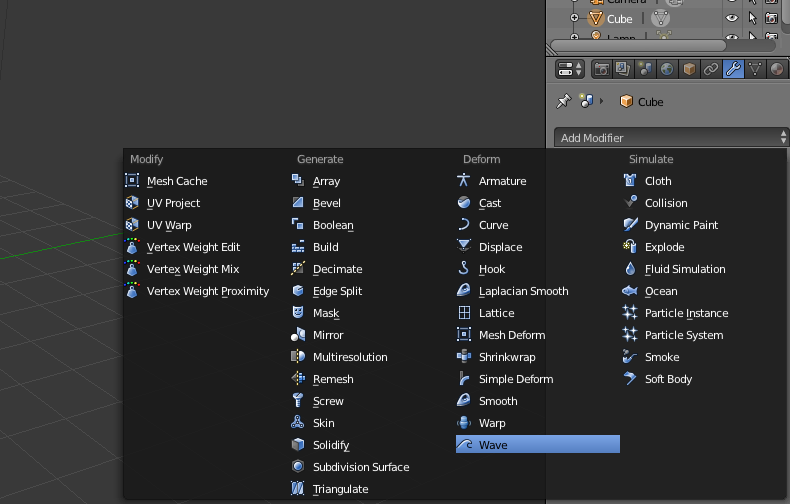
Add Wavemodifier.

Image

Add one Cube with Shift+A. Subdevide one time. Select the middle one of vertex and press tab.
Image

With Shift down you select the wave and select 3 vertex and press Ctrl+P. You have now connected 3+1 vertexes.
Image

Play your project with Alt+A.

Good Luck.

_________________
Late 2017 iMac Retina 4K 21,5 inch Mac OS High Sierra version 10.13.4
3,6 GHz Intel Core i7
16 GB Ram 2400 MHz DDR4
Graphic card Radeon Pro 560 4096 MB
Affinity Photo and Affinity Designers.


Top
 Post subject: Re: GIMP iceberg - Wallpaper (GIMP+Blender 3D)
PostPosted: Sat Jul 13, 2013 1:32 pm  (#13) 
Offline
GimpChat Member
User avatar

Joined: Nov 09, 2011
Posts: 726
Thanks you people!

@Lurifax73: Thanks, it's interesting this modifier. I still can not find how to make the letters look like floating with the motion of the waves . Anyway I applied the modifier to the plane and running the animation is very funny to see how the waves interact with the static letters. I will keep experimenting.

_________________
Image
Be patient, English is not my language.


Top
 Post subject: Re: GIMP iceberg - Wallpaper (GIMP+Blender 3D)
PostPosted: Sat Jul 13, 2013 2:03 pm  (#14) 
Offline
GimpChat Member
User avatar

Joined: Feb 14, 2013
Posts: 462
Location: Stockholm
Hi YAFU.
Text is not a mesh, you can not do nothing but typ letters. You need to convert the text to mesh with Alt+C

Image


Image

Image

_________________
Late 2017 iMac Retina 4K 21,5 inch Mac OS High Sierra version 10.13.4
3,6 GHz Intel Core i7
16 GB Ram 2400 MHz DDR4
Graphic card Radeon Pro 560 4096 MB
Affinity Photo and Affinity Designers.


Top
 Post subject: Re: GIMP iceberg - Wallpaper (GIMP+Blender 3D)
PostPosted: Sat Jul 13, 2013 2:35 pm  (#15) 
Offline
GimpChat Member
User avatar

Joined: Nov 09, 2011
Posts: 726
Thanks Lurifax73, I know that.
My problem is that you have added the cube in Edit Mode when the plane was already there, so you can select vertex of the cube and the plane at the same time. I just find a way to do this by selecting the plane and a letter and join with Ctrl+J. Then in Edit Mode select the vertex and then parent them. And then again separated letter and the plane with P (Separate). I know what I've done is something cluttered and must be a better way to do it. It had never before needed to send two separate objects to Edit Mode at the same time :mrgreen:

EDIT:
You forget what I had said, I think I understand now. In object mode I must first select the cube and then select the plane with shift key, and then go to edit mode. So in this way the vertex from both objects are parented.

_________________
Image
Be patient, English is not my language.


Last edited by YAFU on Sat Jul 13, 2013 3:16 pm, edited 2 times in total.

Top
 Post subject: Re: GIMP iceberg - Wallpaper (GIMP+Blender 3D)
PostPosted: Sat Jul 13, 2013 3:12 pm  (#16) 
Offline
GimpChat Member
User avatar

Joined: Feb 14, 2013
Posts: 462
Location: Stockholm
Perfect. Yes there is more than one metode to use. Look at my blend file and compere with yours.

Yes you can select more than one object in edit mode if you select the first one and then press Shift and select the other one. As I mention before. If you select a vertex and press Tab you can work on something els and the first one still selected when you go back to edit mode again. Thats why 3+1 vertexes select when you press Ctrl+P because the single one is hiding (selected) behind Tab. Blender dont let you select 1+1 or 2+3. Only 3+1 work and not 3 on the cube and 1 on the wave. Dont work.

http://www.pasteall.org/blend/22782

_________________
Late 2017 iMac Retina 4K 21,5 inch Mac OS High Sierra version 10.13.4
3,6 GHz Intel Core i7
16 GB Ram 2400 MHz DDR4
Graphic card Radeon Pro 560 4096 MB
Affinity Photo and Affinity Designers.


Top
Post new topic Reply to topic  [ 16 posts ] 

All times are UTC - 5 hours [ DST ]


cron

* Login  


Powered by phpBB3 © phpBB Group