It is currently Tue Nov 10, 2026 12:14 am


All times are UTC - 5 hours [ DST ]


Post new topic Reply to topic  [ 15 posts ] 
Author Message
 Post subject: how to fill in an area on photo with different colour?
PostPosted: Sat Aug 03, 2013 7:35 am  (#1) 
Offline
GimpChat Member

Joined: Jul 27, 2013
Posts: 32
GIMP Version: 2.8.4
Operating System: Windows
GIMP Experience: Beginner Level


Hi, Please can someone give me some advice on the following attachment. I've cropped a little bit out of a photo that I am trying to improve and I am hoping that I can get rid of the sunlight reflection that's on the bottom right. Is there any way that I can fill this in with the brown colour from the rest of the photo please? Thanks very much :)


Last edited by lucymay on Wed Aug 07, 2013 10:51 am, edited 1 time in total.

Share on Facebook Share on Twitter Share on Orkut Share on Digg Share on MySpace Share on Delicious Share on Technorati
Top
 Post subject: Re: how to fill in an area on photo with different colour?
PostPosted: Sat Aug 03, 2013 7:57 am  (#2) 
Offline
Script Coder
User avatar

Joined: Oct 25, 2010
Posts: 4812
lucymay wrote:
GIMP Version: 2.8.4
Operating System: Windows
GIMP Experience: Beginner Level


Hi, Please can someone give me some advice on the following attachment. I've cropped a little bit out of a photo that I am trying to improve and I am hoping that I can get rid of the sunlight reflection that's on the bottom right. Is there any way that I can fill this in with the brown colour from the rest of the photo please? Thanks very much :)

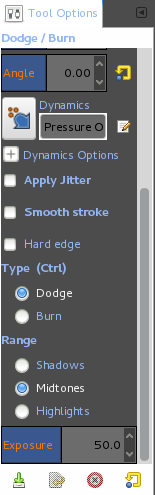
You don't fill with another color (otherwise it will make a uniform flat area). Use the Dodge/Burn tool (in "Burn" mode), using a fuzzy brush with low opacity (so you can adjust the darkening with more strokes).

_________________
Image


Top
 Post subject: Re: how to fill in an area on photo with different colour?
PostPosted: Sat Aug 03, 2013 8:37 am  (#3) 
Offline
GimpChat Member

Joined: Jul 27, 2013
Posts: 32
Thanks for your reply. I've chosen dodge/burn tool then put the opacity to 20 (don't know if that right?), chosen what looks like a fuzzy brush (acrylic 05) and then set to burn mode. But then when I hover over part of the image I want to change and click the mouse nothing happens? Sorry I'm completely new to this and don't even know how to get the brush to work on the image once its all selected? Still this time last week I didn't even know how to select anything so that's a start!


Top
 Post subject: Re: how to fill in an area on photo with different colour?
PostPosted: Sat Aug 03, 2013 8:43 am  (#4) 
Offline
GimpChat Member
User avatar

Joined: Mar 23, 2012
Posts: 7388
Location: Göteborg at last!
With low opacity you'll need to keep going over it until you get the result you want. You might want to try cloning part of the image over the reflection. Select the clone tool and a fuzzy brush then use Ctrl-click on a dark area then paint over the reflection. If I were you though, I would keep playing with the burn tool trying out different settings. Have fun experimenting.


Top
 Post subject: Re: how to fill in an area on photo with different colour?
PostPosted: Sat Aug 03, 2013 8:57 am  (#5) 
Offline
GimpChat Member

Joined: Jul 27, 2013
Posts: 32
Thank's, the cloning idea is working really well, the only things is the fuzzy brush takes the brown colour over onto the grass in the picture. Just wondered if there's anyway that I can put a line or something along that part of the picture to stop the brown colour going over into the grass?

Also when I experiment with the first idea (burning) it's lightening the area rather than darkening it - just wondered what I may be doing wrong?!


Top
 Post subject: Re: how to fill in an area on photo with different colour?
PostPosted: Sat Aug 03, 2013 9:36 am  (#6) 
Offline
Script Coder
User avatar

Joined: Oct 25, 2010
Posts: 4812
lucymay wrote:
Thanks for your reply. I've chosen dodge/burn tool then put the opacity to 20 (don't know if that right?), chosen what looks like a fuzzy brush (acrylic 05) and then set to burn mode. But then when I hover over part of the image I want to change and click the mouse nothing happens? Sorry I'm completely new to this and don't even know how to get the brush to work on the image once its all selected? Still this time last week I didn't even know how to select anything so that's a start!

20 is a bit low, try 50.

_________________
Image


Top
 Post subject: Re: how to fill in an area on photo with different colour?
PostPosted: Sat Aug 03, 2013 9:37 am  (#7) 
Offline
GimpChat Member
User avatar

Joined: Apr 07, 2010
Posts: 14182
The burning tool has two functions, dodge and burn. Make sure you click the dot beside burn when you use it.

Image

_________________
Image


Top
 Post subject: Re: how to fill in an area on photo with different colour?
PostPosted: Sat Aug 03, 2013 9:43 am  (#8) 
Offline
GimpChat Member

Joined: Jul 27, 2013
Posts: 32
I've got the cloning colour quite good now using the opacity at 50 but the only problem is that the brown goes over into the grass and I don't know if I can do anything to stop this - other than having a very steady hand which isn't working! :mrgreen:


Top
 Post subject: Re: how to fill in an area on photo with different colour?
PostPosted: Sat Aug 03, 2013 10:12 am  (#9) 
Offline
GimpChat Member
User avatar

Joined: Jan 20, 2013
Posts: 14835
Location: roma, italy
select the grass area (use free form selection tool), invert the selection (under Selection, click on Invert), then you can operate only on everything else but the grass

_________________
"Where am I ?"


Top
 Post subject: Re: how to fill in an area on photo with different colour?
PostPosted: Sat Aug 03, 2013 10:18 am  (#10) 
Offline
GimpChat Member

Joined: Jul 27, 2013
Posts: 32
Its just so difficult to get the line straight between the grass and the brown - even with the free select it looks a 'wiggly' line! I'll keep trying though - it seems you need a steady hand for this! :hehe


Top
 Post subject: Re: how to fill in an area on photo with different colour?
PostPosted: Sat Aug 03, 2013 10:36 am  (#11) 
Offline
GimpChat Member
User avatar

Joined: Apr 07, 2010
Posts: 14182
If you want to paint a straight line, click where you want to start, hold down the shift key and click where you want the line to end.

_________________
Image


Top
 Post subject: Re: how to fill in an area on photo with different colour?
PostPosted: Sat Aug 03, 2013 11:18 am  (#12) 
Offline
GimpChat Member

Joined: Jul 27, 2013
Posts: 32
Thanks everyone, I'm pleased with the finished version. :) It was the line between the brown and the green I was trying to get straight - well by straight I don't mean literally straight - I mean so that it followed the brown smoothly if that makes sense! Didn't work out any other way to do it other that having a steady hand though so if there is another way - just so I know for the future I'd be grateful if someone could let me know!


Last edited by lucymay on Wed Aug 07, 2013 10:52 am, edited 1 time in total.

Top
 Post subject: Re: how to fill in an area on photo with different colour?
PostPosted: Sat Aug 03, 2013 12:53 pm  (#13) 
Offline
GimpChat Member
User avatar

Joined: Aug 16, 2012
Posts: 4271
Location: Göteborg, Sweden
lucymaylooks like you got a good result! i usually zoom in the image i'm working on and make the selection line one click at the time, that makes it easier to get a smooth line with the lasso tool. another way to get a smooth line is using the path tool :pathtool, but that can be a bit tricky if you're not used to it. i start the same way as with the lasso tool, zoom in the image quite a bit. then i make just a few clicks on places where the line bends "dramatically", then i close the path. after that i tweak the path by dragging the little "handles" on each point until the path follows the line in the picture as closely as possible. when the path looks good i go to the paths menu and click "path to selection". - a bit trickier, like i said, but gives nice and smooth selections.
_________________


Top
 Post subject: Re: how to fill in an area on photo with different colour?
PostPosted: Sat Aug 03, 2013 2:01 pm  (#14) 
Offline
Script Coder
User avatar

Joined: Oct 25, 2010
Posts: 4812
lucymay wrote:
I've got the cloning colour quite good now using the opacity at 50 but the only problem is that the brown goes over into the grass and I don't know if I can do anything to stop this - other than having a very steady hand which isn't working! :mrgreen:


With Burn/Dogde you should not have a different color in the grass. It could just turn darker or lighter. You can zoom in and use a smaller brush. In fact you shouldn't t fix the problem completely up to the border, but to fade the fix near the border, which is naturally done is you use a soft brush.

_________________
Image


Top
 Post subject: Re: how to fill in an area on photo with different colour?
PostPosted: Sun Aug 04, 2013 11:55 am  (#15) 
Offline
GimpChat Member

Joined: Jul 27, 2013
Posts: 32
Thanks again everyone - this is an extremely helpful forum!! :tyspin


Top
Post new topic Reply to topic  [ 15 posts ] 

All times are UTC - 5 hours [ DST ]


* Login  


Powered by phpBB3 © phpBB Group