It is currently Sat Oct 10, 2026 2:20 pm


All times are UTC - 5 hours [ DST ]


Post new topic Reply to topic  [ 103 posts ]  Go to page Previous  1, 2, 3, 4, 5, 6  Next
Author Message
 Post subject: Re: GIMP 2.8.6 released.
PostPosted: Wed Jul 03, 2013 9:06 am  (#81) 
Offline
Global Moderator
User avatar

Joined: May 16, 2010
Posts: 16200
YAFU wrote:
It disappeared the Image > Transform > "Arbitrary Rotation" option in GIMP 2.8.6?

Is that option existed before, right? Or am I confusing with layer options?

EDIT:
I think I'm confused and I'm getting ahead of the canvas rotation feature :hehe


Check out Gimp-Painter
Image

Which essentially is rotating the entire canvas. :)


Top
 Post subject: Re: GIMP 2.8.6 released.
PostPosted: Thu Jul 18, 2013 4:10 am  (#82) 
Offline
Global Moderator
User avatar

Joined: May 16, 2010
Posts: 16200
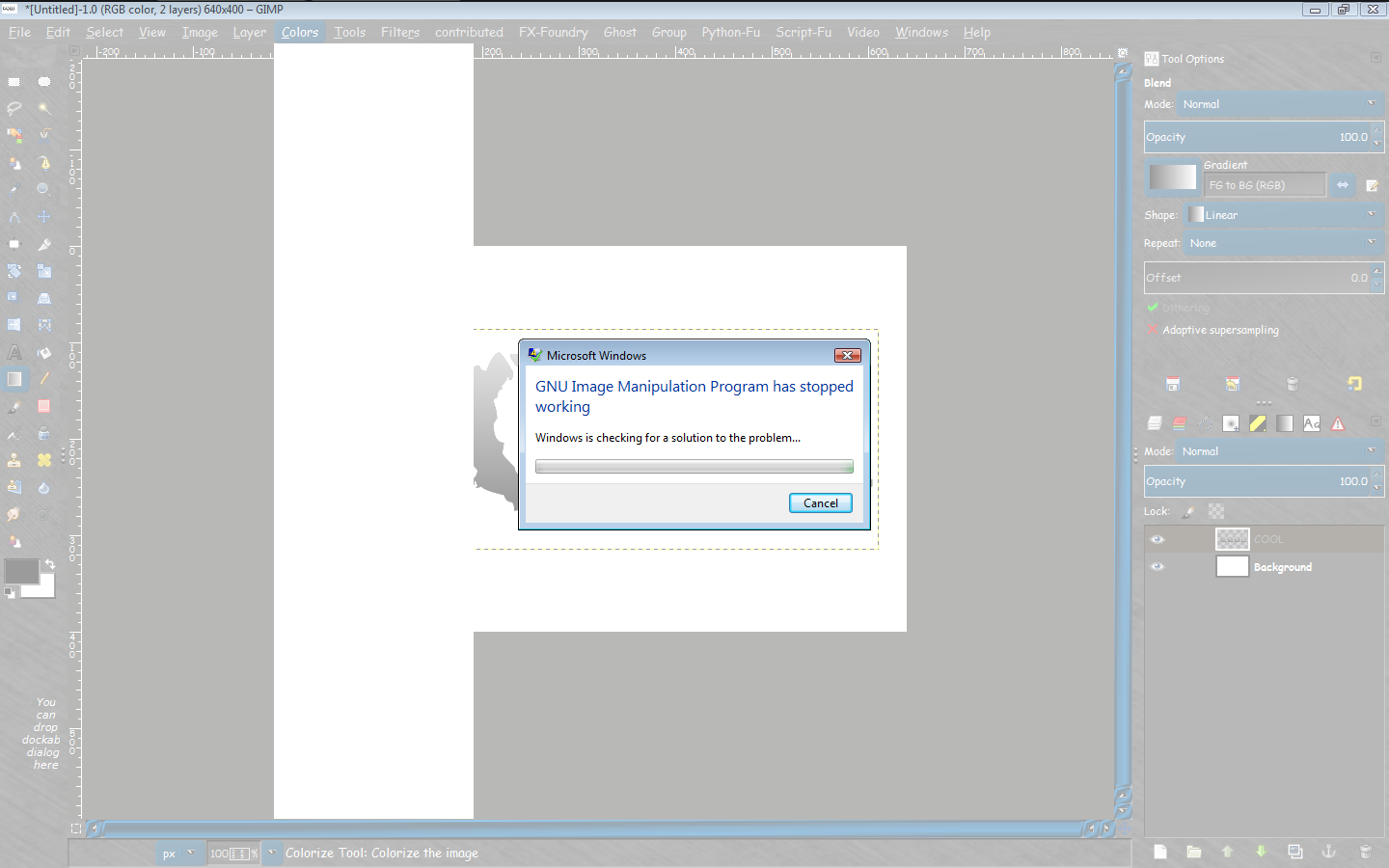
Onkel i get a crash using colorize. :)
Gimp-2.8.7 and Gimp-2.8.5 both have this issue. Does this have anything to do with cairo dlls?

Image


Top
 Post subject: Re: GIMP 2.8.6 released.
PostPosted: Thu Jul 18, 2013 10:36 am  (#83) 
Offline
GimpChat Member

Joined: Feb 22, 2012
Posts: 295
Location: Germany
I don't know. I don't use this plug-in and without error message, I have no clue, whats going on.
I tried to compile it once, but I failed, because I dont get libblas, libumfpack, etc. (the whole suitesparse)
to compile. Colorize depends on umfpack, umfpack depends on... and this depends on... and so on...


Top
 Post subject: Re: GIMP 2.8.6 released.
PostPosted: Thu Jul 18, 2013 7:31 pm  (#84) 
Offline
Global Moderator
User avatar

Joined: May 16, 2010
Posts: 16200
Onkel Hatti wrote:
I don't know. I don't use this plug-in and without error message, I have no clue, whats going on.
I tried to compile it once, but I failed, because I dont get libblas, libumfpack, etc. (the whole suitesparse)
to compile. Colorize depends on umfpack, umfpack depends on... and this depends on... and so on...


It didn't give me an error. It just crashed. This is the actual default colorize that comes with Gimp. This isn't a third party plug-in. :)


Top
 Post subject: Re: GIMP 2.8.6 released.
PostPosted: Sat Jul 20, 2013 1:48 am  (#85) 
Offline
GimpChat Member

Joined: Feb 22, 2012
Posts: 295
Location: Germany
hmm, I do not know, what wron there. I have no problems with the 64bit version. I do not think, that it is a a problem with Cairo. I am on a weekend vacation, I will try the 32bit version next week.


Top
 Post subject: Re: GIMP 2.8.6 released.
PostPosted: Sun Jul 21, 2013 8:39 am  (#86) 
Offline
GimpChat Member

Joined: Feb 22, 2012
Posts: 295
Location: Germany
I checked the 32bit version also.
There is nothing wrong. Works like expected.
Sorry, but i can't help.


Top
 Post subject: Re: GIMP 2.8.6 released.
PostPosted: Sun Aug 04, 2013 8:22 pm  (#87) 
Offline
GimpChat Member

Joined: May 09, 2012
Posts: 914
Bonjour,

Here is a 32-bit version of gimp 2.8.7 Windows.
Information is available from viewtopic.php?f=23&t=8111&start=10#p105560


Top
 Post subject: Re: GIMP 2.8.6 released.
PostPosted: Mon Aug 05, 2013 11:50 pm  (#88) 
Offline
GimpChat Member
User avatar

Joined: Jul 06, 2013
Posts: 2663
Location: California
Is Gimp 2.8.6 even worth downloading? I'm happy the version I have which is 2.8 & I use Windows 7 on a 64bit system.


Top
 Post subject: Re: GIMP 2.8.6 released.
PostPosted: Wed Aug 07, 2013 8:07 am  (#89) 
Offline
GimpChat Member

Joined: Apr 29, 2013
Posts: 203
mackenzieh wrote:
Is Gimp 2.8.6 even worth downloading? I'm happy the version I have which is 2.8 & I use Windows 7 on a 64bit system.

It has some bug fixes, sure. ;)

I'm sorry, I think somewhere in this forum has explained how to fix slow Gimp 2.8.6 start up? What should I do to fix that? :)

_________________
~


Top
 Post subject: Re: GIMP 2.8.6 released.
PostPosted: Wed Aug 07, 2013 8:41 am  (#90) 
Offline
Global Moderator
User avatar

Joined: May 16, 2010
Posts: 16200
Quote:
I'm sorry, I think somewhere in this forum has explained how to fix slow Gimp 2.8.6 start up? What should I do to fix that?


If you have a bunch of your own brushes and patterns in the resource directory using a brush and pattern manager will help immensely.
But even just loading the patterns or brushes you need per GIMP session will allow GIMP to load very quickly.


Top
 Post subject: Re: GIMP 2.8.6 released.
PostPosted: Mon Aug 12, 2013 5:03 pm  (#91) 
Offline
GimpChat Member
User avatar

Joined: Feb 25, 2013
Posts: 95
Location: Missouri
I upgraded to this version from gimp 2.6.12. It's not bad, really. I see a lot of new tools and folders on it. Perhaps, in a future release, we could have a healing selection script and a background ground selection tool. Maybe, more image effects too.

Okay, I do have a few questions to ask. How do I enable the toolbox to show up, when I open gimp? Everytime I open gimp, i have to click on toolbox to have it show up. In gimp 26. It used to show up right on startup.

The other question is saving the files, I have to click on export to save everything now. Why is it set up that way now? In gimp 2.6.. I used to save files Save as and now, i can't do that anymore.


Top
 Post subject: Re: GIMP 2.8.6 released.
PostPosted: Mon Aug 12, 2013 5:18 pm  (#92) 
Offline
GimpChat Member

Joined: Apr 29, 2012
Posts: 110
Rod wrote:
Quote:
I'm sorry, I think somewhere in this forum has explained how to fix slow Gimp 2.8.6 start up? What should I do to fix that?


If you have a bunch of your own brushes and patterns in the resource directory using a brush and pattern manager will help immensely.
But even just loading the patterns or brushes you need per GIMP session will allow GIMP to load very quickly.


On 32 bits version at least, not sure if it exists on the 64bits version there's a problem with 2.8.6 that forces the plugin redetection/querying at every start of Gimp, wasting startup time.

Fortunately it seems to be a known bug on bugzilla so hopefully will be fixed for the next version


Top
 Post subject: Re: GIMP 2.8.6 released.
PostPosted: Mon Aug 12, 2013 5:32 pm  (#93) 
Offline
GimpChat Member
User avatar

Joined: Apr 07, 2010
Posts: 14182
spunkygurl80 wrote:
I upgraded to this version from gimp 2.6.12. It's not bad, really. I see a lot of new tools and folders on it. Perhaps, in a future release, we could have a healing selection script and a background ground selection tool. Maybe, more image effects too.

Okay, I do have a few questions to ask. How do I enable the toolbox to show up, when I open gimp? Everytime I open gimp, i have to click on toolbox to have it show up. In gimp 26. It used to show up right on startup.

The other question is saving the files, I have to click on export to save everything now. Why is it set up that way now? In gimp 2.6.. I used to save files Save as and now, i can't do that anymore.

When you save as: in Gimp 2.8, it will save your XCF file only,
When you export you can name it with any of the extensions like jpg, png, gif, etc. So, if you want to have all your layers intact, save as XCF, if not, EXPORT.

_________________
Image


Top
 Post subject: Re: GIMP 2.8.6 released.
PostPosted: Mon Aug 12, 2013 6:00 pm  (#94) 
Offline
GimpChat Member
User avatar

Joined: Feb 25, 2013
Posts: 95
Location: Missouri
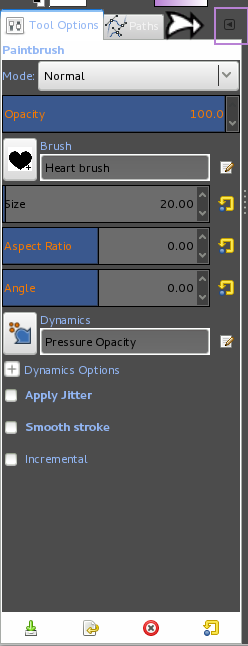
i have another question, how do I add docs to the toolbox? I lost the one that came with it and started new one on accident. I don't know how to retrieve it back.


Top
 Post subject: Re: GIMP 2.8.6 released.
PostPosted: Mon Aug 12, 2013 6:17 pm  (#95) 
Offline
GimpChat Member
User avatar

Joined: Apr 07, 2010
Posts: 14182
Click the tiny button selected in purple... click add tab and it will add the button your select from list

Image

_________________
Image


Top
 Post subject: Re: GIMP 2.8.6 released.
PostPosted: Mon Aug 12, 2013 6:28 pm  (#96) 
Offline
GimpChat Member

Joined: May 23, 2012
Posts: 150
2.8.6 Partha portable build 32-bit
My Gimpscripter and my glade.exe is not working, works in 2.8.5
has anyone got suggestions


Top
 Post subject: Re: GIMP 2.8.6 released.
PostPosted: Mon Aug 12, 2013 7:06 pm  (#97) 
Offline
Global Moderator
User avatar

Joined: May 16, 2010
Posts: 16200
Mikechat wrote:
2.8.6 Partha portable build 32-bit
My Gimpscripter and my glade.exe is not working, works in 2.8.5
has anyone got suggestions

You may need these files for glade - http://www.sullockenzlin.demon.nl/gimp/ ... _32bit.zip
Not sure why gimpscripter no longer works.
Here is the python module if someone wants to check it out.

https://github.com/bootchk/gimpscripter ... cripter.py


Top
 Post subject: Re: GIMP 2.8.6 released.
PostPosted: Mon Aug 12, 2013 10:29 pm  (#98) 
Offline
GimpChat Member

Joined: May 23, 2012
Posts: 150
Thanks Rod for your suggestion,
however the glade and gimpscripter
did not work. Maybe I'll just keep working
on it till next upgrade.


Top
 Post subject: Re: GIMP 2.8.6 released.
PostPosted: Tue Aug 13, 2013 7:53 am  (#99) 
Offline
Global Moderator
User avatar

Joined: May 16, 2010
Posts: 16200
Mikechat wrote:
Thanks Rod for your suggestion,
however the glade and gimpscripter
did not work. Maybe I'll just keep working
on it till next upgrade.


Good luck with it Mike. If you have any progress let us know will you? :bigthup
I would like to see GimpScripter working again. :)

I couldn't get "Line Border" to work until i added glade. Maybe GimpScripter needs some libraries that are missing also?


Top
 Post subject: Re: GIMP 2.8.6 released.
PostPosted: Tue Aug 13, 2013 10:53 am  (#100) 
Offline
GimpChat Member

Joined: Apr 29, 2013
Posts: 203
Brogun wrote:
Quote:
I'm sorry, I think somewhere in this forum has explained how to fix slow Gimp 2.8.6 start up? What should I do to fix that?

On 32 bits version at least, not sure if it exists on the 64bits version there's a problem with 2.8.6 that forces the plugin redetection/querying at every start of Gimp, wasting startup time.

Fortunately it seems to be a known bug on bugzilla so hopefully will be fixed for the next version


I've tried Partha's Gimp 2.8.6 portable 32bit build, and that's fixed. :coolthup

_________________
~


Top
Post new topic Reply to topic  [ 103 posts ]  Go to page Previous  1, 2, 3, 4, 5, 6  Next

All times are UTC - 5 hours [ DST ]


* Login  


Powered by phpBB3 © phpBB Group