It is currently Sun Nov 08, 2026 9:16 pm


All times are UTC - 5 hours [ DST ]


Post new topic Reply to topic  [ 21 posts ]  Go to page 1, 2  Next
Author Message
 Post subject: Hot Number...
PostPosted: Mon Aug 19, 2013 5:41 pm  (#1) 
Offline
Administrator
User avatar

Joined: Aug 10, 2012
Posts: 14266
Location: Native to NYC living in Arizona, Gimp 2.8 - 3.0, Win 11 PC.
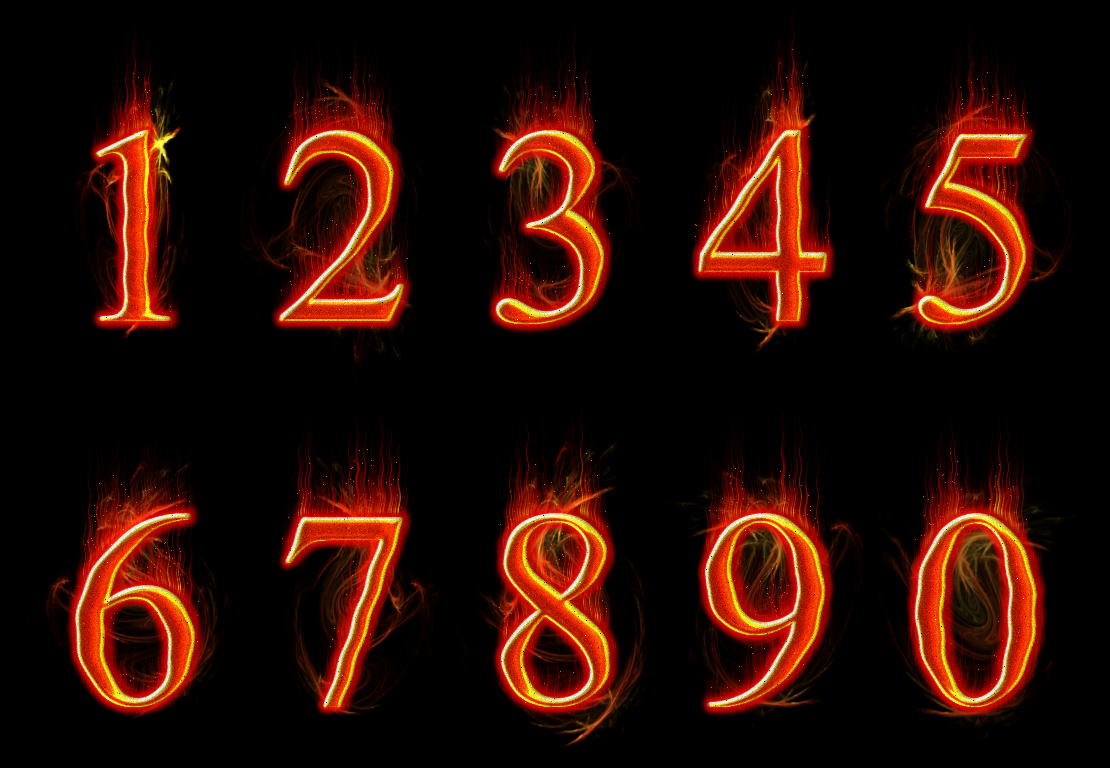
Made these a little while ago. I hope you weren't expecting anything different. :hehe
Image


Attachments:
hot numbers.xcf [1.52 MiB]
Downloaded 143 times

_________________
Image
"A wise man learns more from a foolish question than a fool can learn from a wise answer"
Image
Share on Facebook Share on Twitter Share on Orkut Share on Digg Share on MySpace Share on Delicious Share on Technorati
Top
 Post subject: Re: Hot Number...
PostPosted: Mon Aug 19, 2013 5:45 pm  (#2) 
Offline
GimpChat Member
User avatar

Joined: Jul 17, 2012
Posts: 2769
very nice !

how did you make these ?


Top
 Post subject: Re: Hot Number...
PostPosted: Mon Aug 19, 2013 5:52 pm  (#3) 
Offline
Administrator
User avatar

Joined: Aug 10, 2012
Posts: 14266
Location: Native to NYC living in Arizona, Gimp 2.8 - 3.0, Win 11 PC.
Esper wrote:
very nice !

how did you make these ?

I was afraid someone was going to ask that. :hehe

_________________
Image
"A wise man learns more from a foolish question than a fool can learn from a wise answer"
Image


Top
 Post subject: Re: Hot Number...
PostPosted: Mon Aug 19, 2013 5:57 pm  (#4) 
Offline
GimpChat Member
User avatar

Joined: Jul 17, 2012
Posts: 2769
do you want me to scream tutorial next ? :mrgreen:


Top
 Post subject: Re: Hot Number...
PostPosted: Mon Aug 19, 2013 6:04 pm  (#5) 
Offline
GimpChat Member
User avatar

Joined: Apr 07, 2010
Posts: 14182
Did you drag the fire colors up with the smudge brush.

_________________
Image


Top
 Post subject: Re: Hot Number...
PostPosted: Mon Aug 19, 2013 6:29 pm  (#6) 
Offline
Global Moderator
User avatar

Joined: May 16, 2010
Posts: 16251
I was thinking black crayon graffiti.
Looks great Wallace. :)

_________________
Image


Top
 Post subject: Re: Hot Number...
PostPosted: Mon Aug 19, 2013 6:40 pm  (#7) 
Offline
GimpChat Member
User avatar

Joined: Jul 06, 2013
Posts: 2666
Location: California
That is awesome! I like it. Not what I was expecting when I clicked on it. lol!


Top
 Post subject: Re: Hot Number...
PostPosted: Mon Aug 19, 2013 6:42 pm  (#8) 
Offline
GimpChat Member
User avatar

Joined: Aug 28, 2012
Posts: 3060
Location: Idk where I am.
Not what I expected either. :lol

Nice work! :D

_________________
Image
Reality is a lovely place...But I wouldn't wanna live there.


Top
 Post subject: Re: Hot Number...
PostPosted: Mon Aug 19, 2013 6:44 pm  (#9) 
Offline
GimpChat Member
User avatar

Joined: Jul 17, 2012
Posts: 2769
my guess is the flame filter


Top
 Post subject: Re: Hot Number...
PostPosted: Mon Aug 19, 2013 7:57 pm  (#10) 
Offline
Administrator
User avatar

Joined: Aug 10, 2012
Posts: 14266
Location: Native to NYC living in Arizona, Gimp 2.8 - 3.0, Win 11 PC.
Esper wrote:
my guess is the flame filter

I made the base text and duplicated it, blurred it, did 'Wind' and then did 'Ripple'. Duplicated this layer and blurred, then set the layer mode to dissolve lowering the opacity.
Used the 'Render'> Nature> Flame. Made a nice flame using red and yellow. Flipped, rotated and scaled the flame render for each number and placed it behind everything.

I was making a tut, but only got about 1/4 the way through and my Gimp crashed (auto save not enabled). I only managed to get 4 screenshots of how I did the base text, but wasn't able to get to the making of the flames.

_________________
Image
"A wise man learns more from a foolish question than a fool can learn from a wise answer"
Image


Top
 Post subject: Re: Hot Number...
PostPosted: Mon Aug 19, 2013 10:20 pm  (#11) 
Offline
GimpChat Member
User avatar

Joined: Aug 28, 2012
Posts: 3060
Location: Idk where I am.
There's an auto save???
How do I enable that? Please tell me! plzplzplzplzplzplzplz!!!! *puppy eyes*

_________________
Image
Reality is a lovely place...But I wouldn't wanna live there.


Top
 Post subject: Re: Hot Number...
PostPosted: Mon Aug 19, 2013 10:40 pm  (#12) 
Offline
Administrator
User avatar

Joined: Aug 10, 2012
Posts: 14266
Location: Native to NYC living in Arizona, Gimp 2.8 - 3.0, Win 11 PC.
Mokonafan wrote:
There's an auto save???
How do I enable that? Please tell me! plzplzplzplzplzplzplz!!!! *puppy eyes*

Yes there is an 'Auto Save'.
There is a thread about it here on GC, but I'm not sure where.
In the mean time I'll look in my Gimp files and try to find the correct file/plugin and send you a link or attach a file so you can download it, if necessary. ;)

I found the plugin, it's a python-plugin, so you need to have python installed.


Attachments:
autosave_a.zip [4.7 KiB]
Downloaded 224 times

_________________
Image
"A wise man learns more from a foolish question than a fool can learn from a wise answer"
Image
Top
 Post subject: Re: Hot Number...
PostPosted: Mon Aug 19, 2013 11:27 pm  (#13) 
Offline
GimpChat Member
User avatar

Joined: Aug 28, 2012
Posts: 3060
Location: Idk where I am.
I have GIMP 2.8, so can I install this? I read that python was built in to 2.8.

_________________
Image
Reality is a lovely place...But I wouldn't wanna live there.


Top
 Post subject: Re: Hot Number...
PostPosted: Mon Aug 19, 2013 11:39 pm  (#14) 
Offline
Administrator
User avatar

Joined: Aug 10, 2012
Posts: 14266
Location: Native to NYC living in Arizona, Gimp 2.8 - 3.0, Win 11 PC.
Mokonafan wrote:
I have GIMP 2.8, so can I install this? I read that python was built in to 2.8.

You should have python installed, but it dose depend on which Gimp build you have installed. Otherwise, you should be able to install this plugin.
I'm using Gimp 2.6.11 and had to install python myself.
If you place this file into your plugin folder, it should work for you.

_________________
Image
"A wise man learns more from a foolish question than a fool can learn from a wise answer"
Image


Top
 Post subject: Re: Hot Number...
PostPosted: Tue Aug 20, 2013 6:29 am  (#15) 
Offline
GimpChat Member

Joined: Aug 05, 2013
Posts: 23
Awesome effect. Very unique look.

Does anyone know how you could take something like this and turn it into a font?

_________________
Image


Top
 Post subject: Re: Hot Number...
PostPosted: Tue Aug 20, 2013 6:53 am  (#16) 
Offline
GimpChat Member
User avatar

Joined: Apr 07, 2010
Posts: 14182
Wallace wrote:
Mokonafan wrote:
There's an auto save???
How do I enable that? Please tell me! plzplzplzplzplzplzplz!!!! *puppy eyes*

Yes there is an 'Auto Save'.
There is a thread about it here on GC, but I'm not sure where.
In the mean time I'll look in my Gimp files and try to find the correct file/plugin and send you a link or attach a file so you can download it, if necessary. ;)

I found the plugin, it's a python-plugin, so you need to have python installed.


this was posted this morning by Kevin...

First hit: Autosave on the Gimp Registry: http://registry.gimp.org/node/20875
Fifth hit: Python version discussed here on GimpChat: viewtopic.php?f=9&t=983

_________________
Image


Top
 Post subject: Re: Hot Number...
PostPosted: Tue Aug 20, 2013 10:45 am  (#17) 
Offline
GimpChat Member
User avatar

Joined: Aug 28, 2012
Posts: 3060
Location: Idk where I am.
I don't wanna take away from your thread so I'll go to the installation one you made and ask there...Thank you!

_________________
Image
Reality is a lovely place...But I wouldn't wanna live there.


Top
 Post subject: Re: Hot Number...
PostPosted: Tue Aug 20, 2013 12:28 pm  (#18) 
Offline
GimpChat Member
User avatar

Joined: Aug 30, 2012
Posts: 2174
Nice effect wallace.

_________________
Image


Top
 Post subject: Re: Hot Number...
PostPosted: Tue Aug 20, 2013 12:36 pm  (#19) 
Offline
Administrator
User avatar

Joined: Aug 10, 2012
Posts: 14266
Location: Native to NYC living in Arizona, Gimp 2.8 - 3.0, Win 11 PC.
he4rty wrote:
Nice effect wallace.

Thanks He4rty. ;)

_________________
Image
"A wise man learns more from a foolish question than a fool can learn from a wise answer"
Image


Top
 Post subject: Re: Hot Number...
PostPosted: Tue Aug 20, 2013 7:01 pm  (#20) 
Offline
GimpChat Member
User avatar

Joined: Jan 10, 2013
Posts: 863
Wallace wrote:
I made the base text and duplicated it, blurred it, did 'Wind' and then did 'Ripple'. Duplicated this layer and blurred, then set the layer mode to dissolve lowering the opacity.
Used the 'Render'> Nature> Flame. Made a nice flame using red and yellow. Flipped, rotated and scaled the flame render for each number and placed it behind everything.

I was making a tut, but only got about 1/4 the way through and my Gimp crashed (auto save not enabled). I only managed to get 4 screenshots of how I did the base text, but wasn't able to get to the making of the flames.

I tried ... not even close

This effect was really cool Wallace!

Edited:
mackenzieh wrote:
That is awesome! I like it. Not what I was expecting when I clicked on it. lol!

neither do I. :hoh
:lol

_________________
bbbbbbbbbbbImage
bbbbbbbbbbb Be patient, English is not my language.


Top
Post new topic Reply to topic  [ 21 posts ]  Go to page 1, 2  Next

All times are UTC - 5 hours [ DST ]


* Login  


Powered by phpBB3 © phpBB Group