It is currently Fri Jul 24, 2026 11:42 pm


All times are UTC - 5 hours [ DST ]


Post new topic Reply to topic  [ 27 posts ]  Go to page 1, 2  Next
Author Message
 Post subject: Help with beautify & focus blur plug ins
PostPosted: Tue Aug 27, 2013 5:13 pm  (#1) 
Offline
GimpChat Member

Joined: Aug 27, 2013
Posts: 11
GIMP Version: 2.6
Operating System: Windows
GIMP Experience: Beginner Level


First off...I am 50+ yrs of age...not a computer dude by any means. I have been able to muddle through gimp and help our school with class trip pictures for various yearbooks and class rooms. Now they think I am the "expert". I have seen the focus blur and beautify plug ins on youtube and they are amazing. I really did try to download the two but I ended up with all kinds of toolbars and crap on the computer. I had to get my daughter to help get rid of it all. I saw Rod's post about the "beautify" plugin. Rod...you are amazing. Here is what I need. Can somebody (Rod!!!) walk an idiot like myself through the process of downloading these 2 plugins without me really screwing up my computer or getting some dumb toolbar again? You really need to take me by the hand. Do not assume I know anything because most likely I do not. At this point in time, I am deathly afraid to trust anything on the web so that is why I came here. Copying files with weird extensions etc is something I have never done, and I fear I will screw everything up.

I am very sorry to bother you all. I appreciate all of your help. There are a lot of young folks counting on me to make some "amazing" photos for various school projects. I would hate to let them down.

If anyone has some free time and wants to help the computer challenged...I am your man. Thanks in advance!!!!


Share on Facebook Share on Twitter Share on Orkut Share on Digg Share on MySpace Share on Delicious Share on Technorati
Top
 Post subject: Re: Help with beautify & focus blur plug ins
PostPosted: Tue Aug 27, 2013 5:43 pm  (#2) 
Offline
Administrator
User avatar

Joined: Aug 10, 2012
Posts: 14129
Location: Native to NYC living in Arizona, Gimp 2.8 - 3.0, Win 11 PC.
Here are the files you need (see 'dropbox' link).
You place them into your plug-ins folder. I'm using Windows XP and My plugins folder is located at, (C:\Documents and Settings\Administrator\.gimp-2.6\plug-ins).
I'm also still using Gimp 2.6 and I'm going to turn 50 years old in Oct. :hehe
I tried to upload both plug-ins here to Gimp Chat, but they are to large (6.56 MB of the allowed 5).
So, I've added a link to Dropbox where you can down the files needed, without any trouble.

https://www.dropbox.com/s/fgdfjjgx93oew ... usblur.zip
Once you've downloaded the plug-ins from the dropbox link, you'll need to extract the files from the compressed zip folder. Then place them into you Gimp plug-ins folder.

_________________
Image
"A wise man learns more from a foolish question than a fool can learn from a wise answer"
Image


Top
 Post subject: Re: Help with beautify & focus blur plug ins
PostPosted: Tue Aug 27, 2013 8:41 pm  (#3) 
Offline
Script Coder
User avatar

Joined: Feb 18, 2011
Posts: 4826
Location: Bendigo Vic. Australia
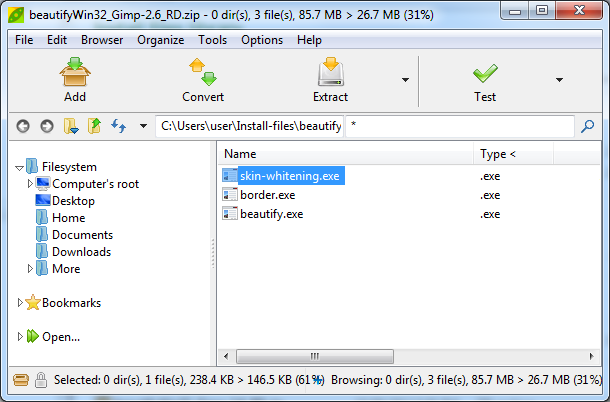
This is what the full compliment of beautify files for 2.6 should be

Image

_________________
Image
No matter how much you push the envelope, it'll still be stationery.


Top
 Post subject: Re: Help with beautify & focus blur plug ins
PostPosted: Tue Aug 27, 2013 11:49 pm  (#4) 
Offline
Global Moderator
User avatar

Joined: May 16, 2010
Posts: 16130
Sorry i no longer have those compressed files for Gimp-2.6 (windows explosion you see) :P
I did re upload those for Gimp-2.8 though and fixed those links in the Beautify topic. I seriously urge you to download the Gimp-2.8.6 version from Partha.com website.
Be sure and download the correct bit version for your computer (ask your daughter). :)
32 bit and 64 bit are available at Parthas website.
Don't worry about over writing your Gimp-2.6 version this installer doesn't do that.Both your Programs Gimp-2.6 and Gimp-2.8 will be installed side by side and both will run (one at a time of course). :)
After installing Gimp-2.8 grab the Beautify files from the link in the Beautify topic here.
viewtopic.php?f=9&t=4811
Good luck with everything!

_________________
Image


Top
 Post subject: Re: Help with beautify & focus blur plug ins
PostPosted: Wed Aug 28, 2013 3:00 am  (#5) 
Offline
Script Coder
User avatar

Joined: Feb 18, 2011
Posts: 4826
Location: Bendigo Vic. Australia
Rod I still have your original 2.6 zip

Image

But it doesn't contain the 2 border folders ('rip border' and 'texture border')

_________________
Image
No matter how much you push the envelope, it'll still be stationery.


Top
 Post subject: Re: Help with beautify & focus blur plug ins
PostPosted: Wed Aug 28, 2013 8:48 am  (#6) 
Offline
Global Moderator
User avatar

Joined: May 16, 2010
Posts: 16130
Graechan wrote:
Rod I still have your original 2.6 zip

[ Image ]

But it doesn't contain the 2 border folders ('rip border' and 'texture border')


You can just add the folders from the Gimp-2.8 install Graechan. :)
Zip them all together and email them to me. I will PM you my email addy.
Then i will upload them also. :bigthup
I believe i may have forgotten to add border.exe to the Gimp-2.8 beautify download though. :lol
border.zip is now available as a separate download.

_________________
Image


Top
 Post subject: Re: Help with beautify & focus blur plug ins
PostPosted: Wed Aug 28, 2013 8:53 pm  (#7) 
Offline
GimpChat Member

Joined: Aug 27, 2013
Posts: 11
You guys are awesome. I will try to follow the instructions asap. I want to make sure my daughter is around for mental support. Thank you! If it does not work or if I set the computer on fire, I will get back to you all. Thanks again for the extreme kindness. I had a crappy day, and seeing how you all responded renewed my faith in people. Take care, and I will let you know how it goes.


Top
 Post subject: Re: Help with beautify & focus blur plug ins
PostPosted: Wed Aug 28, 2013 9:27 pm  (#8) 
Offline
Global Moderator
User avatar

Joined: May 16, 2010
Posts: 16130
mikebon313 wrote:
You guys are awesome. I will try to follow the instructions asap. I want to make sure my daughter is around for mental support. Thank you! If it does not work or if I set the computer on fire, I will get back to you all. Thanks again for the extreme kindness. I had a crappy day, and seeing how you all responded renewed my faith in people. Take care, and I will let you know how it goes.


You bet. Anytime you need help just holler. :)

_________________
Image


Top
 Post subject: Re: Help with beautify & focus blur plug ins
PostPosted: Thu Aug 29, 2013 4:34 pm  (#9) 
Offline
GimpChat Member

Joined: Aug 27, 2013
Posts: 11
Wallace & others...Awesome!!! It worked. We had a little difficulty finding where the files went, but my daugher figured it out. I think she is next for Gimp.

Wallace etc... I still need one more big favor. I promise this is the last one. I have the Beautify plugin. I still need the focus blur also. That drop box thingy was amazing. God bless you all.

Can you all provide a similar download for the focus blur AND my daughter wants me to beg for a cool brush collection as well.

Thank you!!!! for everything. The school kids are going to love what I have, and this year's books should be off the charts...


Top
 Post subject: Re: Help with beautify & focus blur plug ins
PostPosted: Fri Aug 30, 2013 5:30 am  (#10) 
Offline
Global Moderator
User avatar

Joined: May 16, 2010
Posts: 16130
Hi Mike.
Just a quick warning - The more brushes you have in Gimps brush folder the longer it will take to start. Just a heads up. :)
Start here and download all 7 zip files attached in the topic from Draconian. Extract to your USERNAME/.gimp-2.8 (or gimp-2.6) brushes folder and restart Gimp.
viewtopic.php?f=12&t=2619&start=50#p47171

Another great Gimp brushes link.
http://www.noupe.com/how-tos/1000-free- ... ushes.html

I have attached focus blur plugin in another zip. Extract to your USERNAME/.gimp-2.8 (or gimp-2.6) /plug-ins folder.Then restart Gimp.
Menu location after install - Filters>Blur>Focus Blur
Attachment:
File comment: Focus Blur plug-in windows 32 bit
focusblur-win32_RD.zip [59.58 KiB]
Downloaded 181 times

_________________
Image


Top
 Post subject: Re: Help with beautify & focus blur plug ins
PostPosted: Fri Aug 30, 2013 8:34 pm  (#11) 
Offline
GimpChat Member

Joined: Aug 27, 2013
Posts: 11
Hi Rod, not sure what I did wrong. I got the beautify working. I unzipped your file and dropped the file into the plugins folder. Seemed to be fine. When I opened gimp 2.6 again I got an error message with something like...libffwer-3.dll was not found. When I press the ok. gimp boots up, but there is not the "focus blur" plug in installed. What did I screw up? Many thanks. Hope you have a great holiday weekend! Mike


Top
 Post subject: Re: Help with beautify & focus blur plug ins
PostPosted: Fri Aug 30, 2013 10:34 pm  (#12) 
Offline
Global Moderator
User avatar

Joined: May 16, 2010
Posts: 16130
mikebon313 wrote:
Hi Rod, not sure what I did wrong. I got the beautify working. I unzipped your file and dropped the file into the plugins folder. Seemed to be fine. When I opened gimp 2.6 again I got an error message with something like...libffwer-3.dll was not found. When I press the ok. gimp boots up, but there is not the "focus blur" plug in installed. What did I screw up? Many thanks. Hope you have a great holiday weekend! Mike

libffwer-3.dll , or is it libffwer3-3.dll you need?

_________________
Image


Top
 Post subject: Re: Help with beautify & focus blur plug ins
PostPosted: Sat Aug 31, 2013 6:01 pm  (#13) 
Offline
GimpChat Member

Joined: Aug 27, 2013
Posts: 11
Rod,

It looks like libfftw3f-3.dll. I hope that helps. And thanks again....


Top
 Post subject: Re: Help with beautify & focus blur plug ins
PostPosted: Sat Aug 31, 2013 9:36 pm  (#14) 
Offline
Global Moderator
User avatar

Joined: May 16, 2010
Posts: 16130
Okay check in your USERNAME/.gimp-2.8/plugins folder for that dll file. If it isn't present download the attached file i have here and unzip to the plug-ins folder and restart Gimp.

Attachment:
libfftw3-3.zip

_________________
Image


Top
 Post subject: Re: Help with beautify & focus blur plug ins
PostPosted: Sun Sep 01, 2013 12:05 am  (#15) 
Offline
GimpChat Member

Joined: Aug 27, 2013
Posts: 11
Hi Rod,

I appreciate all your help. Ok..I am using Gimp 2.6. Not sure if that matters with what you are trying to do for me. I searched and I do not see the libftw3f-3.dll file anywhere. Next...I tried to download the zipped file you sent but I could not do so. The "open it" program says the file is corrupted...I guess it does not recognize the extension. Tried to unzip just with the normal windows wizard but it says there are no files. What am I doing wrong?

Thanks for your patience. I owe you a coffee at a minimum. I appreciate your time and effort. Mike


Top
 Post subject: Re: Help with beautify & focus blur plug ins
PostPosted: Sun Sep 01, 2013 9:23 am  (#16) 
Offline
GimpChat Member

Joined: Apr 12, 2010
Posts: 5870
if is corrupted that come usually by ADSL connection quirks during download (when only few kb went lost, browsers often doesn't detect the error , yet the files are corrupted )
just try to download again and if your computer again fail to open , install 7zip (http://7zip.org ) and try again

_________________
My 3D Gallery on Deviantart http://photocomix2.deviantart.com/
Main gallery http://www.flickriver.com/photos/photocomix-mandala/
Mandala and simmetry http://www.flickriver.com/photos/photocomix_mandala/

Image

Mrs Wilbress


Top
 Post subject: Re: Help with beautify & focus blur plug ins
PostPosted: Sun Sep 01, 2013 1:36 pm  (#17) 
Offline
Global Moderator
User avatar

Joined: May 16, 2010
Posts: 16130
Hi Mike. I always use send to zip to make sure the files can be opened with Windows default compression software. The file seems ok to me when i download it and decompress.
I have attached the correct DLL for Gimp-2.6.

Attachment:
libfftw3-3-Gimp-2.6.zip [606.66 KiB]
Downloaded 140 times

_________________
Image


Top
 Post subject: Re: Help with beautify & focus blur plug ins
PostPosted: Sun Sep 01, 2013 4:26 pm  (#18) 
Offline
GimpChat Member

Joined: Aug 27, 2013
Posts: 11
Rod...I feel like such an idiot. Ok...I used your zipped file and unzipped it with the normal windows wizard. It unzipped the file. I then dropped it into the plugins folder for gimp 2.6 then opened gimp. Same error message..."focusblurexe - Unable to locate component. "This application failed to start because libfftw3f-3.dll was not found. Re-installing the application may fix the problem." Next...I downloaded the zip opener you suggested..got it to work. Unzipped the folder you provided. Seemed like it worked. Then again dropped the folder into the plugins folder in 2.6, opened the program...same error message.

I must be doing something wrong. The data gods are against me on this one, and I am too much of a computer illiterate to know what exactly I did wrong or am doing wrong.

Do you have any suggestions? I apologize for my lack of knowledge on this. You are so kind to help, and I appreciate everything. I am trying!!!! Just cannot get over this hump. Stay well...Mike


Top
 Post subject: Re: Help with beautify & focus blur plug ins
PostPosted: Mon Sep 02, 2013 12:35 am  (#19) 
Offline
Global Moderator
User avatar

Joined: May 16, 2010
Posts: 16130
mikebon313 wrote:
Rod...I feel like such an idiot. Ok...I used your zipped file and unzipped it with the normal windows wizard. It unzipped the file. I then dropped it into the plugins folder for gimp 2.6 then opened gimp. Same error message..."focusblurexe - Unable to locate component. "This application failed to start because libfftw3f-3.dll was not found. Re-installing the application may fix the problem." Next...I downloaded the zip opener you suggested..got it to work. Unzipped the folder you provided. Seemed like it worked. Then again dropped the folder into the plugins folder in 2.6, opened the program...same error message.

I must be doing something wrong. The data gods are against me on this one, and I am too much of a computer illiterate to know what exactly I did wrong or am doing wrong.

Do you have any suggestions? I apologize for my lack of knowledge on this. You are so kind to help, and I appreciate everything. I am trying!!!! Just cannot get over this hump. Stay well...Mike

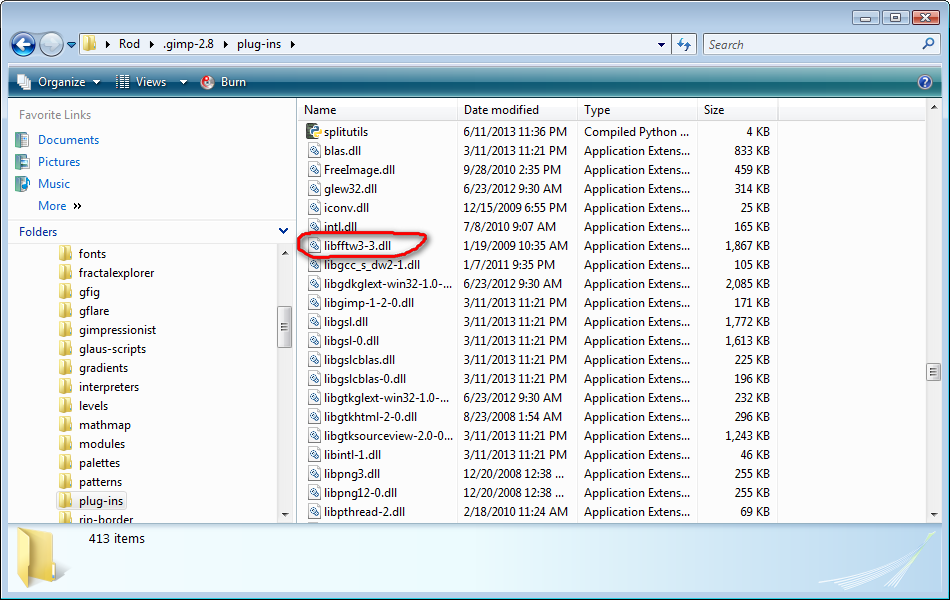
If you are dropping the entire folder with the dll inside into the plugins folder Gimp will not see the dll file.

You need to place ONLY the dll file in the plugins folder. I hope you understand what i mean. Image example of my plugins folder.
Image

_________________
Image


Top
 Post subject: Re: Help with beautify & focus blur plug ins
PostPosted: Mon Sep 02, 2013 3:04 am  (#20) 
Offline
Script Coder
User avatar

Joined: Feb 18, 2011
Posts: 4826
Location: Bendigo Vic. Australia
Rod and Mikebon313 I have the 2 scripts working in my 2-6 and It doesn't have libfftw3f-3.dll installed in this gimp

_________________
Image
No matter how much you push the envelope, it'll still be stationery.


Top
Post new topic Reply to topic  [ 27 posts ]  Go to page 1, 2  Next

All times are UTC - 5 hours [ DST ]


* Login  


Powered by phpBB3 © phpBB Group