It is currently Wed Sep 30, 2026 6:30 pm


All times are UTC - 5 hours [ DST ]


Post new topic Reply to topic  [ 4 posts ] 
Author Message
 Post subject: Starting GIMP in Sinle-Window-Mode?
PostPosted: Mon Sep 09, 2013 5:16 am  (#1) 
Offline
GimpChat Member
User avatar

Joined: Sep 09, 2013
Posts: 10
GIMP Version: 2.8.4
Operating System: Windows
GIMP Experience: Basic Level


I want to introduce GIMP to absolute beginners and for these guys I think the singel-window-mode is best.
Is there a way to start GIMP always in single-window mode?


Share on Facebook Share on Twitter Share on Orkut Share on Digg Share on MySpace Share on Delicious Share on Technorati
Top
 Post subject: Re: Starting GIMP in Sinle-Window-Mode?
PostPosted: Mon Sep 09, 2013 5:24 am  (#2) 
Offline
Global Moderator
User avatar

Joined: May 16, 2010
Posts: 16175
Yes.
Go to Windows>Single Window Mode
Then go to...
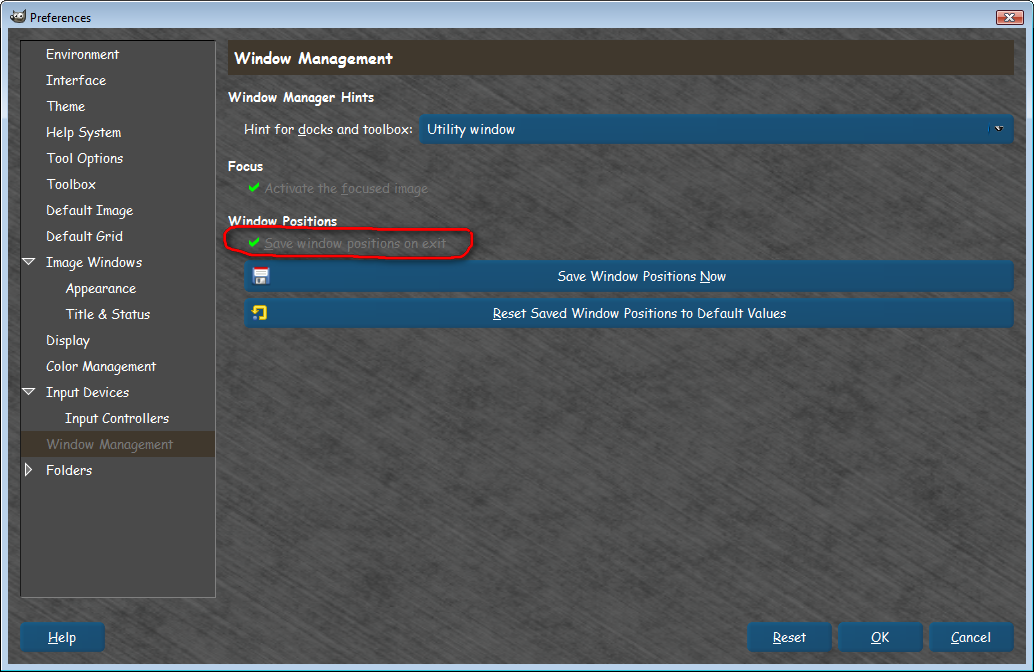
Edit>Preferences>Window Management>TICK "Save window positions on exit".
Click OK
Close GIMP in single window mode. Restart GIMP.

Image


Top
 Post subject: Re: Starting GIMP in Sinle-Window-Mode?
PostPosted: Mon Sep 09, 2013 6:35 am  (#3) 
Offline
Script Coder
User avatar

Joined: Oct 25, 2010
Posts: 4812
In addition to what Rob says, this setting is be saved in the "sessionrc" file in the Gimp user profile. The relevant entries are:

(session-info "toplevel"
    (factory-entry "gimp-single-image-window")
    (position 160 70)
    (size 1140 780))

and
(single-window-mode yes)


If you want all students to start with the same windows setup, you can copy this file to each user profile.

_________________
Image


Top
 Post subject: Re: Starting GIMP in Sinle-Window-Mode?
PostPosted: Mon Sep 09, 2013 9:06 am  (#4) 
Offline
GimpChat Member
User avatar

Joined: Sep 09, 2013
Posts: 10
Thank You


Top
Post new topic Reply to topic  [ 4 posts ] 

All times are UTC - 5 hours [ DST ]


* Login  


Powered by phpBB3 © phpBB Group