It is currently Sun Nov 08, 2026 1:58 am


All times are UTC - 5 hours [ DST ]


Post new topic Reply to topic  [ 25 posts ]  Go to page 1, 2  Next
Author Message
 Post subject: Bengal tiger.
PostPosted: Wed Sep 18, 2013 5:43 am  (#1) 
Offline
GimpChat Member
User avatar

Joined: Sep 12, 2011
Posts: 377
Location: UK
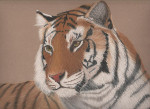
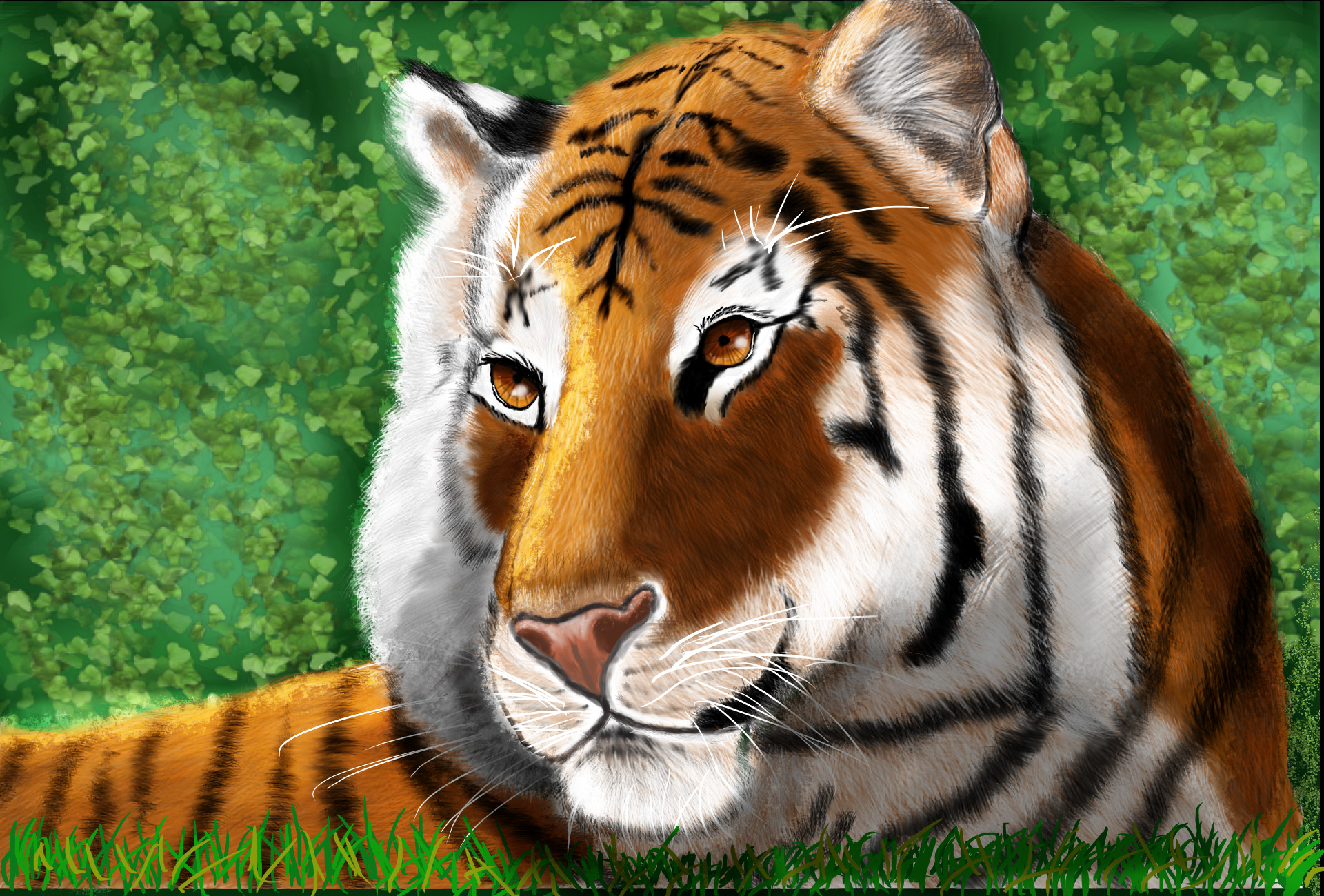
Well as some of you know that I'm back. I had done a lot of graphite and pastel work. But I had NEVER used Gimp for art work not like this before. This was a challenge for me and it came out quiet well. I don't know anybody has used for painting animals. Well not what I know of anyway!!!!!!!!!.


If you think I could do better please let me. All tips and advice is a must.


Thank you for taking a few minutes of your time for reading and looking.

Lorraine


Attachments:
bengal tiger in Gimp.jpg
bengal tiger in Gimp.jpg [ 945.97 KiB | Viewed 2919 times ]
Share on Facebook Share on Twitter Share on Orkut Share on Digg Share on MySpace Share on Delicious Share on Technorati
Top
 Post subject: Re: Bengal tiger.
PostPosted: Wed Sep 18, 2013 6:01 am  (#2) 
Offline
Global Moderator
User avatar

Joined: Apr 01, 2012
Posts: 8498
Location: On the other side of your screen
Very nicely done Lorri. Seems Bengal tigers are the 'in things' these days ;)

_________________
Image
Free Fun Photo Editing & resources
Poems from the Lord
Gimp Newby
Gimp version 3.2.6 and GMIC-Qt 4.0.2 OS :- Windows 10 Home 64


Top
 Post subject: Re: Bengal tiger.
PostPosted: Wed Sep 18, 2013 11:46 am  (#3) 
Offline
GimpChat Member
User avatar

Joined: Aug 28, 2012
Posts: 3060
Location: Idk where I am.
Lol what do you know about that...? xDD
I just drew one of these as a cartoon, small world. XD

Very nice! I'm not sure if it's style or not, but I think adding depth with shading would take this to a whole new level!
And the eyes could use some depth I think too.

Quite nice, I like it a lot! :D

_________________
Image
Reality is a lovely place...But I wouldn't wanna live there.


Top
 Post subject: Re: Bengal tiger.
PostPosted: Wed Sep 18, 2013 12:43 pm  (#4) 
Offline
GimpChat Member

Joined: Dec 27, 2012
Posts: 393
Location: England
I like it, looks good. If it were a photo I'd say there was a shallow depth of field as the body looks softer than the face. It might be worth softening some of the lines on the face as they do appear to be a bit sharp at the moment, just a thought.

_________________
Image

DeviantArt gallery


Top
 Post subject: Re: Bengal tiger.
PostPosted: Wed Sep 18, 2013 1:10 pm  (#5) 
Offline
GimpChat Member

Joined: Apr 29, 2013
Posts: 203
You use leaf(?) brush on the background, so why not using grass brush on the grass in the front? ;) :guitrock

_________________
~


Top
 Post subject: Re: Bengal tiger.
PostPosted: Wed Sep 18, 2013 1:40 pm  (#6) 
Offline
GimpChat Member
User avatar

Joined: Sep 12, 2011
Posts: 377
Location: UK
Mokonafan Where would you put the shading and in what way do you mean depth in the eyes?

Caz thank you considering it done with soften the face.

Zeo I haven't got a grass brush but they easy enough to install or make one!


Top
 Post subject: Re: Bengal tiger.
PostPosted: Wed Sep 18, 2013 1:46 pm  (#7) 
Offline
GimpChat Member
User avatar

Joined: Mar 23, 2012
Posts: 7388
Location: Göteborg at last!
A beautiful painting Lorri. The fur is really good.


Top
 Post subject: Re: Bengal tiger.
PostPosted: Wed Sep 18, 2013 1:53 pm  (#8) 
Offline
GimpChat Member
User avatar

Joined: Aug 28, 2012
Posts: 3060
Location: Idk where I am.
I was going to try to show you what I mean by doing it myself but my GIMP isn't working for some reason. :\

I'm not sure how to explain the eyes part, but with the fur, it seems basically a shadeless image, it's got "shades" but not "Shadows" from how I see the image.
I'd say on the "chin" area and around where the head attaches to the neck, also the furthest side of the neck on --> that side and behind the ear could all use shadows.

the muzzle area on the "top could use some more lighting also the top of the head and the edge of the ears on <--- this side.

_________________
Image
Reality is a lovely place...But I wouldn't wanna live there.


Top
 Post subject: Re: Bengal tiger.
PostPosted: Wed Sep 18, 2013 2:13 pm  (#9) 
Offline
GimpChat Member
User avatar

Joined: Sep 12, 2011
Posts: 377
Location: UK
Ok Mokonafan. Wait till your gimp is working OK and you can show me from there.

Thank you Erisian


Top
 Post subject: Re: Bengal tiger.
PostPosted: Wed Sep 18, 2013 2:28 pm  (#10) 
Offline
Global Moderator
User avatar

Joined: May 16, 2010
Posts: 16251
Beautiful work Lorri. I hope it is a female because for some reason it looks like a female cat. The eyes i think. Really gorgeous though. :)

_________________
Image


Top
 Post subject: Re: Bengal tiger.
PostPosted: Wed Sep 18, 2013 2:46 pm  (#11) 
Offline
GimpChat Member
User avatar

Joined: Sep 12, 2011
Posts: 377
Location: UK
Thank you Rod. For some reason Rod I'm not really happy with the eyes. I think it's an tigress lol


Last edited by Lorri on Wed Sep 18, 2013 2:48 pm, edited 1 time in total.

Top
 Post subject: Re: Bengal tiger.
PostPosted: Wed Sep 18, 2013 2:46 pm  (#12) 
Offline
GimpChat Member
User avatar

Joined: Aug 30, 2012
Posts: 2174
Very nice.

_________________
Image


Top
 Post subject: Re: Bengal tiger.
PostPosted: Wed Sep 18, 2013 2:48 pm  (#13) 
Offline
GimpChat Member
User avatar

Joined: Sep 12, 2011
Posts: 377
Location: UK
Thank you he4try :)


Top
 Post subject: Re: Bengal tiger.
PostPosted: Wed Sep 18, 2013 4:32 pm  (#14) 
Offline
GimpChat Member
User avatar

Joined: Aug 28, 2012
Posts: 3060
Location: Idk where I am.
Lorri wrote:
Ok Mokonafan. Wait till your gimp is working OK and you can show me from there.


Okay GIMP works now, I had to restart the machine... :hoh

I added some shadows and lighting to your lovely tiger. I used only black and white so the colors wouldn't be confused, 2 layer modes "Normal" and "Overlay". - If I was on a transparent layer with just the tiger I'd use multiply on a layer over it instead of normal.

Image


I hope this helps! :D

_________________
Image
Reality is a lovely place...But I wouldn't wanna live there.


Top
 Post subject: Re: Bengal tiger.
PostPosted: Wed Sep 18, 2013 9:43 pm  (#15) 
Offline
GimpChat Member
User avatar

Joined: Apr 08, 2010
Posts: 5420
Location: Northwest Ohio
I think you did an amazing job on the fur, it all goes in the proper direction that it would actually grow.


Top
 Post subject: Re: Bengal tiger.
PostPosted: Wed Sep 18, 2013 11:52 pm  (#16) 
Offline
GimpChat Member
User avatar

Joined: Aug 16, 2012
Posts: 4271
Location: Göteborg, Sweden
lorri: well de! the tiger looks really good and like 2-ton i'm very impressed with the fur. i agree with moko that it needs some more shadows to give it depth, though.

_________________


Top
 Post subject: Re: Bengal tiger.
PostPosted: Thu Sep 19, 2013 12:41 am  (#17) 
Offline
GimpChat Member
User avatar

Joined: Sep 12, 2011
Posts: 377
Location: UK
Mokonafan Thank you very much for taking your time in showing me. What a difference the tiger looks. I'll sort that out today.

Thank you again Mokonafan :)


Thank you for the other guys liking my first animal project :)


Top
 Post subject: Re: Bengal tiger.
PostPosted: Thu Sep 19, 2013 1:59 am  (#18) 
Offline
GimpChat Member
User avatar

Joined: Sep 12, 2011
Posts: 377
Location: UK
I have enhance the painting which Mokonafan had given me advice over the areas that needed doing and now it's brought it out a lot more. I'm happy with it now. Thank you Mokonafan for you help.


Attachments:
bengal_tiger 1- 2.jpg
bengal_tiger 1- 2.jpg [ 867.83 KiB | Viewed 1792 times ]
Top
 Post subject: Re: Bengal tiger.
PostPosted: Thu Sep 19, 2013 4:56 am  (#19) 
Offline
GimpChat Member
User avatar

Joined: Mar 23, 2012
Posts: 7388
Location: Göteborg at last!
Excellent Lorri!


Top
 Post subject: Re: Bengal tiger.
PostPosted: Thu Sep 19, 2013 1:00 pm  (#20) 
Offline
GimpChat Member
User avatar

Joined: Sep 12, 2011
Posts: 377
Location: UK
Thank you Erisian.


Top
Post new topic Reply to topic  [ 25 posts ]  Go to page 1, 2  Next

All times are UTC - 5 hours [ DST ]


* Login  


Powered by phpBB3 © phpBB Group