It is currently Sun Aug 23, 2026 3:10 am


All times are UTC - 5 hours [ DST ]


Post new topic Reply to topic  [ 5 posts ] 
Author Message
 Post subject: Problem with G'MIC Dream Smoothing
PostPosted: Sat Sep 21, 2013 10:06 pm  (#1) 
Offline
GimpChat Member
User avatar

Joined: Jul 17, 2012
Posts: 2769
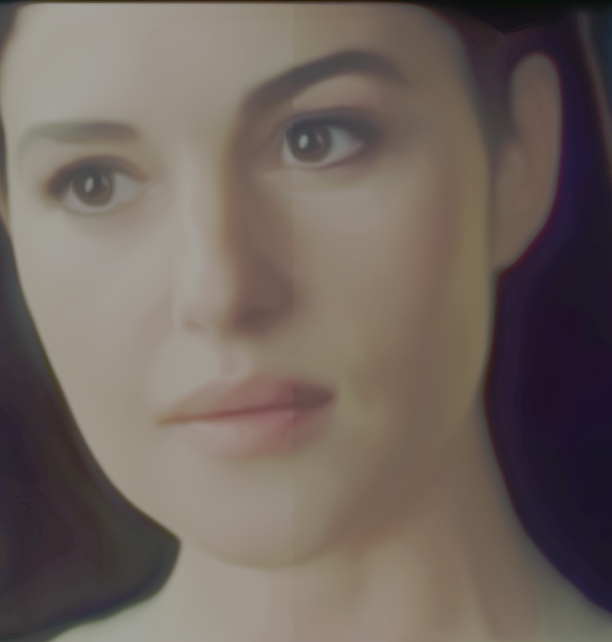
i tried to apply the filter to this image and every time i get a stripe in the middle of the face

whats up with that ?

Image

Image


Share on Facebook Share on Twitter Share on Orkut Share on Digg Share on MySpace Share on Delicious Share on Technorati
Top
 Post subject: Re: Problem with G'MIC Dream Smoothing
PostPosted: Sat Sep 21, 2013 10:38 pm  (#2) 
Offline
GimpChat Member
User avatar

Joined: Aug 30, 2012
Posts: 2174
What settings are you using Esper, sometimes when I have had artefacts in the image unchecking the "Equalise at each step" has done the trick for me.

I have played with the image and so far no line :?

_________________
Image


Top
 Post subject: Re: Problem with G'MIC Dream Smoothing
PostPosted: Sat Sep 21, 2013 10:48 pm  (#3) 
Offline
GimpChat Member
User avatar

Joined: Jul 17, 2012
Posts: 2769
default values....

unchecking the "Equalise at each step" did the trick

thanks he4rty !!


Top
 Post subject: Re: Problem with G'MIC Dream Smoothing
PostPosted: Sun Sep 22, 2013 4:07 am  (#4) 
Offline
GimpChat Member
User avatar

Joined: Jan 03, 2011
Posts: 1656
Well, a bit more explanations : the Dream Smoothing filter is based on the 'Smooth [anisotropic]' filter, which has been recently updated to allow parallelization.
All filters that uses it should then be updated as well (as the way it is called has changed), but unfortunately, not all have been updated.
Often, filters coming from external sources have not been updated. This is the case for Dream Smoothing, which has been done by Arto Huotari.
So, in your case, I can tell you have 2 available CPUs, and the computation has been split in 2 sub-images. If you had 4 cpus, you will have a crossing artefact at the image center.


Top
 Post subject: Re: Problem with G'MIC Dream Smoothing
PostPosted: Sun Sep 22, 2013 5:27 pm  (#5) 
Offline
GimpChat Member
User avatar

Joined: Jan 10, 2013
Posts: 863
he4rty wrote:
I have played with the image and so far no line :?

Esper, as he4rty, same here. Not line in center, and i used default settings.
Sometimes not having the latest versions is advantageous! :hehe

_________________
bbbbbbbbbbbImage
bbbbbbbbbbb Be patient, English is not my language.


Top
Post new topic Reply to topic  [ 5 posts ] 

All times are UTC - 5 hours [ DST ]


* Login  


Powered by phpBB3 © phpBB Group