It is currently Wed Nov 25, 2026 6:35 am


All times are UTC - 5 hours [ DST ]


Post new topic Reply to topic  [ 5 posts ] 
Author Message
 Post subject: How to identify buttons in Preference folders
PostPosted: Thu Sep 26, 2013 4:59 pm  (#1) 
Offline
GimpChat Member
User avatar

Joined: Apr 07, 2010
Posts: 14182
GIMP Version: 2.8.6
Operating System: Linux
GIMP Experience: Basic Level


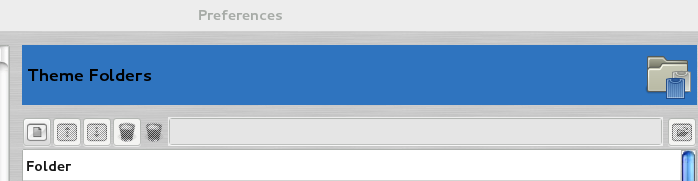
Could some one please tell me how to edit or delete some items from the preferences theme folder. I can't identify the buttons. I know the one on the left is the add. but the rest I can't find anywhere to identify them. I think the two beside the add button are to raise or lower the rows. I have a couple duplicated links and can't find edit or delete to get rid of them. I tried to Google it but to no avail. thanks.
Image


From left to right... add, raise, lower, ??? the rest

_________________
Image


Share on Facebook Share on Twitter Share on Orkut Share on Digg Share on MySpace Share on Delicious Share on Technorati
Top
 Post subject: Re: How to identify buttons in Preference folders
PostPosted: Thu Sep 26, 2013 5:10 pm  (#2) 
Offline
Script Coder
User avatar

Joined: Apr 23, 2010
Posts: 1553
Location: not from Guildford after all
From left to right... add, raise, lower, delete, replace, text entry box, file chooser

All but the 'replace' button are fairly straightforward. If you have one of the folders in the list selected and you type a filepath to a folder into the text entry box -- or choose a folder with the file chooser button to the right of the text entry box -- then the folder specified in the text box will replace the selected folder. If you don't have one of the folders selected when you attempt to 'replace', the text box folder will be added to the list.

If the folder in the text box does not exist, the 'replace' button should be red. The 'replace' button isn't actually a button, but merely an indicator. You execute the replace by hitting RETURN while the cursor is in the text box.

_________________
Any sufficiently primitive technology is indistinguishable from a rock.


Last edited by saulgoode on Thu Sep 26, 2013 5:38 pm, edited 2 times in total.

Top
 Post subject: Re: How to identify buttons in Preference folders
PostPosted: Thu Sep 26, 2013 5:13 pm  (#3) 
Offline
GimpChat Member
User avatar

Joined: Apr 07, 2010
Posts: 14182
Thank you so much Saul. Usually when I hover over a button, it always says what it is but not in this case. I will try the delete one to see if I have any luck.

_________________
Image


Top
 Post subject: Re: How to identify buttons in Preference folders
PostPosted: Thu Sep 26, 2013 5:16 pm  (#4) 
Offline
Script Coder
User avatar

Joined: Apr 23, 2010
Posts: 1553
Location: not from Guildford after all
You may not be able to delete a folder because it is a system folder.

_________________
Any sufficiently primitive technology is indistinguishable from a rock.


Top
 Post subject: Re: How to identify buttons in Preference folders
PostPosted: Thu Sep 26, 2013 5:41 pm  (#5) 
Offline
GimpChat Member
User avatar

Joined: Apr 07, 2010
Posts: 14182
No, I am not deleting a folder, just some of the themes I don't like. What I meant is when hover over an icon, in most cases it will say what the icon is. In this particular case it doesn't. I know it should. maybe next gimp-2.10 :teeth :drum :wh :pengy

_________________
Image


Top
Post new topic Reply to topic  [ 5 posts ] 

All times are UTC - 5 hours [ DST ]


* Login  


Powered by phpBB3 © phpBB Group