It is currently Wed Nov 25, 2026 3:41 am


All times are UTC - 5 hours [ DST ]


Post new topic Reply to topic  [ 67 posts ]  Go to page Previous  1, 2, 3, 4  Next
Author Message
 Post subject: Re: New G'MIC filter 'Rendering / Gradient [custom shape]'.
PostPosted: Sun Oct 06, 2013 8:24 am  (#21) 
Offline
GimpChat Member
User avatar

Joined: Apr 08, 2010
Posts: 5420
Location: Northwest Ohio
What a clever idea...making the bump map! That can lead to some fascination effects!


Top
 Post subject: Re: New G'MIC filter 'Rendering / Gradient [custom shape]'.
PostPosted: Sun Oct 06, 2013 9:21 am  (#22) 
Offline
GimpChat Founder
User avatar

Joined: May 22, 2008
Posts: 5248
Location: Gimpville
Ronounours wrote:
do not hesitate to posts your trials/prototypes :p


Image

_________________
Image


Top
 Post subject: Re: New G'MIC filter 'Rendering / Gradient [custom shape]'.
PostPosted: Sun Oct 06, 2013 10:35 am  (#23) 
Offline
GimpChat Member
User avatar

Joined: Sep 22, 2012
Posts: 2089
Location: US
Very cool stuff, GnuTux! Like how the colors blend


Top
 Post subject: Re: New G'MIC filter 'Rendering / Gradient [custom shape]'.
PostPosted: Sun Oct 06, 2013 1:58 pm  (#24) 
Offline
GimpChat Founder
User avatar

Joined: May 22, 2008
Posts: 5248
Location: Gimpville
Thanks K1. I started with the G'MIC filter, bumped and ran it thought the lighting filter, then played around the with the colors & contrast until I got the result I was after.

2-ton wrote:
how would one save that gradient into the gradient file?

I didn't see a way to do it directly but It would be a really nice feature. :hehe

What I did was to preview the gradient, grab it, then use RobA's sample gradient along path script to turn it into a gradient. It's a bit of a hassle but it works well.

_________________
Image


Top
 Post subject: Re: New G'MIC filter 'Rendering / Gradient [custom shape]'.
PostPosted: Sun Oct 06, 2013 4:07 pm  (#25) 
Offline
GimpChat Member
User avatar

Joined: Apr 07, 2010
Posts: 14182
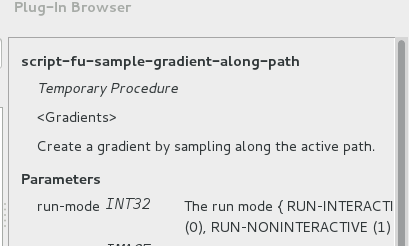
I have looked everywhere for this script. I have it, I opened it, read it looked under Script-fu on top menu. looked under script-fu under filters... It is no where to be seen.
"script-fu-sample-gradient-along-path"
"<Gradients>/Sample Gradient along a _Path
Image

_________________
Image


Top
 Post subject: Re: New G'MIC filter 'Rendering / Gradient [custom shape]'.
PostPosted: Sun Oct 06, 2013 4:17 pm  (#26) 
Offline
GimpChat Founder
User avatar

Joined: May 22, 2008
Posts: 5248
Location: Gimpville
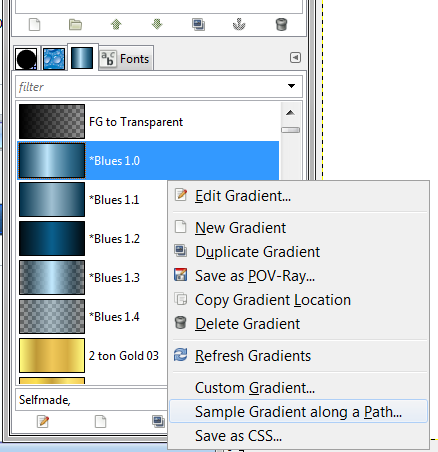
You'll need to open the gradient dialog and right click. It will place the new gradient in the gradient list using whatever name you specify.

_________________
Image


Top
 Post subject: Re: New G'MIC filter 'Rendering / Gradient [custom shape]'.
PostPosted: Sun Oct 06, 2013 6:35 pm  (#27) 
Offline
GimpChat Member
User avatar

Joined: Apr 07, 2010
Posts: 14182
O, I thought you made this gradient with RobA's script. It showed that is was under Script-fu. in the plug-in browser.

_________________
Image


Top
 Post subject: Re: New G'MIC filter 'Rendering / Gradient [custom shape]'.
PostPosted: Sun Oct 06, 2013 7:35 pm  (#28) 
Offline
GimpChat Member
User avatar

Joined: Apr 08, 2010
Posts: 5420
Location: Northwest Ohio
wouldn't it be soooooo nice if there was a choice in this G'MiC filter to 'save gradient' as (name it). *coughbatseyelashescough*


Top
 Post subject: Re: New G'MIC filter 'Rendering / Gradient [custom shape]'.
PostPosted: Mon Oct 07, 2013 2:32 am  (#29) 
Offline
GimpChat Founder
User avatar

Joined: May 22, 2008
Posts: 5248
Location: Gimpville
molly wrote:
O, I thought you made this gradient with RobA's script. It showed that is was under Script-fu. in the plug-in browser.

Yes. I have made several .ggr gradients from this G'MIC filter's preview gradient option. I used the RobA's scheme script. The way to access the script is as I mentioned. You right click in the gradients dialog. ;)

So, I have to run this G'MIC filter, screenshot the gradient preview and paste into GIMP, then create a path and run Rob's script. Like 2-Ton said. it would be nice to be able to save the .ggr directly. It would also be nice to have a separate G' MIC filter (or script) to be able to pick several colors and create a .ggr from them. Perhaps that is a project worth pursuing.

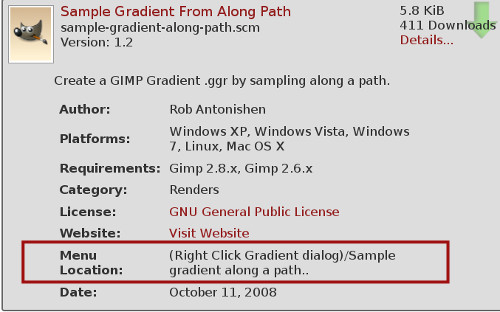
By the way, if you ever wonder how to access a script, you can check to see if the script is up on GIMP Scripts. In the details section for each script, there is an entry on how to access the script.

Image

_________________
Image


Top
 Post subject: Re: New G'MIC filter 'Rendering / Gradient [custom shape]'.
PostPosted: Mon Oct 07, 2013 4:45 am  (#30) 
Offline
GimpChat Member
User avatar

Joined: Jul 17, 2012
Posts: 2769
GnuTux wrote:
By the way, if you ever wonder how to access a script, you can check to see if the script is up on GIMP Scripts. In the details section for each script, there is an entry on how to access the script.

there is also a description here:
http://silent9.com/blog/archives/155-GI ... -Path.html


Top
 Post subject: Re: New G'MIC filter 'Rendering / Gradient [custom shape]'.
PostPosted: Mon Oct 07, 2013 4:48 am  (#31) 
Offline
GimpChat Member
User avatar

Joined: Apr 07, 2010
Posts: 14182
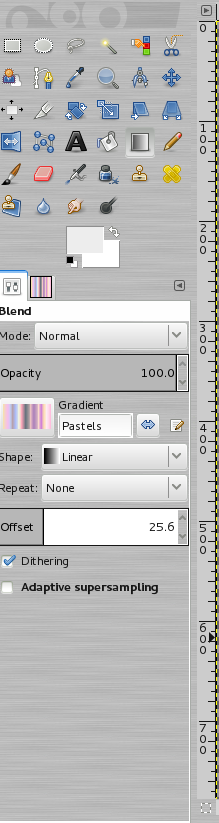
Is this the gradient dialogue you are talking about... if so nothing happens when I right click on that. I don't get that image you posted.
Image

_________________
Image


Top
 Post subject: Re: New G'MIC filter 'Rendering / Gradient [custom shape]'.
PostPosted: Mon Oct 07, 2013 4:55 am  (#32) 
Offline
GimpChat Member
User avatar

Joined: Jul 17, 2012
Posts: 2769
you right-click in your list of gradients


Top
 Post subject: Re: New G'MIC filter 'Rendering / Gradient [custom shape]'.
PostPosted: Mon Oct 07, 2013 5:03 am  (#33) 
Offline
GimpChat Member
User avatar

Joined: Apr 07, 2010
Posts: 14182
Never mind, I found it.

_________________
Image


Top
 Post subject: Re: New G'MIC filter 'Rendering / Gradient [custom shape]'.
PostPosted: Mon Oct 07, 2013 5:07 am  (#34) 
Offline
GimpChat Member
User avatar

Joined: Jul 17, 2012
Posts: 2769
:roll:

Image


Top
 Post subject: Re: New G'MIC filter 'Rendering / Gradient [custom shape]'.
PostPosted: Mon Oct 07, 2013 5:23 am  (#35) 
Offline
GimpChat Member
User avatar

Joined: Jan 03, 2011
Posts: 1656
Hi. Thanks for your feedback !
I've update the filter with a small change, allowing to save G'MIC color gradients as GIMP gradient files.
After a refresh, you should be able to have the filter updated, with a new option :

Attachment:
gmic_custom_gradient.png
gmic_custom_gradient.png [ 199.76 KiB | Viewed 1949 times ]


Then, if you click 'Apply', the filter should save a new gradient file in your local gradient folder, and you can access it afterwards in the "Gradient selector" of GIMP :

Attachment:
gmic_custom_gradient2.png
gmic_custom_gradient2.png [ 17.76 KiB | Viewed 1949 times ]


Note that the generated gradients are not intended to be edited afterwards (each color corresponds to a gradient segment).
Not sure also that it works on Windows.

So, if you have some time, please test and tell me if everything is OK.

Thanks.


Top
 Post subject: Re: New G'MIC filter 'Rendering / Gradient [custom shape]'.
PostPosted: Mon Oct 07, 2013 5:47 am  (#36) 
Offline
GimpChat Founder
User avatar

Joined: May 22, 2008
Posts: 5248
Location: Gimpville
Awesome! It works great.

Image

_________________
Image


Top
 Post subject: Re: New G'MIC filter 'Rendering / Gradient [custom shape]'.
PostPosted: Mon Oct 07, 2013 6:08 am  (#37) 
Offline
GimpChat Member
User avatar

Joined: Apr 07, 2010
Posts: 14182
Very nice Tux. nice job.

_________________
Image


Top
 Post subject: Re: New G'MIC filter 'Rendering / Gradient [custom shape]'.
PostPosted: Mon Oct 07, 2013 6:27 am  (#38) 
Offline
GimpChat Member
User avatar

Joined: Jul 17, 2012
Posts: 2769
Image

it may not seem obvious how this came out of the filter, but believe me, it did :rofl
(somehow)

Image


Top
 Post subject: Re: New G'MIC filter 'Rendering / Gradient [custom shape]'.
PostPosted: Mon Oct 07, 2013 11:04 am  (#39) 
Offline
GimpChat Member
User avatar

Joined: Jul 17, 2012
Posts: 2769
same old Esper bore, lol, but i like the posterized look, when you play with the Shading

btw, wouldnt it be more intuitive to name it 'Number Of Shades', instead of Shading ?

Image


Top
 Post subject: Re: New G'MIC filter 'Rendering / Gradient [custom shape]'.
PostPosted: Mon Oct 07, 2013 11:36 am  (#40) 
Offline
GimpChat Member
User avatar

Joined: Jan 10, 2013
Posts: 863
Ronounours wrote:
Then, if you click 'Apply', the filter should save a new gradient file in your local gradient folder, and you can access it afterwards in the "Gradient selector" of GIMP :
(...)
So, if you have some time, please test and tell me if everything is OK.
Thanks.

Work ok here, but...
Can't access it aftwards the "Gradient selector.
Even after refreshing the gradients

_________________
bbbbbbbbbbbImage
bbbbbbbbbbb Be patient, English is not my language.


Top
Post new topic Reply to topic  [ 67 posts ]  Go to page Previous  1, 2, 3, 4  Next

All times are UTC - 5 hours [ DST ]


* Login  


Powered by phpBB3 © phpBB Group